Category: Custom software
Picture this: you give every department in your company a smart new tool. This tool can think, act, and learn. Sounds like a dream, right? But, what happens when those tools don’t communicate? What if they don’t follow a clear plan or, even worse, work against each other? That’s the reality many enterprises are facing today with agentic AI.
Here’s the catch: strong AI agents are just part of the solution. The true game-changer is how we organize these agents. Why? Agent Orchestration connects AI efforts. It creates a strong, coordinated engine. This engine brings real value to businesses.
In short, without orchestration, your agents can’t work together. Without that teamwork, even the best AI tools won’t meet enterprise needs. Let’s discover how agent orchestration can help your business.
What Is Agent Orchestration?
Agent orchestration involves operating and coordinating multiple AI agents. It makes them align on common business goals.
In an agentic AI setup, agents can focus on different tasks. Some may handle data retrieval. Others might specialize in reasoning, decision-making, workflow execution, or system integration. Orchestration ensures these agents:
- Communicate effectively
- Follow defined workflows
- Share context and memory
- Escalate tasks when needed
- Operate within governance and security boundaries
AI agent orchestration helps manage interactions. It connects agents, tools, data, and humans in complex business settings. Even the most sophisticated agents suffer from lack of consistent output without orchestration.
In essence, agent orchestration transforms autonomous agents into a workforce with direction.
Core Components of Agent Orchestration
Successful agent orchestration relies on several foundational components working together:
1. Agent Management Layer
This layer defines how agents are created, assigned roles, and activated. It ensures the right agent is triggered at the right time.
2. Workflow and Task Coordination
Orchestration engines manage task order. They handle dependencies and transfers. These engines are key for multi-step tasks. They also work well in cross-functional tasks.
3. Context and Memory Sharing
Agents need shared context to avoid redundant actions and conflicting decisions. Orchestration enables persistent memory across agents and workflows.
4. Tool and System Integration
Agents are commonly dependent on enterprise systems like CRMs, ERPs, databases, and APIs. Orchestration also regulates the agents’ access to and use of those instruments in a secure manner.
5. Security and Compliance
Enterprise agent orchestration can help you make sure that your company systems stay safe and meet the appropriate security requirements. It makes sure that audit logs are maintained and policies are enforced. These components combine to create a watchful environment in which agentic AI can thrive.
Take Slow, Yet Powerful Steps Towards AI
How Agent Orchestration Works
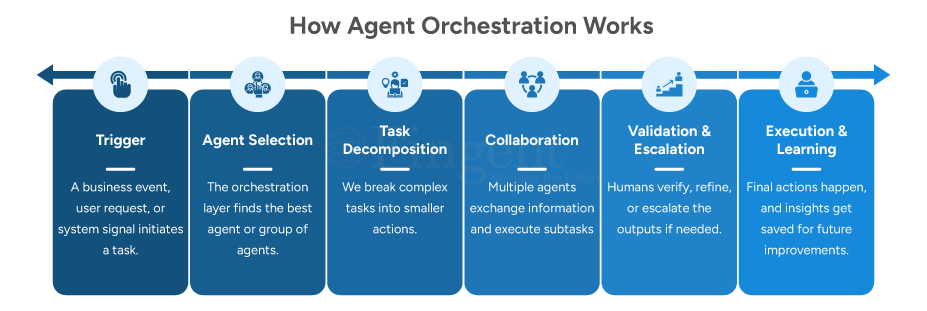
How Enterprises Benefit from Agent Orchestration
Enterprises using agent orchestration scale better and achieve greater consistency, speed, and collaboration.
1. Scalability Without Chaos
AI agent orchestration helps businesses use agents effectively. This is especially beneficial in finance, customer service, HR, supply chain, and cybersecurity. It ensures that oversight remains strong.
In a financial services firm for instance, it is used to integrate customers, detect anomalies, issue fraud alerts, and approve loans. Telecom giants are helped in billing, fraud detection, network monitoring, and customer service. Resources are adjusted during busy times.
2. Consistent Decision-Making
A central governance layer ensures all agents are applying the same rules. It applies to business rules, compliance rules, and ethical rules. It eliminates data silos for full analytics and swift, coordinated action.
Retail banks for instance, keep complete conversation histories for loan apps, account support, and investment advice. This leads to a boost in customer retention. Fingent’s tools help the healthcare and finance sectors by using context abstraction, long-term memory, and policy-based agents. This ensures HIPAA and SOX compliance, which helps reduce audit discrepancies.
3. Faster Time to Value
Reusable orchestration templates and pre-built integrations accelerate development. This has sliced the time to market from months to weeks. This allows for quick prototyping of multi-agent workflows. Multi-agent systems solve problems faster than single agents or manual methods. This increases efficiency and significantly cuts admin time.
4. Improved Human-AI Collaboration
Orchestration patterns include:
- Supervisor agents for breaking down tasks.
- Handoff protocols for escalating issues.
- Progress monitoring to choose when agents act alone or involve humans.
In SOCs, agents tackle threats faster and escalate only high-risk cases. This lets analysts concentrate on strategy.
5. Enterprise-Grade Trust
Built-in monitoring dashboards and zero-trust security provide full audit trails. They also offer explainable AI for GDPR, EU AI Act, and SOC 2 compliance. Platforms provide end-to-end tracking of interactions with real-time anomaly detection, enabling you to detect issues sooner.
Use Cases of Agent Orchestration
Use Case 1. Customer Support Automation
Agent orchestration coordinates specialized AI agents end-to-end. A lead intent-detection agent checks messages. It then sends them to a knowledge-retrieval agent for FAQs or documents. Sentiment-analysis evaluates tone, triggering resolution agents for responses or escalations. Telecom customers tweet about billing errors. The orchestrator detects urgency, retrieves history, and assesses sentiment. It then auto-refunds, resolving 80% of cases in under 2 minutes. This boosts satisfaction by 30% and cuts costs.
Use Case 2. Business Process Automation
Orchestration chains agents for invoice processing, approvals, fraud detection, and exceptions. The central orchestrator does the following:
- OCR extracts data.
- Validation checks the ledgers.
- Fraud flags any anomalies.
- Approval routes or auto-approves.
Example: Accounts payable handles 1,000 invoices each day with 99% accuracy. OCR reads the invoices. Then, validation checks POs and fraud scans look for duplicates. Approval notifications follow, cutting processing time from days to just hours. AI-driven document processing and workflow automation can completely eliminate manual data handling and help achieve 99.9% scalable operational accuracy.
Use Case 3. IT Operations and DevOps
Agents monitor in real-time. They scan logs and metrics, check diagnostics, and find root causes through correlation. If needed, they apply remediation fixes, like scaling pods, and send escalation alerts.
Example: When there’s a CPU spike during peak traffic, monitoring catches it. Diagnostics find a memory leak, then remediation patches or rollbacks. This logs the fix, cutting MTTR from hours to minutes.
Use Case 4. Data Analytics and Insights
Agents automate pipelines in the following ways:
- Ingestion collects data.
- Cleaning handles outliers.
- Analysis runs models, like regressions and clustering.
- Insights visualize and narrate findings.
Example: Retail sales involve data from DBs/APIs. We clean, standardize, and analyze this data. Then, we create insights reports on underperformers. This approach boosts revenue by 15% each quarter through smart inventory adjustments.
Use Case 5. Enterprise Search and Knowledge Management
Query understanding clarifies what you mean. Retrieval finds what you need. Summarization makes it brief. Contextualization tailors it for each role or history.
Example: An executive asks about the “Q4 sales strategy.” The orchestrator quickly adds memos and grabs over 50 regional documents. It delivers a summary in seconds.
Enterprise agent orchestration uses a central controller. This controller handles handoffs. It also ensures governance with privacy and audits. Plus, it boosts reliability and supports scalable AI.
What Are the Challenges of Agent Orchestration?
Agent Orchestration has some challenges that need to be dealt with. There is an element of complexity and issues with governance among a few. Here’s a transparent look:
- Complexity of Design – Defining roles, workflows, and dependencies requires deep domain understanding.
- Integration Overhead – Interfacing agents with legacy systems and contemporary platforms is notoriously difficult.
- Governance Gaps – Agents can produce variable or noncompliant results if there are no controls in place.
- Performance and Cost Control – Inadequate orchestration results in duplicate activities and wasteful consumption of compute.
- Skills and Expertise – Agentic AI orchestration requires knowledge of AI, architecture, security, and business processes.
What You Need to Know Before Deploying Agent Orchestration
Before deploying agent orchestration, enterprises should test:
- If your business processes are sufficiently defined and stable to be automated
- If you have a technology stack that can support the required tools and multi-agent workflows
- Whether your security and compliance regulations are strong enough for a regulated environment
- Whether you want small pilot projects or an enterprise-wide, long-term deployment
- Whether you have the right partner expertise to support your efforts
- Are you ready for partner expertise? Do you have the right support for implementation?
Early architectural choices can save you from expensive rework later.
Still Doubtful About AI Agents? Let Us Help You Take The Right Steps
How Fingent Can Help
Agentic AI has great potential, but that potential remains unexplored. Agent orchestration is what takes proximity to autonomous agents and scales it, bringing them into cohesive enterprise-grade systems. It adds structure, governance, scalability, and trust to AI-driven workflows. AI needs to line up with real business results, and not just test success.
But orchestration is not a technical challenge. It requires the right strategy, architecture, and execution partner.
Enterprises need partners who understand both agentic AI and complex enterprise ecosystems. From system integration to governance design, experience matters.
Fingent helps organizations design, build, and scale enterprise-ready agent orchestration solutions. Fingent is an expert in AI and system integration. They help businesses go from separate AI projects to working together. This makes a real difference. Ready to prep your business for success? Connect with our experts now!
Stay up to date on what's new

About the Author

Featured Blogs







Stay up to date on
what's new



Talk To Our Experts
Stay up to date on what's new
About the Author
Featured Blogs
Stay up to date on
what's new
Talk To Our Experts
Stay up to date on what's new
About the Author
Featured Blogs
Stay up to date on
what's new
Talk To Our Experts
Work isn’t linear anymore, and that changes everything! It brings Multi-Agent Systems into context like never before.
Think about it. A customer order triggers procurement. Procurement works its effect on suppliers. Logistics is way beyond delivery, affecting cash flow, customer experience, and brand trust. One decision rarely stays isolated, and by the time humans coordinate all of it, the moment has passed.
That’s exactly why Multi-Agent Systems (MAS) matter now.
Traditional automation follows scripts. AI tools often focus on single tasks or predictions. But modern enterprises need something more dynamic: Systems that can think locally, act independently, and still work toward a shared business outcome.
Like a team of specialists, each one knows its role. Each one makes decisions in real time, and none of them needs to wait for constant managerial approval.
When supply chains start acting up, customers don’t always stay put. Pricing becomes a moving target. MAS stops feeling futuristic; it starts feeling necessary.
What Are Multi-Agent Systems (MAS)?
In practice, MAS takes huge, complex business problems and chops them up into smaller decisions made independently but directed toward the same objective. Instead of a single AI trying to do everything, you have multiple agents sharing the load. Different roles but the same goal.
Before getting into benefits or use cases, there’s value in pausing here. MAS doesn’t make decisions the way traditional automation or standalone AI tools do.
At its core, a Multi-Agent System is just a set of software agents that act on their own, talk to each other, and react to their environment to reach a goal. If this still sounds abstruse, don’t worry. Let’s decompose it:
- One team watches demand signals
- Another monitors inventory
- A third negotiates supplier options
- A fourth handles customer commitments
Now imagine all of them working simultaneously, sharing context, resolving conflicts, and optimizing outcomes—without waiting for meetings or email chains.
That’s MAS!
Step Into The World of Multi-Agent Systems. Let Us Help You Navigate Smoothly with the Best Practices & Roadmaps.
The Key Components of a Multi-Agent System
The effectiveness of Multi-Agent Systems depends less on intelligence and more on structure. Clear roles, controlled interactions, and shared context determine whether agents reduce complexity or multiply it.
1. Agents (The Decision Makers)
Agents are independent software entities. Each agent:
- Has a specific role or responsibility
- Can perceive its environment
- Makes decisions based on rules, data, or learning models
- Acts without direct human intervention
In business terms, think autonomous digital employees with clearly defined KPIs.
2. Environment (The Business Reality)
It spans ERP and CRM. Also, it reacts to markets and customers, and stays within budgets, SLAs, and regulations. Nothing stays static. Agents have to adapt as it changes.
3. Communication & Coordination Mechanisms
Here’s where things get interesting. Agents don’t work in silos. They share context. They negotiate priorities. And they coordinate actions so one good decision doesn’t accidentally create three bad ones somewhere else.
This is what prevents “local optimization” from hurting the bigger picture.
4. Decision Logic & Policies
Each agent operates within:
- Business rules
- Governance policies
- Risk thresholds
- Ethical and compliance boundaries
This is where leadership intent is embedded into the system.
5. Learning & Adaptation
Advanced MAS can learn from outcomes. What worked. What failed. What cost more than expected? Over time, the system doesn’t just execute decisions—it improves them.
What Are the Benefits of Multi-Agent Systems?
The real value of Multi-Agent Systems isn’t raw intelligence. It’s how quickly decisions move, how well systems recover, and how easily they scale. In practice, what they deliver to firms is the ability to run decisions in parallel without constant human coordination.
The value becomes particularly very explicit under extreme conditions on the system—essentially when there are spikes in demand or disruption that require decisions faster than humans can coordinate.
This isn’t a tooling issue. It’s a decision bottleneck. This is where Multi-Agent Systems quietly shine.
1. Faster, Parallel Decision-Making
Traditional automation waits its turn. Multi-Agent Systems agents think, decide, and act simultaneously. Result? Bottlenecks disappear. Response time shrinks.
2. Better Resilience in Uncertain Environments
Markets change, suppliers fail. Customers behave unpredictably. With Multi-Agent Systems, decisions don’t collapse when one component fails. Other agents adapt, reroute, or compensate. Think shock absorbers, not brittle pipelines.
3. Scalability Without Linear Headcount Growth
As operations grow, coordination costs explode. More meetings. More approvals. More delays. Multi-Agent Systems scale decision-making without scaling people. That’s operational leverage.
4. Local Intelligence, Global Alignment
Each agent optimizes its own domain—pricing, inventory, logistics, compliance—while staying aligned to shared business goals. No tunnel vision. No chaos.
5. Continuous Optimization
With learning-enabled agents, systems don’t just execute decisions. They learn from what happens and improve as they go, which static automation simply can’t do.
Multi-Agent Systems in Practice: Real-World Enterprise Use Cases
You don’t have to look far to find Multi-Agent Systems in action. They’re already at work in supply chains, pricing engines, IT operations, and risk management today. These systems don’t just analyze data; they act on it in real time. The best way to understand Multi-Agent Systems is to see how they operate in production environments today.
1. Enterprise-Scale Supply Chain
Agents don’t react late. They continuously monitor demand and supplier reliability. This they do even during pricing shifts and logistics constraints. When disruption hits, they adjust orders and explore alternatives, no escalation emails required.
2. Dynamic Pricing & Revenue Management
One agent tracks market signals, another monitors competitor pricing. A third enforces margin rules. Together, they adjust prices in real time without sacrificing margins.
3. Customer Experience Arrangement
Agents handle personalization, support prioritization, churn prediction, and retention offers, coordinating actions across channels instead of reacting in isolation.
4. IT Operations & Incident Management
In IT operations, monitoring agents can help detect anomalies, whereas diagnosis agents isolate root causes, and remediation agents execute fixes. Human teams step in only when needed.
5. Fraud Detection and Risk Administration
Multiple agents can simultaneously analyze the transaction, behavioral pattern, and contextual risk. This flags issues not only faster but more accurately compared to rule-based systems.
Challenges and Considerations of Multi-Agent Systems
Multi-Agent Systems introduce autonomy, and without discipline, that autonomy quickly becomes risk. If not controlled properly, complexity will build up rather than be reduced. This is the part that matters before pilots turn into production at scale.
1. Architectural Complexity
Designing agent roles, interaction rules, and escalation paths takes serious thought. Poor design leads to noise, not intelligence.
2. Governance & Control
Autonomy without guardrails is a risk.
Enterprises must define:
- Decision boundaries
- Approval thresholds
- Auditability and explainability
Without governance, MAS can drift from business intent.
3. Security & Trust
Agents interact across systems and sometimes with external partners. That expands the attack surface. Strong identity, access control, and monitoring aren’t optional.
4. Cost & ROI Clarity
This isn’t the cheapest path upfront. The value comes later, through scale, speed, and resilience. Smart enterprises start small. Then expand.
Multi-Agent Systems in AI Explained and Why Businesses Should Care
Frequently Asked Questions (FAQ)
When executives assess multi-agent systems, the questions are usually predictable. These are sensible questions, and clear answers matter.
1. What are multi-agent systems in AI?
Multi-agent systems in AI are built around the idea that more than one intelligent agent, working together and reacting to change, often makes better decisions than one acting alone.
2. How do multi-agent systems work?
Each agent watches what’s changing, shares context with others, decides its next move, and acts without losing sight of the broader business objectives.
3. What is multi-agent system architecture?
A multi-agent system architecture outlines data flows, communication protocols, governance guidelines, agent roles, and enterprise system integration.
Why Multi-Agent Systems Are Foundational to Agentic AI?
Agentic AI isn’t about a single super-intelligent system. It’s about many intelligent agents working together responsibly. That’s why Multi-Agent Systems sit at the foundation of agentic AI. They bring structure to autonomy and discipline to intelligence.
Enterprises that succeed don’t start big. Start with one domain, define clear boundaries. Then measure outcomes and expand gradually. The goal isn’t replacing human judgment, but it’s amplifying it.
How Can Fingent Help Enterprises Start Small and Scale Safely?
Designing Multi-Agent Systems is as much a business decision as a technical one. Fingent helps enterprises architect, build, and govern Multi-Agent Systems that align with real outcomes—not experiments.
Connect with our experts today and discover ways you can leverage the latest technologies for your business. Talk to us now!
Stay up to date on what's new
About the Author
Featured Blogs
Stay up to date on
what's new
Talk To Our Experts
In today’s digital world, businesses rely on strong software. This includes analytics tools, CRM systems, and large enterprise platforms. How these applications are built affects cost, performance, and scalability a lot. One architectural style gaining popularity, especially in SaaS (software-as-a-service) products, is multi-tenant architecture. It’s a way to design software so that many customers, or tenants, can use the same system. However, their data and settings stay private and secure.
In this blog post, let’s deep dive. Multi-tenant architecture. The benefits of multi-tenant architecture, its trade-offs, and the clincher: how can you make it work for your business?
What Is Multi-Tenant Architecture in Software Development?
Yes, multi-tenant architecture has been a buzz in the business world. And rightly so. The benefits of multi-tenant architecture are being felt by organizations globally. This popularity isn’t accidental. According to the Multi-Tenant SaaS Market Report, the global multi-tenant SaaS market is growing at over 17% CAGR and is expected to cross $100 billion in the coming years.
Here’s why so many businesses are turning to it:
1. It helps you scale easily
Multi-tenant systems can scale more gracefully than traditional environments. You can bring new tenants up on the existing platform rather than building out separate systems for each customer. That makes scaling faster and more efficient.
According to the article “Latest trends in SaaS deployment models: Moving towards multi-tenancy and split plane”, published on Medium, around 64–68% of IT leaders said they would consider using multi-tenant or split-plane SaaS architectures in the next three years, showing strong future interest in shared SaaS models.
2. It saves money
Many tenants use the same infrastructure. So, businesses don’t have to invest in separate servers or software for each customer. Lower costs over time come from fewer resources and simpler operations. This is a win-win situation for providers and customers alike.
3. It simplifies updates and maintenance
Updating a traditional setup with many separate systems can be a hassle. But in the case of multitenancy, you update once, and that update goes out to every tenant. This makes it much easier to maintain software and reduces the potential for version mismatch.
4. It improves resource efficiency
Common resources are shared, such as processing power, data storage and so on, thus enabling more efficient exploitation of resources. This avoids the waste that often comes with dedicated systems sitting idle.
5. It still lets tenants customize their experience
Tenants all have the same core app, but in many multi-tenant systems, each customer can tweak or customize things like dashboards, branding, and user roles. That makes it efficient and flexible.
Bring Your Customers Closer To Your Business Develop SaaS Tools with the Right Architecture
How Does Multi-tenant Architecture Work?
At its heart, a multi-tenant architecture is shared infrastructure with segregated access. Here’s the high-level view:
- Shared software and servers: One copy of the application serves many tenants.
- Tenant data separation: The platform is shared, but the data of each tenant is isolated and secure.
- Customizations per tenant: Tenants are able to tailor their app environment.
- Upgrades and monitoring are centralized: The application provider manages and upgrades the system in one place.
The platform filters data and uses access controls. This keeps tenant data private and ensures smooth performance. From a business view, it feels like you have your own space in a shared system.
What’s the Difference Between Multi-tenant and Single-tenant Architecture?
To get a sense of why multi-tenant architecture is all the hype at the moment, let’s juxtapose “real” single-tenant architecture.
1. Single-Tenant Architecture
Think of this as a standalone house. Every tenant (customer) has their own house (software instance and database). So it’s complete isolation and full control, but also higher cost and more maintenance.
2. Multi-Tenant Architecture
It’s like living in a high-rise apartment. You rent the same building infrastructure but you own your space. It is more affordable, easier to scale, and simpler to administer.
What Are the Pros and Cons of Multi-Tenant Software?
The Upside of Multi-Tenant Architecture
Let’s break down the main advantages:
1. Saves Costs
Shared infrastructure means you need fewer servers. This decreases the expenses for the hardware and licensing fees. For SaaS providers, this translates into higher prices and larger margins.
2. Easier updates and upgrades
Instead of updating hundreds of separate systems, developers update the shared platform once. This dramatically simplifies maintenance.
3. Better Utilization of Resources
Because the computing power, storage, and memory are shared, resources are better utilized. This is useful for when the load varies between tenants.
4.Scales without Headaches
Need to bring on 10 new customers? Multi-tenant systems save time and reduce complexity. They don’t need 10 new environments to operate.
5. Allows Tenant-Level Customization
Tenants can control their preferences, access rights, and interface settings without affecting others. This provides a sense of customization in a shared platform.
The Downside of Multi-Tenant Architecture
The multi-tenant architecture also has its cons:
- Security Needs Extra Care
Data can be secured, but bad implementation or weak access controls can lead to cross-tenant data leaks. That’s why attention to authorization and secure data partitioning is essential. - More Complex Design
The system must have smart logic to keep each tenant’s data separate and safe. Designing and testing correctly requires expertise. - Potential for Shared Downtime
Since the tenants use the same software rather than a separate instance, a single outage or bug may affect multiple tenants. While many vendors use microservices and other cloud tools to alleviate this risk, it is still something to consider. - Limited Deep Customization
Tenants may not fully customize every feature. This is due to the shared core application, unlike a fully dedicated system.
When is the Best Time for an Enterprise to Opt for Multi-Tenant Architecture?
Opting for a multi-tenant architecture is a choice that depends on your objectives and circumstances. Here is when you know it’s a pretty good time to make that call:
- You’re Building an SaaS Product
Because there’s no overhead cost per customer, if you want to serve a large number of customers with your software, especially on the internet, a multi-tenant design is usually the way to go. - Cost Efficiency Is a Priority
Startups and small businesses save money with multi-tenant systems. This is because they share infrastructure, which lowers operational costs. - You Expect Growth and Variable Usage
If your user base grows or changes, multi-tenant systems can scale easily. This means you won’t need separate environments for each customer. - You Want Smooth, Centralized Maintenance
If your priority is to be able to quickly deliver updates, security patches, and new features to all of your customers, multi-tenant architecture is your best bet.
Popular Multi-Tenant Architecture Questions (FAQs)
Q: Can you trust your data in a multi-tenant system?
A: Yes, tenant data is private and secure if you implement strong access controls and data partitioning. It’s all about careful implementation.
Q: Can tenants customize their experience?
A: Absolutely. Many multi-tenant applications allow tenants to configure dashboards, branding, and user roles according to their requirements.
Q: What is the difference between multi-tenant and shared hosting?
A: The multi-tenant architecture is a smart design that is secure and separates users.
Q: Does multi-tenant architecture mean slower performance?
A: Not necessarily. With good resource allocation and cloud architecture, multi-tenant systems can be highly performant. Poorly managed systems can face resource contention. So, smart infrastructure design matters.
Bring the Touch of Expert Guidance to Your Software Development
How Fingent Can Help You Make the Right Choice
The “right architecture” isn’t only about the technology. It affects your income, the way users interact with your app, how you run your business, and even how much you can grow. Multi-tenant architecture has been adopted as a standard model for SaaS products and cloud solutions. It offers scalability and cost-effectiveness. It makes maintenance easier and resource usage better. Plus, it lets tenants enjoy a personalized experience.
But getting it right requires expertise. That’s where Fingent comes in. With deep experience in software strategy and development, Fingent can help you:
- Evaluate your business needs and define the right architectural approach.
- Architect and construct scalable multi-tenant systems specific to your needs.
- Security, compliance, and tenant isolation are baked in from day one.
- Handle deployments, updates, and integrations with ease.
- Assist you in avoiding common traps and speed up your product roadmap.
Collaborate with experts to launch your SaaS product or modernize a system. You’ll make smarter decisions, reduce risk, and deliver better user experiences. Ready to upgrade with Fingent? Find out more here.
Stay up to date on what's new
About the Author
Featured Blogs
Stay up to date on
what's new
Talk To Our Experts
Increased customer expectations and rapid digital change – ring a bell? Work has become increasingly complex for business professionals. There’s more competition, and you need smarter, faster, and connected systems urgently. In this environment, using only generic tools can create roadblocks instead of support. This is why you need to take the route of custom software development.
Through tailored solutions, you now have the ability to cater to your particular requirements. Custom software development streamlines complicated tasks, slashing the cost of running operations and boosting output. It also designs experiences for customers and employees. Bespoke software development is the only way for businesses to survive today. With AI, the benefits are more powerful than ever. Come have a look at this power combo and see the benefits of custom software development for your business.
Why Businesses Must Invest in Custom Software Today
Off-the-shelf solutions work only when your needs are basic. But no successful business is truly “basic.” Each has its own complexities. This could include a unique customer journey, a complex approval process, needs for sensitive data, or regulatory controls. This is where custom software development becomes invaluable.
Custom tools are made just for your business goals, processes, and future plans. They’re different from packaged software, which is more general in the way it functions. Custom software grows with you and is very easy to integrate into your workflows. If you want your business to evolve, custom software is the way to go.
Drive Business Excellence With Custom-Built Software Solutions
7 Clear Signs Your Business Needs Custom Software
Here are the signs that your organization may need custom software because generic tools no longer fit:
1. Manual processes are slowing down growth
If teams are relying on spreadsheets, emails, or handwritten records, their growth will be limited. Manual work causes delays, errors, and decreases productivity, which is true when you’re a part of a fast-paced industry. Custom solutions automate workflows. This reduces human error. Your team gets to focus on what they do best. Scalability is one of the crucial benefits of custom software development. You know you need it if you are growing.
2. Your current tools cannot address unique business challenges
Every business has at least one process that no off-the-shelf tool can fully support. Your approval cycle might be complex. Maybe your customer onboarding journey is unique. You could also have special compliance needs. When generic platforms become restrictive, slow, or require endless workarounds, that’s your cue. With custom software development, your system adjusts to your business, not the other way around.
3. Operational costs are increasing year after year
The cost of commercializing, subscription renewals, and integrations that require a lot of work can accumulate. Relying on numerous individual tools can also put a drain on finances. Organizations sometimes have to buy a lot more features than they need. Proprietary solutions, on the other hand, may have a higher up-front cost, but significantly reduce costs over time. You are free from recurring licensing, additional add-ons, and platforms that your teams don’t fully use. Eventually, bespoke software is the more cost-effective and scalable route to take.
4. Contradictory data and low data visibility
Data is gold and should enable decision-making. Oftentimes, it becomes an impediment. What will you do with data that is spread out everywhere? Multiple CRM platforms, ERPs, Excel sheets, WhatsApp chats, legacy systems – where do you begin to look? This is bad data governance. In turn, it results in bad insights, siloed reports and more. The outcome? Sluggish decision-making. Custom software provides real-time analytics and enables automation. Custom software development boosts business performance, and this is one of its biggest benefits today.
5. Your software cannot scale with your business
Scalability is a big issue if your current tools:
- crash during busy times
- slow down as more users join
- need costly upgrades
- can’t handle new business models or departments
Custom solutions are built to grow with your business. They adjust to your needs. Whether you open new locations, add product lines, or onboard more users, they maintain strong performance.
6. Integration limitations are affecting productivity
Most businesses use a mix of applications — CRM, HRMS, accounting tools, ERPs, marketing platforms, and more. But when they don’t communicate with each other, efficiency drops. Poor integration leads to:
- double data entry
- inconsistent information
- miscommunication
- delayed operations
Custom software development makes it easy to let all your tech systems work together. That includes APIs, legacy systems, third-party platforms, and new tools. This produces a smooth flow of work that increases productivity and visibility.
7. You’re struggling to keep up with industry compliance or security standards
Now, for industries such as healthcare, BFSI, government, logistics, HR, real estate, etc., strict guidelines are to be maintained. Readymade software solutions rarely comply with or cater to all the regulations pertaining to industry, and they lack advanced security features. With custom software development, you can include:
- role-based permissions
- secure authentication
- audit trails
- encryption
- compliance configurations
- automated reporting
You can lower risk, improve your data privacy, and increase trust from customers and regulators.
Wait No More! Stay Ahead of The Competitive Curve with Custom Software Development
Your Most Common Custom Software Questions Answered
The benefits of custom software development are evolutionary to say the least. But it’s natural to have questions before you implement it.
1. How do I know if my business needs custom software?
Most businesses begin with off-the-shelf tools. But soon, these tools can limit growth. You’ll need custom software development if daily operations are slow.
This is how you know your existing tool set is underperforming:
- When repetitive work begins to take up too much of your staff’s time.
- If you constantly find yourself jumping from system to system.
- If your people are inventing workarounds
- Key tasks are being performed in Excel
- You rely on manual data entries that are dotted with errors
This shows that your off-the-shelf software isn’t working to your benefit. When it becomes a roadblock, you need to tap into the benefits of custom software development.
2. How does custom software improve efficiency and scalability?
Custom software fits your business perfectly. It removes issues caused by irrelevant features, confusing interfaces, or broken workflows. The system fits well with your internal processes. So, employees finish tasks faster and make fewer mistakes. As your business grows, custom software grows with you. You can easily add new features, support more users, introduce automation, or connect with new systems. Custom solutions grow at your pace. Unlike packaged tools, they don’t pressure you to upgrade to costly enterprise plans. Custom software development is very flexible. This flexibility makes it powerful for long-term efficiency and scalability.
3. Can custom software help reduce operational costs?
Absolutely. A major advantage of bespoke software development is the savings in cost in the long run. With process automation and optimization, your team can spend less time on repetitive work. This means fewer labour hours.
Custom software cuts out the need for many third-party tools. It also removes ongoing subscription fees. Plus, fewer manual errors mean reduced losses, faster service delivery, and better customer satisfaction. These enhancements accumulate into a leaner, more cost-effective operation over time. Although it may be a more expensive upfront cost, a custom solution can offer a far superior long-term ROI than off-the-shelf software.
4. How does poor data management affect business performance?
Simple truth: poor data organization slows down your business processes. How? Think about how your team is affected. They are now invested in gathering and verifying data from various documents and spreadsheets. Does this help in productivity? Of course not. They could have been spending this valuable time playing to their strengths – skills that they were hired for.
This is where custom software can benefit you. It is designed to help you automate. Collecting and analyzing data is done automatically. And it’s accessible to your team whenever they need it. Real-time dashboards and automated reporting are an immense help in making decisions – faster and more efficiently. This not only helps you but also your team to be more confident in what their role is, and this leads to greater business intelligence.
5. Why is integration so important in business software?
Modern businesses have many digital tools that are available for use, such as:
- CRM
- ERP
- HRMS
- Accounting software
- Marketing platforms
When these tools are not talking to one another, the information gets siloed. Teams are wasting time manually re-keying information, and productivity decreases. Integration makes each system function as a cohesive unit, like one integrated ecosystem. Tailor-made software allows a seamless flow of data across departments. This creates a unified experience for operations. It eliminates redundancy, errors, and accelerates the workflows. In simple words: better integration = better business performance.
6. What are the benefits of on-demand development teams?
Having an on-demand team can help you source talented developers quickly. This avoids long hiring cycles. Fingent offers vetted experts who can join your team right away. This helps speed up development and eases workload stress. You keep full control of the project. That’s nothing but a boon for you — flexible, expertise, predictable costs. This model is perfect when you have a short-term project or want to expand your tech team. It reduces the time required to make a delivery and maintains the momentum of development.
7. How do offshore software development centers speed up delivery?
Offshore development centers (ODCs) serve as your extended arms outside your home country. They help you grow fast. You get access to global talent, smooth processes, and 24/7 development. Because teams in different time zones can work while your local team rests, projects progress significantly faster. Fingent’s ODC model offers dedicated teams, advanced tools, and tested workflows. These elements speed up releases without sacrificing quality. An ODC is great for businesses seeking steady output. Expense reduction and accelerated time-to-market – that’s a win-win.
8. What industries most benefit from custom software development?
Almost all industries benefit from custom software development. This is particularly true for those who have unique processes or are subject to heavy compliance. Healthcare utilizes custom software for managing patients, medical records, and exchanging data in a secure manner. Finance depends on tailor-made solutions for reporting, risk management, and compliance. Retail and e-commerce have access to custom solutions for creating personalized customer experiences, automating inventory and product management, and integrating with email marketing platforms and sales channels. Customized software solutions are needed in manufacturing, logistics, real estate, education, hospitality and public administration. The software helps increase productivity, reduce errors, and improve customer service. If an industry calls for accuracy and process control, custom software is essential.
9. How can a tech partner help build future-ready custom solutions?
A reliable tech partner doesn’t just build software; they help you plan for the future. Companies like Fingent have knowledge of various industries and how they work. AI, automation, cloud, analytics, and IoT – they have the know-all on it.
They know industry trends. They help you create solutions that stay relevant as your business changes. With Global Capability Centers, Fingent provides continuous support, scalability, and innovation. Their teams use AI tools to cut build time, boost code quality, and make smarter apps. A good tech partner makes sure your software works well today. It should also be adaptable, secure, and ready for future challenges.
How Can Fingent Help?
Fingent’s Global Capability Center model offers businesses dedicated teams, scalable infrastructure, and continuous delivery. It also focuses on innovation-driven engineering. GCCs support:
- large-scale transformation
- multi-year digital roadmaps
- enterprise-grade solutions
- faster execution with reduced costs
This model is ideal for businesses looking for long-term digital capability building.
Fingent uses AI in all parts of software development. This includes requirement gathering, testing, and deployment.
AI accelerators help improve:
- project timelines
- code accuracy
- automation capabilities
- predictive analytics
- overall software intelligence
That way, you can be sure that all the solutions are smart, and future-ready.
Fingent offers flexible teams or a fully managed offshore center. We provide top talent in various technologies. Clients gain speed, flexibility, and budget benefit. We know the industry well. This helps us create solutions that meet real business needs and compliance rules. It doesn’t matter if you’re in healthcare, BFSI, education, logistics, or retail.
Stay up to date on what's new
About the Author
Featured Blogs
Stay up to date on
what's new
Talk To Our Experts
Are you stuck in AI pilot purgatory?
Many businesses get a great start on AI. They have promising AI pilots. Then, they are stuck in a particularly painful purgatory, never able to breathe real life into their projects. This means they often fail to deliver measurable value.
In this article, we’ll discuss why scaling AI is important. We’ll look at how you could get trapped in AI pilot purgatory. Then, we’ll provide a practical guide for companies to move from testing to actual use through a strong AI for enterprise.
Drive Maximum Business Impact With AI. Our Experts Can Help You Adopt AI with Clear,Stress-free, Quick-Win Strategies.
Why AI Scaling Matters
Launching a single AI model is easy. The real challenge is using it in various departments or locations. It also needs to meet client needs.
For companies, AI for enterprise is not a passing fad. It is an operating strategy that helps your enterprise make better decisions, cuts down on costs, and increases your competitiveness in the market. In its proper deployment, AI in the enterprise transforms all functions. It mechanizes routine tasks, foresees customer behavior, and discovers new sources of revenue.
But few AI initiatives ever get into production. In fact, Gartner estimates that over 40% of AI projects will be discarded by 2027. Most of these projects end up discarded because they can’t deliver ROI or retain stakeholder confidence.
When you get a project underway as soon as you can, it saves you effort, money, and time. Yet why is scalability so important?
- Enterprises need to move from experimentation to impact, fast. Pilots test feasibility, and scaling proves the value of the project. AI insights help businesses make smarter marketing and logistics choices. This intelligence spreads across the organization.
- Scaled AI systems learn continuously, which improves performance outcomes over time rather than staying as a one-off experiment. This provides ROI sustainability.
That’s why AI scaling from pilot to production separates visionary firms from those just experimenting with innovation.
Understanding the AI Pilot Purgatory Challenge
Many organizations are eager to begin new initiatives. Pilot projects are a great choice because they show potential. But somewhere between understanding the concept and production, the excitement fades. We call this stage the AI Pilot Purgatory, a place where great ideas stall. So, what keeps enterprises stuck here?
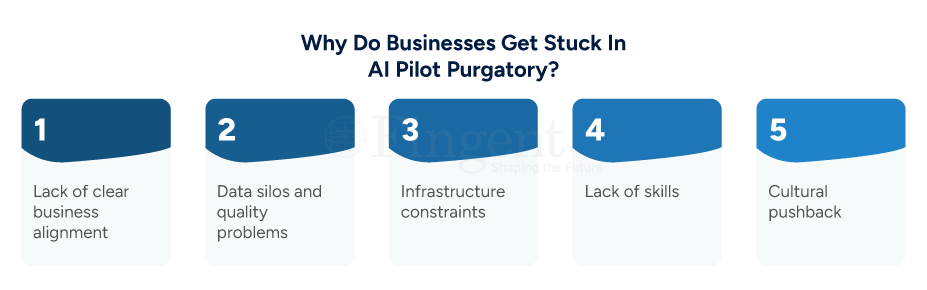
- Lack of clear business alignment: Many pilots show off new tech but fail to prove their value. Without measurable business outcomes, a pilot struggles to secure leadership support.
- Data silos and quality problems: AI hungers for good data. If data is disparate across departments, it can end up being inconsistent. This will hinder scaling.
- Infrastructure constraints: AI needs top-notch cloud infrastructure, data pipelines, and MLOps platforms to scale, but most companies ignore that.
- Lack of skills: To scale, data scientists won’t be enough. You require a team consisting of engineers, domain specialists, and a manager. They will keep an eye on the progress.
- Cultural pushback: Employees will push back against AI because they don’t believe in its decision, or they are afraid of being completely automated.
Eventually resulting in adoption barriers. To help your pilot escape purgatory, you need a complete enterprise AI strategy. This strategy should blend technology, governance, and cultural readiness.
Strategizing a Blueprint from Pilot to Production for AI Success
When you transition from pilot to production, the process isn’t done overnight. It is a structured journey that follows a blueprint. Here’s a blueprint to help your business scale AI from pilot to production.
1. Start with Business Value, Not Technology
Before coding for your project, determine high-impact business challenges that can be addressed with the help of AI. You can inquire:
- What are the most important processes in my company that can use automation? Are there any areas that can implement prediction to ease workflows?
- How should the project’s success be measured (KPIs, ROI, or time saved)?
This makes your AI for enterprise investment business-focused, not an experimental lab.
2. Build a Scalable Data Foundation
When your data is ready, AI success starts there. Construct central data lakes and maintain clean, labeled, and easily available data for departments. Invest in data governance frameworks such that data is of good quality and compliant.
3. Plan Scalability in Advance
Use reusable and modular blocks in building AI models on a strong foundation. Enforce MLOps practices that help integration, version control, and auto-deployment. This makes your AI a repeatable and scalable system rather than a one-time project.
4. Establish a Cross-Functional AI Taskforce
Scaling AI is an enterprise project, not an IT one. It involves more than one entity to make it work. So, you can bring in business leaders, data scientists, engineers, and compliance teams. Join forces towards a single purpose.
5. Use Ethical and Secure AI Practices
Enterprises need to focus on fairness and data privacy. To safeguard important data, establish an AI ethics board that looks carefully into policies that protect information. You can show accountability and regulatory compliance with XAI models.
6. Measure and Learn
Every successful enterprise AI strategy has ongoing feedback loops. Continuously track model performance, user adoption, and business results. Subsequently, retrain and improve models to keep pace with changing business objectives.
Strategize a Successful AI Journey for Your Enterprise. Assess AI Readiness, Spot Opportunities, and Integrate AI into Your Workflows.
Real-World Examples: Industry-Wise AI Scaling
Let’s explore how different industries are scaling AI in the enterprise effectively.
1. Banking and Financial Services
Banks lead with AI for enterprise when they use predictive analytics to detect fraud. They also use it to assess credit risk and personalize customer experiences.
Example: JPMorgan Chase’s COiN platform checks legal documents in seconds. This cuts down on spending for manual work and lowers operational costs.
Value: They experience all-round risk management and wiser decision-making.
2. Retail
AI for enterprise enables retailers to build buying experiences that are unique to their customers. It also streamlines supply chains.
Example: AI is employed by Walmart to predict customers’ demand. If their demand is altered, they modify stocks in real time.
Value: They get reduced wastage of products and improved customer service
3. Healthcare
Healthcare organizations gain from using AI in the enterprise. It helps with the before–diagnostics and predictive care. It also makes a notable difference to patient engagement.
Example: Diagnostic systems powered by deep learning can help analyze patient data and medical imaging in real time. The AI solution can be integrated with Electronic Health Records (EHRs) and lab databases. It also keeps HIPAA compliance and ethical transparency with enterprise AI strategy frameworks.
Value: Improved diagnostic accuracy, faster report turnaround time, and enhanced collaboration between clinicians and AI systems.
4. Manufacturing
AI in the enterprise changes manufacturing. It helps with predictive maintenance and quality control.
Example: Top players are using AI sensors that monitor machinery and prevent any breakdown.
Value: With this, they saved money, cut downtime, and achieved improved product consistency.
5. Nonprofits and the Public Sector
Non-profit organizations have greatly benefited from scaling AI implementations in enterprises for their workflows. It helps them to enhance engagement with donors and optimizes the way resources are utilized.
Example: UNICEF employs AI-driven data analytics to understand which regions require emergency aid.
Value: AI helped enhance their response time and effectively use their resources.
Common FAQs
Q. What is enterprise AI, and how is it different from general AI?
A. Enterprise AI is the use of artificial intelligence within large business settings. Enterprise AI is different from general AI. While general AI is used for consumer, as opposed to business, purposes and research, enterprise AI is designed to reinvent core business processes. Decision-making, prediction, automation, and customer interaction are just a few of them. It is about structured frameworks, governance models, and scalable infrastructure designed to enable the enterprise environment. Consider it as AI designed to deliver performance, compliance, and influence at scale.
Q. What is the timeline to deploy AI in a firm?
A.The timeline for implementing AI in the enterprise within a business relies on three key considerations: scope of business, data maturity, and complexity. A pilot would take 3–6 months, and a scaled deployment would take 12 to 24 months. Data-driven organizations with an adaptable culture can reduce the adoption time. Scaling is needed to plan extensively. That involves using AI to enhance processes and employee retraining. It can also establish MLOps for continuous improvement.
Q. Can small or medium enterprises scale AI successfully?
A. Yes! A size 500 fortune is not necessary to do business using AI for an enterprise. When an AI application is cloud-based, it allows SMEs to apply scalable analytics and automation. Begin small. Begin with one that has a high impact, such as sales forecasting or customer support automation. Pilot first, then roll it out incrementally. Strategic use of AI for enterprise has nothing to do with size but with clarity, intent, and action.
Q. How secure are enterprise AI implementations?
A. Enterprise AI rollouts put security at the top of the agenda. All serious AI systems abide by data protection legislation, like GDPR, and follow industry best practices. Security best practices include:
- Encryption of data in motion and rest
- Role-based access control implementation
- Conducting regular model audits
- Explainable AI (XAI) brings a whole new level of transparency
When done right, yes, enterprise AI can be secure. As secure as the systems it runs on. In fact, it can be even more secure because of its built-in anomaly detection and predictive monitoring.
How Can Fingent Help
At Fingent, we help businesses with their enterprise AI strategy. We guide them from ideas to full-scale implementation. We focus on finding real business value. We build data-driven roadmaps and facilitate responsible adoption across the enterprise. We help organizations:
- Move from pilot to production confidently
- Implement scalable and secure AI structures
- Make all transactions transparent and compliant
- Return quantifiable ROI with intelligent automation and analytics
Start your AI journey or move past pilot purgatory with Fingent. We can help you speed up transformation using AI for enterprise solutions that really work.
Think, Transform, and Evolve with AI
Scaling AI is not just about technology — it’s about transforming the way enterprises think, work, and evolve. Companies can avoid pilot purgatory by embracing an AI-based strategy that is robust and more powerful. Scalable infrastructure and an innovative culture are required. This can unlock the full potential of AI. The companies that succeed today will be leaders tomorrow.
Stay up to date on what's new
About the Author
Featured Blogs
Stay up to date on
what's new
Talk To Our Experts
Picture this: your sprint demo ends at 11:30 a.m. By 11:35, an AI agent has mined the meeting transcript, opened three Pull Requests, generated user-facing docs, and even drafted release notes. Your team didn’t skip lunch, yet the backlog just got lighter. That’s the new cadence of software development—and the only way to hit it consistently is to make every engineer an AI-powered engineer.
How Is AI Evolving the Roles of Software Engineers?
Writing code? That’s no longer the main event. The days of engineers spending most of their time typing out syntax and fixing trivial bugs? Gone. AI has changed the game, not by replacing software engineers, but by reshaping what their job actually is.
Today, engineers are stepping into a more strategic role—think less “code monkeys,” more “system orchestrators.” Instead of handcrafting every line, developers now collaborate with AI models. Copilots are prompted to scaffold apps now. Agents are deployed to handle edge cases. Automation now replaces the time-consuming ops work that used to consume hours.
Can you see the shift? Engineers are spending more time designing long-lasting systems and less time coding in isolation. They’re asking better questions. Not “How do I build this feature?” but “How do I shape the system so the next ten features don’t fight it?”
It’s no longer about completing tasks. It’s about enabling scale. This mindset shift—toward system thinking—is what separates fast teams from future-ready teams.
Even junior developers are feeling the shift. Instead of being stuck debugging in silence, they’re reviewing AI suggestions, learning why certain approaches work, and gaining real-time mentorship through feedback loops built into intelligent tooling.
Let’s call it what it is: a promotion.
Speed Up Product Development With AI Into the Mix! We Ensure Safe AI Integration In Software Development with a Human-in-the-Loop Approach
Areas Where AI Is Augmenting the Capabilities of Software Engineers
AI isn’t just nudging productivity. It’s rewiring the whole toolkit. From code generation to complex simulation, it’s filling in the tedious gaps, accelerating feedback loops, and, frankly, pampering engineers by letting them focus on the fun stuff.
Here’s where the real magic is happening:
1. Quicker, More Intelligent Programming
AI tools like GitHub Copilot are already writing code side by side with developers. However, that is only the beginning. In the future, artificial intelligence will not only help but also anticipate. It recognizes context, suggests architectural patterns, identifies design errors early, and even explains trade-offs.
It’s not about faster coding. It’s about smarter engineering. Think beyond autocomplete. Engineers are now using AI to spin up boilerplate in seconds, suggest logic based on previous patterns, and even catch bugs as they code. The best teams don’t just code faster—they code more intentionally, handing off the grunt work to AI so they can architect with clarity.
2. Automated Testing and QA (That Actually Works)
Nobody loves writing test cases, but AI doesn’t complain. It generates unit, integration, and even regression tests—at scale. And it learns from your system’s behavior over time. Altair points out that AI-driven simulation can pre-validate how a system will respond under different loads, configurations, or scenarios—before it even hits staging. It’s like having a QA engineer who works 24/7 and never skips edge cases.
3. Design & Simulation with Superhuman Speed
In more technical engineering domains—product design, mechanical systems, data-heavy platforms—AI is unlocking something radical: real-time simulation. These models use AI to predict system behavior that used to take hours (or days) of compute time. With AI in the mix, engineers can try out endless design tweaks—without getting stuck in a simulation backlog.
4. Smart Documentation & Knowledge Transfer
No more “go ask Ben.” Now it’s, “Check the AI-generated doc.” It’s not just faster—it’s clearer. Transparency becomes the default.
5. Enhanced Decision-Making
AI isn’t just assisting with “doing”—it’s helping with deciding. Tools powered by data-driven models can evaluate trade-offs in architecture, infrastructure, and resource allocation. Should you use serverless or containers? Should that ML pipeline be batched or streaming? AI doesn’t just guess—it runs simulations, compares past outcomes, and gives engineers recommendations backed by actual data.
6. Augmented Collaboration
AI also plays the mediator. It bridges the gap between product, engineering, and design by translating goals into technical suggestions and nudging teams when alignment slips. Some teams are even embedding AI into their SDLC tooling so it can surface risks, clarify requirements, or flag PRs that need a second look—before the human even blinks.
7. Blurred Boundaries: Cross-Functional Superpowers
AI isn’t content to stay in one lane—and neither should your teams. The rise of AI is removing the silos between engineers, designers, and product leaders. Now, a developer can mock up a UI prototype. Even a UX designer can suggest deployment strategies. All using AI-enabled tools. The result? Collaboration isn’t just cross-functional anymore—it’s co-creative. Not a handshake, but a shared, intelligent canvas.
8. Group Interactions & Change relevant
Last but not least, culture is changing along with technology. Implementing AI includes more than simply plugging in the relevant tools. It’s about bringing your team along. It’s not enough to teach the how. The real shift comes when people get the why.
That means candid forums where engineers ask, “Will this replace me?” and leadership responds with clarity. It means readiness assessments, pilot programs in low-risk zones, and structured learning communities. Done right, AI becomes a team-builder, not a wedge. AI isn’t just adding horsepower—it’s overhauling the engine. Those are the hidden gears in the transformation —high impact, often overlooked, but absolutely essential.
What’s clear is this: AI isn’t a “tool” in the old sense of the word. It’s a collaborator. A tireless co-pilot. A knowledge sponge.
Discover How Fingent Is Transforming Software Development With AI!
How Can Fingent Facilitate the Advancement of AI-Driven Engineering Transformation?
It takes more than simply plugging in a fancy tool and calling it a day to embrace AI. It’s about understanding when to intervene as a human, how to trust it, and where to use it. The real skill? Striking that balance between automation and intuition. That’s where Fingent comes in.
We don’t just build with AI—we build for AI-native engineering.
We start by understanding your engineering DNA.
Your tech stack, your workflows, your product lifecycle—everything. Then we look for friction. Where is time leaking? Where is human bandwidth wasted? Where is velocity throttled by legacy code, outdated processes, or siloed systems? That’s where we apply AI—with surgical precision.
We embed intelligence into the SDLC, not just bolt it on.
We integrate AI where it actually moves the needle:
• Prompt-based code generation wired to your repo conventions.
• Autonomous test generation that learns from your past bugs.
• Natural language to task automation that turns voice notes into ready-to-run specs.
• Agents that triage tickets, monitor system health, and fix common issues before your team even logs in.
It’s just well-engineered intelligence.
Blog : Supercharging Software Development Life Cycle (SDLC) with Al Tools
We coach your team to evolve with the tools.
AI doesn’t work without humans who know how to steer it. That’s why we train your engineers, product managers, and ops folks to speak the language of AI: better prompts, stronger oversight, cleaner design thinking. We ensure to roll out AI with your team so adoption sticks, and morale climbs.
We build responsibly—with governance, not guesswork.
Fingent sets up your AI workflows with guardrails baked in:
• Model transparency
• Audit trails
• Data privacy
• Ethical use protocols
No black-box chaos. Just responsible innovation you can trust.
Bottom line? Fingent helps your engineering team go from “trying AI” to thriving with it. We bring the blueprints, the tools, and the hands-on experience to turn AI from a buzzword into a business advantage.
Because in this new era, you don’t just need more code—you need smarter teams. And we know how to build them.
Stay up to date on what's new
About the Author
Featured Blogs
Stay up to date on
what's new
Talk To Our Experts
Software development followed the same pattern for decades. Slow. Linear. Predictable. Not anymore. The rhythm just got turbocharged. Welcome to the AI-powered SDLC.
We’re talking code generation at warp speed, bugs flagged before humans can blink, tests written automatically, and systems deployed with predictive precision.
How do you get all this? This article will tell you exactly how.
Speed Up Product Development With AI Into the Mix! We Ensure Safe AI Integration In Software Development with a Human-in-the-Loop Approach
How Is AI Changing the Game in SDLC?
According to McKinsey, companies integrating generative AI into development workflows can achieve 35–45% time savings in coding tasks. If you’re in software and you’re not using AI, here’s the harsh truth: You’re already behind.
What is changing under the hood, then?
Let’s make this plain: AI isn’t just an add-on to the SDLC. It’s a full-blown force multiplier.
In the traditional model, speed and quality always fought each other. Want to ship fast? Sacrifice testing. Want clean code? Extend the deadline. Want both? Good luck hiring 10 new devs next month.
AI throws that tug-of-war out the window.
- AI accelerates development cycles: Coding assistants like GitHub Copilot now handle code output in real-world projects. Developers no longer start with a blank file—they get a running head start.
- AI reduces bugs before code hits production: AI doesn’t just write code—it reviews it. Tools like DeepCode and Snyk use machine learning to catch common (and not-so-common) security flaws as they’re written. McKinsey reports that companies using AI in code review see 20–30% reduction in post-release defects. This results in fewer hotfixes, reduced outages, and more satisfied customers.
- AI transforms testing from manual to magical: Writing test cases by hand is slow and boring and is often outdated before the code is even finished. They watch how users interact with your app, track UI changes, and even learn from old bugs—then build test cases for you. While exact percentages vary, firms report faster test development and higher test coverage with AI-enhanced QA pipelines.
- AI turns debugging into prediction—not reaction: In traditional setups, developers hunt bugs reactively. AI flips the script. Tools like Datadog and Dynatrace don’t just show you what broke—they warn you before it does. Slowdowns, memory leaks, crashes? All flagged early with predictive analytics. Sure, results vary by setup. But one thing’s clear: AI is helping teams trade firefighting for foresight.
Bottom Line?
AI isn’t just making the SDLC better. It’s making it fundamentally different. The game isn’t about how fast you can code anymore. It’s about how smart your tooling is. And AI tools? They’re smart, fast, and always learning.
Traditional SDLC vs. AI-Enhanced SDLC
The conventional Software Development Life Cycle (SDLC) functioned effectively for many years. As it happens, it doesn’t fit the bill in today’s scenario. It is slow, rigid, and prone to delays. AI-augmented SDLC fixes it. It is significantly quicker and smarter.
Here’s how the two stack up across the key stages of development:
1. Requirement Gathering
- Traditional: Teams rely on long meetings. That is because they are manually note-taking. And those notes are subject to varying interpretations.
- AI-Enhanced: NLP tools convert raw input into structured user stories in real-time.
Result: Clearer requirements, less time lost in clarification loops.
2. Design & Architecture
- Traditional: Architects create static diagrams manually. Every change requires human effort and multiple review cycles.
- AI-Enhanced: Suggestions of architecture based on project constraints and historical design patterns – that is what AI-powered tools bring to the table.
Result: Faster architecture decisions, with higher scalability and fewer redesigns.
3. Development
- Traditional: Developers write all code manually.
- AI-Enhanced: AI coding assistants can autocomplete code. They can suggest functions and correct errors on the fly.
Result: Development speeds up. And free developers to focus on logic and business value.
4. Testing
- Traditional: QA writes static test cases.
- AI-Enhanced: AI tools create dynamic, adaptive tests.
Result: Wider reach and quicker testing.
5. Debugging
- Traditional: Root cause analysis is manual.
- AI-Enhanced: AI-driven observability tools notify users of problems before they escalate.
Result: Less downtime, faster issue resolution.
6. Deployment & Maintenance
- Traditional: Manual CI/CD, fragile scripts.
- AI-Enhanced: Adaptive pipelines and automated rollback safety nets.
Result: Safer, smarter deployments.
The Influence of AI Agents in Software Development
The influence of AI agents on software development isn’t theoretical anymore—it’s measurable, repeatable, and rapidly scaling.
Let’s start with what AI agents actually do. These aren’t just coding tools. They’re intelligent systems that analyze your development environment, respond to input context, and generate solutions in real-time. Think of them as embedded, proactive teammates that span across code, infrastructure, and workflow.
1. Speed Without the Trade-Off
In legacy development, building new features or products involves a massive upfront cost—design, code scaffolding, approval cycles, and QA. AI agents dramatically reduce that time. According to a recent GitHub study, developers using Copilot were able to complete programming tasks 55% faster than those without it.
But it’s not just about saving hours—it’s about preserving flow. Developers report being able to stay “in the zone” longer, because AI handles the boring parts: repetitive code, syntax corrections, and predictable patterns. You focus on logic; the agent fills in the rest.
2. Consistent Code Quality at Scale
Code quality tends to drop under pressure. Technical debt creeps in. Teams rush to meet deadlines. Reviews get skipped. But AI doesn’t skip steps.
AI code reviewers like DeepCode, Codiga, and Amazon CodeGuru analyze pull requests in real time, flag security vulnerabilities, and recommend refactors—all before a human ever looks at the code. And because they’re trained on millions of examples, they learn from a global knowledge base—not just what your team’s seen before.
3. Test Coverage You Can Trust
Testing is often where quality breaks down—either due to time pressure, incomplete coverage, or simple human oversight. But AI agents eliminate that bottleneck
4. Real-Time Debugging and Predictive Ops
Traditional debugging often involves poring over log files and replicating issues days after a user reported them. By then, the damage is done. AI flips this entirely. Modern observability now come with built-in AI agents that continuously monitor application behavior. They flag anomalies before they cause downtime.
5. AI Agents as Team Amplifiers
It’s important to note: AI agents aren’t here to replace your engineers. They amplify them. Senior developers still architect systems. They still design interfaces and handle edge cases. But now? Since AI agents back them, they make fewer mistakes, move quicker, and ship better code.
Gartner predicts that by 2027, 80% of software engineering roles will incorporate AI-assisted development as a standard part of the workflow. The goal isn’t automation. It’s augmentation.
Discover How Fingent Is Transforming Software Development With AI!
How Fingent Enhances the Software Development Journey with AI
At Fingent, we don’t believe in jumping on trends. We believe in adopting what delivers measurable business value. And AI-powered SDLC is no longer experimental. It’s proven, scalable, and already delivering results.
At Fingent, we don’t believe in trends for trend’s sake. We believe in using what works—and AI-powered SDLC works. We’ve helped clients accelerate time-to-market by up to 40%, improve release quality, and automate testing without sacrificing governance or compliance.
Here’s what our AI-enhanced SDLC looks like:
- AI-First Planning: We transform raw discussions into user stories using NLP tools.
- Accelerated Development: We deploy Copilot-style assistants to speed up delivery.
- Smarter QA – We use AI-driven testing tools that adapt on the fly. No more static test scripts.
- Proactive Monitoring: We identify problems before they become outages because AI observability is built in.
- Confident Change: We assist your teams in implementing AI in a responsible, strategic, and forward-thinking manner. Fingent incorporates intelligence into every stage, whether you’re starting from scratch or updating an existing project.
Because speed is insufficient in today’s market. Quick and clever wins. Ready to supercharge your SDLC with AI tools that actually deliver? Let’s talk.
Stay up to date on what's new
About the Author
Featured Blogs
Stay up to date on
what's new
Talk To Our Experts
Imagine being able to describe an app out loud and watching it come to life—no syntax, no setup, no stress. That’s the essence of vibe coding. It’s not just a new coding style; it’s a new interface between humans and software development, one that’s reshaping who can build, how fast they can do it, and what the future holds.
In this article, we’ll take a grounded, practical look at vibe coding—what it is, how it works, its current limitations, and where it’s headed.
Vibe Coding: Explained Simply
Andrej Karpathy popularized the term “vibe coding,” which he summed up as “see stuff, say stuff, run stuff.” Vibe coding is the process of explaining your project to an AI system, usually in natural language, and having it produce functional code for you.
AI tools that power this workflow include:
- GitHub Copilot – Offers relevant code completions based on project context
- ChatGPT – Can generate full functions, explain code, and handle debugging
- Replit Ghostwriter – Helps solo developers build full-stack apps quickly
- Cursor – A VS Code-based editor with deep AI integration
These tools run on large language models. Like the kind trained on billions (yes, billions) of lines of open-source code.
They don’t just guess what you’re trying to build — they’ve practically read the manual for every major language out there. From Python and JavaScript to TypeScript, Go, and beyond, they understand how real-world developers write code.
They’ve studied common patterns. They know the popular libraries. And they get the frameworks most teams use. It’s like having a super well-read coding buddy — minus the coffee breaks.
Have a Software Development Idea? Let Us Help You Strategize a Streamlined Development Cycle
How Does Vibe Coding Work?
The vibe coding approach aims to reduce coding efforts to almost zero. The process is heavily reliant on AI, where users can generate code by just explaining how they want the software to function. Developers can simply apply prompts in natural language, and the AI assistant writes the code, including backend logic, frontend UI, and even APIs. Codes can be generated, debugged, and also refined. Here’s more on what a basic vibe coding flow might look like:
Choose Your Platform
Start by selecting an AI coding assistant. When you do that, ensure it complements your tech stack and budget. Replit, Cursor, Copilot, Lovable— they all help you write code. But the way they interact? Totally different. Some feel like a chatty co-pilot, finishing your thoughts before you do. Others are quiet powerhouses—minimal, fast, and out of your way.
Choosing one isn’t just about features. It’s about discovering the one that matches. Once you’ve picked your tool, the magic begins. These AI assistants don’t just suggest syntax—they generate actual, working code. Backend logic? Check. Frontend UI? Covered. API hooks? Already there.
Tell the AI Your Dream
A prompt is your design brief.
Example prompt (front-end):
“Create a React component that animates dots in rhythm with an audio track. Needs start/stop buttons, dark-mode friendly colours, and a prop for BPM so I can tweak tempo later.”
Tips that pay off
- Context first: Mention the tech stack up front (React 18, Tailwind, Supabase).
- Goal over detail: Focus on the ‘why’—the vibe you want—then layer specifics.
- Constraints save time: Screen size, performance targets, or API versions narrow the search space for the model.
Sculpt the First Draft
The AI responds with a “rough cut”: working code plus comments. It’s functional, not flawless. Here’s where you channel your inner film editor:
- Run it immediately. See what breaks.
- Copy-paste any error back into the prompt
- terate conversationally. Treat the model like a junior dev—ask why it chose a library or pattern.
Pro tip: Keep iterations short. If you haven’t improved the build after two tweaks, rewrite the prompt instead of patching spaghetti.
Review, Secure, Ship
AI can compose a melody, but you still master the track:
- Static analysis & linting (ESLint, Flake8) catch style drift and obvious bugs.
- Security scans (Semgrep, Snyk) look for SQL injection, weak auth, exposed secrets.
- Unit & integration tests anchor behaviour before refactors.
- Peer review stays non-negotiable—formal and informal inspections catch around 60–65% of latent bugs before code is merged.
Let’s Put It All Together
- Platform gives you the stage.
- Prompt sets the script.
- Iteration directs the scene.
- Review keeps the critics quiet.
Repeat this loop and you’ll notice a rhythm: shorter feedback cycles, fewer context switches, and more time spent on what the software should do—not how to spell it in code. That’s the real vibe.
Why Vibe Coding Is Gaining Real Traction
Simply because it’s faster and more accessible. Most of all, it’s enabling even non-developers to turn ideas into working software quickly. No doubt, vibe coding is promising a new future for software development, opening doors to faster and seamless development cycles.
Speed to Value
Time is money—especially in tech. AI-assisted development shortens time-to-market. Did you know that the research shows that developers using GitHub Copilot were able to complete programming tasks 55–56% faster. AI didn’t just speed things up. It hit fast-forward.
Availability
With the right prompt, product managers, analysts—even founders—can spin up MVPs in no time. No code bootcamp. No sleepless nights. Just clear ideas, well-worded.
Focus on High-Value Assignments
Let boilerplate be handled by AI. Developers can concentrate on tasks like building scalable architectures and so on. These are areas where human insight still holds sway.
Expedited Feedback Loops
Faster iteration = better products. AI allows for quick testing, immediate revisions, and more user-centric development.
Democratization of Software Building
Non-engineers can now participate meaningfully in development. This creates cross-functional innovation and faster internal tooling.
Who’s Using Vibe Coding?
Anyone from startups, enterprises, indie developers, and even boot camps is adopting vibe coding to speed up delivery and lower technical barriers. The 2025 report from SnapLogic is noteworthy. It said that 50% of enterprises are already deploying AI agents in production. Another 32% planning to do so within the next year.
A whitepaper by IBM, 2024, provided an interesting forecast. It claimed that 40% of the global workforce will need reskilling over the next three years due to AI and automation efforts.
There’s circumstantial (but growing) indication that vibe coding is being used in:
- Startups: Founders are building MVPs using AI tools with minimal traditional coding.
- Enterprise Prototypes: AI is used by businesses like Visa and SnapLogic to speed up internal tools.
- Education: To improve learning, coding schools and boot camps are incorporating AI tools into their curricula.
- Indie developers: One-person SaaS teams are shipping apps faster using Replit and ChatGPT.
2025 report from SnapLogic is noteworthy. It said that 50% of enterprises are already deploying AI agents in production. And another 32% planning to do so within the next year. A whitepaper by IBM, 2024 provided an interesting forecast. It claimed that 40% of the global workforce will need reskilling over the next three years due to AI and automation efforts.
The Limitations: What Vibe Coding Can’t Do (Yet)
The fact is that AI is what it is – artificial and not human. While that plays out well in many scenarios, it does fail the litmus test when it comes to some. One of the main glitches in the Vibe Coding system is the ability to include real-world context – the “why”s of the task. And the fact that its context window is comparably short. Which means the need for repetitive and highly specific prompts. Additionally, it can’t be expected to design systems from scratch, or guarantee secure code—it still needs human oversight and engineering discipline.
Despite the hype, vibe coding is not a silver bullet. Here are its current shortcomings:
- Prompt clarity matters: Vague prompts = vague output. Clear thinking is still required.
- Architecture isn’t automatic: AI can build features. However, it doesn’t design maintainable systems.
- Debugging can be opaque: You may get working code, but understanding and fixing bugs is still human territory.
- Security issues: AI doesn’t use auth flows, automatically clean inputs, or adhere to OWASP standards.
- Tooling fragmentation: is a growing pain. AI-generated code often breaks. Especially when it meets your tests, linters, or CI/CD pipeline. Speed is great—but without precision, it’s chaos.
Winning teams strike the balance: fast code, clean handoffs, solid engineering.
How Can Enterprises Use Vibe Coding Strategically?
Enterprises can use Vibe Coding strategically by playing to its strengths and propping up its weaknesses. Use it in low-risk areas like prototyping, which is one of its superpowers. Train your teams in prompt writing – specific and detailed prompts that leave no room for ambiguity. Review AI-generated code like you would a junior dev’s work and get micro with security measures.
Here’s how enterprises can experiment with vibe coding without taking on unnecessary risk:
- Leverage it for prototypes and other internal tools
These could prove to be high-reward. Plus, low-risk settings for experimentation. - Train your developers in prompt writing
Prompt engineering is the need of the hour. It is turning into a real skill set. - Establish human-in-the-loop code reviews
Treat AI code like a junior developer’s work—it needs checking. - Build reusable prompt templates
Standardize how teams ask for common patterns like login flows, dashboards, or API scaffolds. - Measure outcomes rigorously
Track time saved, bugs introduced, and deployment cycles to ensure real value.
Discover How Fingent Is Accelerating Software Development Process with AI
Final Thoughts: Is Vibe Coding the Future?
Vibe coding is not about eliminating developers—it’s about augmenting them. It reframes coding as a combination of design thinking, communication, and quick iteration rather than just a technical task.
The main trend is true: AI is significantly speeding up software development, even though some of the statistics that are circulating—such as 95% AI-generated codebases—are unverified.
We at Fingent trust that the most prosperous businesses will be those that carefully incorporate AI rather than those that heedlessly pursue automation.
Are you curious about the potential applications of AI-assisted development in your company?
Stay up to date on what's new
About the Author

Featured Blogs
Stay up to date on
what's new

