Category: Business
How Face Recognition Apps Are Defining The Future Of Competitive Industries?
There has been a lot of talk about Face Recognition Apps recently. It has received accolades for its use in enhancing security as well as flak over privacy concerns. Speculations aside, there is no denying that face recognition software has revolutionized the way we perceive technology. It is no longer a faraway concept as it finds a place in our pockets through mobile technology.
In this blog, we will look at the technology behind face recognition software, what makes it tick and how it has found application across industries.
What Is A Face Recognition App?
Face recognition is a biometric technology that creates a face print of an individual by mapping out his or her facial features mathematically. This face print is stored and used to compare a digital image of a person verifying their identity.
This mapping is done by identifying 80 nodal points on a human face. These nodal points are used to measure different variables of the face. The width of the forehead, the length of the nose, the shape of the eyes – these measurements are captured on a digital image of the person’s face and stored as a face print. Deep learning algorithms are then used to identify a person in comparison with the face print.
This technology has been used in various ways from automatic photo tagging by apps like Facebook for authentication and identification by Apple’s iPhone X. The way in which Apple has used this technology is interesting. Face ID technology, which allows users to unlock their phones using the stored face print, is designed with 3-D modeling. The software compares over 30,000 variables to fine-tune recognition capabilities. This face print or Face ID can be used as authentication for purchases done with Apple Pay and other Apple stores. Amazon Rekognition, Google Cloud Vision API and other image analysis APIs can be now used to add facial recognition capabilities to other applications.
The inclusion of technologies like augmented reality, mixed reality and more have made face recognition software a powerful force. At Fingent, we developed a mixed reality application using Microsoft Hololens. This application helps in the identification of a person and also links the face print to the biodata of the person. It will also be able to capture images and compute similarities between the captured image and all the other images in a secure database.
Read More: The future of communication and security using augmented reality.
The Role of Face Recognition Apps in Safety and Protection
According to a Javelin Strategy and Research study, identity fraud hit a record high with 15.4 million U.S. Victims in 2016 and an increase of 16 percent from previous years. In a connected world where such vulnerabilities exist, face recognition software is proving to be an invaluable asset. The software is helping law enforcement and corporate to put a name to the faces of criminals who have been playing havoc with stolen identities. Some applications of face recognition software in ensuring safety are:
- Identity validation at ATMs and prevention of identity theft with photo IDs.
- Face recognition surveillance systems in schools to protect students from expelled students or parents who have been flagged as dangerous.
- Equipping law enforcement personnel with identification of criminals and contextual data to warn them of dangerous persons before they approach offenders.
- Automated facial recognition (known as AFR) helps in forensic investigations by identifying individuals on surveillance cameras and videos, as well as in recognition of dead/unconscious individuals at crime scenes.
- Protecting retailers from shoplifters by warning security personnel of known criminals with a record. It also helps them avoid potential violence in the store by warning them when dangerous criminals or disgruntled former employees enter.
How Various Industries Can Benefit from Face Recognition Apps
Apart from ensuring safety and prevention of identity theft, face recognition software has many commercial applications as well. Many organizations across industries are recognizing the vast potential of face recognition apps and exploring different ways to capitalize on its features. Let us look at the Healthcare and Retail industries as an example.
Healthcare
Healthcare is constantly making giant strides with technology and facial recognition is contributing in unexpected ways. Researchers from the National Human Genome Research Institute (NHGRI) in the United States have come up with a face recognition system, which can diagnose a rare genetic disease called DiGeorge syndrome. People with this syndrome exhibit particular facial anomalies, which give them characteristic expressions that can be detected by facial recognition software. Despite the many challenges associated with effective detection, the team has developed software with an accuracy of 96.6%.
Another example of face detection software being used in healthcare is the facial recognition app developed by Listerine. This app enables a blind person to detect when somebody is smiling at them, by setting off vibrations when the face recognition app detects a smile. This helps the blind respond better in social situations, thus contributing to their quality of life.
Speaking about the further possibilities that technology can bring to healthcare, Christoffer Nellaker, of the Medical Research Foundation’s Functional Genomics Unit at Oxford says: “A doctor should in the future, anywhere in the world, be able to take a smartphone picture of a patient and run the computer analysis to quickly find out which genetic disorder the person might have”. This is already coming true with the help of face recognition.
Related Reading: Check out how modern healthcare is revolutionizing with automation.
Retail
Retailers have been using augmented reality to improve the customer experience for a while now. The retail giant Sephora has gone one step further and added a live 3D facial recognition feature to its Virtual Artist application. This enables a more accurate facial tracking and rendering, allowing users to virtually try on Sephora’s various products while they are moving in real time. Parham Aarabi, CEO of ModiFace, which is the developer of this function for Sephora says: “We believe the ability to see yourself with products can impact sales online … and thus the integration on Sephora will, based on our expectation, result in increased conversions and user engagement.” The goal with this move is to enable customers to try on their products in a fun and more interactive way. The accuracy enabled by this technology will go a long way in enhancing the customer’s experience and boosting sales.
By using face recognition software in making educated guesses about a potential customer’s gender, age, etc., big retail giants are optimizing their ad campaigns to specific target audiences. Such advertisements are more effective as they help deliver a targeted message that has a powerful effect on consumers. An example is the “Because I’m a Girl” campaign rolled out by children’s charity Plan the UK. The charity created bus billboards, which would scan the viewer’s face and display an ad depending on the viewer’s gender. This was done to highlight the plight of women who are denied rights based on their sex. Brands like Virgin Mobile, Nike and others have also used face recognition software to create a more immersive ad experience for their customers.
Related Reading: Find top ways to leverage smart IT solutions for your retail business.
Implementing Face Recognition Technology
Face recognition software is closer to home than we think, and it is apt to look at ways in which your company can capitalize on its capabilities. Talk to us and let’s discuss how.
Stay up to date on what's new

About the Author

Featured Blogs







Stay up to date on
what's new



Talk To Our Experts
A Comparison Between Tableau and Power BI: The Most Powerful Leaders In The BI Market.
Business Intelligence or BI tools are a precursor of the world-altering digital technology in this modern technology landscape. Analytics plays a key role in determining which Business Intelligence tool is a better choice. This is because the more flexible the analytics platform offered by a specific BI tool is, the more it provides businesses to customize applications that need updates. Let’s take a deeper look at how Power BI is different from Tableau and which technology promises a better future for your business.
Related Reading: Read on to learn more about Business Intelligence. What it is and how your business can get the best from it.
Tableau And Power BI
Tableau was the first and foremost to come into the market. Though both Tableau and Power BI are well-known to be able to execute fine enough, Power BI has an advantage of making itself accessible to even the no-techy users, making it possess a higher adoption rate than Tableau.
On the other hand, Power BI is ranked higher on one of the key characteristics in terms of its Data Visualization, according to Gartner’s Magic Quadrant.
However, Microsoft’s Power BI has the most user-friendly features in terms of ‘completeness of vision’ or ‘Data Visualization’ capability and has been embedded within Office 365. But Tableau offers advanced functionality and it is best considered for power users.
So to choose a BI tool that is the best fit for your business, it is important to first learn about the analysis needs. In the recent decade, Power-BI and Tableau have emerged as the two powerful BI tools.
Let us look at how companies can choose the best for their business from the following key factors:
Cost
Cost of Tableau is on the higher side when it comes to larger enterprises. The primary reason for this premium cost is the need to build data warehousing. Thus, it is advisable for a startup to choose Power BI initially and then consider Tableau when required.
The professional version of Power BI costs you less than 10$ whereas, on the other end, Tableau would cost you more than 35$ per month per user.
Reporting
Power BI supports Predictive Modelling and Reporting when on the other side, Tableau opts for Data Visualization.
With Power BI, we can create visualizations by queries and natural language. Say, for instance, Cortana PDA (Personal Digital Assistant). Power BI is said to place a 3500 limit when it comes to conducting analysis on data sets.
Tableau can be the best choice when it comes to Data Visualization. With a user-friendly dashboard, Tableau allows an in-depth data analysis. As compared with Power BI, Tableau offers more visualization flexibility.
With Tableau, we are able to create 24 different types of basic visualizations. This includes heat maps and line charts.
Functionality
The functionality associated with Tableau with respect to Data Searching is on the higher side than when compared to that of Power BI.
Tableau tends to answer more queries from users as compared to Power BI.
Large Data Handling Capacities
In case of processing large chunks of data, the capacity of Tableau is over and above that of Power BI.
Power Bi handles data via import functionality and hence is slower to process large volumes of data as compared to Tableau that makes use of direct connections for the same purpose.
Data Connectors
Tableau offers, convenience for data connectors. For example, OLAP (OnLine Analytical Processing), cloud and also big data options such as Hadoop and NoSQL. Tableau can automatically determine the relationships of data that users add from various data sources. It also provides for the creation and modification of data links manually as per the company policies.
Power BI, on the other hand, can connect to user’s external sources such as SAP HANA, MySQL and JSON. It helps users connect to third-party databases and online services like Salesforce.
Thus, if connecting to a specific data house is your business requirement, Tableau is the best choice as Power BI is integrated with Microsoft’s Azure cloud platform.
Related Reading: Business Intelligence or Business Analytics. Find what is best for your business.
Deployment
Power BI is a SAAS model. Tableau, on the other hand, is available both on cloud and on-premises options. The deployment options for Power BI is lower as some business policies do not allow for SAAS deployment. Thus, in case of flexible deployment capacity, Tableau is considered the better option here, even though it is on the higher-end when the cost factor is considered.
User Interface
The user interface of Tableau allows for the creation of a customized dashboard. On the other hand, Power BI has an interface that is easy to use and intuitive. So, if easy to use is your major requisite, Power BI is the choice for your business.
Programming Tools Support
Though both Power BI and Tableau run smoothly with programming languages, Tableau can be integrated better with the R language rather than Power BI. R language provides a wide range of tools used to capture the right model of your data.
Power BI, on the other hand, also can be connected to the R language, but by using Microsoft Revolution analytics and it is made available only for Enterprise users.
Product and Customer Support
Tableau emerged in an early stage than Power BI and hence has a smaller community when compared to Tableau. The knowledge base of Tableau has three subscription categories, namely Desktop, Online, and Server.
On the other hand, Power BI offers a support functionality that is limited to users with a free account, allowing only it’s premium and pro users for faster support.
Licensing
This ultimately depends on whether you want to pay the full cost up front. If yes, then Tableau should be your first choice.
If we could put it this way, Power BI can be your best choice if you are a common stakeholder because of its intuitive drag and drop features, for which a data analyst’s experience is not crucial. Tableau can win if your choice is speed and if you have the capital to support.
Related Reading: Find how SAP HANA is becoming the game changer.
In a nutshell, both Power BI and Tableau have different functionalities which depend on the variant business requirements. The best BI tool for your business can be selected only depending on the business requirements. With the help of expert IT consultants, you can make the right choice for your business. Contact Fingent today!
Stay up to date on what's new
About the Author

Featured Blogs
Stay up to date on
what's new
Talk To Our Experts
How To Use Mobile App Data For Optimized Business Processes
In this era of technology evolution, each company pays rapt attention to understand mobile data leverage, or in other words, how mobile app data can be used for business growth and to generate revenue from it. This data gives insights on mobile app user buying decisions and other behaviors. This data is vital for marketing, sales, and management services in organizations to understand and learn what to engage users or rather, their audience with.
With more than 6.5 million apps in the major app stores, and consumers spending 70 percent of media usage and other screen time on their mobile phones, more and more businesses are trying to make use of mobile app data to compete for customers.
This crucial mobile app data are used as a learning tool to deploy various estimation models which let us accurately estimate performance for apps in iTunes and Google Play.
Related Reading: Check out the top technologies used to develop Mobile App.
What Is First Party Or Mobile app data?
Mobile app data or in other words, the data you collect from your mobile app is termed as first-party data. This data is derived from mobile applications to analyze and identify unique users, record their behavior online and real-time, and then leverage this data into the existing workflow, CRM, dashboards, communication platforms and many more.
The first party data could be user-centric information wherein each data point can be user profiles, upgrades, installs, processes, location tracking data and even push notifications.
Related Reading: Basic steps of writing a mobile application requirements document.
How And Why Use Mobile App Data?
Mobile App Data track unique users to record their statistics real-time. The tracking strategy can vary from different websites, which could be using JavaScript technology or cookies and apps, which then, will need a software development kit (SDK) as the most critical requisite.
A lot of pressing concerns stem from the thought of how mobile app data are recorded. This takes place when the app triggers data at the action of a user while visiting a web page. This data is then recorded in the mobile analytics platform which is then used to derive insights and so on.
What Does The Mobile App Data Track?
- Page views
- Number of Visits and Time Of Every Visit
- Visitor Information
- Resource Of Data
- The course of activities in real-time
- The behavior of User Online
- Location
- Device Information
- Login/logout Activities and Time Schedules
- Custom Event/ Activity Information
Organizations will now leverage this data to figure out the user activity path in its entirety to understand and learn what users require or demand. This gives them insights to prepare to deliver an improved customer experience.
The following are some key insights derived from mobile application data:
- Reasons behind visits on a specific page or application.
- Issues related to customer interaction.
- Buying decision outcomes.
- Analysis of reasons for app data usage and retention of existing customers.
Related Reading: Find the top security issues in Mobile App development.
Leveraging Mobile Apps To Make Complete Use Of Data
The following are the major ways in which you can leverage from mobile app data:
1. Use Mobile App Data To Gain Insights
As market insights are valuable, these can be obtained from downloading applications, financial information and many more. This is important because it shows whether your client base is growing and where your users are coming from.
Also known as Acquisition Metrics, it gives an idea about the cost per acquisition thus help in identifying the ROI. It also helps in giving insights on the conversion rate of app traffic to download from the store. Thus, depending on this data, you can decide on whether to optimize the descriptions of your mobile app to push more conversions.
2. Devise Strategies With Behavior Patterns From Mobile App Data
It is crucial to understand how users or rather visitors flow through your mobile app. Also known as Behavior Metrics, it is a major requisite to learn the steps that you expect your target audience to move through.
For instance, the ‘Trip Advisor’ mobile app recently witnessed an increase of 27% more conversions that had more than doubled their acquisition of new users. This was performed by allowing users to quickly log in using Facebook across multiple devices.
3. Boosting Ads Based On User Responses
Mobile advertising now accounts for nearly 70 percent of all digital advertising, according to eMarketer—some $135 billion.
Boost organic and paid mobile user Ads by streamlining your mobile app store optimization and maximizing advertising costs. For instance, an in-app referral program can provide an insight as to how many users will decide on buying and also refer a friend to the same.
The volume of ads/share of a particular network also matters, such as ad type, size, orientation, etc. The marketing teams can create positive feedbacks based on audience responses and can lead to more testing. A/B test, as it is commonly known, is used by teams to serve the user’s needs on mobile apps to yield more data.
4. As an Engagement Tool
According to Localytics research and study, 58% of users who download your app won’t use it after 30 days. The mobile app data can thus be used to enhance targeted audience engagement for improved customer retention by paying rapt attention to the targeted crowd by better understanding their behavior online, interests and their rapidly changing buying decisions, etc. Segment users by emails, push notifications, and other advertising strategies.
To unlock greater revenue potential, the mobile app data will provide you with insights such as average session time, sessions by key demographics, and frequency of mobile app launches and intervals between each launch. It helps to identify the characteristics of engaging users who open a specific mobile app frequently and stay in the app for long intervals.
It helps to understand how to engage a user and drive higher levels of customer engagement.
5. Use Data To Derive Analytics
Use your data to test cost-effectiveness, retention, and other analytics. It is important to find out an average customer lifetime, differences in retention rates based on devices and variant segments and also optimize the onboarding process for new customers along with retaining the existing ones.
Also known as Retention metrics, the strategies can be categorized by device, channel configures or the installation dates. It is one of the key players in identifying and measuring the mobile app release updates.
6. Use Data For Mobile Monetization
The mobile app data can also be used to monetize by collecting, segmenting and processing user data. This includes device type, version, screen size, country, IP Address, mobile operator, RAM/ROM, and many more.
It is thus crucial to understand how to leverage mobile app data and streamline businesses. To know more about how to leverage mobile data for your business growth, contact our IT experts today!
Related Reading: How much will your Business App cost? Read along to know it all!
Read More: Mobile App Development : 4 Tips To Consider
Stay up to date on what's new
About the Author

Featured Blogs
Stay up to date on
what's new
Talk To Our Experts
How to improve business efficiency with voice app?
Your company’s apps are losing attention. It’s not 2010 anymore. Simply telling your customers that you have a mobile app doesn’t impress anyone. It’s become a standard expectation. There are more than 2 million apps available for Android in the Google Play store and nearly the same number in the Apple App Store. As your app gets less and less use, your company is more likely to be ignored and your app uninstalled.
Three Traditional Mobile Best Practices That Dull Your Edge
Let’s review what used to work in building engaging mobile apps and why those tactics are no longer enough.
Releasing new features. An app that goes months without updates looks abandoned. So you should push updates for new features and bug fixes regularly. Unfortunately, every mobile app worth its salt is already updating frequently. Simply keeping up is not going to set you apart.
Responding to reviews. Monitoring the reviews end-users leave for your app is a good source of new ideas. Responding directly to end-user feedback by launching fixes is a good idea. It is also a common idea that most other companies have already implemented.
Staying current with security and privacy expectations. Consumer data privacy concerns have never been higher. GDPR (General Data Protection Regulation) in Europe and increasing regulation in the USA (e.g., the California Consumer Privacy Act 2018) means the minimum security standard is going higher. The good news: Apple and Google are doing some of the heavy lifting in mobile app security for you. Fall behind with security and you will lose customers. On the other hand, simply keeping up with security threats and updates will not make you stand out.
If keeping up with those outdated best practices is not enough, what can you do to keep users coming back for more?
Apps That Speak and Listen: Your App Opportunity
Instead of getting lost in the app shuffle, take advantage of the latest developments in voice interaction. Thanks to Apple, Amazon, and Google, we’ve all become used to interacting with technology by speaking. In fact, there are over 100 million smart speakers currently installed in American homes according to an NPR survey. The true number of voice-enabled devices is much larger than that when you factor in mobile devices. Voice interaction with a mobile app gives a new and more intimate customer experience. That’s why you should take advantage of this new capability.
Why does the growth of smart speakers matter for your company’s apps? The popularity of these devices means that you do not have to worry about hardware. You just need to deploy your app to one of those platforms. Voice interactive apps are still new but don’t worry – your company is not going to be the very first.
Before you speak with other executives about launching a voice interactive app, you should have some live examples in hand. Consider Capital One, the financial services company, which launched an Alexa skill (i.e., a voice interactive app made for Amazon’s platform) back in 2016. Other financial companies have since followed their lead. On the Google Home platform, AutoVoice lets you set up tasks and create personalized commands. You can use these apps to control your smart home, order pizza, check your bank balance and more.

How do you jump into the world of voice interaction?
There Are Two Paths To A Talking and Listening App: Which Will You Choose?
There are two ways to join the voice-enabled app revolution. (Hint: One is easier.)
You can either follow the path forged by technology giants like Amazon and Google. Invest heavily in building a top-flight team of developers and launch a testing program. This approach maximizes your control over the app and gives you the most options for integrating it into your systems.
Bear in mind that there are significant downsides to building your app development team internally. Structuring this kind of app development capacity internally takes months if not years and comes at a considerable expense. After all, developers are well paid — PayScale ballparks the median pay for Android developers at $82,000. Quadruple that amount and you will nearly have built your full team.
Working with a custom software development team to build a voice-capable app is a better choice in many cases. Your IT managers set the scope and retain oversight for the project. But there’s no need to use resources for recruiting or training since the team is already in place. By working with Fingent, you will benefit from our expertise in enterprise projects. We’ve collaborated with professional services firms like PwC and technology companies like NEC on development projects. So which path into the voice-enabled app revolution will you choose?
Stay up to date on what's new
About the Author
Featured Blogs
Stay up to date on
what's new
Talk To Our Experts
Before I give a definite yes or no to this question, let’s understand the concept of User Interface or UI.
Remember back in the days when owning a Gameboy was as good as an Xbox now, when 30 minutes of Super Mario Land was as intense as a game of graphically dense Far Cry 5 today? Or how uber cool it was to hit your favorite music on a Sony Walkman while you browsed through your myspace account?
Fast forward to 2019, where software is more intelligent and much better looking, even the older millennials cannot ditch their Xboxes to go back to the Nintendo DS nor can they return to myspace from Instagram. Did they love their Nintendos? Yes. Did they enjoy using it even though it wasn’t as graphically demanding? Yes. Then what changed?

All thanks to better UI designers.
Related Read: The Power of UX and UI in Delivering Successful Digital Assets
What Is UI?
UI or User Interface is simply the link between your customer and your product. Whatever elements your customer can see, touch or feel to navigate through your product can contribute to the User Interface. Be it the mobile phone we use, the smartwatch we wear, the car we ride or the websites we use. Everything has a User Interface.
Talking about software, do customers really care what your software looks like or do they just want any platform to get their work done quickly?
The answer is Yes. Customers do care about the interface you provide. Are they aware of it? Probably not.
Psychologically, most users aren’t consciously aware of the interface they use to navigate through the software. It is through their experience on your website that they decide whether to stay or leave. This is where the importance of User Experience or UX comes to play. A well thought of User Interface can subsequently lead to good user experience and can undoubtedly help you retain your users.

Here are a few points that you need to keep in mind when you design your next product to help you retain your customers/users.
1. Take Time to Research
This is one of the most underrated steps in the software design process. Many product teams focus on having the requirements in place and getting work started without “wasting” time. Little do we realize that spending those extra hours in user research and understanding the end user, can do wonders for your product.
Nowadays companies even consult with independent UX research companies that conduct user interviews, focus groups, personas, etc. for them. According to Forrester Research, a good user-centric design has proven to boost ROI and bring up conversion rates by up to 400%.
Moreover, in a study by the Design Management Institute, “design-centric” companies outperformed the S&P 500 by 211%.
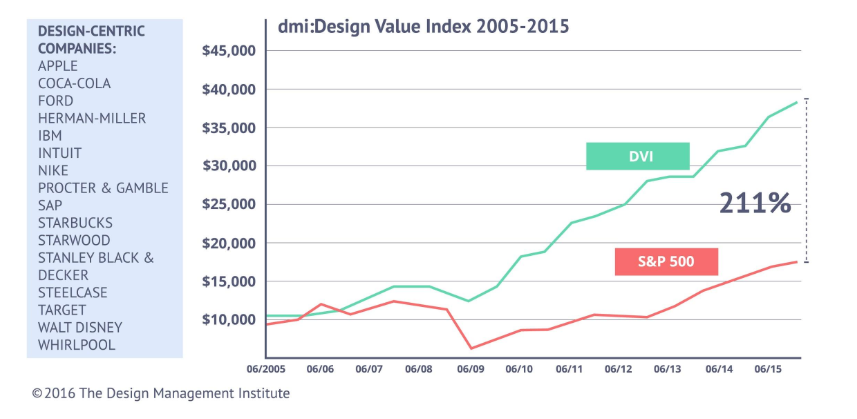
Source – The Design Management Institute
It is imperative that the product that is being delivered to users cater to their needs, accommodate their goals and reflect their behavior in order to make them use your product. A design that does not take into account what the customer wants will only prompt them to move away from your product.
2. Make Educated Decisions
Needless to say, it is absolutely crucial that design teams are aware of the latest trends in software design and are up to date with the current design principles. As a designer, you simply cannot afford to offer a dated solution to your user. So make sure your product team takes that extra step to study what solution your competitors are offering for the same problem and try to come up with a better solution.
This does not mean you need to go over the top with new ideas and designs. For example, a trash can icon is synonymous to “Delete” in the digital world and replacing that with any other fancy icon would only confuse your user.
Some very well thought UI creations that come to my mind are
- Charlie AI
- Samsung SDS Flow
- Airbnb
- Bellroy
- ESPN Sports Programming
3. Use a Style of Communication that Suits Your Audience
Understand your user base and use a communication style that best suits their age and interests. Say for a children’s website or a fashion e-commerce application, a dull downbeat communication style might not sit well with your younger audience and could force your customers to move on to an application they can relate to emotionally.
On the other hand, a professional network like LinkedIn will require a precise and formal tone as the larger audience on it are strictly there for professional reasons.
Using a tone that makes sense to your audience is very important to capture their attention and build trust with them. Users like to know the “people” behind the software and the tone of your website does just that.
4. Consistency is Key
Like we talked about setting a communication style for your website, it is just as important that this style is maintained throughout the website. The importance of being consistent cannot be stressed enough when it comes to optimal user experience. Users tend to use applications that are consistent in their elements, color scheme, typefaces, and interactions.
Say, if your application displays notifications on a side panel, maintain all notifications on the side panel throughout the site. Believe it or not “Your users don’t like surprises”.
5. Include a Knowledge Base
Let’s explain this with an example. Patrick wants to use your application. He loves the concept and the UI design. He can’t wait to start using your app as he has heard it is perfect for his needs. But Patrick has no idea HOW to use your product. He searches for a guide to help him, but found none. Disappointed, he had to move to another application that had a detailed manual.
Now, losing a customer like Patrick is such a shame. Had you spent that extra effort to create a beautifully crafted knowledge base that explains every functionality and feature of your app, you would have retained millions of users like Patrick.
Understand what your users are looking for. If you don’t want to maintain a separate knowledge pile for this, you can add all the information you want to show the user in the UI, by making it seem less like a knowledge base but more like an intuitive design. You could even integrate an AI bot to answer popular queries for you instantly.

When customers are able to find answers to their questions easily and without having to Google/Quora for answers, the overall customer satisfaction increases and also increases user engagement on your website.
Related Read: CTOs Guide – How Robotics and AI Can Improve Customer Experience
6. Less is More Vs More is More
Minimalism isn’t just a fancy word for lazy design. A minimalist design is a visual concept that seeks to embrace simplicity in design, in order to rope in users only towards what is most important.
When catering to a mature target audience, minimalism can be more attractive than a page full of creative design elements, sliding panels, glittering headlines, and modish popups. If your aim is to urge your customers to focus on a particular set of products, minimalist design is the path to choose.
However, it is crucial to understand your customers here. A minimalist design may not work as well for software designed for children, like an educational game. Younger audiences probably would not understand the aesthetic that you are trying to create and may move away to a more attractive website.
7. Improvise and Adapt – The Secret Sauce of Software Design
This is probably THE most important point that businesses need to keep in mind in order to retain their user base for years.
According to a survey by Skype, Adobe, Norton, and TomTom, less than half of the technology users do not like to upgrade software when they should. The simple reason is that people are comfortable with the way things work and do not want to risk getting an update until it’s proven to work for someone else.
On the contrary, users are attracted to new features and functionality as well.
So how do we ensure our software stays on top of its game to an audience that are hesitant to upgrade but wants new stuff too?
Let’s look at the case study of a simple messaging software.
Starting with a messaging platform to simply connect with friends and family via text messages, the team introduced push notifications on mobiles to ensure messages are received even when the application is not running in the foreground. Once the application garnered a few users, more features like photo and video sharing were added and while they were at it, some edit and filter features were included too. Once the application turned out to be an indispensable communication tool for its users, they added voice and video call features.
At this point, users were receptive to all these subtle changes because they hadn’t realized that the application as it was in the beginning, had completely transformed into something much bigger. As far as the customers knew, their experience on the application was flawless. Once the users were comfortable with the current working, the team added group conferencing and even payment integration. Finally, what started as a simple one-on-one messaging app had the potential to replace at least 4-5 apps that were needed every day.
This is the story of how the messaging giant “WhatsApp” increased its user base from a humble 250,000 users to more than 1.5 billion active users standing right next to Facebook and YouTube.
Takeaway – Start by building trust with your customers. Be attentive to your customer’s needs and incorporate improvements without overwhelming the users.
Some popular applications that have evolved into tech giants over time are
- Google Suite
- Adobe Photoshop
- Amazon
- Windows
- Android
- SAP
- iOS
Knowing how to improvise and adapt is the reason these intelligent businesses remain relevant in the market for years.
Related Read: How AI is Redefining the Future of Customer Service
Summing Up
Coming back to the beginning of this article, we asked you why millennials are unable to switch back to older technologies even though they enjoyed the UI at that time. Gameboys for one, were well researched, were consistent, came with a detailed manual and had a great design given the technological limitations of that age. Where they failed to deliver was improvisation. Users are always looking for the next big technological breakthrough.
To stay on top of your game, you must be open to enhance your product for improvements and cater to the continuous cycle of changing customer demands. Product teams should focus on providing users with a flawless experience, be it through the user interface, functionality or customer service. A user-friendly UI is a catalyst for building good relationships with your customers. Retaining your users become easy when you have earned their trust by consistently meeting your customer’s expectations.
By building sustainable software that sees well into the future, we at Fingent, believe our partners deserve the best that technology can offer. Feel free to contact our consultants to get an insight into how we work to deliver your dreams.
Stay up to date on what's new
About the Author

Featured Blogs
Stay up to date on
what's new
Talk To Our Experts
Customer Experience or CX may be the single most important factor that could make or break a business in today’s customer-centric market. A good product, a great marketing team, and competitive pricing can all amount to nothing if the customer experience isn’t up to the mark. As more and more businesses head towards brand transformation, it is vital that they keep the customer experience at the center of things.
In this blog, we will discuss why a memorable Customer Experience is key for brand transformation and how you can achieve it for your business.
How Important is Customer Experience?
Before we get into the importance of customer experience, let’s have a look at what that term really means.
Gartner defines customer experience as “the customer’s perceptions and related feelings caused by the one-off and cumulative effect of interactions with a supplier’s employees, systems, channels or products.”
A take on the definition of what a customer has come to mean today was brought out in this interesting article: “In a connected business reality, everyone in the ecosystem of your business is a customer: from employees and investors to partners, buyers and their networks, including the various players in the value chain from manufacturer to end consumer and back. In other words: all stakeholders.”
Customer Experience then is much more than achieving customer satisfaction. Everything a brand does play a part in forming the customer experience. A study by the Temkin group brought out that CX is made up of three components – success, effort, and emotion. The study showed that out of all the three, emotion played the most significant part. Affecting the emotions of customers through a concerted effort by the brand is what customer experience management is all about. Does it pay off? Definitely. As the study goes on to show, “companies that earn $1 billion annually can expect to earn, on average, an additional $700 million within 3 years of investing in customer experience.”
The benefits of Customer Experience extend to much more than revenue, though that is a pretty great factor in itself! A Walker study found that customer experience will overtake price and product as the key brand differentiator by the year 2020. This is of prime importance in brand transformation as the key goal of this transformation is to differentiate a business from its competitors and get ahead of them.
Related Reading: Find how Robotics and AI can help improve the customer experience
Ways to Enhance the Customer Experience
Ensuring that Customer Experience is the best it can get is a complete discipline in itself. Customer experience management (CEM or CXM) is the function that works towards streamlining every interaction between an organization and its customers. The goal is to foster brand loyalty in customers by ensuring that every touch point in the customer’s journey with the brand is satisfactory. The Customer Experience must be memorable and for the right reasons.
The most important factor in creating a good CX is to have a 360-degree view of customers. Starting from there, the customer’s journey is optimized at every point to ensure a consistently positive experience. Consumer research, a thorough knowledge of market conditions, and an organization’s culture, vision and mission are some factors to keep in mind when designing a customer experience strategy for your business. This will ensure that the strategy takes into account all departments in the organization and not just those in customer-facing roles.
Customer Strategist Journal lists six key areas of the digital customer experience:
-
Reachability
-
Service convenience
-
Purchase convenience
-
Personalization
-
Simplicity and ease of use
-
Channel flexibility
If you notice, many of these key areas are linked to the channels used by customers. The Genesys State of Customer Experience research brings out that 83% of consumers say the ability to move from one assisted channel to another, such as moving from web chat to a live conversation, is desirable. However, only 50% of businesses support such cross-channel interactions. This is definitely something to be considered. Let’s look into this in detail.
Unlike a few years ago where customers would communicate with brands either through email, telephone or directly visiting the company, today’s connected customer has various channels at their disposal. Websites, Facebook, Twitter, Whatsapp, and public forums are being used to contact and interact with brands. They expect customer service to be available and top notch in all these channels. This makes the brand transformation complicated, as delivering flawless customer service through every one of these platforms is challenging to say the least. If you fail, you know they are going to switch brands, which are available at the next click.
Channel Switching is another related challenge. For example, a customer could raise an issue through email and then request for escalation through a call and leave negative feedback on social media. The customer would expect the brand to be aware of his/her different interactions, respond and resolve the issue satisfactorily.
This challenge can be addressed with a few measures:
-
Centralization of interactions and data
This gives all customer-facing executives the necessary information to deal with issue no matter which platform is used.
-
A unified stand
The goal is to make the customer feel that it is one conversation, even if they are talking to different teams. This requires all teams to be equipped with the resources, information, and vision to show a unified stand and represent the brand consistently.
-
Engage with customers on their terms
Customers prefer using different channels according to their convenience. They will not appreciate being directed to the channel that is convenient for the brand. This makes it important to identify and respond to them in their own terms.
Related Reading: Check out other blogs to know how a streamlined workflow can improve customer service.
Apart from addressing Channel Switching, there are a few important measures that brands need to keep in mind if they want to deliver a seamless and satisfactory Customer Experience. Here’s listing a few of them.
-
Go Mobile
The Genesys report showed that “when interacting with a business for service and support, 78% of consumers surveyed use a mobile device. And that number jumps to 90% when working with millennials.” This makes it extremely important for brands to provide mobile-optimized solutions including apps, which focus on ease of access and interaction with the brand.
-
Weave CX into your entire structure
The goal of Customer Experience must be all pervasive throughout the organization. A customer experience strategy must be designed and weaved into the core of your business. Your vision and mission must include this commitment. An example is Dell Computer. Their mission is “to be the most successful computer company in the world at delivering the best customer experience in the markets we serve.” Employees have this on their ID cards and every bulletin board in every office has a sign that reads “The Customer Experience: Own It.”
-
Know your customers
Understand your customer completely. Use technology to its fullest to derive insights into customer behavior and demographics. Getting detailed and actionable insights will help you plan your customer experience strategy effectively.
Personalize! Personalize!
The most important aspect of getting your Customer Experience strategy right is personalization. Hyper-personalization is what the customer demands, and it is vital for brands to adopt measures to ensure this. At Fingent, we help brands build custom applications and solutions to achieve this for their customers. Let’s talk.
Stay up to date on what's new
About the Author

Featured Blogs
Stay up to date on
what's new
Talk To Our Experts
Do manufacturers need custom software solutions?
When Fingent started operations nearly two decades ago, we had the vision of helping organizations solve business challenges using technology. As we have helped numerous clients in the manufacturing as well as other industries, we have seen one thing – there isn’t a one-solution-fits-all software in the world that fits the needs of every organization. Each organization is unique.
While this is the most obvious benefit of custom software development, there are many other benefits that it brings to your organization. Let’s have a look at them in this blog.
How Custom Software Helps Manufacturers
Technology and software have become integral to the manufacturing industry. Irrespective of what the product is, manufacturers have recognized the role of good software in every aspect of their business. Right from design to implementation, production to shipping, employee management, to invoicing, and client relationship management (CRM) to predicting customer demand – there is no function that can run effectively without the help of good software. This makes software perhaps the most important element in your business. It stands to reason therefore that we consider in detail on which software suits your business best.
In that vein, let’s discuss the 5 benefits of custom software in manufacturing:
1. Better Production Planning and Control (or PPC)
In today’s competitive environment, lead times are getting shorter and price pressure is getting tougher. In addition, today’s consumers demand make-to-order manufacturing and hyper-personalized products. This is a tall order and requires highly optimized production processes, which focus on effectively allocating the internal resources of the company. This includes manpower, materials, and machines. Custom software will help you optimize processes more effectively than out-of-the-box software. This is because the software will be customized to include the right mix of resources and production needs, which are unique to your business.
2. Effective Monitoring of Machinery and Processes
Each manufacturer and product require precise process workflows and specifically calibrated machinery. Any change, however small, in the process or machinery can cause huge setbacks in production and eat away at your profits. A good custom software, which is specifically designed for your process flow and machinery, will help you track and monitor even slight changes. This will help you detect and rectify issues before they snowball into a major problem.
3. Insightful Business Intelligence
With AI, IoT and machine learning adding exceptional capabilities to software, it has become possible to collect and process data to derive precise actionable insights. Business intelligence software helps managers have their finger on the pulse of every function in the organization and obtain an insight into the workings of the organization as a whole. These insights can be used to fine-tune inventory management, employee management, and other functions. Unique organization-specific data can be analyzed in real-time, allowing business leaders to make sound decisions without having to pour through lengthy and complex reports. Data mining, automated reporting, benchmarking and predictive analytics capabilities are features of Business Intelligence software, which are invaluable to manufacturers in achieving cost and time efficiencies as well as meet customer demand effectively.
4. Customer Relationship Management and Customer Service
With a custom CRM software for your manufacturing business, you can achieve better client relationship handling, faster responsiveness to customer demand and queries, and reduced customer dissatisfaction. Accurate Demand Forecasting helps manufacturers detect trends and cut the time from the concept phase to market delivery. This will ensure that you are keeping up with the competition and giving your customers exactly what they need. A custom CRM solution also helps figure process errors in real-time and ensure that the products are high-quality. It helps in creating an intelligent supply chain through insights into operations, order processing, inventory management, warehousing, and distribution chains. A CRM will also keep track of warranties, scheduled service calls, etc. to help serve customers better and maintain good customer relationships.
Related Reading: Find how custom software can benefit your business more.
Why Custom Software Is Better Than Off-The-Shelf Software
Although “custom” is often synonymous with “expensive,” this isn’t the case when it comes to custom software for your manufacturing business. The scalability, ease of integration and other benefits that come with custom software far outweigh the costs of initial investment. Some of the pros of custom software are:
1. Competitive Advantage
In today’s age when technology can be one of the most important competitive advantages, it is important to stand out from the crowd in this area. Using a mass-produced software gives you the same or lesser functionalities as your competitors.
2. Scalability
While off-the-shelf software might work for your start-up phase, these aren’t easily scalable, and the technology used could become obsolete with time. Custom software, on the other hand, can be designed to provide the scalability required for your individual business. This will help you have a solution that is perfect for your business while avoiding costs associated with major software overhauls every time a technology becomes obsolete.
3. Performance
Since off-the-shelf software aren’t customized for your business, they have many redundant features that you may never use for your business. This unnecessarily increases the amount of space required and load times, thereby decreasing performance. Custom software is sleek and only has the functionalities that your business requires. This makes it faster with improved performance.
Related Reading: Find how to make the right choice between off-shelf and custom software development.
Get Custom Software for Your Manufacturing Business
Despite knowing the benefits of custom software development, many manufacturers shy away from investing time and resources on this. They feel it is a daunting task considering the effort and resources needed to implement a custom solution. It need not be a difficult task at all however if you have the right help.
With decades of experience in custom software development, Fingent can help dismiss these fears. We help simplify the process for you, giving you the peace of mind to concentrate on your core business while we take care of the complete development and implementation. Get in touch with us to discuss more.
Video: Custom Software Vs Off The Shelf – Dileep Jacob (Head of Operations, Fingent Corporation)
Stay up to date on what's new
About the Author
Featured Blogs
Stay up to date on
what's new
Talk To Our Experts
Why should businesses invest in custom software development?
The need to transform digitally has created a scenario where enterprises are constantly investing in new digital solutions to either make life easier for operations or help them explore new revenue streams in the digital space. However, there are a lot of misconceptions that prevail in the market with regards to digital solutions. As soon as a business announces that it is ready to invest in digital, they get bombarded with ready-to-deploy and off the shelf digital tools that are provided by several players in the tech industry.
But is investing in readily available solutions the best way to gain a foothold in digital adoption? Not always is what industry experts say. It is important for enterprises to invest in custom software development to empower their business growth with a more personalized digital arsenal. Several executives may argue that custom software development is a costly affair, but buying commercial off the shelf software could do more harm than good in the long run if it is not tailored to your objectives.
Here are 5 reasons why investing in custom software development is important for your enterprise.
1. Complexities in Systems Integration
Different areas of your business operations may find tools from different vendors to be useful. However, these tools may each have their own technology infrastructure requirements, architectural differences, different development methodologies and varying levels of implementation support. As an organization, your technology ecosystem needs to work as a streamlined single unit, capable of delivering value across your business.
For integrating systems from multiple vendors, a considerable effort is needed and this could outweigh the advantages offered by individual systems. Such a scenario calls for creating a suite of operational enterprise applications, custom made to fit the objectives of your business. Every custom software, thus built would follow common standards in development and execution, thereby creating a flexible and interoperable enterprise technology stack.
2. Scalability restrictions
Ready to deploy enterprise solutions are often advertised to be scalable for large workloads. But when unique requirements of your organization require flexibility beyond the scope defined by the software development company, then you are left with expensive software that cannot scale up with your business demand. This is another area where tailored and custom software development can be the game changer in your technology landscape.
Components of such software can be built keeping in mind the objectives specific to your business areas and not just a standard industry requirement. Hence, when scalability requirements arise, a custom built enterprise software will be able to accommodate your unique business and process workflows accordingly without creating new challenges for the teams handling your enterprise applications. This is vital for SMB’s as their growth ambitions would definitely require a scalable technology backend to support a critical business process.
3. Future proof innovations
Innovation is at the heart of every competitive business environment today. The more you innovate, the greater will be your chances of satisfying diverse consumer interests. When enterprises buy expensive and ready to deploy software from reputed vendors, they often limit their own dimensions of innovation. Such businesses are often forced to either wait till the software vendor comes up with the desired innovation or they may have to again purchase a new software if their existing application vendor is not in a position to add the new feature anytime soon.
Having your own custom software built will enable you to experiment and bring on board innovative concepts faster and without depending on other technology vendors to do it for you. This can help in greater market competence as your brand would be recognized as a forerunner rather than a late adopter for innovations that consumer’s desire.
4. Existing technology support
Many times, businesses invest in new digital solutions by blindly following trends in the market. It could be possible that the technology that they already have may just need a few tweaks and upgrades to provide the exact same or even better features that a totally new commercial off the shelf software can provide. Bringing a new digital solution from a vendor into your existing technology ecosystem can cause challenges not just in systems integration as mentioned above, but may also create instances where large effort is needed to maintain existing software that serves other core business processes.
When businesses go for custom software development, they have the liberty to build new capability on top of existing enterprise applications and hence saving considerable effort in development as well as reducing cost escalations. Having a team to customize existing software is a better alternative than engaging one to implement a third-party solution from scratch and then follow it up with expensive customizations to further suit your business requirements and objectives.
5. Compliance with standards and processes
Even the best of digital solutions from world-class vendors may have compliance issues with the standard rules and processes adopted within a business. The makers of such software may have included recommendations from industry recognized standards, but very often a business may have to think out of the box while running their daily operations. This leads to their core processes and standards being subjected to deviations from what the industry follows.
When third-party digital solutions are directly brought into such deviation prone business scenarios, there will be issues with compliance policies and standards. This is yet another scope for custom software development to take center stage and empower businesses with the flexibility to meet their unique compliance requirements. This is also true when government and other geopolitical influences require custom standard or compliance implementation rules to be followed by enterprise applications. Areas such as data privacy and consent management would be under multiple legal and judicial networks. A region and a third-party digital solution may not be flexible to handle such variances.
Any technology implementation done today should be closely linked to business objectives, and enterprises need to have a clear idea on the business use cases that a particular technology could solve. With custom software development, it is possible to have a clear picture of the quantifiable value every investment in enterprise application development is made.
This will prove to deliver more ROI than a fully-fledged third-party digital solution implementation where your business may often be at the mercy of the vendor’s technology prowess. If technology is not your core forte, then you need to have the right advisory and consulting partner to help drive the most value out of your custom software development initiatives.
With years of empowering some of the world’s best businesses with custom software development, Fingent can be the right partner to help you build the technology backbone of your business. Get in touch with us to know more.
Stay up to date on what's new
About the Author

Featured Blogs
Stay up to date on
what's new
Talk To Our Experts
Imagine you are a salesman and you have logged into your system with the dashboard pulled up in front of you. Viewing the dashboard with a horde of information on it can turn out to be a very overwhelming experience. Bar charts, pies, metrics, numbers, arrows, percentages, ratios and what not go swimming in front of your eyes. Do they make any sense or do they end up confusing you? Does it include an intuitive interface allowing seamless navigation or is it cluttered and poorly organized? Well, it all depends on how well the sales dashboard is designed.
Recently, Fingent was approached by a client to develop a sales dashboard for their customers who are real estate agents and brokers. The requirement was to develop a portal for the agents and brokers to log into and a dashboard which gives a snapshot of their business performance. With this real estate platform, realtors should be able to access third-party applications to help them with the various stages of their business process.
Related Read: The Tech Disruptors in the Real Estate Space: What to Implement First?
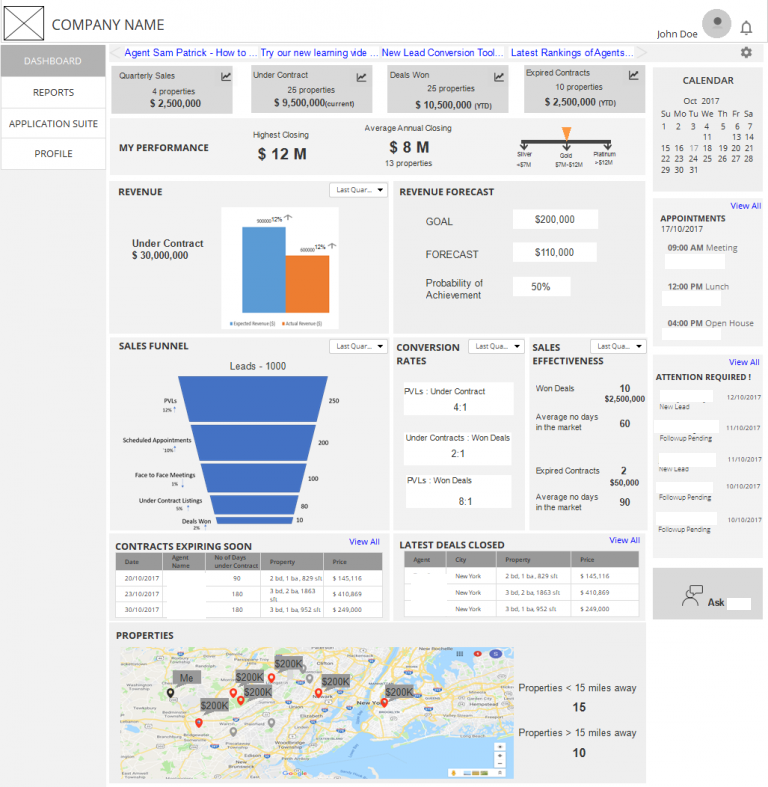
Fig 1. Wireframe of Dashboard Designed for a Real Estate Agent
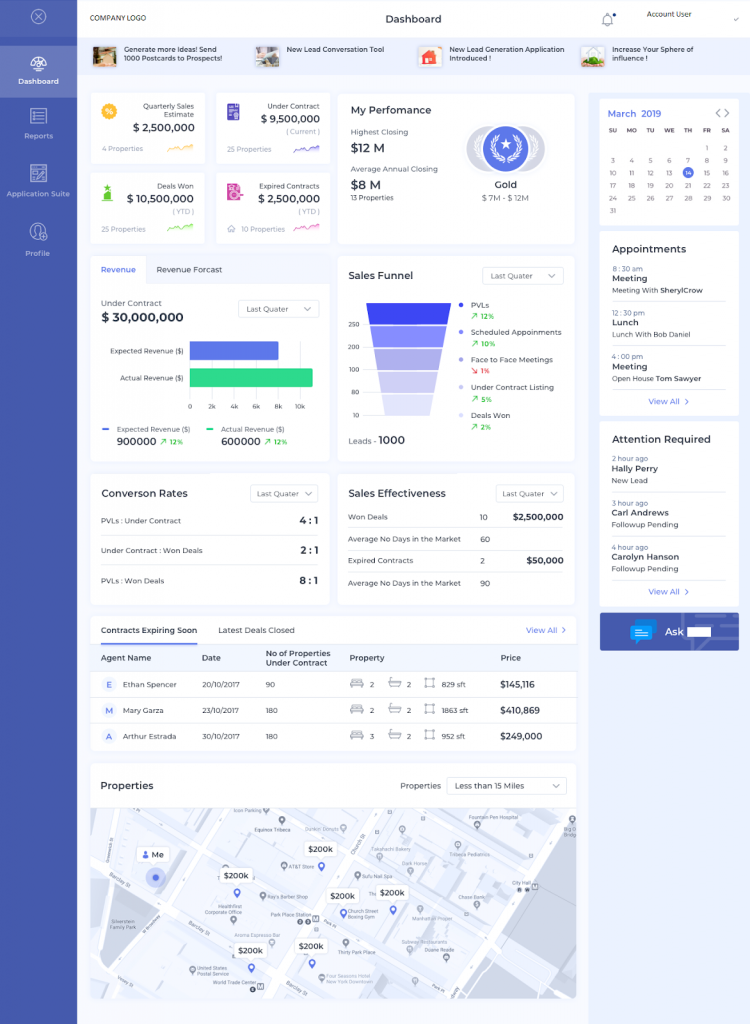
Fig 2. Sample Mockup Designed for a Real Estate Agent
In the real estate industry, data is often unstructured and unaccounted. This platform allows agents to prospect leads, manage and follow up on them, view the status, close on them and ultimately account for the costs and commissions.
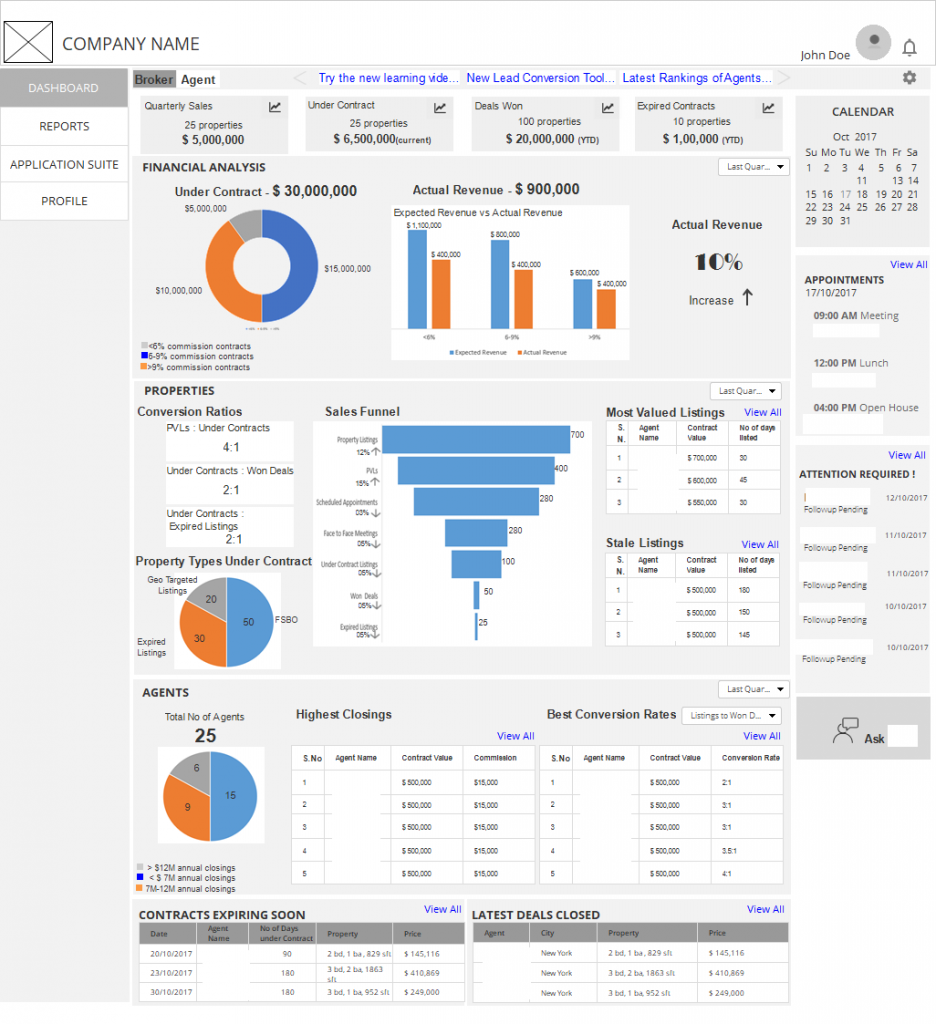
Fig 3. Wireframe of Dashboard Designed for a Real Estate Broker
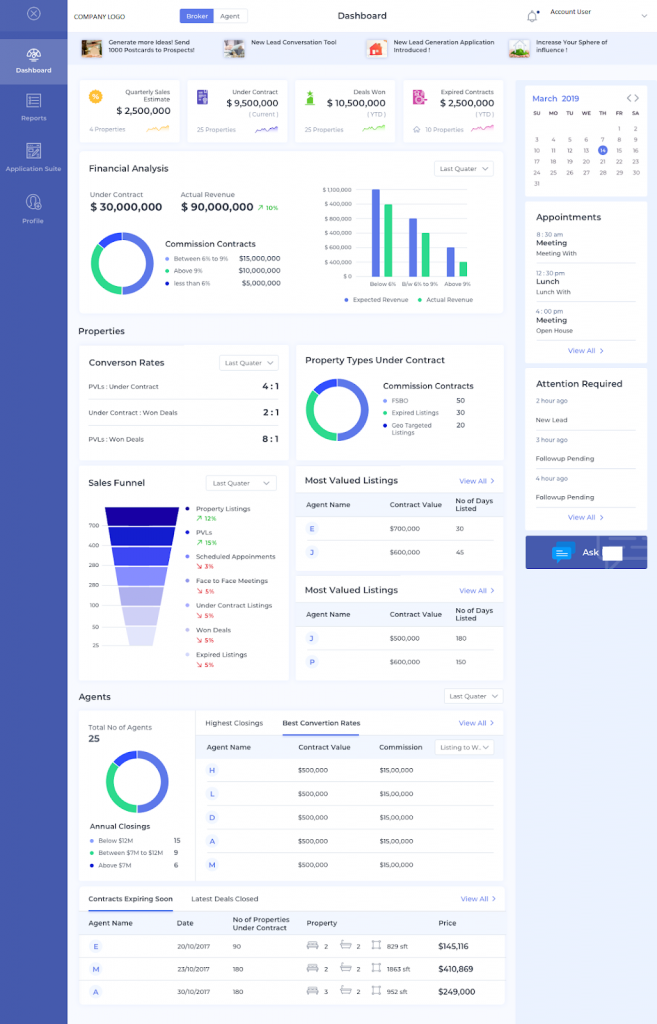
Fig 4. Mockup Template Created for a Real Estate Broker
Expectations from a Good Sales Dashboard
A well-designed sales dashboard is like a good storyteller. It tells you a story complete with the setting, the characters, the main plot, the conflicts, and a conclusion. This should all flow in a seamless, logical way as the eyes of the user move from the top of the dashboard to the bottom; gauging information, which is crucial to making accurate decisions.
Salespeople usually juggle with a lot of numbers. They have numbers related to revenue, sales pipeline, products and services, customer base, forecasts, financial data etc. These numbers help them analyze and make critical decisions on the next move to steer their business forward to success. If these numbers are all scattered around, a salesperson may end up spending precious time gathering data and in the process slip on making important decisions.
Now, imagine if all these numbers come across as a story. Accordingly, the salesperson is able to quickly view the Key Performance Indicators (KPIs) of their business, make a conclusion and plan for the next moves. That is what a good sales dashboard aims to achieve.
A good sales dashboard gives an unbiased true picture of the day to day workings of one’s business. It provides an illustrated view of KPIs and other information crucial in the sales process.
Related Read: Ok Seriously, How Important Is Data Visualization?
Besides, a well-designed sales dashboard should also offer access to real-time data. With this real-time data, salespeople can continually monitor the sales pipeline and activities for making crucial decisions.
The design is yet another leading factor in ensuring better user experience. The logical arrangement of the metrics and other information contribute to effortless navigation all the while ensuring that the most important information is accessed first.
Designing a Sales Dashboard
Now, on the other hand, designing a sales dashboard is an equally daunting task. How do we represent all those numbers in a visually pleasing and logical manner? Furthermore, which numbers to choose from the many, that would ultimately matter the most to the client.
Keeping in mind the following tips will help you design an effective sales dashboard.
1. Getting Your Story Right
A good understanding of the client’s business and its KPIs will help you build the story. Identifying the pulse of the business by tapping on which will give you a correct understanding of the business’s lifeline is the key. Following are some metrics that are generally used in sales –
-
Revenue
This is the key indicator denoting how well the business is doing. Revenue is compared over time (monthly, quarterly, yearly) or with the projected versus actual revenue. It can also be compared to the costs and expressed as a return on investment (ROI). Another way of representing it is to show profits after all the costs are deducted from the revenue. Finding out from your clients which figure would best be useful to them will help you in the design.
-
Forecast
The client can integrate a system to predict their future sales and revenue based on their past backlog, current pipeline, employee performances, market conditions etc. Showing this data on the dashboard will help them see the direction their business is taking.
-
Sales in Numbers and Value
From where is all the revenue coming? Is it from just one product or are all the departments making enough sales? These questions can be answered by displaying the sales in numbers and value. This will give more clarity on the inner workings of the client’s business.
-
Sales Pipeline
The sales pipeline reflects the number of deals in each stage of the sales process. The stages can be open leads, qualified leads, face to face meetings, proposal stage, and closed deals. The number of deals in each stage will help the salesman asses whether they have enough incoming leads to sustain their business, and also whether they have an appropriate distribution of deals to meet their sales targets. It also helps in forecasting revenue in the near future.
-
Lost Deals or Backlog
Negative metrics such as the number of lost deals or the backlog from the previous financial cycle, on the dashboard help in critical decision making. It can tell the salesman where their business is lacking and what it is that they need to focus on.
-
Conversion Ratios
Conversion ratios tell the efficiency of the various stages in the sales process. Numbers such as these – the ratio of open leads to qualified leads, the ratio of qualified leads to closed deals, the ratio of open leads to closed deals etc. help in understanding where the work is getting piled and identifying the bottlenecks faced in the business.
-
Attention Required/Overdue items
Salespeople would appreciate if they can get hold of a list of items on the dashboard, which needs their immediate attention. Overdue tasks is another area which needs to be highlighted in the day to day functioning of the business.
-
Performance
A metric that reflects the sales effectiveness or achievements of a salesperson in line with the company strategy and targets would summarize their performance and also act as a motivating factor to push them towards achieving more.
2. Making Data Comparisons for Deriving Insights
One can gather meaningful insights from data when a comparison is made. Therefore, the way these metrics get compared side by side to derive a logical conclusion is downright important.
Should the metrics be compared with respect to each other? For example actual revenue against forecasted, lost deals versus won deals, sales backlog against the pipeline etc.
Or should it be compared with respect to time? Daily, weekly, quarterly, year on year, year to date etc. Making a comparison should ultimately help the salesperson answer the right questions.
3. Building your Story on Actual Data
Getting real-time data is really helpful in determining the best way of representing it. If it is fictional data, then one must stick to keeping the proportions right. Each chart has a specific type of data that it represents. For example, a pie is used to represent parts of a whole, a funnel represents a progression and a line displays variation over time of different series.
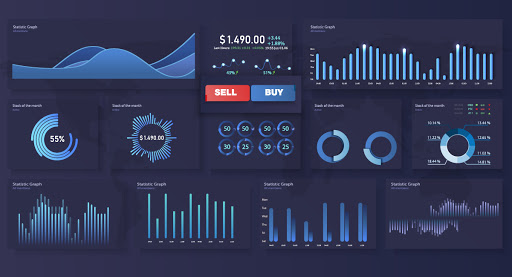
When you use actual data, you tend to realize that some charts do not look as good as you expected and maybe you should think about representing it in some other way. Or, that some numbers are better off shown as numbers itself and not compared to other figures as part of a chart, because it might end up skewing the chart in one direction.
4. Following General UI/UX Principles
Following the general UI/UX principles of good design makes the dashboard visually pleasing and easily navigable. Since most people read from left to right and top to bottom, aligning the widgets on the dashboard in the same order as the story progresses, helps in seamless navigation. The top left space on the dashboard is where the eye falls first. Placing the most important piece of information there ensures high visibility.
Leaving enough white spaces and keeping the dashboard uncluttered will help the user assimilate the information better. A sales dashboard should be concise with just the right amount of information for the salesperson to make an assessment of their business.
5. Keep Reinventing
Nobody gets it right the first time. Redesigning the dashboard a couple of times gives you a better perspective each time and helps you discover the one which will ultimately win your client’s heart.
Related Read: Make Your Data Visualization go Viral: 10 Quick Tips
Wrapping Up
Bringing things into perspective or distilling the essence from a mix of information is what a sales dashboard is all about. Companies have been relying on such visual representations to get an overview of what needs to be done. Particularly in the area of sales, such close visualizations of a range of data can indeed prove helpful for salespeople to gauge information as it is intended and make decisions crucial to the sales process. Owing to its importance, it is downright necessary to build and design a sales dashboard in accordance with certain principles.
By taking into consideration the key metrics that define the sales process, it is possible to delineate the entire workflow and pipeline to an easily identifiable visual form. Such a dashboard brings more clarity in the process, enabling salespeople to understand and apply the necessary changes. We did just that with our client by formulating an effective sales dashboard. This would ultimately help them leverage sales data to contrive practices that push their business forward, all the while accelerating efficiency and ROI.
Stay up to date on what's new
About the Author

Featured Blogs
Stay up to date on
what's new
Talk To Our Experts
A workshop to get you technology-ready for business challenges
District Hall, 75 Northern Ave., Boston 6 pm, April 4th, 2019.
INFINCE is sponsoring a great opportunity for small business owners to learn new and overlooked ways they can adapt technology that lets them serve their clients better and more cost-effectively. On 4th April 2019, INFINCE is sponsoring a workshop to guide new and growing businesses to recognize tech-addressable business challenges, evaluate their implications, and to assess technological available options.
Although most businesses in today’s world are “internet companies”, yet a major portion of the small scale industry remains technologically challenged. Plenty of factors like lack of time, tight budgets, and limited infrastructure often restricts the small and medium business owners from transforming digitally. Moreover, replicating what other small businesses have done can not only be costly, but can lock a business into outmoded technology.
“Many a time small business owners turn down digital adoptions as they consider technology as too complex or too costly an affair or are unaware of the benefits they could acquire from such transitions.”
Dileep Jacob, Head of Global Delivery, Fingent.
Considering the many challenges faced by business owners today, INFINCE has pulled together this workshop to help organizations make better technological decisions for rapid business growth. The session, on 4th April 2019 from 6 PM to 8 PM in the District Hall of Boston, will include information about a variety of digital tools and solutions applicable to growing businesses.
Our objective is to better prepare the owners of small enterprises to choose and use the right technology that arms them for constant business battles; the workshop will present cost-effective and streamlined ways of organizing a firm’s IT options. Whether this is the first step towards business innovation or accommodating the needs of a growing business with changing technologies, the workshop will walk business owners through many do’s and don’ts of technology transition.
“In today’s world innovation is no longer an option but a necessity. The workshop aims at leaving attendees well informed on choosing the right digital options to solve their prevailing business situations and prepare their whole organization for a remarkable future”, said Stephen Cummings, Senior Vice President, Fingent.
The workshop – A Technology Guide For Small Business, presents a great opportunity for business owners who are making their first digital steps toward a technology future within an immensely competitive market. After the workshop, those interested will be able to have a hands-on introduction to INFINCE, a new platform designed expressly to provide small business owners control over their digital capabilities now and in the future.
For free registration sign up at: https://www.infince.com/workshop
About INFINCE
INFINCE is cloud technology optimized for small businesses and a platform to run IT without any hassles. Stephen highlighted on some of the key traits of INFINCE that makes it different from other cloud platforms. Quick deployment is one such, where a company can set up and run INFINCE within minutes. INFINCE is also economical as it integrates optimal cloud configurations that cut down cost without sacrificing on performance.
About Fingent
Fingent is a software development company, with an office in Cambridge, that develops custom software to enable our clients to operate more effectively, more efficiently, and with more resiliency. Since 2003, Fingent has developed web and mobile software solutions that have been key to our clients’ business success. Our technology and industry expertise enables us to deliver sophisticated solutions rapidly and on budget. For us, it is not only about delivering software but also about partnering and playing a part in business efforts to shape a brighter and smarter future.
Stay up to date on what's new
About the Author
Featured Blogs
Stay up to date on
what's new

