Intelligent Document Processing: Turning Documents into Actionable Data

Think about how much time all your employees devote to documents – e-mails, invoices, contracts, forms, and even scanned PDFs. It adds up quickly. Imagine if all that could be done automatically, with no need for constant manual work.

That’s precisely what Intelligent document processing is meant to do.
With AI-powered OCR automation, companies can revolutionize the processing of documents from basic data extraction to end-to-end automated workflows. Systems no longer just read documents. They understand, validate, and take action on the information contained within them. Let’s dive deeper into understanding how IDP accelerates operations and business capacity.

Harness AI for Maximum Business Impact

Explore Your Options Now!

What is Intelligent Document Processing?

Intelligent Document Processing (IDP) leverages artificial intelligence (AI) to read documents. It helps understand and process them, too. It works with structured files, such as forms. It also handles semi-structured files like invoices. Plus, it deals with unstructured documents, including contracts and emails.

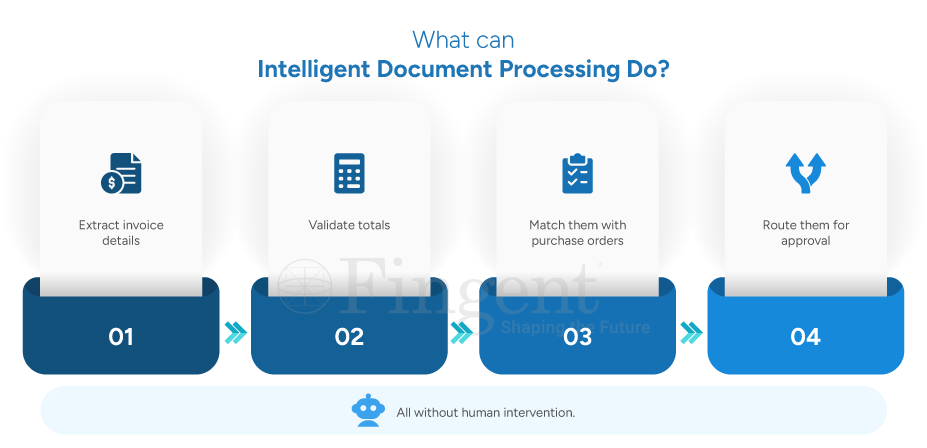
It doesn’t just stop at extracting data. Modern intelligent document processing solutions use business logic. This includes validation, calculations, and routing. They handle tasks from start to finish.

What is Intelligent Document Processing

How Can IDP Benefit Modern Businesses?

There’s a lot to be gained from IDP. For one, it’s a time saver. Tasks that once took hours, such as reading through documents or entering data, can now be done in minutes.
Second, accuracy is enhanced. Manual entry tends to be error-prone, when there are huge amounts of data.

And third, it scales very easily. Whether you’re working with 100 documents or 10,000, the system can handle it without breaking a sweat. And finally, it frees up your team. Your employees can focus on tasks needing human judgment. They won’t have to do repetitive work.

More companies are using OCR automation with smart workflows. This helps them create systems that read documents. They also understand and act on the information.

Why Businesses Must Consider IDP:

In this digital-first era, companies that don’t automate their document processing are getting left behind. Intelligent document processing (IDP) speeds up work and results in faster decision-making. Customer experience improves and gives your business a significant competitive advantage.

Top Industry Use Cases

Here’s how various industries are using Intelligent Document Processing in real life:

1) Legal

Challenge: Law firms manage massive volumes of contracts, agreements, and case files, making document review time-consuming and difficult to scale manually.

How IDP helps: Legal teams can automatically extract clauses, identify key terms, and organize legal documents for faster review and retrieval. IDP also streamlines contract analysis and automates repetitive document-processing tasks.

Key Benefits:

  • Faster contract review and approval
  • Quick document search
  • Reduced manual effort and review time
  • Improved accuracy and compliance tracking

2) Insurance

Challenge: Insurance providers process large volumes of claim documents manually, leading to delays, errors, and longer approval cycles.

How IDP helps: Insurers can automatically extract claim information, validate policy details, and streamline claim assessment workflows. This enables faster and more accurate claims processing with minimal manual intervention.

Key Benefits:

  • Faster claim approvals and settlements
  • Reduced manual data entry and processing errors
  • Improved policy validation accuracy
  • Enhanced customer experience and response times

3) Banking & Financial Services

Challenge: Banks and financial institutions handle large volumes of customer and compliance documents, making onboarding and verification processes slow and resource-intensive.

How IDP helps: Automates KYC verification, loan document processing, and compliance checks for faster and more efficient banking operations. It reduces manual handling while improving document accuracy and processing speed.

Key Benefits:

  • Faster customer onboarding and KYC processing
  • Automated loan document verification
  • Streamlined compliance and audit checks
  • Reduced operational workload and processing delays

4) Logistics

Challenge: Logistics companies manage high volumes of invoices, shipping documents, and billing records, often leading to processing delays and operational inefficiencies.

How IDP helps: Automate invoice and billing workflows, classify logistics documents, and route them to the right teams or systems instantly. This accelerates document handling and improves operational efficiency across the supply chain.

Key Benefits:

  • Faster invoice and billing processing
  • Automated document classification and routing
  • Reduced operational delays and manual effort
  • Improved accuracy in logistics documentation

5) Healthcare

Challenge: Healthcare providers handle large volumes of sensitive patient records and medical documents, making data management complex and time-consuming.
How IDP helps: Digitize medical records, automate patient data extraction, and streamline documentation workflows. This improves data accessibility, accuracy, and processing efficiency across healthcare operations.

Key Benefits:

  • Faster patient data processing
  • Efficient digitization of medical records
  • Improved documentation accuracy
  • Reduced administrative workload and delays


Achieve 99.99% Scalable Operational Accuracy with IDP

Read Full Use Case Now!

What Is the Difference Between IDP and OCR?

OCR automation is the foundation. It converts images or scanned files into readable text.
But OCR alone doesn’t understand context. It simply reads what’s there. Here’s a quick comparison table.

Aspect OCR (Optical Character Recognition) IDP (Intelligent Document Processing)
Definition Converts scanned or image-based text into machine-readable text Extracts, understands, validates, and processes document data using AI
Understanding Context Cannot understand the meaning or context Understands the meaning and context of the content
Data Extraction Extracts raw text only Extracts specific fields like names, dates, invoice numbers, totals, etc.
Workflow Automation Requires manual processing after extraction Automates end-to-end workflows
Document Classification Cannot identify document type Automatically classifies invoices, forms, contracts, receipts, etc.
Decision Making No decision-making capability Can trigger approvals, routing, and next actions
System Integration Usually standalone text extraction Integrates with ERP, CRM, accounting, and business systems
Human Intervention High manual involvement Minimal to no manual intervention
Example Use Case Converting a scanned PDF into editable text Processing invoices end-to-end, including validation and approvals

In simple terms:

OCR reads, converts images to text, requires human intervention, and uses rule-based text recognition.

IDP, on the other hand, reads, understands, and acts. Automates document workflows. Enables straight-through processing and enables AI-driven intelligent automation.

How Can Businesses Get Started With IDP Solutions?

Getting started with Intelligent document processing doesn’t have to be overwhelming. The key is to take a structured approach.
Here’s how businesses can do it:

  1. Find high-impact use cases. Concentrate on the process with lots of paperwork, like invoices and onboarding.
  2. Identify your document types. It may be structured, semi-structured, or unstructured.
  3. Run pilot phases. Try out the solution on a small scale. Then roll it out across the organization.
  4. Train and support your team. This helps them learn how to use the system.
  5. Monitor the system. This enables a no/low-touch integration for now and long-term scalability.

Frequently Asked Questions (FAQs)

Q. Can IDP process unstructured and semi-structured documents?

A. Yes, this is one of the biggest advantages of Intelligent Document Processing. Traditional systems struggle with anything beyond structured formats like fixed templates or forms. But IDP can be made to support multiple formats of documents. With the help of AI and OCR automation, IDP systems can:

  • Identify patterns even when layouts change
  • Understand context using natural language processing
  • Extract key data fields regardless of format

Q. How does IDP automate invoice processing?

IDP simplifies and automates the entire workflow of invoice processing. Here’s how it works:

  1. Invoices are received via email, upload, or scanning
  2. Text is extracted from PDFs or images
  3. Key fields are captured, including invoice number, vendor name, date, and total amount.
  4. The system checks data against purchase orders or existing records
  5. Any mismatches are flagged for review
  6. Invoices are automatically routed to the right stakeholders
  7. Final data is pushed into accounting or ERP systems

Intelligent document processing allows businesses to save time. It reduces manual data entry while improving accuracy.

Q. What is the difference between IDP and automated document processing?

A. While these terms are frequently interchanged, they are not the same.
Automated document processing usually has a strong emphasis on rule-based systems. It works well for structured documents where fields are fixed and predictable. But it has difficulty reading flow or complex material.
Intelligent document processing does the following:

  • IDP understands context, while traditional systems only extract data
  • IDP can handle structured, semi-structured, and unstructured documents
  • IDP uses machine learning to improve over time
  • IDP includes validation, decision-making, and workflow automation

Automated document processing does simple tasks. Intelligent document processing does more. It allows complete automation in document workflows.

Q. Can IDP support KYC and compliance document handling?

A. Yes, IDP supports KYC (Know Your Customer) and compliance. This is particularly the case within regulated sectors such as banking and finance. IDP enhances the KYC and compliance processes by:

  • Extracting data from identity documents automatically
  • Verifying information against internal and external databases
  • Detecting inconsistencies or missing details
  • Classifying and storing documents securely
  • Maintaining audit trails for regulatory requirements

IDP combines OCR automation with AI validation. This results in faster onboarding, higher accuracy, and better regulations compliance. It also reduces the risk of fraud.

Q. Who should use intelligent document processing?

A. Intelligent Document Processing can process documents and information of any kind, so any organization dealing with a significant volume of documents stands to gain from this. It is particularly suitable for organizations that require high levels of accuracy, speed, and compliance.
Industries that stand to gain the most include

  • Banking and financial services — for KYC, loan processing, and compliance
  • Insurance – for claims processing and policy management
  • Healthcare – for patient records and insurance documentation
  • Legal – for contract analysis and document review
  • Logistics and supply chain – for invoices, shipping documents, and tracking


Don’t Stay Back In the Run! Build Smart AI-powered Applications that Deliver Quick Wins.

Talk To Us Now!

Build A Smart Business with IDP

In the fast-moving digital world today, businesses need smart systems that can evolve and offer real value. Intelligent document processing automates tasks that were once done manually. It helps organizations work faster. It also improves accuracy and supports better decisions.

How Fingent Enables Seamless IDP Implementation:

Fingent uses AI-powered solutions and industry expertise to make IDP easier to implement. We begin by identifying the best use cases. Then, we give you scalable automation catered to your needs. Want to automate your workflows with intelligent document processing? Click here to know more.
 

Stay up to date on what's new

    About the Author

    ...
    Tony Joseph

    Tony believes in building technology around processes, rather than building processes around technology. He specializes in custom software development, especially in analyzing processes, refining it and then building technology around it.He works with clients on a daily basis to understand and analyze their operational structure, discover (and not invent) key improvement areas and come up with technology solutions to deliver an efficient process.

    Talk To Our Experts

      ×