Tag: Artifical Intelligence
AI Adoption in enterprises is a no-brainer. Shouldn’t everyone be on it by now? You would think so. Businesses that have adopted it successfully are acing it. Predictive analytics, smart automation, and informed decision-making are a breeze for them.
For a few, however, AI adoption in enterprises is still patchy. Most companies have success in proof-of-concepts but fail to replicate them. In recent years, more businesses have seen the need to discard AI projects before production.
That’s why this blog talks about the most significant challenges in AI adoption, and how businesses can overcome them. Read on!
Discover How Your Business Can Harness AI For Maximum Impact
Why Enterprises Struggle with AI Adoption?
More than three-quarters (78%) of businesses apply AI in one or more business processes. While CEOs all concur that AI is the future, many find that scaling beyond pilots is challenging. Difficulty in cross-department collaboration, skills gap, unclear ROI, and security issues are some reasons.
Here is an overview of the main reasons why companies are having trouble applying AI:
- Data Complexity and Silos : AI models depend on data quality. Yet, 72% of enterprises admit their AI applications are developed in silos without cross-department collaboration. This fragmentation reduces accuracy and scalability.
- Talent and Skills Gap: AI adoption demands data scientists, ML engineers, and domain experts. But 70% of senior leaders say their workforce isn’t ready to leverage AI effectively.
- High Costs and Unclear ROI: Enterprises hesitate when infrastructure, integration, and hiring costs overshadow immediate returns. In fact, only 17% of companies attribute 5% or more of their EBIT to AI initiatives.
- Organizational Resistance to Change: Employee resistance is a major issue. 45% of CEOs say their employees are resistant or even openly hostile to AI.
- Security, Privacy, and Issues with Compliance: AI consumes sensitive data. Due to this, abiding by laws like GDPR becomes difficult. Lacking effective governance, companies are worried about reputation damage and penalties.
A Look into the Risks and Blockers of Scaling AI Across Organizations
Even when pilots succeed, enterprises face barriers in scaling AI across the organization. The key factor is the lack of understanding of the way AI models operate. Model drifts that reduce accuracy, integration challenges, and cost overruns are some reasons that could impede scaling. Let’s look at some key risks and blockers of AI adoption in enterprises:
1. Shadow AI and Rogue Projects
Departments start “shadow AI” projects with little IT governance. Local success translates to enterprise-wide failure, forming silos, duplication, and the danger of non-compliance.
2. Model Drift and Maintenance Burden
AI models are degrading over time with changing market trends and user behavior. Enterprises don’t know the price of ongoing monitoring and retraining. This results in “model drift,” which reduces accuracy and reliability. Poorly trained models may amplify biases, risking reputational and legal challenges.
3. Lack of Interoperability Standards
With more AI platforms emerging, firms battle interoperability. They are often hampered by integration challenges in scaling AI owing to variable data formats and incompatible systems.
4. The Hidden Costs of Scaling Infrastructure
Scaling AI doesn’t take just algorithms. There’s more behind the curtain. Cloud storage, GPU computing power, and security controls cost money. Most firms underestimate these hidden expenses, leading to cost overruns.
5. Cultural Misalignment Between Business and IT
Successful AI demands cross-functional alignment. IT is worried about security and compliance, and business units are always in a rush. The clash of cultures gets in the way of execution and keeps enterprise-wide scaling at bay.
Tips To Overcome These Challenges
AI adoption challenges in enterprises are common. But that does not mean that they aren’t impossible to overcome. Here are some tips to speed up AI adoption in enterprises:
- Establish Crystal Clear Business Goals: AI must address business priorities, not simply adopt technology for the sake of it. Leaders need to determine high-impact opportunities. Fraud detection, customer service automation, and demand forecasting are priorities.
- Invest in Data Readiness : High-quality, integrated data is key. Enterprises require good governance and integrated data in real-time. Organized data habits are far more likely to derive ROI from AI.
- Organize Cross-Functional Teams :AI is best with IT, business, regulatory, and domain subject matter experts in collaboration. It enables scalability and reduces ethical risk.
- Upskill and Reskill Talent: Cultural readiness is needed for AI deployment. Only 14% of organizations had a completely synchronized workforce, technology, and growth strategy—the “AI pacesetters”. Learning investments prevent more transition problems.
- Pilot Small, Scale Fast: Pilot projects must produce quantifiable ROI before large-scale adoption. This instills organizational confidence and reduces financial risk.
- Emphasize AI Governance and Ethics: Open models, bias testing, and compliance frameworks establish employee and customer trust.
- Collaborate with Seasoned Providers: Companies that lack in-house expertise bring value by partnering with seasoned AI providers like Fingent, which are focused on filling skill gaps, managing integration, and scaling responsibly.
Popular FAQs Related to AI Adoption in Enterprises
Q1: What are the main barriers to AI adoption in enterprises?
The primary inhibitors of AI adoption in enterprises are siloed data. The absence of competent talent, vague ROI, cultural opposition, and governance are a few other factors that pose challenges in AI adoption.
Q2: Why do AI pilots work but get stuck on scaling?
This happens because scaling needs robust data systems, governance, and alignment at departmental levels. Without them, pilots do not work in production.
Q3: How can businesses overcome AI adoption challenges?
AI adoption challenges in enterprises can be overcome if you first set clear business objectives. Once that is done, invest in upskilling employees and partnering up with seasoned AI providers like Fingent.
Q4: Is AI adoption in enterprises worth the risks?
Yes! Best-practice adopting firms are more likely to see positive returns and ROI. But firms with no AI strategy witness business success only 37% of the time. Whereas firms with at least one AI implementation project succeed 80% of the time.
Q5: Which are the industries that benefit most from AI adoption?
Tech seems to come immediately to mind. But the past few years have seen other industries jostle for space on the top list of adopters. The pharmaceutical industry has discovered what AI can do for clinical trials. Chatbots and virtual assistants have revolutionized banking and retail. Predictive maintenance has smoothed out many a problem for the manufacturing industry.
Strategize a Smooth AI Transition. We Can Help You Effortlessly Integrate AI into Your Existing Systems
How Can Fingent Help?
At Fingent, we deal with the intricacies of AI implementation in business organizations on a regular basis. Our capabilities are:
-
- Scalable AI solution planning based on business objectives.
- Effective data governance models.
- Glitch-free integration with legacy systems.
- Ethical and transparent AI model building.
- Cultural transformation through adoption and upskilling initiatives.
Whether your business is just starting pilots or fighting to scale, Fingent can assist in optimizing ROI and mitigating risks. Learn more about our AI services here.
Knock Those Barriers With Us
AI adoption barriers in business still keep organizations from realizing potential. The silver lining? With the right strategy and partnerships, businesses can blow past the challenges and drive a successful AI adoption journey.
The future of AI adoption in enterprises is not algorithms; it’s about trust, collaboration, and a vision for the longer term. Those who act today will reign supreme tomorrow. Give us a call and let’s knock these barriers down and lead your business to making a success of AI.
Stay up to date on what's new

About the Author

Tony Joseph

Tony believes in building technology around processes, rather than building processes around technology. At Fingent, he specializes in custom software development, especially in analyzing processes, refining them, and then building technology around it. He works with clients on a daily basis to understand and analyze their operational structure, discover (and not invent) key improvement areas, and come up with technology solutions to deliver an efficient process. You can reach him at [email protected], Skype: tony_fingent
Featured Blogs








Stay up to date on
what's new



Talk To Our Experts

We’ve all used single AI models, whether it’s a bot answering questions or an algorithm working seamlessly in the background. But can you imagine what would happen when many AI systems come together to enhance efficiency? That’s what a multi-agent system in AI does.
A multi-agent system in AI, also known as MAS, is an artificial intelligence computation system that consists of many agents interacting with each other and with their environment to achieve their individual or collective goals. In contrast to single-agent systems, where one primary agent undertakes decisions, applications of multi-agent systems in AI enable agents to work through cooperation, competition, and coordination with each other.
While multi-agent systems are complicated to build, they provide a massive helpful edge to individual entrepreneurs who may be struggling to compete with larger organizations. The key, then, is to simplify it so it works for you. Exactly how you want it! This article will discuss all that, and the benefits and challenges of multi-agent AI. Read on!
Dive Into The World of Artificial Intelligence! Explore How AI Can Transform Your Business Operations
How Multi-Agent Intelligence Works?
According to Roots Analysis, AI agent applications in customer service and virtual assistants are predicted to account for 78.65% of the market share by 2035. Worth a deep dive, don’t you think?
Since we have established what multi-agent AI systems are, let’s dive into their makeup and how they work.
The foundation of MAS is artificial intelligence agents. These, in essence, are systems or programs that can autonomously perform tasks requested by the user or another system.
How do they function? Large language models (LLMs) are the powerhouses behind it. Natural language processing techniques are tapped into to understand and respond to user inputs. Agents follow a no-nonsense, strategic step-by-step process to resolve problems. When they feel the need to call on external tools, they alert the user to do what is needed.
If Multi-agent intelligence is broken down into pieces, it consists of four major components –
- Agents: As discussed earlier, these are individual parts of the system that have their own abilities, knowledge, and goals. Agents can range from simple assistant bots to advanced robots that can learn and adapt. Agents are considered the blood that courses through the veins of MAS.
- Shared Environment: This is defined by the space in which the agents operate. This could be a physical place, like a factory. Or it could be a virtual place, like a digital platform. Either way, this environment will determine how the agents act and interact.
- Interactions: Once the right agents are placed in the most appropriate environment, they proceed to interact with each other through various methods, such as collaboration or competition. These dialogues are vital for the system’s workings and improvement.
- Communication: Agents are often required to communicate to share information, negotiate, and/or coordinate their actions.
The two most important behaviors of Multi-agent intelligence are –
- Flocking: Here, agents have a single aim and some organization or supervisor to coordinate their behavior.
- Swarming: This is where the simple decentralized interactions of simple AI agents come together collectively. Shared context is the crux of this complex and amazing collaboration.
Business Benefits of Multi-Agent Systems
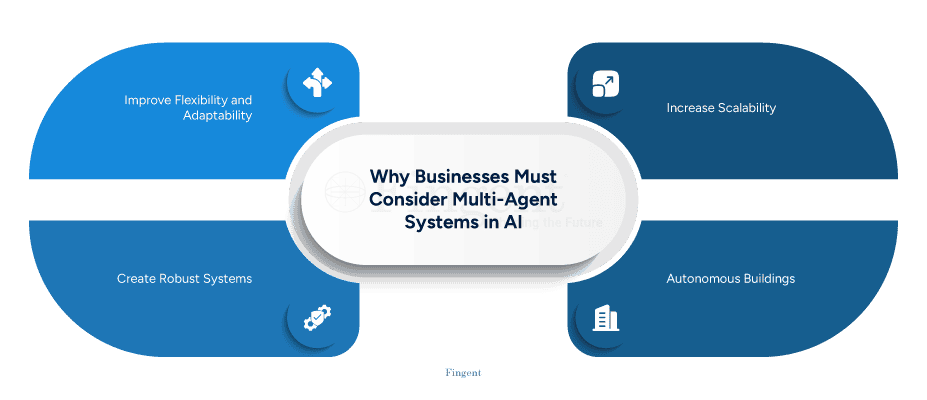
Hands down, multi-agent AI systems can and have solved many intricate and real-world tasks. With unmatched ease and efficiency at that. At its root, its main benefit is that it makes complex processes more intelligent and efficient. Here are some reasons why multi-agent systems work so well for businesses.
1. Adds flexibility and adaptability
Research indicates that due to AI, 81% of companies react faster to market shifts. MAS can add to this benefit as it can easily adapt to business models, needs, and goals.
2. Extra hands to increase scalability
If the complexity of a problem increases, extra AI agents can be seamlessly introduced to steer new tasks or responsibilities. This level of scalability makes MAS suitable for a wide range of applications and dynamic environments.
3. Creates a robust system
Multi-agent systems improve fault tolerance. This means that if one AI component fails or malfunctions, another takes over without missing a beat. This ensures that there is continuity to MAS and can be critical for industries like healthcare and finance.
4. Domain Specialization
The ingredient for the efficiency of multi-agent systems is delegation. Each agent is assigned a specific domain expertise. In contrast, single-agent systems need one agent to multitask and handle tasks in various domains. In multi-agent systems, each agent focuses on their own unique task. Focus means more efficiency and reduced risk of manual errors.
Building Trust In AI: Enabling Businesses to Strategize an Ethical AI Future
Challenges of Multi-Agent Systems
Just as every aspect of Artificial Intelligence has its fair share of challenges, there are several push-backs in designing and implementing Multi-agent intelligence, including:
1. Agent malfunctions
Foundation models are a type of artificial intelligence model trained through techniques like fine-tuning, prompting, and transfer learning. They are subjected to massive, diverse datasets to perform a wide range of general tasks. Sometimes, multi-agent systems built on the same foundation model can experience shared obstacles. This can cause a system-wide failure of all agents involved. It also exposes vulnerability to adverse attacks.
2. Coordination complexity
This is perhaps the greatest challenge with developing multi-agent systems – the complexity of creating agents that can coordinate and negotiate with one another. This cooperation is vital for a multi-agent system to function at full potential.
3. Unpredictable behavior
Some multi-AI agents that are set to perform autonomously and independently in decentralized networks can exhibit conflicts or unpredictable behavior. This can make the detection of issues and their management difficult.
How do you deal with these challenges?
Fingent Can Help!
Fingent can help organizations implement multi-agent systems by offering custom AI software development, cloud solutions, and expertise in designing and deploying intricate AI systems. Fingent’s expertise in AI can help businesses create specialized, unique, and autonomous multi-AI agents that are programmed to collaborate and solve complex problems. They also manage workflows and automate processes at scale.
Fingent designs and implements workflows for AI agents to ensure harmonious collaboration and efficient execution of tasks. We incorporate human oversight and intervention to highlight critical workflows. We also help create the necessary infrastructure, such as MCP servers, to connect and manage AI agents and their interactions. Lastly, Fingent uses multi-agent systems to automate and optimize complex business procedures, thus leading to greater efficiency and cost savings.
Stay up to date on what's new
About the Author
Tony Joseph
Tony believes in building technology around processes, rather than building processes around technology. At Fingent, he specializes in custom software development, especially in analyzing processes, refining them, and then building technology around it. He works with clients on a daily basis to understand and analyze their operational structure, discover (and not invent) key improvement areas, and come up with technology solutions to deliver an efficient process. You can reach him at [email protected], Skype: tony_fingent
Featured Blogs
Stay up to date on
what's new
Talk To Our Experts
Banks have been using AI for a while now—flagging fraud, crunching credit scores, and personalizing offers. But Agentic AI in Financial Services? That’s a whole new game. It doesn’t just follow instructions. It sets its own goals, makes strategic decisions, and adjusts dynamically –like a financial analyst with intuition, speed, and zero downtime.
If traditional AI is your calculator. Agentic AI is your CFO.
In a sector defined by risk, regulation, and razor-thin margins, the emergence of agentic systems marks a turning point. We’re not talking about marginal gains or fancy dashboards. We’re talking about structural change—across asset management, compliance, customer engagement, and credit decisioning.
But here’s a hot take: If you’re still using AI just to automate workflows, you’re already behind. The leaders aren’t just automating—they’re delegating.
So ask yourself—would you trust an AI to make a million-dollar lending decision on your behalf?
Create Frictionless Experiences For Your Financial Service Customers Build Unique, User-Friendly Apps & Digital Payment Solutions Contact Us Now!
What Is Agentic AI – How Is It Transforming the Financial Service Industry?
Agentic AI refers to artificial intelligence systems capable of autonomous decision-making, goal-setting, and adaptation—without needing constant human supervision. That’s a big deal in financial services—because it means AI isn’t just supporting back-office processes. It’s beginning to run important processes with context-awareness and real-time optimization. All done with exceptional speed.
A report by McKinsey highlights that agentic systems could boost productivity by up to 30%. This is especially in areas like customer onboarding, risk assessment, and portfolio management.
Here’s how it’s already transforming the industry:
- In asset management, agentic AI acts like your sharpest portfolio manager—minus the coffee breaks. No manual hustle. Just smart, automated moves.
- In lending, decisions that used to take hours now take milliseconds. Agentic systems crunch structured and unstructured data—credit history, bank statements, even sentiment—then deliver faster, fairer loan outcomes. It’s speed without bias.
- In compliance, it’s like having a 24/7 watchdog with a law degree. Agentic AI tracks regulation shifts, flags suspicious patterns, and adapts to new policies before your compliance team even hits refresh. No more scrambling when auditors show up.
This isn’t experimental anymore. If your bank still relies on manual decision chains, the real risk might not be in adopting Agentic AI—it’s in ignoring it.
Blog: Agentic Al vs Traditional Al: Understanding The New Era of Technology
What Are the Benefits of Agentic AI in the Financial Sector?
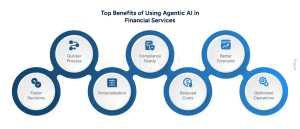
The biggest advantage of Agentic AI in financial services is simple: better decisions, made faster—with less human drag.
Agentic AI doesn’t just process data; it interprets intent, adapts to new signals, and takes initiative. That’s a huge leap in a world where timing and trust are everything.
By 2028, Deloitte says AI could slash software investment costs by 20% to 40%. Do it right, and banks could save up to $1.1 million per engineer.
- Faster decisions, zero drama – Fraud alerts? Loan approvals? Agentic systems handle it in real time. No more batch queues or red tape.
- Personalization on autopilot – These AIs know what customers want before they do. Dynamic offers, tailored nudges, frictionless onboarding—done.
- Compliance that never clocks out – Agentic AI in banking and finance can watch out for regs 24/7. It spots policy shifts and stops breaches before they happen.
- Costs down, speed up – What takes a human hours, agents do in seconds. Now scale that across thousands of tasks. That’s efficiency with a capital E.
- AI with a strategy hat – This isn’t reactive AI. It thinks ahead—optimizing portfolios, forecasting liquidity. Basically, your tireless junior strategist—minus the all-nighters.
Here’s the question: Are your human teams spending hours making decisions that an AI agent could resolve in seconds? Because in finance, slow decisions are expensive decisions.
Top Use Cases
Here are the top five real-world applications of AI-powered financial services driven by agentic systems:
1. Autonomous Portfolio Rebalancing
Robo-advisors powered by agentic AI are now able to make micro-adjustments to portfolios based on market swings, client sentiment, and long-term goals—without waiting for human review. Platforms like Wealthfront use AI to keep investment portfolios in check.
2. Dynamic Fraud Detection
Rather than flagging predefined red flags, agentic AI in banking and finance learns the user’s behavioral fingerprint. It can detect anomalous activity in seconds, even if it’s never seen that pattern before.
3. AI-Driven Credit Underwriting
Traditional scoring models use fixed criteria. Agentic systems blend traditional and alternative data—like transaction history, geolocation, and even tone in customer communication—to build nuanced borrower profiles.
4. Regulatory Change Management
Instead of manually interpreting thousands of pages of new compliance updates, agentic systems ingest and act on them automatically—triggering workflows, updating documentation, and training staff through personalized AI tutors.
5. Personalized AI Agents for HNIs
Some private banks are offering bespoke AI financial agents that act on behalf of high-net-worth individuals—handling alerts, rebalancing portfolios, generating reports, and even booking meetings with human advisors. These agents learn preferences and adjust strategies over time—just like a human relationship manager would.
Discover Customized Fintech Solutions That Can Ramp Up Your Financial Services
Common FAQs
Q: How Agentic AI is transforming financial services?
A: AI doesn’t just predict risks—it anticipates them. It doesn’t just personalize—it preempts. McKinsey says the prize is massive: $1 trillion in annual value for global banking, thanks to sharper decisions, smarter workflows, and leaner operations.
This isn’t an “innovation lab” experiment anymore. It’s core strategy. It’s in underwriting, fraud detection, investment strategies, compliance monitoring—and it’s changing how banks think, operate, and compete.
Q: What are the applications of Agentic AI in banking?
A: Agentic AI powers autonomous decision-making across the banking value chain.
Key use cases include:
- Autonomous customer onboarding
- Real-time fraud prevention
- Portfolio optimization for wealth clients
- Credit decisioning using alternative data
- Dynamic compliance tracking
- Conversational AI agents can think and act
Unlike traditional AI, which waits for input, agentic models initiate actions based on context and intent. It functions more like intelligent teammates than static tools.
Q: Is AI safe to use in financial decision-making?
A: It can be—but only when governed properly. Agentic AI doesn’t just automate — it acts. And with that autonomy comes new responsibilities: traceability, auditability, and fairness. Good intentions mean little if AI decisions are a black box. Use explainable frameworks so every action can be traced and trusted.
Q: How does Agentic AI improve customer experience in finance?
A: By transforming banking into more of a relationship rather than a mere transaction. Agentic AI allows for hyper-personalization: tailored deals, timely notifications, adaptive spending analysis, and immediate support. It can predict customer wants, respond to choices, and even address issues before the customer signals for help. An agentic system could recognize a customer’s international travel and immediately modify fraud detection limits, notify them of foreign exchange fees, or recommend travel insurance—all automatically.
That’s not just smart CX. That’s loyalty, built in.
Q: Could Agentic AI be the key to financial compliance efficiency?
A: Definitely—and it’s in progress.
Agentic AI can analyze new regulations, align them with internal policies, and automatically initiate updates throughout systems. It continuously performs checks, identifies anomalies instantly, and produces audit-ready logs automatically.
Q: What does Agentic AI refer to?
A; Agentic AI denotes AI systems that work with a degree of freedom. They are able to establish objectives, make choices, adjust to new circumstances, and take action without needing human prompts. They don’t adhere to rules—they find solutions.
This concept goes beyond automation. Agentic AI mimics human reasoning and initiative, allowing financial institutions to offload entire decision chains, not just isolated tasks.
Q: What is the role of Agentic AI in banking?
A: The core function? Delegation with confidence.
Agentic AI in finance functions as a battalion of relentless junior analysts. It performs fraud evaluations, optimizes investment tactics, and executes rapid, data-informed choices. No delays. No burnout. Just consistent performance across millions of transactions. It cuts human bottlenecks and keeps things moving—fast and fair.
Q: What are the Agent AI-related dangers and Challenges in Finance?
A: Here’s the honest truth: agentic AI can be brilliant—and also brittle.
Decisions can lack transparency, making it tough to trace logic—bad news for compliance and reputation. If trained on biased data, agents may reinforce unfair practices in lending or fraud checks. They’re also vulnerable to attacks, especially in high-stakes financial environments. And the more we rely on them, the more human oversight can fade—dangerous when edge cases hit.
Best Practices to Begin with AI Agents in Finance
You don’t jump into agentic AI the way you’d test a chatbot. This isn’t just plug-and-play tech—it’s strategic infrastructure. Always keep the goals and strengths of Agentic AI at the forefront and play to these strengths. Think high-impact use cases. Establish cross-functional task forces. Build scalable, modular architectures. This is what will get you the most benefit from Agentic AI.
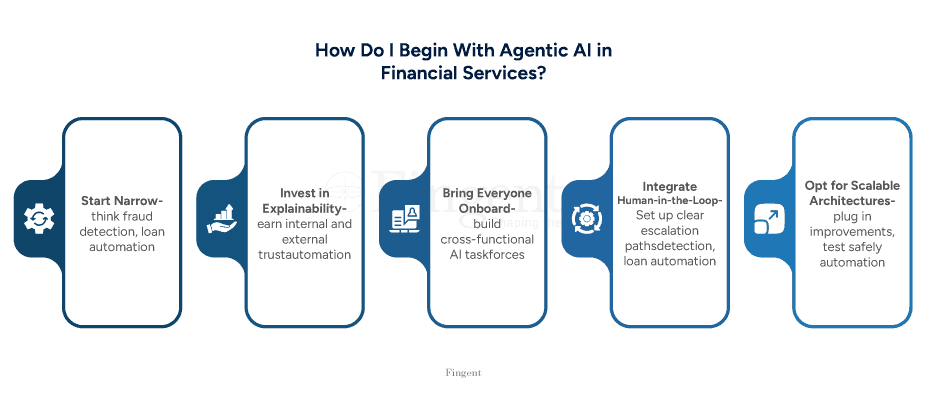
Here are the best practices that separate smart adopters from expensive mistakes:
1. Start with Narrow, High-Impact Use Cases
Don’t boil the ocean. Begin with agentic pilots where the business case is clear—think fraud detection, loan automation, or KYC. Prove value. Then scale.
2. Invest in Explainability from Day One
Agentic AI must earn internal and external trust. Ensure all decisions are auditable and interpretable. That’s not optional—it’s regulatory survival.
3. Build Cross-Functional AI Taskforces
Bring together data scientists, compliance officers, finance leads, and customer experience heads. Why? Because deploying AI agents is everyone’s job.
4. Integrate Human-in-the-Loop Governance
Give AI agents autonomy. But within smart boundaries. Set up clear escalation paths for when agents hit a wall. Don’t leave them guessing.
5. Opt for Scalable, Modular Architectures
Ensure to pick scalable, modular architectures. That way, you can plug in improvements, test safely, and grow without breaking what already works.
How Can Fingent Help?
Fingent brings more than AI capability—we bring business clarity.
Our approach to agentic AI in financial services is grounded in one principle: strategy before software. We don’t just throw models at problems. We diagnose what matters, design what scales, and deploy what works.
Here’s how we help circumnavigate and win with agentic AI:
- Use Case Identification with Measurable ROI
We work with your stakeholders to pinpoint the highest-leverage agentic opportunities—those that cut costs, boost margins, or elevate experience. Fast. - Custom AI Agent Development
Need an agent that adapts to your risk models? Or one that acts on portfolio thresholds? We design and build autonomous agents that speak your business language—not generic code. - Trust-First Architecture
All our deployments include explainability frameworks, fairness checks, and built-in compliance mapping—so your AI earns internal trust and passes external scrutiny. - Integration with Your Existing Stack
Whether you’re on Salesforce, Temenos, or a custom core system—we integrate cleanly. No forklift upgrades. No system sprawl.
AI Agents are the future. If you are yet to embrace them now for your financial services, then you must act now! Connect with our experts today and explore your opportunities with Agentic AI in financial services.
Stay up to date on what's new
About the Author
Tony Joseph
Tony believes in building technology around processes, rather than building processes around technology. At Fingent, he specializes in custom software development, especially in analyzing processes, refining them, and then building technology around it. He works with clients on a daily basis to understand and analyze their operational structure, discover (and not invent) key improvement areas, and come up with technology solutions to deliver an efficient process. You can reach him at [email protected], Skype: tony_fingent
Featured Blogs
Stay up to date on
what's new
Talk To Our Experts
Why trust in AI devices that can’t tell you how they make decisions?
From approving home loans to screening job applicants to recommending cancer treatments—AI is already making high-stakes calls. The technology is powerful! However, the question isn’t whether AI will transform your business. It already has. The real question is: How to build trust in artificial intelligence systems?
And here’s the truth—trust in AI isn’t a “tech thing.” It’s all about how businesses strategize. This blog aims to delve deeper into building ethical AI that is safe and trustworthy.
Why Building Trust in AI Is a Business Imperative
Trust in AI isn’t just a technical concern. It’s a business lifeline. Without it, adoption slows down. User confidence drops. And yes—financial risks start stacking up. A KPMG survey brought out that 61% of respondents are not completely trusting of AI systems.
That’s not a small gap. It’s a credibility canyon. And it comes at a cost—delayed AI rollouts, expensive employee training, low ROI, and worst of all, lost revenue. In a world racing toward automation, that trust deficit could leave businesses trailing behind.
Let’s unpack why this isn’t just a tech issue — it’s a business one:
Consumers are skeptical
No one wants to be manipulated or misjudged by a system. And today’s consumers? They’re sharper than ever. They’re not just using AI-driven services—they’re questioning them.
They’re asking:
- Who built this model?
- What assumptions are baked in?
- What are its blind spots—and who’s accountable when it gets it wrong?
Regulators are watching
Governments across the globe are tightening the screws on AI with laws like the EU AI Act, and the FTC’s AI enforcement push in the U.S. The message is clear: if your AI isn’t explainable or fair, you’re liable.
Trust is a serious competitive advantage
McKinsey found that leading companies with mature responsible AI programs report gains such as greater efficiency, stronger stakeholder trust, and fewer incidents. Why? Because people use what they trust. Period.
Unlock Quick Wins with AI Effortlessly Integrate AI to Your Existing Systems
What Are the Risks of AI When Trust Is Missing?
When trust in AI is missing, the risks stack up fast—and high. Things break. Error rates shoot up. Compliance cracks. Regulators come knocking. And your brand? It takes a hit that’s hard to recover from. By 2026, companies that build AI with transparency, trust, and strong security will be 50% ahead — not just in adoption, but in business outcomes and user satisfaction. And the message is clear: Trust isn’t a nice-to-have. It’s your competitive edge.
Here’s what’s on the line:
- Bias that reinforces inequality
AI learns from available data. If left unchecked, that could result in unfair loan denials. Discriminatory hiring practices or incorrect medical diagnoses. And once the public spots bias? Trust doesn’t just drop—it vanishes. - Data privacy nightmares
Mishandling personal data isn’t just risky. It’s legally explosive. When users believe their privacy has been compromised, they lose trust. This absence of trust can result in unjustified legal actions and increased regulatory enforcement. - Black-box algorithms
If no one—not even your dev team—can explain an AI decision, how do you defend it?
Opacity is more than just inconvenient in the fields of finance, insurance, and medicine. It’s not acceptable. Lack of accountability results from inexplicability. - AI should support people—not sideline them.
Handing full control to a machine, especially in high-stakes situations, isn’t innovation. It’s negligence. Automation without oversight is like putting a self-writing email bot in charge of legal contracts. Fast? Sure. Accurate? Maybe. Trustworthy? Only if someone’s reading before clicking send. - Reputational and legal repercussions
A crisis can be started without malice. One bad algorithm for hiring? The next thing you know, you are stuck in a class action lawsuit.
How Can We Create Reliable AI That Remains Effective in the Future?
AI that’s just smart isn’t enough anymore. If you want people to trust it tomorrow, you’ve got to build it right today. You don’t audit in trust—you engineer it. A McKinsey study showed that companies using responsible AI from the get-go were 40% more likely to see real returns. Why? Because trust isn’t some feel-good buzzword. It’s what makes people feel safe and respected. That is everything in business. Trustworthy AI doesn’t just reduce risk. It boosts engagement. It builds loyalty. It gives you staying power.
And let’s be real—trust isn’t something you can duct-tape on later. It’s not a PR move. It’s the foundation.
That leads us to the question: How do you build that kind of AI?
1. Embed ethics from the start
Don’t treat ethics like a bolt-on or PR exercise. Make it foundational. Loop in ethicists, domain experts, and legal minds—early and often. Why? Bringing it in during design will only get harder and costlier. We don’t fix seatbelts in the car after a crash, do we?
2. Make transparency non-negotiable
Use interpretable models when possible. And when black-box models are necessary, apply tools like SHAP or LIME to unpack the “why” behind predictions. No visibility = no accountability.
3. Prioritize data integrity
Trustworthy AI is dependent on trustworthy data. Audit your datasets. Identify bias. Scrub what shouldn’t be there. Encrypt what should never leak. Because if the inputs are messy, the outputs won’t just be wrong—they’ll be dangerous.
4. Keep humans in the loop
AI should support—never override—human judgment. The toughest calls belong with people. People who get the nuance. The stakes. The story behind the data. Because accountability can’t be coded. No algorithm should carry the weight of human responsibility.
5. Monitor relentlessly
An ethical model today can become a liability tomorrow. Business environments change. So do user behaviors and model outputs. Set up real-time alerts, drift detection, and regular audits—like you would for your financials. Trust requires maintenance.
6. Educate your workforce
It’s not enough to train people to use AI—they need to understand it. Offer learning tracks on how AI works, where it fails, and how to question its outputs. The goal? A culture where employees don’t blindly follow the algorithm, but challenge it when something feels off.
7. Collaborate to raise the bar
AI does not operate on a zero-sum basis. Work together with regulators, educational organizations, and even competitors to create shared standards. Because one public failure can sour user confidence across the entire industry.
Blog : Unlocking Quick Wins with Al: Strategizing for Fast Business Results
Ensuring Safe AI Integration with a Human-in-the-Loop Approach
Fingent understands the benefits and speed AI brings to software development. While leveraging the efficiency of AI, Fingent ensures safety with a human-in-the-loop approach.
Fingent works with specially trained prompt engineers to validate the accuracy and vulnerabilities of each code generated. Our process aims at enabling smart utilization of LLMs. LLM models are chosen after thorough analysis of a project’s needs to best fit its uniqueness. Building trusted AI solutions, Fingent assures streamlined workflows, reduced operational costs, and enhanced performance for clients.
How AI Is Transforming Software Development at Fingent
Questions Businesses Are Asking About AI Trust
Q:What approaches can we use to establish trust in AI?
A: Construct it as you would a bridge—prioritizing visibility, accountability, and robust foundations. This implies transparent models, responsible design, assessable systems, and—importantly—human supervision. Begin ahead of time. Remain open. Engage individuals who will utilize (or be affected by) the system.
Q: Is AI trustworthy in any way?
A: Indeed—but solely if we put in the effort. AI, by its nature, isn’t reliable initially. Trust arises from the manner in which it is established, the individuals involved in its creation, and the security measures implemented.
Q: Why is Trust in AI critical for companies?
A: Trust is what transforms technology into momentum. If customers lack trust in your AI, they will not participate. What if regulators do not? You may not even succeed in bringing it to market. Trust is tactical.
Q: What are the dangers of using unreliable AI?
A: Think biased decisions. Privacy leaks. Even lawsuits. Reputations can tank overnight. Innovation stalls. Worst of all? Once people stop trusting your system, they stop using it. And rebuilding that trust is tough. It’s slow, painful, and expensive.
Q: How to Build Ethical and Trustworthy AI Models That Endure?
A: Start strong—with rich, diverse training data. No shortcuts here. Make ethics part of the blueprint. Let people stay in control where it really matters. And set up solid governance as a backbone. Are you committed to understanding how to build ethical and trustworthy AI models? If so, ensure that it’s a shared responsibility for all.
Q: What methods can we use to uphold trust in AI?
A: Trust is not like a one-time fix. It’s not a badge—it’s a process. Design for it. Monitor it. Grow it. Do audits. Train your models—and your teams. Adapt fast when the law or public expectations shift. What if your AI develops, but your trust practices don’t? You’re building on sand not on a solid foundation.
Final Word: Ethical AI Isn’t a Bonus. It’s the Strategy.
We already know AI is powerful. That’s settled. But can it be trusted? That’s the real test. The businesses that pull ahead won’t just build fast AI — they’ll build trustworthy AI from the inside out. Not as a catchy slogan. But as a foundational principle. Something baked in, not bolted on. Because here’s the truth: only reliable AI can be used confidently, scaled safely, and made unstoppable. The rest? Sure, they might be quick out of the gate. But speed without trust is a sprint toward collapse.
Hence, every forward-thinking business is asking: How can we create ethical and reliable AI models? And how can we do it without hindering innovation? Because in today’s AI economy, doing the right thing is strategic.
Make it your edge. Today!
Stay up to date on what's new
About the Author
Tony Joseph
Tony believes in building technology around processes, rather than building processes around technology. At Fingent, he specializes in custom software development, especially in analyzing processes, refining them, and then building technology around it. He works with clients on a daily basis to understand and analyze their operational structure, discover (and not invent) key improvement areas, and come up with technology solutions to deliver an efficient process. You can reach him at [email protected], Skype: tony_fingent
Featured Blogs
Stay up to date on
what's new
Talk To Our Experts
AI is here to stay, and we know it! Leading players are on a constant move to identify apt opportunities with AI —implementations that offer quick results. But the dilemma begins when companies start defining the real objectives, project size, costs, and ofcourse, the results. That’s where quick wins with AI come in – It’s practical. It’s low-risk. It’s budget-friendly. And its USP – You see results fast.
Quick Wins with AI is a tool with the goal to simplify or automate basic tasks that can help you save time and be efficient without requiring you to become a tech wizard overnight.How do we use this innovative haul? Let’s explore.
What Are Quick Wins with AI?
Small projects that have high impact – that about sums up the strategy of Quick Wins with AI. The goal of any business is to get the job done on time -the faster the better. Quick wins are exactly that. You work on a few pain points in your business that impact the big picture. Think automating customer enquiries or streamlining inventory management.
These projects are small tweaks that bring major upgrades to the way things work. They’re relatively easy to implement, cost-efficient and show value quickly.
Quick wins are about starting small but thinking strategically. For example, you want to revamp your supply chain with AI. You can start off with predicting stock levels for a single product line first. You can gradually work your way up to the whole supply chain. This will give you a chance to manage changes at a micro level before you apply it to the entire supply chain.
In this way, you pick projects that align with your business goals, with minimal disruption, and give you a taste of AI’s power. It’s like trying a new recipe before committing to a full-course menu change.
Power Your Business Growth With AI We Can Help You Strategize a Friction-Free AI Adoption Journey
What Are the Top Benefits?
Why bother with quick wins? Because they pack a punch without the headache of a full-scale AI transformation. Here are some of the top benefits:
- Quick Results: Quick Wins mean quick results. You will see a difference in efficiency and customer satisfaction within weeks.
- Cost-Effective: Quick Wins help you save money by using already available data in your database. You don’t need to spend millions on new systems.
- Low Risk: With Quick wins, you can start small. That way, you won’t be taking on a huge loss if your project fails.
- Builds Confidence: Seeing AI give you results in one area can build your confidence in it and help you expand its uses in your business.
- Competitive Edge: You can use AI to make small adjustments in your business. This helps you get ahead of your competitors who still have manual processes.
Having your first response time dropping by 37% or 52% faster ticket resolutions are the kinds of wins that make AI feel like a game-changer.
How To Achieve Quick Business Wins Using AI
You can find the right quick-win opportunity without throwing AI at every problem. Here’s a step-by-step guide to being strategic with those golden opportunities and some expert tips to make the process easy:
1: Find Pain Points:
You can start by looking at where your business is lagging. Is your customer service team drowning in repetitive questions? Are you losing out on sales because of slow pricing decisions? You can make a list of processes that seem time-consuming or clunky.
Expert Tip: The best way to find a pain point would be by taking a look at your data. For example, if your customer service team spends 20 hours a week answering queries, you have found an area to work on.
2: Find the Right AI Tool:
What is it that you really want to achieve with AI? Really think about that first. Then come the tools that will help you achieve it.
Effective query handling? Chatbots can help. Need help with establishing a good pricing model? Predictive analytics could be the tool you need.
Expert Tip: Projects with clear and measurable outcomes – that should be at the top of your priority list. Go specific – reduce customer response time by 30٪, increase sales by 5%. This will get you to the outcomes faster.
3: Start with Existing Data: Your CRM, sales records, or website analytics are goldmines for AI insights so use this data to get a quick win.
Expert Tip: Clean your data before you start. This will optimize the process for you.
4: Choose The Right Tools: You can pick tools that will help you in the best way possible. These tools can also grow with your business so that you don’t have to spend a lot to scale up or down. You can use tools like chatbots and cloud solutions to achieve this.
Expert Tip: You need to choose a vendor that will help you smoothly implement these tools and guide you if you need it. Companies like Fingent create custom AI solutions and can bet the best fit for your business.
5: Test and Learn: Your project is now ready to launch. You can measure the results and tweak the project as needed. This helps you ensure that you have what works perfectly for you.
Expert Tip: Loop your team in to monitor AI performance. When you check in on your project regularly, you can know for sure that you’re getting the best out of your investment.
Real-World Use Cases and Case Studies
Let’s bring this to life with some examples. Quick wins with AI are already transforming businesses across industries. Here are a few ways companies are making it happen:
Uber Boosts Employee Productivity With AI
Uber uses AI agents that help employees be more productive. It helps them to save time and be more efficient at what they do. The company launched new projects that helped with communication with users by making it brief and summarized. It also uses surface context from previous interactions so that the front-line staff can be more effective in their processes and helpful to customers.
PODS and the “World’s Smartest Billboard.”
PODS worked with an advertising agency Tombras to create the “World’s Smartest Billboard.” They used Google Gemini to design a campaign on its trucks. The clincher is that it could adapt to different areas in New York City and could change based on available data in real-time. It was able to reach 299 neighbourhoods in just 29 hours and created more than 6000 unique headlines!
Expert Tracking by UPS
UPS built a duplicate of its distribution network. Now, workers as well as customers can see the location of their packages at any given time.
Checkout How AI Is Transforming Software Development with AI
Addressing Inefficiencies and Reducing Costs With Fingent
Fingent, a company known for crafting custom AI solutions, helped a private jet charter firm that was struggling with inefficiencies in its systems due to off-the-shelf software. The challenges of this firm were:
- Limited Integration
- Manual Processes
- Costly “Empty Leg” Flights (planes that fly without passengers)
Fingent created an AI solution customized to this company’s needs and turned things around. They built a platform that integrated with tools like Avinode and Airmail. These tools helped automate email monitoring and storing to spot high-value opportunities (like trips within the next 30 days). The AI also adjusted prices for customers in real-time which helped the firm with competition.
The result was phenomenal. The firm could now plan flights flawlessly and this eliminated empty legs. The tools also streamlined booking processes which enhanced customer satisfaction.
These are perfect examples of how AI projects that target a company’s pain points can deliver quick wins without it being heavy on the pocket.
Blog : Building Trust in Al: Enabling Businesses to Strategize an Ethical Al Future
Common FAQs About Quick Wins with AI
Here are some common questions businesses ask when getting started with AI:
1: Are AI tools expensive?
A: Not at all. Quick wins are designed in a way that helps you manage costs effectively. You don’t have to spend a lot because these tools use already existing data from your database and are affordable.
2: Does my team have to be experienced with tech to use these tools?
A: No, they don’t have to be! These AI tools are very user friendly and if you have a good partner, like Fingent, who can guide you through the process and help you implement it, then that’s the best way to go about it.
3: Can Small businesses use AI?
A: Most definitely. In fact, small businesses benefit a lot from AI as these tools are scalable. They use already existing data in your company database, so it’s light on the pocket and low-risk, too.
4: By when can you start seeing results?
A: This depends on the AI project you’ve chosen to implement. A chatbot can go live in about a week but if you’re dealing with something a little more complex that needs fine tuning, like predictive analytics, it can take a month at best.
5: How do I know if AI would be the right choice for my business?
A: To know this, you can take a look at the systems in place at your business. If there’s anything that strikes you as being data-driven or slow with repetitive processes, you can then automate these tasks using an AI implementation strategy. This will definitely save a lot of time and improve efficiency.
Get Started With Quick Wins With AI
The key to success with quick wins? Start small. Stay focused. Reach out. Don’t go it alone. Get help from the experts.
Your first step: Identify one or two pain points in your business. Then, see the different AI tools that can help you with it. You don’t have to AI solutions easily fit your needs and can be customized to suit your specific needs. Fingent has helped many small businesses find the best solution to their requirements by crafting custom tools that deliver results fast.
Check out our AI solutions to discover opportunities with AI, or contact us now and let’s discuss your project.
Stay up to date on what's new
About the Author
Tony Joseph
Tony believes in building technology around processes, rather than building processes around technology. At Fingent, he specializes in custom software development, especially in analyzing processes, refining them, and then building technology around it. He works with clients on a daily basis to understand and analyze their operational structure, discover (and not invent) key improvement areas, and come up with technology solutions to deliver an efficient process. You can reach him at [email protected], Skype: tony_fingent
Featured Blogs
Stay up to date on
what's new
Talk To Our Experts
Picture this: your sprint demo ends at 11:30 a.m. By 11:35, an AI agent has mined the meeting transcript, opened three Pull Requests, generated user-facing docs, and even drafted release notes. Your team didn’t skip lunch, yet the backlog just got lighter. That’s the new cadence of software development—and the only way to hit it consistently is to make every engineer an AI-powered engineer.
How Is AI Evolving the Roles of Software Engineers?
Writing code? That’s no longer the main event. The days of engineers spending most of their time typing out syntax and fixing trivial bugs? Gone. AI has changed the game, not by replacing software engineers, but by reshaping what their job actually is.
Today, engineers are stepping into a more strategic role—think less “code monkeys,” more “system orchestrators.” Instead of handcrafting every line, developers now collaborate with AI models. Copilots are prompted to scaffold apps now. Agents are deployed to handle edge cases. Automation now replaces the time-consuming ops work that used to consume hours.
Can you see the shift? Engineers are spending more time designing long-lasting systems and less time coding in isolation. They’re asking better questions. Not “How do I build this feature?” but “How do I shape the system so the next ten features don’t fight it?”
It’s no longer about completing tasks. It’s about enabling scale. This mindset shift—toward system thinking—is what separates fast teams from future-ready teams.
Even junior developers are feeling the shift. Instead of being stuck debugging in silence, they’re reviewing AI suggestions, learning why certain approaches work, and gaining real-time mentorship through feedback loops built into intelligent tooling.
Let’s call it what it is: a promotion.
Speed Up Product Development With AI Into the Mix! We Ensure Safe AI Integration In Software Development with a Human-in-the-Loop Approach
Areas Where AI Is Augmenting the Capabilities of Software Engineers
AI isn’t just nudging productivity. It’s rewiring the whole toolkit. From code generation to complex simulation, it’s filling in the tedious gaps, accelerating feedback loops, and, frankly, pampering engineers by letting them focus on the fun stuff.
Here’s where the real magic is happening:
1. Quicker, More Intelligent Programming
AI tools like GitHub Copilot are already writing code side by side with developers. However, that is only the beginning. In the future, artificial intelligence will not only help but also anticipate. It recognizes context, suggests architectural patterns, identifies design errors early, and even explains trade-offs.
It’s not about faster coding. It’s about smarter engineering. Think beyond autocomplete. Engineers are now using AI to spin up boilerplate in seconds, suggest logic based on previous patterns, and even catch bugs as they code. The best teams don’t just code faster—they code more intentionally, handing off the grunt work to AI so they can architect with clarity.
2. Automated Testing and QA (That Actually Works)
Nobody loves writing test cases, but AI doesn’t complain. It generates unit, integration, and even regression tests—at scale. And it learns from your system’s behavior over time. Altair points out that AI-driven simulation can pre-validate how a system will respond under different loads, configurations, or scenarios—before it even hits staging. It’s like having a QA engineer who works 24/7 and never skips edge cases.
3. Design & Simulation with Superhuman Speed
In more technical engineering domains—product design, mechanical systems, data-heavy platforms—AI is unlocking something radical: real-time simulation. These models use AI to predict system behavior that used to take hours (or days) of compute time. With AI in the mix, engineers can try out endless design tweaks—without getting stuck in a simulation backlog.
4. Smart Documentation & Knowledge Transfer
No more “go ask Ben.” Now it’s, “Check the AI-generated doc.” It’s not just faster—it’s clearer. Transparency becomes the default.
5. Enhanced Decision-Making
AI isn’t just assisting with “doing”—it’s helping with deciding. Tools powered by data-driven models can evaluate trade-offs in architecture, infrastructure, and resource allocation. Should you use serverless or containers? Should that ML pipeline be batched or streaming? AI doesn’t just guess—it runs simulations, compares past outcomes, and gives engineers recommendations backed by actual data.
6. Augmented Collaboration
AI also plays the mediator. It bridges the gap between product, engineering, and design by translating goals into technical suggestions and nudging teams when alignment slips. Some teams are even embedding AI into their SDLC tooling so it can surface risks, clarify requirements, or flag PRs that need a second look—before the human even blinks.
7. Blurred Boundaries: Cross-Functional Superpowers
AI isn’t content to stay in one lane—and neither should your teams. The rise of AI is removing the silos between engineers, designers, and product leaders. Now, a developer can mock up a UI prototype. Even a UX designer can suggest deployment strategies. All using AI-enabled tools. The result? Collaboration isn’t just cross-functional anymore—it’s co-creative. Not a handshake, but a shared, intelligent canvas.
8. Group Interactions & Change relevant
Last but not least, culture is changing along with technology. Implementing AI includes more than simply plugging in the relevant tools. It’s about bringing your team along. It’s not enough to teach the how. The real shift comes when people get the why.
That means candid forums where engineers ask, “Will this replace me?” and leadership responds with clarity. It means readiness assessments, pilot programs in low-risk zones, and structured learning communities. Done right, AI becomes a team-builder, not a wedge. AI isn’t just adding horsepower—it’s overhauling the engine. Those are the hidden gears in the transformation —high impact, often overlooked, but absolutely essential.
What’s clear is this: AI isn’t a “tool” in the old sense of the word. It’s a collaborator. A tireless co-pilot. A knowledge sponge.
Discover How Fingent Is Transforming Software Development With AI!
How Can Fingent Facilitate the Advancement of AI-Driven Engineering Transformation?
It takes more than simply plugging in a fancy tool and calling it a day to embrace AI. It’s about understanding when to intervene as a human, how to trust it, and where to use it. The real skill? Striking that balance between automation and intuition. That’s where Fingent comes in.
We don’t just build with AI—we build for AI-native engineering.
We start by understanding your engineering DNA.
Your tech stack, your workflows, your product lifecycle—everything. Then we look for friction. Where is time leaking? Where is human bandwidth wasted? Where is velocity throttled by legacy code, outdated processes, or siloed systems? That’s where we apply AI—with surgical precision.
We embed intelligence into the SDLC, not just bolt it on.
We integrate AI where it actually moves the needle:
• Prompt-based code generation wired to your repo conventions.
• Autonomous test generation that learns from your past bugs.
• Natural language to task automation that turns voice notes into ready-to-run specs.
• Agents that triage tickets, monitor system health, and fix common issues before your team even logs in.
It’s just well-engineered intelligence.
Blog : Supercharging Software Development Life Cycle (SDLC) with Al Tools
We coach your team to evolve with the tools.
AI doesn’t work without humans who know how to steer it. That’s why we train your engineers, product managers, and ops folks to speak the language of AI: better prompts, stronger oversight, cleaner design thinking. We ensure to roll out AI with your team so adoption sticks, and morale climbs.
We build responsibly—with governance, not guesswork.
Fingent sets up your AI workflows with guardrails baked in:
• Model transparency
• Audit trails
• Data privacy
• Ethical use protocols
No black-box chaos. Just responsible innovation you can trust.
Bottom line? Fingent helps your engineering team go from “trying AI” to thriving with it. We bring the blueprints, the tools, and the hands-on experience to turn AI from a buzzword into a business advantage.
Because in this new era, you don’t just need more code—you need smarter teams. And we know how to build them.
Stay up to date on what's new
About the Author
Tony Joseph
Tony believes in building technology around processes, rather than building processes around technology. At Fingent, he specializes in custom software development, especially in analyzing processes, refining them, and then building technology around it. He works with clients on a daily basis to understand and analyze their operational structure, discover (and not invent) key improvement areas, and come up with technology solutions to deliver an efficient process. You can reach him at [email protected], Skype: tony_fingent
Featured Blogs
Stay up to date on
what's new
Talk To Our Experts
Software development followed the same pattern for decades. Slow. Linear. Predictable. Not anymore. The rhythm just got turbocharged. Welcome to the AI-powered SDLC.
We’re talking code generation at warp speed, bugs flagged before humans can blink, tests written automatically, and systems deployed with predictive precision.
How do you get all this? This article will tell you exactly how.
Speed Up Product Development With AI Into the Mix! We Ensure Safe AI Integration In Software Development with a Human-in-the-Loop Approach
How Is AI Changing the Game in SDLC?
According to McKinsey, companies integrating generative AI into development workflows can achieve 35–45% time savings in coding tasks. If you’re in software and you’re not using AI, here’s the harsh truth: You’re already behind.
What is changing under the hood, then?
Let’s make this plain: AI isn’t just an add-on to the SDLC. It’s a full-blown force multiplier.
In the traditional model, speed and quality always fought each other. Want to ship fast? Sacrifice testing. Want clean code? Extend the deadline. Want both? Good luck hiring 10 new devs next month.
AI throws that tug-of-war out the window.
- AI accelerates development cycles: Coding assistants like GitHub Copilot now handle code output in real-world projects. Developers no longer start with a blank file—they get a running head start.
- AI reduces bugs before code hits production: AI doesn’t just write code—it reviews it. Tools like DeepCode and Snyk use machine learning to catch common (and not-so-common) security flaws as they’re written. McKinsey reports that companies using AI in code review see 20–30% reduction in post-release defects. This results in fewer hotfixes, reduced outages, and more satisfied customers.
- AI transforms testing from manual to magical: Writing test cases by hand is slow and boring and is often outdated before the code is even finished. They watch how users interact with your app, track UI changes, and even learn from old bugs—then build test cases for you. While exact percentages vary, firms report faster test development and higher test coverage with AI-enhanced QA pipelines.
- AI turns debugging into prediction—not reaction: In traditional setups, developers hunt bugs reactively. AI flips the script. Tools like Datadog and Dynatrace don’t just show you what broke—they warn you before it does. Slowdowns, memory leaks, crashes? All flagged early with predictive analytics. Sure, results vary by setup. But one thing’s clear: AI is helping teams trade firefighting for foresight.
Bottom Line?
AI isn’t just making the SDLC better. It’s making it fundamentally different. The game isn’t about how fast you can code anymore. It’s about how smart your tooling is. And AI tools? They’re smart, fast, and always learning.
Traditional SDLC vs. AI-Enhanced SDLC
The conventional Software Development Life Cycle (SDLC) functioned effectively for many years. As it happens, it doesn’t fit the bill in today’s scenario. It is slow, rigid, and prone to delays. AI-augmented SDLC fixes it. It is significantly quicker and smarter.
Here’s how the two stack up across the key stages of development:
1. Requirement Gathering
- Traditional: Teams rely on long meetings. That is because they are manually note-taking. And those notes are subject to varying interpretations.
- AI-Enhanced: NLP tools convert raw input into structured user stories in real-time.
Result: Clearer requirements, less time lost in clarification loops.
2. Design & Architecture
- Traditional: Architects create static diagrams manually. Every change requires human effort and multiple review cycles.
- AI-Enhanced: Suggestions of architecture based on project constraints and historical design patterns – that is what AI-powered tools bring to the table.
Result: Faster architecture decisions, with higher scalability and fewer redesigns.
3. Development
- Traditional: Developers write all code manually.
- AI-Enhanced: AI coding assistants can autocomplete code. They can suggest functions and correct errors on the fly.
Result: Development speeds up. And free developers to focus on logic and business value.
4. Testing
- Traditional: QA writes static test cases.
- AI-Enhanced: AI tools create dynamic, adaptive tests.
Result: Wider reach and quicker testing.
5. Debugging
- Traditional: Root cause analysis is manual.
- AI-Enhanced: AI-driven observability tools notify users of problems before they escalate.
Result: Less downtime, faster issue resolution.
6. Deployment & Maintenance
- Traditional: Manual CI/CD, fragile scripts.
- AI-Enhanced: Adaptive pipelines and automated rollback safety nets.
Result: Safer, smarter deployments.
The Influence of AI Agents in Software Development
The influence of AI agents on software development isn’t theoretical anymore—it’s measurable, repeatable, and rapidly scaling.
Let’s start with what AI agents actually do. These aren’t just coding tools. They’re intelligent systems that analyze your development environment, respond to input context, and generate solutions in real-time. Think of them as embedded, proactive teammates that span across code, infrastructure, and workflow.
1. Speed Without the Trade-Off
In legacy development, building new features or products involves a massive upfront cost—design, code scaffolding, approval cycles, and QA. AI agents dramatically reduce that time. According to a recent GitHub study, developers using Copilot were able to complete programming tasks 55% faster than those without it.
But it’s not just about saving hours—it’s about preserving flow. Developers report being able to stay “in the zone” longer, because AI handles the boring parts: repetitive code, syntax corrections, and predictable patterns. You focus on logic; the agent fills in the rest.
2. Consistent Code Quality at Scale
Code quality tends to drop under pressure. Technical debt creeps in. Teams rush to meet deadlines. Reviews get skipped. But AI doesn’t skip steps.
AI code reviewers like DeepCode, Codiga, and Amazon CodeGuru analyze pull requests in real time, flag security vulnerabilities, and recommend refactors—all before a human ever looks at the code. And because they’re trained on millions of examples, they learn from a global knowledge base—not just what your team’s seen before.
3. Test Coverage You Can Trust
Testing is often where quality breaks down—either due to time pressure, incomplete coverage, or simple human oversight. But AI agents eliminate that bottleneck
4. Real-Time Debugging and Predictive Ops
Traditional debugging often involves poring over log files and replicating issues days after a user reported them. By then, the damage is done. AI flips this entirely. Modern observability now come with built-in AI agents that continuously monitor application behavior. They flag anomalies before they cause downtime.
5. AI Agents as Team Amplifiers
It’s important to note: AI agents aren’t here to replace your engineers. They amplify them. Senior developers still architect systems. They still design interfaces and handle edge cases. But now? Since AI agents back them, they make fewer mistakes, move quicker, and ship better code.
Gartner predicts that by 2027, 80% of software engineering roles will incorporate AI-assisted development as a standard part of the workflow. The goal isn’t automation. It’s augmentation.
Discover How Fingent Is Transforming Software Development With AI!
How Fingent Enhances the Software Development Journey with AI
At Fingent, we don’t believe in jumping on trends. We believe in adopting what delivers measurable business value. And AI-powered SDLC is no longer experimental. It’s proven, scalable, and already delivering results.
At Fingent, we don’t believe in trends for trend’s sake. We believe in using what works—and AI-powered SDLC works. We’ve helped clients accelerate time-to-market by up to 40%, improve release quality, and automate testing without sacrificing governance or compliance.
Here’s what our AI-enhanced SDLC looks like:
- AI-First Planning: We transform raw discussions into user stories using NLP tools.
- Accelerated Development: We deploy Copilot-style assistants to speed up delivery.
- Smarter QA – We use AI-driven testing tools that adapt on the fly. No more static test scripts.
- Proactive Monitoring: We identify problems before they become outages because AI observability is built in.
- Confident Change: We assist your teams in implementing AI in a responsible, strategic, and forward-thinking manner. Fingent incorporates intelligence into every stage, whether you’re starting from scratch or updating an existing project.
Because speed is insufficient in today’s market. Quick and clever wins. Ready to supercharge your SDLC with AI tools that actually deliver? Let’s talk.
Stay up to date on what's new
About the Author
Tony Joseph
Tony believes in building technology around processes, rather than building processes around technology. At Fingent, he specializes in custom software development, especially in analyzing processes, refining them, and then building technology around it. He works with clients on a daily basis to understand and analyze their operational structure, discover (and not invent) key improvement areas, and come up with technology solutions to deliver an efficient process. You can reach him at [email protected], Skype: tony_fingent
Featured Blogs
Stay up to date on
what's new
Talk To Our Experts
Imagine being able to describe an app out loud and watching it come to life—no syntax, no setup, no stress. That’s the essence of vibe coding. It’s not just a new coding style; it’s a new interface between humans and software development, one that’s reshaping who can build, how fast they can do it, and what the future holds.
In this article, we’ll take a grounded, practical look at vibe coding—what it is, how it works, its current limitations, and where it’s headed.
Vibe Coding: Explained Simply
Andrej Karpathy popularized the term “vibe coding,” which he summed up as “see stuff, say stuff, run stuff.” Vibe coding is the process of explaining your project to an AI system, usually in natural language, and having it produce functional code for you.
AI tools that power this workflow include:
- GitHub Copilot – Offers relevant code completions based on project context
- ChatGPT – Can generate full functions, explain code, and handle debugging
- Replit Ghostwriter – Helps solo developers build full-stack apps quickly
- Cursor – A VS Code-based editor with deep AI integration
These tools run on large language models. Like the kind trained on billions (yes, billions) of lines of open-source code.
They don’t just guess what you’re trying to build — they’ve practically read the manual for every major language out there. From Python and JavaScript to TypeScript, Go, and beyond, they understand how real-world developers write code.
They’ve studied common patterns. They know the popular libraries. And they get the frameworks most teams use. It’s like having a super well-read coding buddy — minus the coffee breaks.
Have a Software Development Idea? Let Us Help You Strategize a Streamlined Development Cycle
How Does Vibe Coding Work?
The vibe coding approach aims to reduce coding efforts to almost zero. The process is heavily reliant on AI, where users can generate code by just explaining how they want the software to function. Developers can simply apply prompts in natural language, and the AI assistant writes the code, including backend logic, frontend UI, and even APIs. Codes can be generated, debugged, and also refined. Here’s more on what a basic vibe coding flow might look like:
Choose Your Platform
Start by selecting an AI coding assistant. When you do that, ensure it complements your tech stack and budget. Replit, Cursor, Copilot, Lovable— they all help you write code. But the way they interact? Totally different. Some feel like a chatty co-pilot, finishing your thoughts before you do. Others are quiet powerhouses—minimal, fast, and out of your way.
Choosing one isn’t just about features. It’s about discovering the one that matches. Once you’ve picked your tool, the magic begins. These AI assistants don’t just suggest syntax—they generate actual, working code. Backend logic? Check. Frontend UI? Covered. API hooks? Already there.
Tell the AI Your Dream
A prompt is your design brief.
Example prompt (front-end):
“Create a React component that animates dots in rhythm with an audio track. Needs start/stop buttons, dark-mode friendly colours, and a prop for BPM so I can tweak tempo later.”
Tips that pay off
- Context first: Mention the tech stack up front (React 18, Tailwind, Supabase).
- Goal over detail: Focus on the ‘why’—the vibe you want—then layer specifics.
- Constraints save time: Screen size, performance targets, or API versions narrow the search space for the model.
Sculpt the First Draft
The AI responds with a “rough cut”: working code plus comments. It’s functional, not flawless. Here’s where you channel your inner film editor:
- Run it immediately. See what breaks.
- Copy-paste any error back into the prompt
- terate conversationally. Treat the model like a junior dev—ask why it chose a library or pattern.
Pro tip: Keep iterations short. If you haven’t improved the build after two tweaks, rewrite the prompt instead of patching spaghetti.
Review, Secure, Ship
AI can compose a melody, but you still master the track:
- Static analysis & linting (ESLint, Flake8) catch style drift and obvious bugs.
- Security scans (Semgrep, Snyk) look for SQL injection, weak auth, exposed secrets.
- Unit & integration tests anchor behaviour before refactors.
- Peer review stays non-negotiable—formal and informal inspections catch around 60–65% of latent bugs before code is merged.
Let’s Put It All Together
- Platform gives you the stage.
- Prompt sets the script.
- Iteration directs the scene.
- Review keeps the critics quiet.
Repeat this loop and you’ll notice a rhythm: shorter feedback cycles, fewer context switches, and more time spent on what the software should do—not how to spell it in code. That’s the real vibe.
Why Vibe Coding Is Gaining Real Traction
Simply because it’s faster and more accessible. Most of all, it’s enabling even non-developers to turn ideas into working software quickly. No doubt, vibe coding is promising a new future for software development, opening doors to faster and seamless development cycles.
Speed to Value
Time is money—especially in tech. AI-assisted development shortens time-to-market. Did you know that the research shows that developers using GitHub Copilot were able to complete programming tasks 55–56% faster. AI didn’t just speed things up. It hit fast-forward.
Availability
With the right prompt, product managers, analysts—even founders—can spin up MVPs in no time. No code bootcamp. No sleepless nights. Just clear ideas, well-worded.
Focus on High-Value Assignments
Let boilerplate be handled by AI. Developers can concentrate on tasks like building scalable architectures and so on. These are areas where human insight still holds sway.
Expedited Feedback Loops
Faster iteration = better products. AI allows for quick testing, immediate revisions, and more user-centric development.
Democratization of Software Building
Non-engineers can now participate meaningfully in development. This creates cross-functional innovation and faster internal tooling.
Who’s Using Vibe Coding?
Anyone from startups, enterprises, indie developers, and even boot camps is adopting vibe coding to speed up delivery and lower technical barriers. The 2025 report from SnapLogic is noteworthy. It said that 50% of enterprises are already deploying AI agents in production. Another 32% planning to do so within the next year.
A whitepaper by IBM, 2024, provided an interesting forecast. It claimed that 40% of the global workforce will need reskilling over the next three years due to AI and automation efforts.
There’s circumstantial (but growing) indication that vibe coding is being used in:
- Startups: Founders are building MVPs using AI tools with minimal traditional coding.
- Enterprise Prototypes: AI is used by businesses like Visa and SnapLogic to speed up internal tools.
- Education: To improve learning, coding schools and boot camps are incorporating AI tools into their curricula.
- Indie developers: One-person SaaS teams are shipping apps faster using Replit and ChatGPT.
2025 report from SnapLogic is noteworthy. It said that 50% of enterprises are already deploying AI agents in production. And another 32% planning to do so within the next year. A whitepaper by IBM, 2024 provided an interesting forecast. It claimed that 40% of the global workforce will need reskilling over the next three years due to AI and automation efforts.
The Limitations: What Vibe Coding Can’t Do (Yet)
The fact is that AI is what it is – artificial and not human. While that plays out well in many scenarios, it does fail the litmus test when it comes to some. One of the main glitches in the Vibe Coding system is the ability to include real-world context – the “why”s of the task. And the fact that its context window is comparably short. Which means the need for repetitive and highly specific prompts. Additionally, it can’t be expected to design systems from scratch, or guarantee secure code—it still needs human oversight and engineering discipline.
Despite the hype, vibe coding is not a silver bullet. Here are its current shortcomings:
- Prompt clarity matters: Vague prompts = vague output. Clear thinking is still required.
- Architecture isn’t automatic: AI can build features. However, it doesn’t design maintainable systems.
- Debugging can be opaque: You may get working code, but understanding and fixing bugs is still human territory.
- Security issues: AI doesn’t use auth flows, automatically clean inputs, or adhere to OWASP standards.
- Tooling fragmentation: is a growing pain. AI-generated code often breaks. Especially when it meets your tests, linters, or CI/CD pipeline. Speed is great—but without precision, it’s chaos.
Winning teams strike the balance: fast code, clean handoffs, solid engineering.
How Can Enterprises Use Vibe Coding Strategically?
Enterprises can use Vibe Coding strategically by playing to its strengths and propping up its weaknesses. Use it in low-risk areas like prototyping, which is one of its superpowers. Train your teams in prompt writing – specific and detailed prompts that leave no room for ambiguity. Review AI-generated code like you would a junior dev’s work and get micro with security measures.
Here’s how enterprises can experiment with vibe coding without taking on unnecessary risk:
- Leverage it for prototypes and other internal tools
These could prove to be high-reward. Plus, low-risk settings for experimentation. - Train your developers in prompt writing
Prompt engineering is the need of the hour. It is turning into a real skill set. - Establish human-in-the-loop code reviews
Treat AI code like a junior developer’s work—it needs checking. - Build reusable prompt templates
Standardize how teams ask for common patterns like login flows, dashboards, or API scaffolds. - Measure outcomes rigorously
Track time saved, bugs introduced, and deployment cycles to ensure real value.
Discover How Fingent Is Accelerating Software Development Process with AI
Final Thoughts: Is Vibe Coding the Future?
Vibe coding is not about eliminating developers—it’s about augmenting them. It reframes coding as a combination of design thinking, communication, and quick iteration rather than just a technical task.
The main trend is true: AI is significantly speeding up software development, even though some of the statistics that are circulating—such as 95% AI-generated codebases—are unverified.
We at Fingent trust that the most prosperous businesses will be those that carefully incorporate AI rather than those that heedlessly pursue automation.
Are you curious about the potential applications of AI-assisted development in your company?
Stay up to date on what's new
About the Author

Featured Blogs
Stay up to date on
what's new
Talk To Our Experts
AI was once limited to internal pilots—impressive in demos, but rarely tied to measurable business outcomes. That’s changed. Today, AI systems are being integrated into workflows that impact decisions, operations, and outcomes.
That’s where the Model Context Protocol (MCP) and Agent-to-Agent (A2A) communication come in. MCP provides a minimal interface for tool access and execution context. When paired with agent logic and A2A communication, it enables agents to reason and coordinate actions collaboratively.
This article explains what an MCP server is, why it matters for enterprise AI, and which capabilities to prioritize for scalable automation.
Why MCP & A2A Matter for AI Deployment
To scale AI agents across an organization, enterprises need more than smart models—they need standards.
What is MCP?
Model Context Protocol (MCP) is an open interface specification that allows AI agents to interact consistently with enterprise tools, data sources, and other agents—without custom code or proprietary integrations.
While MCP facilitates the access to resources that might be used in multi-agent workflows, the direct communication and coordination between agents is typically handled by Agent-to-Agent (A2A) protocols. MCP uses a JSON-RPC communication to:
- Allow clients (like AI agents) to connect to servers.
- Standardize how requests, responses, and errors are handled between these components.
- Enable modularity—A single tool setup can serve multiple agents, streamlining development.
The goal of MCP is to create a minimal, interpretable interface that lets intelligent agents work across systems without custom APIs or hardcoded integrations.
What is A2A?
Agent-to-Agent (A2A) allows AI agents to delegate tasks, share partial context, and coordinate across functions—using structured, programmatic protocols rather than hardcoded instructions.
Why This Matters
Without common standards, AI agents become fragmented across teams and workflows. MCP and A2A enable composable architecture, traceability, and shared tooling—key to scaling automation without increasing operational risk.
By adopting MCP:
- Tools and resources become composable: Build once, connect many agents.
- Traceable agent decisions: Every interaction is logged and inspectable.
- Cross-functional orchestration made possible: Agent orchestration enables cross-functional coordination and task delegation.
The result is lower engineering overhead during deployment and a consistent architecture. Scaling from isolated use cases to organization-wide AI agents requires shared protocols—not just APIs or refined models. Without standards, enterprise AI becomes hard to audit and expensive to maintain.
Open-source ecosystems, including LangChain, Autogen, and Semantic Kernel, converge on MCP as a shared layer for tool access and context passing. For enterprises, this eases integration and future-proofs internal AI infrastructure.
Why Should Businesses Consider MCP and A2A?
While CEOs don’t need to master the technical details of AI architectures, they do need to assess whether their systems are:
- Modular enough to evolve.
- Transparent enough to audit.
- Scalable enough to grow.
Studies show that more than 80% of AI initiatives underperform or stall—making them significantly riskier than typical IT projects. Success in this domain demands more than automation. It requires agents that can understand, collaborate, and adapt—across platforms, tools, teams, and geographies. This is precisely what Model Context Protocol (MCP) and Agent-to-Agent (A2A) communication enable.
MCP and A2A should be seen as part of the infrastructure that makes scalable AI possible. They’re not solutions in themselves—but they make robust, reusable, and collaborative AI systems possible. Without shared standards, AI rollouts become expensive one-offs. MCP establishes the connections; A2A provides management. Together, they move you to resilient intelligence.
While specific outcomes may vary, AI implementations in IT support have demonstrated up to 40% cost savings and up to 50% time savings.
AI Is Revolutionizing the Way Businesses Function Are You Ready to Leverage the Best of AI?
Inside the Architecture: How MCP & A2A Work
MCP defines a standardized, modular structure where clients request operations and Servers expose tools and data. JSON-RPC ensures standardized, traceable communication—so models, tools, and policies plug in seamlessly.
MCP servers define available tools, data access layers, and interaction templates. Clients act as execution interfaces. The JSON-RPC format ensures every call and response is standardized and traceable. A compatible format across environments ensures enterprises can plug in new models, tools, or policies easily.
A Modular System for Enterprise-Grade AI
Let’s break down the key MCP elements:
- Tools are executable functions—made accessible via the server, invoked by the client. Think of them as APIs that models can call to perform enterprise-level operations—like querying a CRM or triggering a workflow. These aren’t static scripts—they’re dynamic, callable operations the model can reason over.
- Resources are structured data assets—files, database entries, or API payloads. They remain under enterprise control. The model can read them but doesn’t own them. This safeguards integrity and enforces a clean boundary between AI reasoning and enterprise data.
- Prompts serve as organised models. These use variables and predefined instructions to shape model interactions. Prompts convert model behaviour into repeatable, auditable logic. That is when you answer customer enquiries, convert JSON payloads, or summarise legal contracts. Together, these elements form the foundation for AI systems that are modular, auditable, and safe to scale.
MCP Client: A Lightweight Interface for Model Execution
The MCP Client issues calls based on pre-defined prompts and tools—but orchestration logic (like when to call what) sits outside, typically in the agent runtime. It’s worth noting that agents—built on top of MCP, can use Clients to drive intelligent behaviors. For example, a pricing agent could receive a prompt based on real-time supply chain data and invoke a pricing tool to automatically adjust product costs—without human intervention. It’s not guessing. It’s acting within boundaries you’ve set.
Agent-to-Agent (A2A): Real-Time AI Coordination
While MCP standardizes how a single agent operates, Agent-to-Agent (A2A) takes it a step further. It defines how multiple agents communicate. It offers a structured, encrypted, and completely interoperable communication substrate required for independent cooperation.
With A2A:
- Agents can securely share updates about what they’re doing, what they know, and what they need.
- Agents delegate responsibilities dynamically.
- Agents coordinate actions based on shared objectives.
A2A is still an evolving design pattern. While promising, it lacks a unified protocol spec. Today, teams implement A2A through frameworks like AutoGen or custom coordination logic.
Strategic Upside: Why CEOs Should Care
Key outcomes that matter to enterprise leadership:
- Interoperability: With MCP, switching models or vendors doesn’t require rewriting business logic. You get abstraction without lock-in.
- Security & Governance: Fine-grained control over agent access—down to tools, tasks, and data. MCP makes agent behavior predictable and explainable. It also ensures that all actions are fully auditable.
- Compliance: Because MCP standardizes communication formats, it supports detailed logging and traceability—critical for compliance audits and responsible AI governance.
- Adaptability: When priorities change, your architecture doesn’t break. MCP supports plug-and-play upgrades—whether it’s a new language model or a compliance shift.
Assess your existing AI infrastructure based on these criteria:
- Can AI modules integrate without rearchitecting systems?
- Are agent actions traceable and compliant?
- Is collaboration autonomous or human-assisted?
- Can components be swapped without vendor lock-in?
Bottom Line
For CEOs serious about scaling AI—not just experimenting with it—this is the architecture that moves you from pilot to production, from automation to transformation.
MCP Implementation: Best Practices
Integrating the Model Context Protocol (MCP) into your AI infrastructure doesn’t require a complete architectural overhaul. When implemented thoughtfully, MCP enhances how autonomous agents reason, interact, and collaborate across enterprise systems. For CEOs, this means adopting a systems-thinking approach: How do you enable scalable, modular intelligence across functions without compromising control or security?
Start with a Pilot
Start small. Look for areas where agent-to-agent (A2A) communication can reduce latency or manual intervention. For instance, if your support agents operate without real-time CRM context, MCP can provide the interface to access that data. It will enable better coordination within a broader agent orchestration system.
Choose Open Standards
Avoid proprietary lock-in by selecting an open-standard MCP architecture. Your enterprise should remain flexible—able to integrate new LLMs, APIs, or microservices without rewriting communication protocols.
The MCP server should expose standardized components:
- Tools: Model-invoked operations like database queries or file generation.
- Resources: Application-managed data including APIs, storage, or documents.
- Prompts: Predefined templates for tasks such as summarization or Q&A.
Map Your Context Layers
In AI systems, “context” isn’t just raw data—it includes temporal signals, task relevance, and user intent. MCP enables agents to act not in isolation, but with awareness of their operational environment.
A robust implementation includes a context repository—a shared data layer that maintains evolving state information, enabling agents to coordinate actions with continuity and relevance.
Choose Partners Who Specialize in Agent Orchestration
Work together with engineering teams that have practical MCP framework deployment experience. This will reduce integration risks and accelerate time to value.
For instance, Fingent prioritises security, modularity, and long-term scalability when working with businesses to implement agent-based systems. With tried-and-true design patterns, Fingent customizes design patterns to fit business ecosystems.
Define Success Metrics Early
MCP implementation must translate into measurable business outcomes. Whether you’re targeting a 15% improvement in model accuracy or automating repetitive decision trees, define these metrics early.
When paired with orchestration frameworks, MCP enables real-time visibility into agent workflows—helping your team align AI interactions with measurable KPIs. Engineering efforts should begin only after your success criteria are clearly articulated.
Embrace Incremental Rollout
Deploy MCP incrementally. Begin with isolated, low-risk workflows where output can be quickly validated. Once performance is confirmed, expand to more complex, interdependent functions. This phased approach reduces exposure and allows for faster iteration based on feedback and learning.
Stress-Test A2A Communications
Agent-to-agent communication is the foundation of distributed reasoning. But what happens when an agent disconnects mid-task or misinterprets a shared context?
Design for failure. Run chaos tests that simulate outages, data corruption, and conflicting agent behavior. Your architecture should support retry logic, fallback protocols, and human intervention pathways. Resilience—not just speed—should be the benchmark.
Build in Human Override Mechanisms
As systems scale, autonomous agents must still operate within defined ethical and operational boundaries. Implement policy engines that enforce constraints and human override controls that allow for intervention in edge cases.
These guardrails ensure your AI infrastructure stays compliant, auditable, and aligned with enterprise values.
Treat Your Agents Like Employees
Autonomous agents require structured governance, defined roles, access permissions, audit logs, and performance metrics, similar to how enterprises manage human teams.
Prepare for Disagreement
In modular agent architectures, conflicting outputs are inevitable. One agent may override another; two may interpret context differently. Without conflict resolution protocols, such disagreements can derail workflows.
Implement arbitration logic—whether through rule hierarchies, ensemble models, or escalation to human reviewers. MCP must support not just agent communication, but also reconciliation and collaborative reasoning.
The Challenges
MCP and A2A are powerful—but there are challenges to be aware of so you can deal with them..
Skill Gaps
Most enterprise tech teams are not yet fluent in agent-based coordination. Expect a learning curve in architecture, not just code.
Tooling Immaturity
While libraries like AutoGen and LangGraph are maturing fast, many are still under rapid development. Stability can vary. Documentation often lags.
Standards Fragmentation
Not all “MCP” implementations follow the same conventions. Choose vendors and tools that are interoperable—and be ready to enforce internal standards.
Change Management
Shifting from pipeline automation to agent collaboration requires a mindset change. Some teams may resist. Others may over-engineer. Without constraints, autonomy becomes chaos.
A smart strategy is to treat MCP like an internal protocol—not a one-off project. Invest in internal documentation. Train key leads. And review each rollout with the same rigor as you would a security audit.
Looking Ahead: Future of MCP and A2A Standards
MCP and A2A are still emerging—but the momentum is clear.
Anthropic’s original announcement of MCP provides further context on its origins and intended impact across multi-agent systems.
Open standards are forming. Early implementations are converging around core design principles: JSON-RPC for message passing, shared state objects for coordination, and permissioned tool definitions.
Like Kubernetes standardized containers, MCP is emerging as the control plane for AI agents. Protocols are stabilizing. Tooling is catching up. And early adopters are defining what “good” looks like.
One emerging direction is cross-agent collaboration across platforms—potentially leading to “agent marketplaces,” where enterprises can exchange modular agents that adhere to shared protocols like MCP.
It’s early—but the stakes are high.
Enterprises that adopt MCP now don’t just prepare for the future. They help shape it.
Discover Unique Opportunities With Fingent’s Custom AI Solutions
Turning Strategy into Execution—with Fingent
At Fingent, we build custom AI solutions designed to scale and perform—now and in the future. From MCP-compliant architectures to secure A2A pipelines, we turn complexity into clear, measurable results.
At Fingent, we don’t just build—we partner. From architecture to rollout, we make AI reliable, scalable, and aligned with your business goals. Whether you’re launching your first AI agents or managing enterprise-wide intelligent ecosystems, we make sure your AI speaks one language, works seamlessly, and delivers real outcomes.
In the age of autonomous intelligence, being smart isn’t enough. You need smart that works together.
Keep in mind that disjointed AI hinders business progress. Team up with Fingent to power unified, unstoppable intelligence—and lead your industry forward.
Stay up to date on what's new
About the Author
Featured Blogs
Stay up to date on
what's new
Talk To Our Experts
How Your Business Can Reap Profits Through AI Integration
“Is it the right time for companies to capitalize on AI?” – This question is lingering around the tech air for almost a decade now.
Fear of losing jobs to automation, soaring IT budgets, lack of adequate skills and infrastructure, inability to perch on the ideal technology partner, and many other reasons are refraining businesses from venturing boldly into artificial intelligence initiatives.
Engaging with clients across the globe, Fingent has realized that many of them believe AI to be the next thing in their business. Research suggests that next-generation enterprise IT systems that include AI components — called “future systems” — will grow revenues among leading companies by as much as 33% over the next five years. Many have adopted machine learning and other forms of AI into their core business processes.
Moving from data-driven to AI-driven digital environments is the next evolutionary phase in business. By embracing AI into their workflows in strategic ways, business leaders will transform how data adds value to the business. This will introduce new ways for humans to contribute as well.
As business leaders consider AI for their organizations, the top question is no longer “What is AI?” or “How does it work?” but “What can AI do for us?” In our effort to help our customers take advantage of AI, we have curated the pain points faced by businesses and how they can identify business capabilities and opportunities with AI in our latest white paper.
Read more: 5 Steps to Gain Business Value with AI Adoption
The Insights You Will Gain by Downloading Our White Paper:
- Understand more about AI and its broad categories
- Identify business capabilities and opportunities with AI
- Key business areas where AI brings the most value
- Steps to build a successful AI strategy for your business
- The simplest way to integrate AI into your business
- How to involve all in the AI wave to gain positive outcomes
Link to Download: How Can Your Business Use AI to Achieve Higher Profits Now?
Fingent’s technology solutions ensure that technical implementation and strategic adoption of AI into your business happen in accordance with your long-term goals. Connect with our AI experts today to start a conversation about your first AI initiative.
Stay up to date on what's new
About the Author

Featured Blogs
Stay up to date on
what's new
Talk To Our Experts