Tag: AI
ERP is entering the AI era. For thirty years, ERP had one job. Record the transaction and keep the books straight. That job is changing with AI in ERP.
SAP now builds its Joule AI assistant directly into S/4HANA. It’s no longer just showing you the numbers. It can prepare your expense report, explain a compliance error in plain English, and catch an invoice mismatch before your finance team even opens the screen. ERP stopped being a filing cabinet. It’s turning into a colleague.
But here’s the catch. A colleague who can’t see your data clearly isn’t going to help you. It’s going to make confident mistakes faster than a human ever could. Gartner found that 63% of organizations don’t have, or aren’t sure they have, the right data management practices to support AI. That’s not a footnote you can skip past. It’s the whole ballgame.
So the real question for 2026 isn’t “should we adopt AI?” It’s “can our SAP environment actually carry it?”
5 Signs Your SAP Environment Isn’t AI-Ready
Most companies don’t fail at AI because they picked the wrong tool. They fail because nobody checked whether the ground underneath could hold the weight. Here’s what that looks like in practice.
1. Legacy systems and fragmented data
If your SAP landscape is a patchwork of ECC, spreadsheets, and side systems that don’t talk to each other, AI has nothing solid to stand on. You can’t build a smart forecast on data that lives in five places and agrees with none of them.
2. Heavy reliance on manual processes.
If someone still has to key in, check, and re-key the same number three times, that’s not a process AI can plug into. AI speeds up whatever pattern already exists. Feed it a slow, manual habit, and you just get a faster version of the same mess.
3. Limited integration across business systems
Finance, supply chain, and procurement often run as separate islands in older SAP setups. AI needs the whole picture. One corner of it is really just a guess dressed up as a dashboard.
4. Poor data quality or accessibility
Duplicate vendor records. Missing fields. Data locked away where only IT can find it. AI trained on messy data doesn’t get smarter. It gets confidently wrong, and confident wrong answers are worse than no answer at all.
5. Automation that breaks when exceptions occur
Old automation follows a script. The moment something unusual happens, it stalls or fails quietly. Add AI on top of a system that can’t handle a curveball, and you’ve just given the curveball a bigger stage.
Modernize your Business Now! Plan Your S/4HANA Migration and AI Adoption Strategies with us.
How to Prepare Your SAP ERP for AI
Getting ready isn’t one big leap. It’s six deliberate steps. Skip any one, and the failure point just moves further down the road.
1. Assess your current SAP architecture and processes
Before you build anything new, know exactly what you’re standing on. Which modules are up to date? Which processes are still manual? Where do the bottlenecks actually live? Not where everyone assumes they live. Modernize or migrate where needed. SAP ECC mainstream maintenance ends December 31, 2027. After that, no more patches or compliance updates. With many customers still moving to S/4HANA, the deadline is closer than it looks.
2. Establish a strong data foundation
AI is only as good as the data you feed it. Clean master data, consistent naming, one source – this can make or break everything that follows.
3. Locate high-value AI use cases
AI shiny-object chase may be thrilling. But stop. Select two or three scenarios that decrease time, lower expenses, or minimize mistakes. Demonstrate the worth initially. A single specific, quantifiable success will generate more confidence than five lofty projects that can’t be clarified in a board meeting.
4. Introduce AI gradually
Allow AI to generate the report. Allow a person to make the final decision. Begin with support, then gradually cede more control as confidence develops. It is built one correct answer and one successful handoff at a time.
5. Build an AI governance framework.
Decide who owns the AI, who approves its decisions, and perhaps most importantly, who is accountable when it gets something wrong. Because “the AI did it” is an explanation. It is not an accountability model.
Where AI Is Transforming SAP in 2026
Finance
AI integrated into S/4HANA now manages cash flow predictions, automatic reconciliations, and anomaly identification in transactions that would require a person days to detect manually. For a finance team buried under month-end close, that’s not a minor convenience. That’s hours of a controller’s week handed back.
Supply chain
Stop planning from yesterday’s patterns. AI reads live signals, predicts demand, and helps prevent shortages and overstock before they happen.
Procurement
AI spots supplier risks, flags contract red flags, and turns days of spend analysis into minutes. The value isn’t replacing judgment. It’s giving the team a head start before the judgment call has to be made.
Operations
Workflow automation paired with predictive insight means fewer surprises on the shop floor and fewer emergency calls at 6 a.m. because a machine failed with no warning. Predictive maintenance flags wear and tear before it becomes downtime.
Customer service
AI-assisted responses inside SAP’s customer experience tools help service teams resolve account-specific issues faster, without losing the thread of what the customer already said. Nobody should have to explain their problem twice.
None of this works if the data underneath is fragmented. Every gain here assumes that the foundation from the section above is already in place.
Good News for SAP ECC Users!
You don’t have to wait until SAP S/4 HANA migration to adopt AI! Begin capturing value from AI on ECC while keeping your future S/4HANA plans in view.
Check out this practical guide to AI adoption for SAP ECC users.
FAQs
1. What is AI in ERP?
AI in ERP means putting AI directly into the system that runs your business most effectively. Instead of simply recording what happened, the ERP can now look ahead, spot patterns, and make recommendations. It can even take action.
2. How is AI employed in ERP systems?
AI gives the ERP a new job description. It can predict, spot anomalies, answer questions, and, through AI agents, actually get work done. The ERP is no longer just keeping score. It is starting to help run the play.
3. What are the benefits of AI in ERP?
The biggest benefit is not that the ERP becomes “smarter.” It is that people spend less time doing work the system can handle. That means faster closes, fewer manual errors, quicker decisions, and processes that can adapt when reality changes instead of following the same script regardless of what is happening.
4. Where can AI make the biggest impact in ERP?
The best AI use cases turn better predictions into faster decisions and real business value. Begin with finance and supply chain, areas rich in data where timely decisions are crucial. Consider cash flow, demand, fraud, purchasing, and upkeep.
5. How can businesses prepare their ERP systems for AI?
Do not start with the AI. Start with the foundation.
Take an honest look at your architecture. Remove the unnecessary data. Select a few key issues where AI can provide quantifiable benefits rather than attempting to implement AI throughout the whole ERP system. And ensure individuals are informed from the outset. The goal is not to remove human judgment. It is to give people better information and more time to use it.
6. How is AI used in SAP ERP?
SAP is putting AI directly into the workflows where work already happens. Joule, SAP’s AI copilot, works across S/4HANA, SuccessFactors, and Ariba. That matters because context matters. The AI meets people where the work happens, instead of sending them off to another tool.
7. Does SAP S/4HANA use AI?
Yes. The larger change is regarding the position of AI. It is transitioning into finance, supply chain, procurement, and operations, evolving from an add-on to an essential element of ERP functionality.
SAP Transformation Is Beyond Migration
Moving to S/4HANA Cloud doesn’t make a company AI-ready. It makes it AI-eligible. That’s a real difference, and it’s the one most transformation budgets miss.
The common thread in stalled AI projects isn’t the software. It’s treating migration as the finish line instead of the starting point. A modern ERP core is necessary. It simply isn’t sufficient by itself.
Genuine readiness integrates four elements functioning cohesively: a contemporary foundation, a refined data strategy, automation capable of managing exceptions, and AI employed with purposeful intention. Neglect one, and the other three bear the burden by themselves.
Don’t Wait Too Long! Explore Your SAP S/4HANA Migration Options Now!
How Fingent Can Help
Fingent works with SAP customers on exactly this gap, between migration and true AI readiness. That means architecture assessments that tell you the truth about where you stand. Data foundation work that doesn’t get skipped for a deadline. And AI use cases chosen for measurable value, not for the demo.
We’ve seen enough rushed rollouts to know the teams who slow down for the data foundation are the ones who move fastest once AI actually goes live. We can make that happen seamlessly. Not sure where your SAP environment stands? Talk to our expert today.
Stay up to date on what's new

About the Author

Featured Blogs








Stay up to date on
what's new



Talk To Our Experts

AI pilots are easy to approve. However, production says a different story.
Once an AI agent starts making decisions, calling business systems, handling customer interactions, or triggering actions without waiting for a person at every step, the questions change. Who approved it? What is it allowed to do? Who steps in when something goes wrong? And who answers for the outcome?
Those questions are moving up the agenda, from IT teams to boards and executive leadership.
Agentic AI governance provides the structure for answering them. It gives AI room to act, but not a free pass. Accountability, risk controls, monitoring, and human oversight keep autonomous decisions on track.
Move from AI Pilots to Implementation Faster
Why Agentic AI Governance Is Now a Board-Level Priority
A conventional AI system generates a recommendation. An agent acts on it. It might send an email, approve a workflow, or initiate a transaction. That changes the risk profile.
Three forces are pushing agentic AI governance higher on the executive agenda.
Regulation is moving from principles to obligations
The EU AI Act takes a risk-based approach. Its requirements vary according to the type and intended use of an AI system. As of August 2, 2026, certain transparency obligations apply, while the application timeline for some high-risk requirements has also changed following the EU AI Omnibus agreement.
Australia is taking a different path. Australia’s Voluntary AI Safety Standard sets out ten guardrails for responsible AI, accountability, risk management, data governance and security, testing and monitoring, human oversight, transparency, contestability, supply-chain transparency, record-keeping, and stakeholder engagement. It remains voluntary but gives organizations a practical guide for responsible AI adoption.
Australia’s Privacy and Other Legislation Amendment Act 2024 also introduces transparency requirements for certain automated decisions involving personal information, with the relevant obligation commencing December 10, 2026.
New Zealand takes a more principles-based approach. Its Privacy Act applies when organizations use AI with personal information. The Office of the Privacy Commissioner also recommends privacy impact assessments. It also suggests ongoing risk reviews, accuracy checks, and appropriate safeguards.
Different rules. Same message: responsible AI needs accountability.
Agents have more room to act
An AI that only answers questions has a limited blast radius. An AI agent that can access and act on business systems has a much larger one. As agents take on more decisions and actions, governance must extend beyond checking outputs to controlling what those systems can access, decide, and do.
Expectations are changing too
People want to know how you use AI. What safeguards exist, and who takes responsibility? In fact, they want that demonstrated, not just promised. Good governance answers those questions and gives the business room to scale.
For organizations moving from AI pilots to production, Fingent’s Agentic AI Solutions help turn autonomous AI into practical business workflows.
Agentic AI Governance Frameworks: What Should an Agent-Ready Model Cover?
There is no single global agentic AI governance framework. Organizations typically combine established approaches. These include the NIST AI Risk Management Framework and ISO/IEC 42001 with relevant laws and industry requirements. NIST organizes its framework around: Govern, Map, Measure, and Manage.
For organizations deploying AI agents, those foundations need to address something traditional AI governance often treats less explicitly: ongoing autonomous action.
What Makes a Governance Framework Agentic-Ready?
Traditional AI governance often focuses on models, data, outputs, and individual use cases. Agentic systems require a wider view. A governance framework must control what an agent can access, decide, and do. Plus, it must decide when a human must step in. The shift is from reviewing outputs to governing a system that operates, decides, and acts.
A practical model starts with six principles.
1. Accountability
Someone must own the outcome.
Define who approves, operates, monitors, and can stop the agent. Apply the same clarity to third-party agents and models. For customer-facing agents, provide a clear path for escalation and redress when things go wrong.
2. Impact Assessment
Risk depends on what an agent does, not simply on its use of AI. An agent that recommends meeting times poses little risk compared with one that makes lending decisions or changes customer records.
Assess the intended use, affected people, possible harms, and consequences before deployment. Reassess when the use case or system changes.
This risk-based approach aligns with both the EU’s classification model and Australia’s AI safety guidance.
3. AI-Specific Risk Management
Traditional enterprise risk controls still matter. AI adds its own complications.
An agent might act on unreliable data, produce an incorrect decision, expose sensitive information, or behave differently after a model or workflow changes.
Set risk thresholds. Define unacceptable actions. Establish controls before the agent reaches production.
And keep checking them.
NIST explicitly treats AI risk management as a continuous lifecycle activity rather than a one-time exercise.
4. Transparency and Information Sharing
People should know when AI influences decisions that affect them. Where disclosure is required, and what role it plays. Internally, teams need clear visibility into an agent’s purpose, permissions, dependencies, and limits.
You do not need to expose every line of model logic. You do need enough visibility to govern the system responsibly.
5. Testing and Monitoring
Passing a test before launch does not guarantee safe behaviour six months later. Monitor agent actions, outcomes, errors, exceptions, and changes in behaviour. Test the system before deployment and continue testing after significant changes.
Australia’s AI Safety Standard specifically calls for testing before deployment and monitoring after deployment for behavioural changes and unintended consequences.
6. Human Control
Autonomy should have boundaries.
Set limits on what an agent can do by itself and when it must stop what it is doing. An agent must also know when to escalate a problem or seek approval from someone. We should build oversight into the workflow right from the beginning, not after we have a problem with an agent.
Comparing the Regulatory Foundations
Australia and New Zealand rely on flexible, outcomes-focused principles integrated into existing laws and voluntary guardrails, whereas the EU AI Act enforces rigid, legally binding statutory obligations categorized by risk tier.
Principle
Principles-Led
Approach
Statutory
Approach
Operational
Example
Accountability
Impact
Assessment
AI-Specific
Risk
Management
Transparency
& Information
Sharing
Testing &
Monitoring
Human
Control
Choosing or Building an Agentic AI Governance Framework
The right framework should grow with the risk. A low-impact assistant needs far less control than an agent approving payments or affecting individuals.
Three questions help.
Does it scale with risk? Controls should become stronger as autonomy, impact, and potential harm increase.
Are roles clear? Separate developer and deployer responsibilities where needed, and clearly assign ownership across the AI lifecycle. Both the EU approach and Australia’s guardrails recognize distinct responsibilities across the AI value chain. (Digital Strategy EU)
Does governance extend beyond your walls?
Your agent may depend on a foundation model, cloud provider, data supplier, software component, or external integrator. Governance should cover those dependencies too.
The AI supply chain is part of your risk surface.
Not Sure Which Framework Fits Your AI Maturity?
AI governance works best when it fits your business, technology, and risk. Fingent assesses your AI maturity. Identifies governance gaps and builds a practical framework for responsible AI adoption.
Drive Success with AI We Can Help You Map a Practical Path to AI Adoption
Frequently Asked Questions
1. What is agentic AI governance?
A. Agentic AI governance is about setting rules for Artificial Intelligence agents. These rules are important because Artificial Intelligence agents work and make decisions on their own with little help from people. AI governance includes a lot of things like who’s responsible, how to monitor what AI agent is doing, and how to make sure it is working correctly.
2. How is agentic AI governance different from traditional AI governance?
A. Conventional AI regulation emphasizes models, datasets, results, and particular applications. Agentic AI governance expands to include self-directed actions, authorization, access to tools, interactions between agents, and continuous conduct.
3. What frameworks are available for AI governance?
A. There is no solution that works for everyone when it comes to agentic AI governance. Companies often mix NIST AI RMF and ISO/IEC 42001 with laws, industry standards and their own internal controls.
4. Who is in charge of AI governance: the developer or the deployer?
A. Typically, the responsibility varies depending on the system. On the role involved, the contract that’s in place, and the laws that apply. Developers have responsibilities for systems they create or provide, while deployers have responsibilities for how they use them. The safest approach is not to assume that responsibility ends when a vendor supplies the technology. Define responsibilities across the entire AI supply chain.
5. Does the EU AI Act apply to agentic AI systems?
A. The EU AI Act does not define “agentic AI,” with requirements based on an AI system’s characteristics, purpose, and risk level. Companies need to look at how they use artificial intelligence instead of just thinking it is high-risk or exempt.
6. How do you figure out how risky an artificial intelligence system is?
A. You need to look at what the AI system is used for. What kind of impact it has, what decisions it makes, what actions it takes, and what data it uses. Then you need to identify the risks. Make sure it follows the laws and rules, and check again if anything changes with the intelligence system.
Conclusion
Effective Agentic AI governance should be able to deal with problems that come up. Give AI agents room to work, not a blank cheque.
The goal is simple: let them act, but set clear boundaries for what they can do and when a human needs to step in.
Stay up to date on what's new
About the Author

Featured Blogs
Stay up to date on
what's new
Talk To Our Experts
AI in logistics is changing the game for businesses, from forecasting and order processing to lead generation and customer service. Yet, many logistics leaders struggle to move from experimentation to enterprise-wide AI adoption.
What’s holding them back? The barriers run deeper than strategy!
A striking 51% of logistics leaders say their executive teams aren’t well-prepared to leverage AI. They lack the reliable IT infrastructure and clean, accessible data needed to support AI at scale.
And even when AI makes it into the operation, adoption doesn’t always follow. 30% of logistics leaders express explicit dissatisfaction with their firm’s progress in embedding AI tools.
Change-management complexity, limited training, and unclear ownership leave employees struggling to adapt to new systems. The result? Less than 2% of logistics companies currently qualify as “future-ready.”
AI initiatives built on fragmented data, weak strategy, or unprepared teams can quickly become expensive experiments rather than business transformations.
But what if logistics companies could make AI adoption more practical, scalable, and easier for their teams?
This is where AI Agents in Logistics can make AI adoption more practical. Here’s more on it!
How Are AI Agents Changing the AI Adoption Game for Logistics?
The next shift in logistics AI may not be about deploying bigger models or replacing existing systems. It’s about making AI easier to put to work.
That’s where AI Agents are changing the adoption game.
Unlike large-scale AI transformations that often require organizations to overhaul workflows, retrain teams, and rebuild technology stacks, AI Agents in logistics can work alongside the systems and processes logistics businesses already use. They can take on specific, high-volume tasks, automate repetitive work, and step in where manual effort continues to slow operations.
And the workforce may be more ready for this shift than businesses assume. 77% of employees say they would be comfortable collaborating with an AI Agent as part of their job.
This creates a more practical path to adopting AI in logistics. One where businesses can start small, prove value, and expand without putting their entire operation at risk.
Moving From Reactive Logistics to Autonomous Operations with Agentic AI
What are the Benefits of AI Agents in Logistics?
AI Agents in logistics can bring AI directly into logistics workflows, working alongside existing systems to handle tasks, make decisions within defined boundaries, and escalate exceptions when human judgment is needed. This makes adopting AI in logistics more practical while creating measurable operational value.
1. Move Beyond AI Pilots by Solving Real Operational Problems
Many logistics companies have experimented with AI but struggle to move beyond isolated pilots. AI Agents provide a more practical path forward by targeting specific operational bottlenecks, such as order entry, shipment tracking, invoice reconciliation, customer queries, or lead qualification.
Moreover, they can work with existing systems and workflows. Businesses can introduce AI where it delivers immediate value without having to redesign their entire operation.
2. Automate Repetitive Processes and Reduce Manual Workload
Logistics teams spend significant time handling repetitive tasks: entering order details, checking documents, updating systems, responding to routine queries, and reconciling information across platforms.
AI Agents can take over these repetitive workflows, extracting information, validating data, updating business systems, and triggering the next step automatically. Employees spend less time on administrative work and more time handling exceptions, customers, and higher-value decisions.
3. Accelerate Operations by Cutting Processing Time
In logistics, delays compound quickly. A few extra minutes spent processing an order or responding to a customer can become hours of operational backlog at scale.
AI Agents can process information continuously and perform routine tasks in seconds or minutes rather than waiting for manual intervention. Faster order capture, quicker customer responses, and automated handoffs can help logistics businesses move work through the operation faster.
4. Scale Operations Without Adding Headcount
Growth traditionally comes with a familiar equation: more customers and orders require more people to manage them.
AI Agents can change that equation by absorbing growing volumes of repetitive work without requiring a proportional increase in headcount. Instead of using additional employees to handle predictable workload increases, businesses can use AI to expand their processing capacity while keeping human teams focused on work that requires judgment and relationship-building.
5. Respond Faster to Market Changes
Customer expectations and logistics conditions can change quickly. New service requirements, demand fluctuations, capacity constraints, and competitive pressures can force businesses to adapt faster than traditional processes allow.
AI Agents can help organizations respond by continuously processing information, identifying changes, and initiating predefined actions. Whether it’s prioritizing urgent orders, responding to customer requests, identifying exceptions, or adjusting operational workflows, AI Agents can help businesses react faster without waiting for every task to pass through a manual process.
Key Use Cases: How AI Agents Work for Logistics
1. AI Sales Agent for a Stronger Pipeline
Finding the right prospects and keeping up with personalized outreach can consume hours of a sales team’s time.
An AI Sales Agent acts as a digital sales development representative. It helps identify high-quality prospects, connects with your CRM and marketing tools, personalizes outreach, and automatically books qualified meetings.
Business impact:
- 96% accuracy in lead identification
- Personalized client outreach at scale
- Faster campaign development
- Reduces campaign preparation time
2. AI Agent for Faster Order Processing
Order processing often involves extracting information from emails, documents, calls, and other sources before manually entering it into a TMS or OMS.
An AI Agent for order processing handles this workflow end-to-end. It captures order data, updates systems, and routes exceptions to the right team when human intervention is needed.
Business impact:
- 3× faster order processing
- 50% lower operational costs
- 97% order-entry accuracy
- Faster customer responses
Discover How AI Agents Can Power Your Business to Scale Faster Without Limits
How Can Partnering with Fingent Speed Up AI Adoption
Adopting AI in logistics successfully is rarely about choosing the right technology alone. It’s about knowing where AI can create the most value, how to introduce it without disrupting operations, and how to scale it when the results are proven.
That’s where an experienced implementation partner can make a difference.
Fingent helps logistics businesses identify high-opportunity areas for AI adoption and build practical strategies around them. Rather than forcing organizations to overhaul their existing operations, the focus is on integrating AI intelligently into current workflows and systems, helping businesses transition at their own pace while maintaining business continuity.
With a deep understanding of the logistics industry and experience delivering AI solutions across real-world business environments, Fingent brings together domain expertise, AI capabilities, and an agile approach to implementation.
Why Fingent?
- 20+ years of technology expertise across industries and complex business environments
- Proven AI experience through real-world AI and automation implementations
- Logistics domain understanding to identify use cases that address actual operational challenges
- Intelligent integration approach focused on connecting AI with existing systems rather than disrupting them
- Transparent, agile methodology that enables faster iteration and measurable progress
- AI ecosystem partnerships, including collaboration with Lyzr for building and orchestrating AI Agent solutions
How Can Logistics Businesses Prepare for AI Adoption?
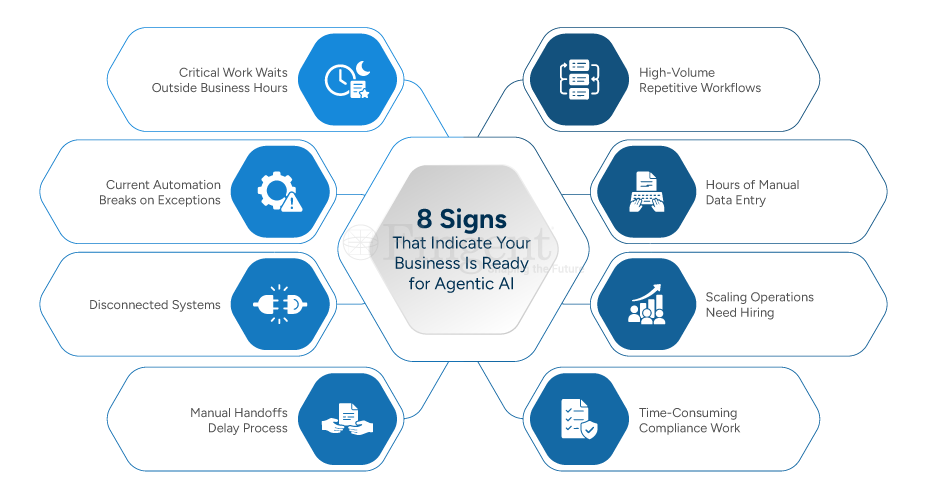
Successful AI adoption starts well before deploying an AI Agent. Logistics businesses need to prepare their processes, data, systems, and people for AI-assisted operations.
- Identify processes worth automating: Start with repetitive, high-volume, rules-driven workflows where AI can deliver immediate value.
- Assess data readiness: Ensure the data AI relies on is accurate, accessible, structured, and clearly owned.
- Connect disconnected systems: Enable AI to work across TMS, WMS, ERP, CRM, email, documents, and other operational systems.
- Map exceptions and human handoffs: Define where AI can act independently and where human judgment must take over.
- Establish clear AI governance: Put security, permissions, auditability, and human oversight in place from the beginning.
- Start with measurable use cases: Prioritize areas such as order processing, invoice reconciliation, customer support, and sales prospecting.
- Prepare employees for AI-assisted workflows: Train teams to collaborate with AI rather than leaving them to figure out new workflows themselves.
- Build for scale: Choose solutions that integrate with existing operations so successful AI use cases can expand beyond isolated pilots.
Frequently Asked Questions (FAQ)
1. What are AI Agents in Logistics?
A. AI Agents in Logistics are AI-powered systems that perform specific logistics tasks or workflows with a degree of autonomy. They can interpret information, interact with business systems, perform defined actions, and escalate exceptions to humans when judgment is required.
2. How can AI Agents be used in logistics?
A. AI Agents can automate several logistics workflows, including order processing, customer support, sales prospecting, shipment-related queries, invoice reconciliation, and knowledge management. They can work across systems such as TMS, WMS, ERP, CRM, email, and document platforms.
3. Can AI Agents integrate with existing TMS and ERP systems?
A. Yes. AI Agents can be integrated with existing TMS, ERP, WMS, CRM, and other business systems through APIs and other integration mechanisms. This allows businesses to introduce AI into existing workflows rather than replacing their core systems.
4. Will AI Agents replace logistics employees?
A. AI Agents are generally better suited to augmenting logistics teams than replacing them entirely. They can handle repetitive and predictable work while employees focus on exceptions, customer relationships, problem-solving, and decisions requiring human judgment.
5. How do logistics businesses know where to start with AI Agents?
A. The best starting point is usually a high-volume, repetitive workflow with measurable business impact. Order processing, customer support, invoice reconciliation, and sales prospecting are examples of areas where businesses can identify clear efficiency or productivity improvements.
6. Are AI Agents suitable for small and mid-sized logistics businesses?
A. Yes. AI Agents can be introduced incrementally, making them suitable for businesses that want to start with a focused use case rather than undertake a large AI transformation. A business can prove value in one workflow and expand to additional processes as adoption grows.
Wait No More!Start Your AI Journey Today with AI Agents Built for Logistics
The Future of AI Adoption in Logistics
AI in logistics does not have to begin with a massive transformation program.
AI Agents in Logistics offer a more practical approach: identify a specific operational challenge, connect Artificial intelligence to the existing workflow, automate what can be automated, keep humans involved where judgment matters, and scale what works.
For logistics businesses, the opportunity is not simply to add AI to existing operations. It is to make AI part of how everyday work gets done, faster, more efficiently, and at greater scale.
Stay up to date on what's new
About the Author
Featured Blogs
Stay up to date on
what's new
Talk To Our Experts

Stay up to date on what's new
About the Author
Featured Blogs
Stay up to date on
what's new
Talk To Our Experts
Stay up to date on what's new
About the Author
Featured Blogs
Stay up to date on
what's new
Talk To Our Experts
Stay up to date on what's new
About the Author
Featured Blogs
Stay up to date on
what's new
Talk To Our Experts
Stay up to date on what's new
About the Author
Featured Blogs
Stay up to date on
what's new
Talk To Our Experts
Stay up to date on what's new
About the Author
Featured Blogs
Stay up to date on
what's new
Talk To Our Experts
Orders are the lifeblood of any business. But managing them is a whole different ball game.
A customer submits a purchase order by email. Another person places an order through a portal. Someone else calls your customer service team with a request. Soon, your operations team is juggling information from many sources. They have to put this together and ensure that every order is fulfilled properly and on time.
As orders multiply, so does complexity. Teams spend countless hours scraping data, confirming details, updating systems, and dealing with exceptions.
As a result of this chaos, many companies continue to struggle with manual work, lag times, and expensive mistakes, even with regular automation.
This is where AI order processing is changing the game.
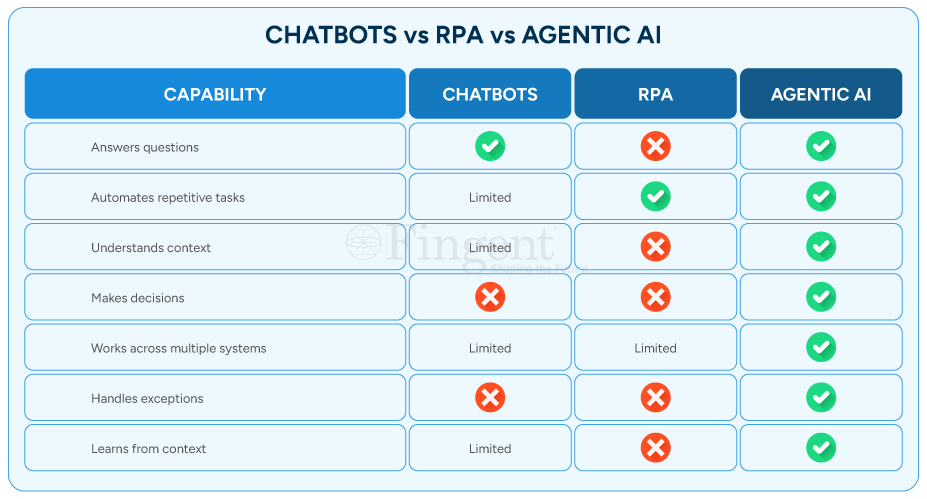
AI Agents differ from traditional automation. They can understand context, make decisions, coordinate actions, and learn from business processes over time. They don’t just automate tasks — they orchestrate workflows.
For companies focusing on improving operations and customer experiences, AI agents are the cornerstone of next-generation order management.
A Look at – What Is AI Order Processing?
AI order processing uses smart AI agents to automate and improve the whole order cycle. This begins with getting customer requests. Then, it continues to validate order details and update OMS systems.
AI agents differ from traditional automation. While traditional systems follow set rules and workflows, AI agents can understand context. It is also able to process unstructured data, decide, and act in real-time. They can process emails, chats, voice calls, portals, and more. This happens without needing manual work for each step.
Imagine AI order processing as a team of digital workers working together in the background. One agent captures incoming order information. Another extracts key details. A third validates the data. Others coordinate workflows, validate business rules, and update OMS and TMS systems. How does this benefit your business? It brings speed, accuracy, and the ability to scale faster. Here’s a more detailed look at how AI agents improve order processing.
Manual Order Processing Is Costing You More Than You Think
How are AI Agents Used in Order Processing?
AI agents enhance order processing by moving beyond traditional automation rules. We are talking about actual reasoning, using memory, and real-time feedback loops, to name a few. Here’s a closer look.
1. Intelligent Order Capture and Validation
One of the biggest challenges in order management is dealing with unstructured information.
Customers don’t always submit orders in a standardized format. Some people send emails. Others attach spreadsheets. Many include key details hidden in long conversations.
Traditionally, employees must review and interpret this information manually. AI agents eliminate that burden by reading, understanding, and extracting relevant data automatically.
They can spot missing fields, flag inconsistencies, and check information before it enters business systems. This greatly cuts down on processing errors.
2. Autonomous Workflow Coordination
Order processing rarely involves a single department.
Sales, inventory, finance, logistics, and customer service often work together. They have to coordinate before fulfilling an order.
AI agents serve as intelligent orchestrators across these functions. They shuttle information between systems, request approvals, and make sure every stakeholder has access to the right data.
This removes bottlenecks and ensures orders flow seamlessly through the pipeline.
3. Real-Time Exception Handling
Even the best of processes run into exceptions.
Stockouts, pricing errors, incomplete customer information, and delivery-related problems interfere with the process flow.
Instead of letting these problems sit unnoticed in someone’s inbox, AI agents flag them. They can take care of simple problems themselves. The complex ones get passed on to the right person.
This means quicker resolution and fewer hold-ups.
4. Faster Order Processing and Customer Response
Customers expect fast responses.
When they place an order, they want to be sure it has been received. They also want to confirm it’s moving through the fulfillment process.
With AI order processing, organizations can handle orders in seconds. Customers can count on faster confirmations, speedier updates, and more dependable service.
The result is enhanced trust and customer satisfaction.
5. Continuous Process Optimization
Conventional automation follows the same instructions over and over. However, the AI agents are trained based on real-world data and previous outcomes. They start to spot repetitive patterns over time, detect inefficiencies, and suggest improvements.
This capability enables the process to be continuously evolved without human intervention.
The Top Benefits of Using AI Agents in Order Management?
1. Scale Operations Without Increasing Headcount
As order volumes increase, companies are often faced with a tough decision — hire more people, or risk overwhelming the teams they already have. AI agents help eliminate that trade-off. Automating order capture, validation, data entry, and workflow coordination helps reduce the workload. This means less need for extra staff. This allows organizations to scale operations without proportionally increasing headcount.
2. Faster Order Processing
Manual processing of orders can take 10 to 15 minutes per order. Teams have to read emails, extract information, verify details, and then update multiple systems. AI agents can perform many of these tasks in 1–2 minutes—or even seconds, in some cases. Order confirmation processing gets faster, order fulfillment cycles get shorter, and customers become happier.
3. Lower Operational Costs
Every manual touchpoint adds time and cost to the order management process. When workers spend hours doing the same administrative tasks over and over, operational costs start adding up. AI agents reduce the need for manual intervention, allowing teams to concentrate on higher-value activities while lowering the overall cost of processing each order.
4. Eliminate Costly Errors
A small mistake in product quantities, pricing, customer info, or shipping can lead to expensive losses. Frequent returns, lost revenue, and unhappy customers can badly affect the brand value. AI agents verify information, looking up to knowledge bases including business rules, inventory records, customer agreements, and past data before they process orders. This significantly reduces human error and helps organizations avoid expensive downstream corrections.
The result is a quicker, more accurate, and scalable order management system. It boosts efficiency and helps the business grow.
Industry Use Cases
1. Manufacturing
Challenge: Manufacturers often deal with large volumes of complex B2B orders. An order can have multiple product configurations, special pricing arrangements, lead times, and production requirements. Manually processing these orders for production may delay workflow and cause errors.
Solution: AI agents support manufacturers by extracting details of orders from emails and messages from customers. They cross-reference this data with production schedules, verify stock availability, and update OMS/TMS systems automatically.
Benefits:
- Accelerates quote-to-order conversion
- Reduce costly rework and scrap due to manual entry errors
- Reduce manufacturing wastes
- Prioritizes high-value or time-sensitive orders
- Tracks customer-specific compliance, quality
- Identifies orders that may impact production line efficiency
2. Retail and eCommerce
Challenge: Retail and ecommerce now operate on websites, marketplaces, mobile apps, social commerce channels, and in-store. It’s not always easy to sync inventory and order fulfillment across these channels.
Solution: AI agents enable the retailer to efficiently fulfill omnichannel customer orders by capturing orders in real time, validating details, and orchestrating the order processing operations. When there is more demand in seasonal sales, AI agents will contribute to these operations efficiently.
Benefits:
- Consolidates orders from multiple sales channels into a single processing workflow.
- Detects duplicate orders submitted across different channels.
- Prevents overselling by validating stock availability.
- Routes orders faster to the nearest fulfillment center.
- Improves order accuracy for products with multiple variants.
- Minimizes cart-to-fulfillment delays, especially during peak seasons.
3. Distribution and Logistics
Challenge: Speed and visibility are paramount for distributors and logistics providers. The orders can include a combination of different warehouses, shipping partners, and delivery dates. Disruptions can change what customers expect and what it takes to run day-to-day operations.
Solution: AI agents can improve shipment coordination, keep transport systems informed with the right data, monitor order status, and detect potential problems. This creates a more resilient and responsive logistics operation.
Benefits:
- Validates delivery locations, service zones, and transportation constraints.
- Reduces manual order entry errors that can lead to shipment delays.
- Prioritizes urgent, time-sensitive, and high-value shipments.
- Help route orders to the most suitable warehouse or distribution centers.
- Reduces order backlogs during seasonal peaks.
- Enables 24/7 order intake and processing.
4. Healthcare and Medical Supply
Challenge: Healthcare providers rely on the correct purchasing and delivery of essential supplies. A missing item or a shipment delay can lead to serious consequences.
Solution: AI agents make procurement easier. They help suppliers validate requests faster based on inventory availability, coordinate approvals, and update systems in real-time to eliminate medical procurement delays. Healthcare providers can be reassured that vital supplies will arrive where and when they are needed most.
Benefits:
- Validates orders against approved product catalogs.
- Prioritizes urgent orders for critical care and emergency departments.
- Prevents ordering errors for regulated, high-value products.
- Ensures compliance with healthcare procurement policies.
- Helps prevent stockouts of life-critical supplies with 24/7 order processing.
- Supports multi-location healthcare networks.
FAQs
1. Can AI agents integrate with ERP systems for order processing?
A. Yes. AI agents can connect to your ERP, OMS, and TMS systems using APIs and connectors. This allows for smooth data synchronization, automated refreshes, and full workflow orchestration.
2. Are AI agents better than traditional order processing automation?
A. Traditional automation is effective for repetitive, rule-based tasks. AI agents take it further. AI agents enhance order management by combining smart order capture, automated checks, workflow coordination, real-time issue handling, and ongoing improvement. This makes the process smarter and self-enhancing.
3. Can AI agents process orders from emails, chats, and voice calls?
A. Absolutely. Modern AI agents can gather information from different channels. They extract important details and start workflows automatically. This happens no matter how the order was received.
4. How do AI agents reduce order processing errors?
A. AI agents validate information against business rules, inventory records, pricing agreements, and customer data before processing orders. This significantly reduces the risk of manual data entry mistakes and operational errors.
Introducing OrderFlow AI Agent Powered by Fingent
OrderFlow AI Agent is Fingent’s smart AI Agent-powered solution for efficient order processing. The AI Agent can be custom-integrated with your existing TMS and OMS systems to act as a digital worker and automate your entire order processing workflow. It uses a multi-agent architecture. Specialized AI agents team up to handle requests, validate information, and act in real time without much human intervention. Here’s a closer look at how the system works.
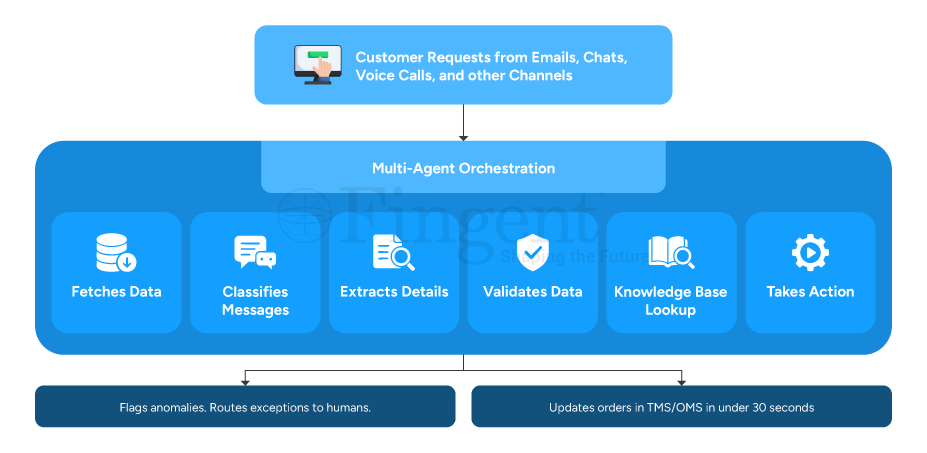
1. Captures Orders from Any Channel: The system automatically identifies and captures relevant order information from emails, chats, voice calls, portals, and more, as soon as it arrives.
2. Understands and Classifies Requests: The OrderFlow AI Agent intelligently classifies each interaction and routes it through the appropriate workflow, whether it is order modification requests, cancellations, inquiries, or support queries.
3. Extracts Critical Order Details: The system automatically gathers key information like product details, quantity, pricing, delivery needs, customer info, or special instructions without manual intervention.
4. Validates Information Against Business Rules: Before processing an order, the system validates its accuracy and compliance by comparing it against specified business rules.
5. Leverages Enterprise Knowledge: The system can access internal knowledge bases, contracts, historical transactions, policies, and documentation to make informed decisions and support complex order-processing scenarios.
6. Executes Actions Automatically: The OrderFlow AI Agent takes action in real-time. It updates the OMS/TMS systems with accurate order details and customer data. If exceptions are found, they’re sent to the right team for review. This ensures that human-in-the-loop for enhanced safety.
The Outcome:
- Zero-touch order entry
- Faster order processing and fulfilment
- Human-in-the-loop exception management
- Seamless OMS and TMS integration
- Reduced manual effort and operational costs
- Continuous process optimization
- Enhanced safety with robust AI guardrails and security policies
Don’t Let Traditional Order Processing Methods Sloth Your Business Leverage AI Agents and Scale Without Limits
Conclusion
Order processing is not just about moving information from one system to another. It’s a key business function that directly impacts customer satisfaction, operational efficiency, and business expansion.
Organizations must ensure efficiency and speed at the core of the order processing workflow.
AI order processing addresses this with seamless understanding of context, making decisions, handling exceptions, and adapting to changing business needs. That’s exactly what businesses need today.
It’s time to reshape and redefine with the latest technologies and find a competitive edge in the market.
Stay up to date on what's new
About the Author
Featured Blogs
Stay up to date on
what's new
Talk To Our Experts
Nobody builds a broken order process on purpose.
It starts with good intentions. A spreadsheet that works. An email thread that keeps everyone in the loop. A team skilled enough to work around the gaps. And for a while, it holds together just fine.
Then volume grows. Customer expectations shift. And the workflow that once felt manageable starts quietly bleeding money from every direction, in ways no single report will ever fully capture.
That’s the thing about manual order processing. It doesn’t fail dramatically. It fails slowly. Can order processing automation solve this burning challenge? Let’s find out!
The Hidden Operational Costs
Did you know it is with errors that the damage begins? Start there.
When orders arrive across multiple channels, someone has to read each one. Interpret it, and re-enter it into a system. That process introduces mistakes. Not because the people doing it are careless, but because humans doing repetitive data entry under volume pressure make errors.
And each error sets off a chain reaction. Wrong item shipped > Return raised > Credit note issued > Customer complaint logged >Re-processed from scratch. What looked like a small mistake at intake turns into a disproportionately expensive problem three steps downstream.
Then there’s visibility, or the complete lack of it. When your ERP lives in one place, your CRM in another, and order status is buried in someone’s inbox, nobody has the full picture. Exceptions go undetected. A shipment stalls or a customer waits. By then, the relationship is already damaged.
Approval workflows sitting inside email threads are their own problem. They add hours to every order that needs a second set of eyes. Sometimes days. In industries like logistics and freight, where speed is essentially the product, that delay isn’t a minor inconvenience. It’s a competitive disadvantage dressed up as normal.
Manual workflows create fragile operations. One absence, one volume spike, or one experienced employee walking out the door can throw the whole system into chaos.
The Business Impact
The cost of manual order processing doesn’t come from one catastrophic failure. It accumulates from thousands of small ones.
1. Reduced productivity
The small errors matter – the re-entered data, the overtime during peak periods, the customer credits issued to smooth over mistakes that should never have happened. Over time, that adds up to a significant and measurable drag on productivity and profitability.
2. Difficulty scaling operations
Scaling makes it worse, not better. Manual processes don’t grow gracefully. When volume spikes, whether from a seasonal rush, a new client, or genuine market growth, the only lever you have is headcount. You hire more people to do the same work at higher volume. Error rates climb because teams are under pressure. Good people burn out doing work that machines should be doing.
Think about what that means when you look at manual order processing vs automated order processing side by side. One scales with volume. The other scales with people. One gets more accurate over time. The other gets more expensive. One gives you real-time visibility across systems. The other gives you a Monday morning status meeting and a backlog nobody is happy about.
3. Lost revenue opportunities
The revenue impact is the part that stings most. Slow fulfillment drives customers toward faster, more reliable competitors. Errors erode trust that took years to build. In logistics, freight, and ecommerce, where the difference between retaining an account and losing it often comes down to speed and accuracy, a process that can’t keep up isn’t just inefficient. It’s a liability.
How AI Agents Can Transform Order Processing
This is where the conversation changes. How do you automate order processing?
Most businesses think they have a people problem – too many delays, too many errors, too much rework. Actually, more often than not, they have a process problem wearing a people costume.
Understanding how to automate order processing starts with understanding what an AI agent actually does. And no, it is not a chatbot sitting in a corner answering polite little questions all day.
An AI agent acts. That is the difference.
It reads incoming orders from emails, PDFs, portals, EDI systems, and spreadsheets. It pulls out the right data, checks it against inventory and business rules, routes the order through approvals, updates connected systems, and flags exceptions before they snowball into expensive problems. No copy-paste marathons. No inbox archaeology. No employee squinting at line items at 7:43 PM, wondering why SKU codes suddenly look like hieroglyphics.
Fingent’s AI Agent connects with your existing systems, automates clean orders, routes exceptions intelligently, and keeps operations moving without the usual inbox chaos. It’s fast, accurate and scalable.
For logistics and freight teams, that means processing orders from messy email chains and PDF attachments in minutes instead of hours. For ecommerce businesses, it means surviving peak season without throwing more exhausted humans at the problem every December. And for operations teams processing hundreds of orders a day, it means fewer mistakes, faster fulfillment, and a workday that no longer revolves around repetitive admin work disguised as productivity.
But the real shift goes deeper than efficiency.
When your order process runs cleanly at scale, your business changes shape. Teams stop reacting and start planning. And in industries where speed and reliability decide who keeps the account and who loses it, that advantage matters.
Dive Into The World of AI Agents Enable More Faster and Efficient Order Processing
Frequently Asked Questions
1. What is order processing automation?
A. Order processing automation replaces manual order handling with software and AI-driven workflows.
Your team does not need to bounce between inboxes, PDFs, spreadsheets, and ERP screens. Instead, AI agents capture the data automatically. They validate it against business rules, and move orders through the right workflows in real time.
2. How can businesses reduce order processing errors?
A. Businesses reduce order processing errors by reducing manual data entry.
One wrong digit turns into the wrong shipment. This can frustrate a customer. The support team then has to scramble to clean up a mess that should never have existed in the first place. AI agents catch those problems early. Before the warehouse does. Before the customer does. Before finance starts issuing credits as apologies.
3. How does order processing automation improve efficiency?
A. Order processing automation improves efficiency by removing repetitive work and workflow bottlenecks.
Teams stop wasting half the day entering the same information over and over. AI agents handle those tasks in minutes. Orders move faster. Teams breathe easier. This allows skilled employees to finally spend time solving problems instead of babysitting spreadsheets.
4. When should a business automate order processing?
A. A business should automate order processing the moment manual work starts slowing growth.
If your team is staying late just to clear order backlogs, if mistakes trigger constant rework, or if peak season feels less like growth and more like surviving a natural disaster, then the process already costs too much. Manual operations scale with stress. Automated operations scale with demand. That’s a big difference.
Conclusion
Manual order processing doesn’t announce when it becomes a problem. It just costs more every month. Quietly – in errors, in rework, in staff hours, and in customers who don’t come back.
Order processing automation, powered by AI agents that read, validate, route, and fulfill orders without human intervention, is how modern logistics, freight, and ecommerce businesses stop paying that cost. Not by replacing their teams. By giving those teams work that’s actually worth their time.
Fingent’s AI Agent for order processing integrates with what you already have and is built to deliver from day one. If your order operations are ready for a better way, we’d like to show you what that looks like.
Stay up to date on what's new
About the Author

Tony Joseph

Tony believes in building technology around processes, rather than building processes around technology. At Fingent, he specializes in custom software development, especially in analyzing processes, refining them, and then building technology around it. He works with clients on a daily basis to understand and analyze their operational structure, discover (and not invent) key improvement areas, and come up with technology solutions to deliver an efficient process. You can reach him at [email protected], Skype: tony_fingent
Featured Blogs
Stay up to date on
what's new
Talk To Our Experts