The adoption of AI co-pilots and virtual assistants has been quick. Businesses embraced them. AI tools, like chat assistants and coding copilots, promised faster work. They helped with smarter decisions and boosted efficiency.

But there was one catch: humans still had to drive the process.

That is now beginning to change.

A new generation of agentic AI platforms is entering the enterprise world: autonomous agents. Unlike traditional AI assistants, these agents do more than respond to prompts. They can plan tasks and make decisions. They also interact with enterprise systems, coordinate workflows, and carry out multi-step objectives with little human help. This change is why agentic workflow platforms are quickly becoming a hot topic in enterprise technology. Predictions show that:
  • By the end of 2026, 40% of enterprise applications will have task-specific AI agents. This is a big jump from under 5% in 2025.
  • As organizations automate decision-making, agentic AI could bring in over $450 billion in extra software revenue by 2035.
Source: Gartner 2025 study
Vendors are quickly trying to stake out the high ground in the agentic AI race. But that momentum has also created confusion. How do you know that you’re going to get your money’s worth? Many platforms called “agentic” are really just advanced chatbots or scripted automations. This trend is called “agent washing.” Vendors claim their products are more autonomous than they really are. They often don’t provide true reasoning, planning, or orchestration. As a result, the enterprise challenge is no longer whether to adopt AI agents. The real question is: which platforms can actually support production-scale autonomous workflows?

It’s Time To Go Beyond Traditional Workflow Automation Drive Process Intelligence With Agentic AI

Contact Us Now!

What Makes a True Agentic Platform?

Not every AI assistant qualifies as an autonomous agent. To qualify as genuinely agentic, a platform must support the following five foundational capabilities.

1. Perception: Understanding What’s Happening

Perception is the agent’s ability to understand its environment. Think of it as the “eyes and ears” of the agent. Before an AI agent can make a decision, it needs to be aware of what is happening across systems and workflows. It carefully understands interactions and is continuously ingesting and interpreting both structured and unstructured information from multiple sources. Modern enterprise agents increasingly support multimodal perception, meaning they can process not just text, but also voice, screenshots, images, and visual documents. Without perception, agents may automate tasks, but they cannot intelligently adapt to changing business conditions.

2. Reasoning: Deciding What to Do Next

Once an agent understands its environment, it needs the ability to reason. Reasoning enables AI agents to:
  • Interpret objectives
  • Evaluate context
  • Compare options
  • Weigh tradeoffs
  • Prioritize actions
  • Make decisions dynamically
The more sophisticated the reasoning engine becomes, the more independently the agent can operate.

3. Planning: Breaking Goals Into Actionable Steps

Planning is what transforms AI from reactive software into autonomous execution systems. A true AI agent does not simply complete isolated tasks. It can break larger objectives into smaller, manageable actions and coordinate them intelligently. Planning capabilities often include:
  • Goal decomposition
  • Task sequencing
  • Dependency mapping
  • Adaptive execution
  • Retry handling
  • Workflow optimization
  • Multi-agent coordination
In practical terms, planning allows agents to manage complex business processes end-to-end. Without planning, systems remain reactive and dependent on constant human direction. With planning, agents become capable of managing long-running workflows autonomously.

4. Tool Use: Turning Intelligence Into Action

An AI agent becomes truly valuable only when it can interact with enterprise systems. This capability is known as tool use. Tool use allows agents to move beyond generating insights into actually executing work. Modern agentic platforms can interact with:
  • APIs
  • Databases
  • CRMs
  • ERP systems
  • Browsers
  • Internal enterprise
  • tools
  • SaaS platforms
  • RPA workflows
  • Communication systems
Tool use is especially important because enterprises rarely operate within a single system. The more effectively an agent can use tools, the more operational value it delivers.

5. Memory: Learning and Improving Over Time

Memory is one of the most important and often overlooked components of agentic AI. Without memory, every interaction starts from zero. With memory, agents gain continuity, personalization, and organizational learning capabilities. Enterprise-grade AI agents increasingly require both:
  • Short-term memory for active workflows
  • Long-term memory for historical context and learning
Memory enables:
  • Context persistence
  • Cross-session continuity
  • Historical reasoning
  • Personalization
  • Workflow optimization
  • Knowledge retention
  • Organizational intelligence
This is one of the key reasons agentic AI is so transformative. These systems are not just automating work. They are gradually building organizational knowledge and operational intelligence over time.

How to Evaluate Agentic AI Platforms

Enterprises should evaluate agentic platforms across eight key areas:

Evaluation Criteria
Why It Matters
Agent Autonomy
Can the system independently reason and act?
Workflow Orchestration
Can it manage complex multi-step processes?
Governance & Compliance
Does it support auditability and enterprise controls?
Integrations
How easily does it connect with enterprise systems?
Builder Experience
How quickly can teams build and deploy agents?
Observability
Can teams monitor and debug agent behaviour?
Data Privacy
Where does enterprise data live?
Pricing Model
Is the pricing scalable and transparent?
With that framework in mind, here’s how leading platforms compare.

What Are the Best Agentic Workflow Platforms for Enterprises?

Here’s a deep dive into the profiles of some of the best Agentic AI Platforms of today.

1. Lyzr

Autonomy High
Orchestration High
Governance High
Integration High
Builder UX Medium
Observability High
Data Privacy High
Pricing Model Enterprise

Features:

Lyzr is an enterprise-ready platform designed for autonomous AI operations at scale. Some features:

  • Strong capabilities in:
    • Multi-agent orchestration
    • Governance controls
    • Hallucination mitigation
    • Human-in-the-loop workflows
    • Observability
  • Built primarily for production deployment rather than experimentation
  • Supports SaaS, private cloud, and VPC deployments
  • Well-suited for regulated industries like banking, healthcare, and insurance
  • Offers governance features such as:
    • Audit trails
    • RBAC
    • Policy enforcement
  • Combines low-code simplicity with developer flexibility
  • Model-agnostic architecture reduces dependency on a single LLM vendor

Best for: Enterprise-scale AI operations

2. LangGraph

Autonomy High
Orchestration High
Governance Medium
Integration High
Builder UX Low
Observability Medium
Data Privacy High
Pricing Model Open-source

Features:

A developer-first orchestration framework with graph-based architecture.

  • Provides fine-grained control over:
    • Workflow states
    • Agent transitions
    • Memory handling
    • Retry logic
    • Execution paths
  • Best suited for highly customized AI systems
  • Requires strong engineering expertise and infrastructure management
  • Governance and observability capabilities depend largely on custom implementation
  • Offers strong deployment flexibility across:
    • Cloud
    • Self-hosted
    • Private infrastructure
  • Highly model-agnostic with low vendor lock-in risk
  • Integrates well across multiple LLM providers and orchestration stacks

Best for: Developer-centric orchestration

3. CrewAI

Autonomy Medium
Orchestration Medium
Governance Low
Integration Medium
Builder UX Medium
Observability Low
Data Privacy Medium
Pricing Model Open-source

Features:

  • Popularized collaborative multi-agent workflows
  • Uses specialized agents for different tasks such as:
    • Research
    • Planning
    • Writing
    • Review
  • Collaborative architecture mirrors how human teams operate
  • Lightweight and flexible compared to enterprise-heavy platforms
  • Attractive for:
    • Startups
    • Innovation teams
    • Rapid prototyping
    • Experimental workflows
  • Governance capabilities remain relatively limited
  • Additional tooling may be needed for:
    • Compliance
    • Auditability
    • RBAC
    • Workflow monitoring
  • Relatively open and model-flexible with lower ecosystem lock-in

Best for: Multi-agent collaboration and prototyping

4. AutoGen (Microsoft)

Autonomy High
Orchestration High
Governance Medium
Integration Medium
Builder UX Low
Observability Medium
Data Privacy High
Pricing Model Open-source

Features:

  • Microsoft framework focused on conversational multi-agent coordination
  • Agents can:
    • Collaborate with each other
    • Interact with humans
    • Invoke tools dynamically
    • Adapt workflows in real time
  • Highly flexible for advanced AI experimentation
  • Better suited for engineering teams than low-code business users
  • Production deployment often requires custom infrastructure
  • Governance capabilities improve significantly when integrated with Azure services
  • Supports enterprise-controlled cloud deployments for stronger data governance
  • Strong alignment with Microsoft’s broader AI ecosystem
  • May increase dependency on Azure infrastructure over time

Best for: Advanced multi-agent experimentation

5. Salesforce Agentforce

Autonomy Medium
Orchestration High
Governance High
Integration Medium
Builder UX High
Observability High
Data Privacy Medium
Pricing Model Premium SaaS

Features:

  • Embeds autonomous AI directly into Salesforce CRM workflows
  • Strong use cases include:
    • Sales automation
    • Customer service
    • Lead management
    • Revenue operations
  • Benefits from access to existing customer histories and workflow logic
  • Provides a strong low-code experience for business teams
  • Includes governance features such as:
    • Audit logging
    • Workflow approvals
    • RBAC
    • Enterprise security policies
  • Primarily cloud-native SaaS infrastructure
  • Deployment flexibility is more limited than self-hosted frameworks
  • Strong ecosystem dependency on Salesforce infrastructure

Best for: CRM-native automation

6. UiPath

Autonomy Medium
Orchestration High
Governance High
Integration Medium
Builder UX High
Observability High
Data Privacy Medium
Pricing Model Premium SaaS

Features:

  • Evolving from robotic process automation into AI-powered agentic automation
  • Particularly strong for:
    • Legacy systems
    • Back-office workflows
    • Document processing
    • Enterprise process orchestration
  • Allows enterprises to extend existing automation investments
  • Combines low-code builders with AI orchestration capabilities
  • Offers strong governance features, including:
    • Workflow monitoring
    • Audit trails
    • Permissions management
    • Security controls
  • Supports:
    • Cloud deployments
    • Hybrid infrastructure
    • On-prem environments
  • Broad enterprise integrations reduce migration complexity
  • Deeper adoption may increase platform dependency over time

Best for: Operational and process automation

7. ServiceNow AI

Autonomy Medium
Orchestration High
Governance High
Integration Medium
Builder UX High
Observability High
Data Privacy High
Pricing Model Enterprise

Features:

  • Focused heavily on enterprise operational workflows
  • Strong capabilities in:
    • IT service management
    • Internal support operations
    • HR automation
    • Enterprise ticketing systems
  • Governance is one of its strongest differentiators
  • Prioritizes:
    • Auditability
    • Operational visibility
    • Compliance
    • Workflow oversight
  • Provides a workflow-centric low-code experience
  • Strong observability for monitoring enterprise operations
  • Supports enterprise-grade security and deployment controls
  • Works best inside the broader ServiceNow ecosystem
  • Existing ServiceNow customers gain strong operational efficiency advantages

Best for: Enterprise operational workflows

8. Amazon Bedrock Agents

Autonomy High
Orchestration High
Governance High
Integration High
Builder UX Medium
Observability High
Data Privacy High
Pricing Model Usage-based

Features:

  • AWS-native platform for building autonomous agents
  • Supports multiple foundation models instead of a single-LLM ecosystem
  • Key strengths include:
    • Cloud scalability
    • Infrastructure security
    • Model flexibility
    • AWS-native integration
  • Best suited for organizations already operating heavily on AWS
  • Governance benefits from AWS enterprise tooling such as:
    • Identity management
    • Access controls
    • Compliance tooling
    • Infrastructure security
  • Supports VPC isolation and regional cloud controls
  • Strong deployment flexibility for sensitive workloads
  • Operational dependency on AWS may increase over time

Best for: AWS-native enterprises

9. Microsoft Copilot Studio

Autonomy Medium
Orchestration Medium
Governance High
Integration High
Builder UX Medium
Observability High
Data Privacy High
Pricing Model Subscription

Features:

  • Low-code AI agent platform designed for business users
  • Integrates deeply with:
    • Microsoft 365
    • Teams
    • Dynamics
    • Power Platform
  • Enables rapid deployment without extensive engineering effort
  • Strongest advantage is accessibility for non-technical teams
  • Useful for:
    • Productivity automation
    • Internal workflow support
    • Enterprise assistants
    • Business process augmentation
  • Includes enterprise-grade:
    • RBAC
    • Security controls
    • Compliance frameworks
    • Administrative governance
  • Deployment is streamlined for Microsoft-centric organizations
  • Heavy Microsoft ecosystem alignment may increase long-term dependency

Best for: Low-code enterprise automation

Common Pitfalls & Evaluation Red Flags

As agentic AI adoption accelerates, many enterprises are discovering that impressive demos do not always translate into production success. Choosing the wrong platform can lead to failed pilots, governance issues, and expensive integration challenges.

1. “Agent Washing”: Spotting Rebranded Chatbots

One of the biggest concerns in the market is “agent washing” — vendors marketing advanced chatbots or scripted automations as autonomous agents.
According to Gartner, only around 130 vendors currently offer genuine agentic AI capabilities despite thousands positioning themselves in the space.
A true agentic platform should support:

  • Reasoning
  • Planning
  • Multi-step execution
  • Tool orchestration
  • Context retention
  • Adaptive decision-making

Before selecting a platform, enterprises should ask:

  • Can the agent complete workflows autonomously?
  • Does it maintain memory across sessions?
  • Can it adapt dynamically to changing conditions?
  • What governance and hallucination controls exist?

2. The Pilot-to-Production Gap

Many enterprises successfully build AI proofs-of-concept but struggle to operationalize them at scale. Many organizations still lack a clear starting point for enterprise AI adoption.
Most pilots fail because organizations underestimate:

  • Integration complexity
  • Governance requirements
  • Security constraints
  • Workflow redesign
  • Operational
  • monitoring

Production-grade systems require observability, auditability, permission management, and workflow resilience — not just functional demos.

3. Integration Mapping Before Platform Selection

Integration challenges remain one of the biggest deployment blockers.
Many organizations assume systems will integrate smoothly, only to discover issues involving:

  • APIs
  • Authentication
  • Permissions
  • Legacy infrastructure
  • Data quality

That is why enterprises should validate integrations before selecting a platform.

4.Avoiding Hype-Driven Procurement

Many AI initiatives fail because organizations prioritize technology before defining measurable business outcomes.
Instead of starting with tools, enterprises should first identify operational goals such as:

  • Reducing processing time
  • Lowering operational costs
  • Improving support resolution
  • Increasing workflow efficiency

Successful AI adoption is driven by business impact, not hype.

Drive Successful Transition to AI Driven Workflows Get Expert Guidance Throughout the Way

Contact Us Now!

What’s Next: The Road to Organizational Intelligence

The future of agentic AI is moving toward interconnected ecosystems of specialized agents working across departments and enterprise systems.

Emerging Architectural Patterns

Several trends are shaping next-generation agentic systems:

  • Shared knowledge graphs
  • Agentic RAG architectures
  • Persistent memory systems
  • Multi-agent collaboration
  • Multi-modal AI capabilities

Future enterprise agents will increasingly process text, voice, images, documents, and real-time operational data while sharing organizational context across workflows.

Regulatory & Governance Horizon

As AI agents become more autonomous, governance requirements are becoming stricter.
Regulations such as the EU AI Act are increasing focus on:

  • Explainability
  • Transparency
  • Human oversight
  • Accountability
  • Risk management

Industries like healthcare, banking, and insurance will require strong governance frameworks including:

  • Audit trails
  • RBAC
  • Compliance controls
  • Bias monitoring
  • Human approval workflows

Lyzr’s Organizational General Intelligence (OGI) Vision

Lyzr’s Organizational General Intelligence (OGI) vision focuses on interconnected enterprise agents sharing context through a centralized knowledge graph.
In this model, HR, finance, operations, sales, and support agents collaborate continuously instead of operating independently.
The goal is not just automation, but a continuously learning enterprise capable of collective decision-making and operational optimization.

FAQs

Q. What are agentic workflow platforms?

A. Agentic workflow platforms are built to enable AI agents to autonomously plan, reason, understand concepts and patterns, make decisions, and execute multi-step tasks across systems and applications to fulfill a specific business objective.

Unlike traditional workflow automation that works on a set of predefined rules, agentic workflow platforms are designed to dynamically take decisions based on given context and business objectives. Agentic workflow platforms often function with a combination of AI agents, LLMs, workflow orchestration, integrated tools, memory, context management, and AI guardrails.

Q. Which platforms are used to build autonomous AI agents?

A. Autonomous AI agents are commonly built using agentic AI platforms and orchestration frameworks. These platforms are categorized on the basis of code-first developer frameworks, low-code/no-code builders, and enterprise agentic platforms. These platforms provide capabilities for agent orchestration, reasoning, memory management, workflow automation, and integration with enterprise systems. Choosing the best platform depends on your technical expertise, production scale, and specific use case.

Q. How do agentic AI platforms automate business workflows?

A. Agentic AI platforms automate business workflows by deploying AI agents that can understand goals, make decisions, and execute multi-step tasks across systems with minimal human intervention. They integrate with enterprise applications, analyze data, coordinate actions, handle exceptions, and collaborate with other agents or humans when needed. Unlike traditional automation, they dynamically adapt workflows based on context, business rules, and real-time information to complete processes more efficiently.

Q. How do autonomous AI agents work with enterprise systems?

A. Autonomous AI agents work with enterprise systems by connecting to applications such as ERP, CRM, supply chain, HR, and finance platforms through APIs, connectors, and integrations. They can retrieve data, analyze information, make decisions based on business rules, and execute actions such as updating records, processing orders, creating tickets, or triggering workflows. This allows agents to operate across multiple systems seamlessly, automating end-to-end business processes while maintaining governance, security, and compliance controls.

Conclusion & Key Takeaways

There is no single best agentic AI platform.
Different platforms excel in different scenarios:

  • Lyzr for governance-heavy enterprise deployments
  • LangGraph for developer flexibility
  • CrewAI and AutoGen for experimentation
  • Salesforce Agentforce for CRM workflows
  • UiPath for operational automation
  • ServiceNow for enterprise operations
  • Amazon Bedrock for AWS-native scalability
  • Microsoft Copilot Studio for low-code adoption

The right choice depends on infrastructure, governance needs, workflow complexity, and enterprise maturity.

What is clear, however, is that competitive advantage will belong to organizations successfully operationalizing agentic AI at scale — not those stuck in endless pilot programs. Have questions? Reach out to our experts.

Stay up to date on what's new

    About the Author

    ...
    ishaque

    Ishaque is a seasoned Application Architecture & Delivery Manager at Fingent with a strong passion for emerging technologies and digital innovation. He specializes in enabling secure, scalable application architectures, with a particular focus on AI-driven solutions. Ishaque is dedicated to helping organizations adopt modern development strategies that accelerate innovation while maintaining security, reliability, and business value.

    Talk To Our Experts

      Orders are the lifeblood of any business. But managing them is a whole different ball game.

      A customer submits a purchase order by email. Another person places an order through a portal. Someone else calls your customer service team with a request. Soon, your operations team is juggling information from many sources. They have to put this together and ensure that every order is fulfilled properly and on time.
      As orders multiply, so does complexity. Teams spend countless hours scraping data, confirming details, updating systems, and dealing with exceptions. 

      As a result of this chaos, many companies continue to struggle with manual work, lag times, and expensive mistakes, even with regular automation.

      This is where AI order processing is changing the game.

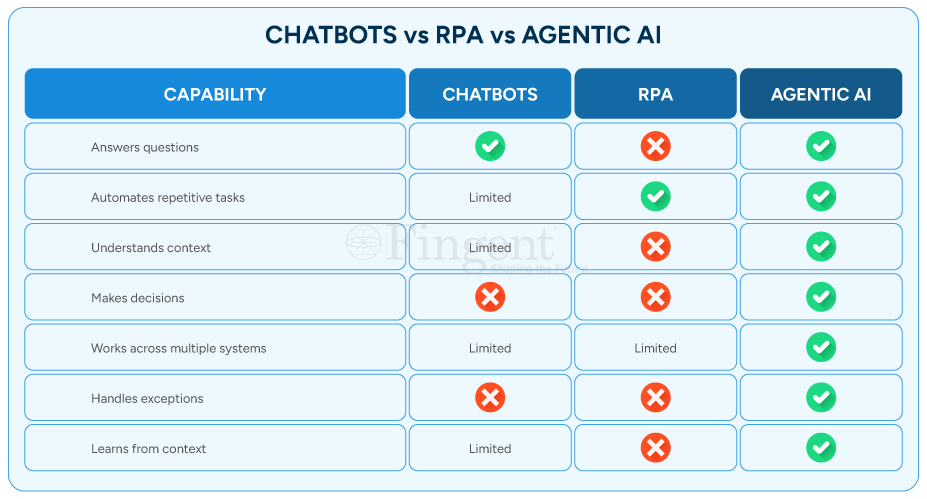
      AI Agents differ from traditional automation. They can understand context, make decisions, coordinate actions, and learn from business processes over time. They don’t just automate tasks — they orchestrate workflows.

      For companies focusing on improving operations and customer experiences, AI agents are the cornerstone of next-generation order management.

      A Look at – What Is AI Order Processing?

      AI order processing uses smart AI agents to automate and improve the whole order cycle. This begins with getting customer requests. Then, it continues to validate order details and update OMS systems.

      AI agents differ from traditional automation. While traditional systems follow set rules and workflows, AI agents can understand context. It is also able to process unstructured data, decide, and act in real-time. They can process emails, chats, voice calls, portals, and more. This happens without needing manual work for each step.

      Imagine AI order processing as a team of digital workers working together in the background. One agent captures incoming order information. Another extracts key details. A third validates the data. Others coordinate workflows, validate business rules, and update OMS and TMS systems. How does this benefit your business? It brings speed, accuracy, and the ability to scale faster. Here’s a more detailed look at how AI agents improve order processing.

      Manual Order Processing Is Costing You More Than You Think

      Take a Look!

      How are AI Agents Used in Order Processing?

      AI agents enhance order processing by moving beyond traditional automation rules. We are talking about actual reasoning, using memory, and real-time feedback loops, to name a few. Here’s a closer look.

      1. Intelligent Order Capture and Validation

      One of the biggest challenges in order management is dealing with unstructured information.

      Customers don’t always submit orders in a standardized format. Some people send emails. Others attach spreadsheets. Many include key details hidden in long conversations.

      Traditionally, employees must review and interpret this information manually. AI agents eliminate that burden by reading, understanding, and extracting relevant data automatically.

      They can spot missing fields, flag inconsistencies, and check information before it enters business systems. This greatly cuts down on processing errors.

      2. Autonomous Workflow Coordination

      Order processing rarely involves a single department.

      Sales, inventory, finance, logistics, and customer service often work together. They have to coordinate before fulfilling an order.

      AI agents serve as intelligent orchestrators across these functions. They shuttle information between systems, request approvals, and make sure every stakeholder has access to the right data.

      This removes bottlenecks and ensures orders flow seamlessly through the pipeline.

      3. Real-Time Exception Handling

      Even the best of processes run into exceptions.

      Stockouts, pricing errors, incomplete customer information, and delivery-related problems interfere with the process flow.

      Instead of letting these problems sit unnoticed in someone’s inbox, AI agents flag them. They can take care of simple problems themselves. The complex ones get passed on to the right person.

      This means quicker resolution and fewer hold-ups.

      4. Faster Order Processing and Customer Response

      Customers expect fast responses.

      When they place an order, they want to be sure it has been received. They also want to confirm it’s moving through the fulfillment process.

      With AI order processing, organizations can handle orders in seconds. Customers can count on faster confirmations, speedier updates, and more dependable service.

      The result is enhanced trust and customer satisfaction.

      5. Continuous Process Optimization

      Conventional automation follows the same instructions over and over. However, the AI agents are trained based on real-world data and previous outcomes. They start to spot repetitive patterns over time, detect inefficiencies, and suggest improvements.

      This capability enables the process to be continuously evolved without human intervention.

      The Top Benefits of Using AI Agents in Order Management?

      1. Scale Operations Without Increasing Headcount

      As order volumes increase, companies are often faced with a tough decision — hire more people, or risk overwhelming the teams they already have. AI agents help eliminate that trade-off. Automating order capture, validation, data entry, and workflow coordination helps reduce the workload. This means less need for extra staff. This allows organizations to scale operations without proportionally increasing headcount.

      2. Faster Order Processing

      Manual processing of orders can take 10 to 15 minutes per order. Teams have to read emails, extract information, verify details, and then update multiple systems. AI agents can perform many of these tasks in 1–2 minutes—or even seconds, in some cases. Order confirmation processing gets faster, order fulfillment cycles get shorter, and customers become happier.

      3. Lower Operational Costs

      Every manual touchpoint adds time and cost to the order management process. When workers spend hours doing the same administrative tasks over and over, operational costs start adding up. AI agents reduce the need for manual intervention, allowing teams to concentrate on higher-value activities while lowering the overall cost of processing each order.

      4. Eliminate Costly Errors

      A small mistake in product quantities, pricing, customer info, or shipping can lead to expensive losses. Frequent returns, lost revenue, and unhappy customers can badly affect the brand value. AI agents verify information, looking up to knowledge bases including business rules, inventory records, customer agreements, and past data before they process orders. This significantly reduces human error and helps organizations avoid expensive downstream corrections.

      The result is a quicker, more accurate, and scalable order management system. It boosts efficiency and helps the business grow.

      Industry Use Cases

      1. Manufacturing

      Challenge: Manufacturers often deal with large volumes of complex B2B orders. An order can have multiple product configurations, special pricing arrangements, lead times, and production requirements. Manually processing these orders for production may delay workflow and cause errors.

      Solution: AI agents support manufacturers by extracting details of orders from emails and messages from customers. They cross-reference this data with production schedules, verify stock availability, and update OMS/TMS systems automatically.

      Benefits:

      • Accelerates quote-to-order conversion
      • Reduce costly rework and scrap due to manual entry errors
      • Reduce manufacturing wastes
      • Prioritizes high-value or time-sensitive orders
      • Tracks customer-specific compliance, quality
      • Identifies orders that may impact production line efficiency

      2. Retail and eCommerce

      Challenge: Retail and ecommerce now operate on websites, marketplaces, mobile apps, social commerce channels, and in-store. It’s not always easy to sync inventory and order fulfillment across these channels.

      Solution: AI agents enable the retailer to efficiently fulfill omnichannel customer orders by capturing orders in real time, validating details, and orchestrating the order processing operations. When there is more demand in seasonal sales, AI agents will contribute to these operations efficiently.

      Benefits:

      • Consolidates orders from multiple sales channels into a single processing workflow.
      • Detects duplicate orders submitted across different channels.
      • Prevents overselling by validating stock availability.
      • Routes orders faster to the nearest fulfillment center.
      • Improves order accuracy for products with multiple variants.
      • Minimizes cart-to-fulfillment delays, especially during peak seasons.

      3. Distribution and Logistics

      Challenge: Speed and visibility are paramount for distributors and logistics providers. The orders can include a combination of different warehouses, shipping partners, and delivery dates. Disruptions can change what customers expect and what it takes to run day-to-day operations.

      Solution: AI agents can improve shipment coordination, keep transport systems informed with the right data, monitor order status, and detect potential problems. This creates a more resilient and responsive logistics operation.

      Benefits:

      • Validates delivery locations, service zones, and transportation constraints.
      • Reduces manual order entry errors that can lead to shipment delays.
      • Prioritizes urgent, time-sensitive, and high-value shipments.
      • Help route orders to the most suitable warehouse or distribution centers.
      • Reduces order backlogs during seasonal peaks.
      • Enables 24/7 order intake and processing.

      4. Healthcare and Medical Supply

      Challenge: Healthcare providers rely on the correct purchasing and delivery of essential supplies. A missing item or a shipment delay can lead to serious consequences.

      Solution: AI agents make procurement easier. They help suppliers validate requests faster based on inventory availability, coordinate approvals, and update systems in real-time to eliminate medical procurement delays. Healthcare providers can be reassured that vital supplies will arrive where and when they are needed most.

      Benefits:

      • Validates orders against approved product catalogs.
      • Prioritizes urgent orders for critical care and emergency departments.
      • Prevents ordering errors for regulated, high-value products.
      • Ensures compliance with healthcare procurement policies.
      • Helps prevent stockouts of life-critical supplies with 24/7 order processing.
      • Supports multi-location healthcare networks.

      FAQs

      1. Can AI agents integrate with ERP systems for order processing?

      A. Yes. AI agents can connect to your ERP, OMS, and TMS systems using APIs and connectors. This allows for smooth data synchronization, automated refreshes, and full workflow orchestration.

      2. Are AI agents better than traditional order processing automation?

      A. Traditional automation is effective for repetitive, rule-based tasks. AI agents take it further. AI agents enhance order management by combining smart order capture, automated checks, workflow coordination, real-time issue handling, and ongoing improvement. This makes the process smarter and self-enhancing.

      3. Can AI agents process orders from emails, chats, and voice calls?

      A. Absolutely. Modern AI agents can gather information from different channels. They extract important details and start workflows automatically. This happens no matter how the order was received.

      4. How do AI agents reduce order processing errors?

      A. AI agents validate information against business rules, inventory records, pricing agreements, and customer data before processing orders. This significantly reduces the risk of manual data entry mistakes and operational errors.

      Introducing OrderFlow AI Agent Powered by Fingent

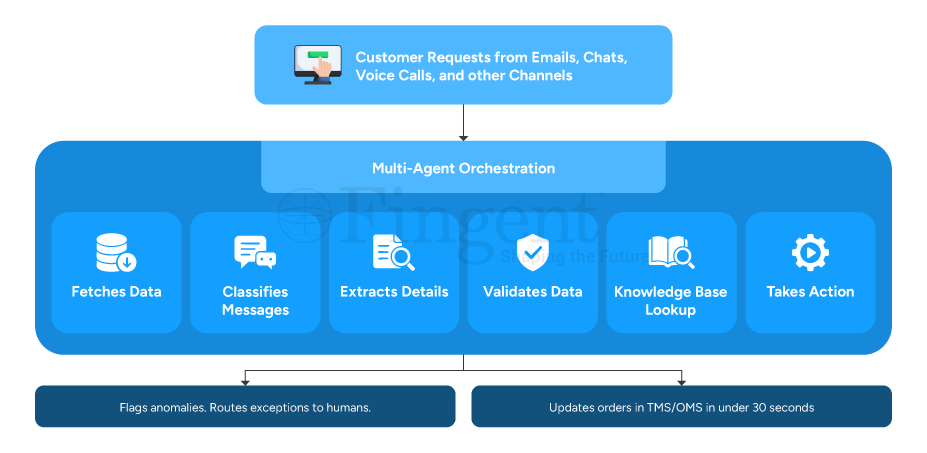
      OrderFlow AI Agent is Fingent’s smart AI Agent-powered solution for efficient order processing. The AI Agent can be custom-integrated with your existing TMS and OMS systems to act as a digital worker and automate your entire order processing workflow. It uses a multi-agent architecture. Specialized AI agents team up to handle requests, validate information, and act in real time without much human intervention. Here’s a closer look at how the system works.

      ai order processing Infographics


      1. Captures Orders from Any Channel: The system automatically identifies and captures relevant order information from emails, chats, voice calls, portals, and more, as soon as it arrives.

      2. Understands and Classifies Requests: The OrderFlow AI Agent intelligently classifies each interaction and routes it through the appropriate workflow, whether it is order modification requests, cancellations, inquiries, or support queries.

      3. Extracts Critical Order Details: The system automatically gathers key information like product details, quantity, pricing, delivery needs, customer info, or special instructions without manual intervention.

      4. Validates Information Against Business Rules: Before processing an order, the system validates its accuracy and compliance by comparing it against specified business rules.

      5. Leverages Enterprise Knowledge: The system can access internal knowledge bases, contracts, historical transactions, policies, and documentation to make informed decisions and support complex order-processing scenarios.

      6. Executes Actions Automatically: The OrderFlow AI Agent takes action in real-time. It updates the OMS/TMS systems with accurate order details and customer data. If exceptions are found, they’re sent to the right team for review. This ensures that human-in-the-loop for enhanced safety.

      The Outcome:

      • Zero-touch order entry
      • Faster order processing and fulfilment
      • Human-in-the-loop exception management
      • Seamless OMS and TMS integration
      • Reduced manual effort and operational costs
      • Continuous process optimization
      • Enhanced safety with robust AI guardrails and security policies

      Don’t Let Traditional Order Processing Methods Sloth Your Business Leverage AI Agents and Scale Without Limits

      Request a Free Demo Now!

      Conclusion

      Order processing is not just about moving information from one system to another. It’s a key business function that directly impacts customer satisfaction, operational efficiency, and business expansion.

      Organizations must ensure efficiency and speed at the core of the order processing workflow.
      AI order processing addresses this with seamless understanding of context, making decisions, handling exceptions, and adapting to changing business needs. That’s exactly what businesses need today.

      It’s time to reshape and redefine with the latest technologies and find a competitive edge in the market.

      Stay up to date on what's new

        About the Author

        ...
        ishaque

        Ishaque is a seasoned Application Architecture & Delivery Manager at Fingent with a strong passion for emerging technologies and digital innovation. He specializes in enabling secure, scalable application architectures, with a particular focus on AI-driven solutions. Ishaque is dedicated to helping organizations adopt modern development strategies that accelerate innovation while maintaining security, reliability, and business value.

        Talk To Our Experts

          Nobody builds a broken order process on purpose.

          It starts with good intentions. A spreadsheet that works. An email thread that keeps everyone in the loop. A team skilled enough to work around the gaps. And for a while, it holds together just fine.

          Then volume grows. Customer expectations shift. And the workflow that once felt manageable starts quietly bleeding money from every direction, in ways no single report will ever fully capture.

          That’s the thing about manual order processing. It doesn’t fail dramatically. It fails slowly. Can order processing automation solve this burning challenge? Let’s find out!

          The Hidden Operational Costs

          Did you know it is with errors that the damage begins? Start there.

          When orders arrive across multiple channels, someone has to read each one. Interpret it, and re-enter it into a system. That process introduces mistakes. Not because the people doing it are careless, but because humans doing repetitive data entry under volume pressure make errors.

          And each error sets off a chain reaction. Wrong item shipped > Return raised > Credit note issued > Customer complaint logged >Re-processed from scratch. What looked like a small mistake at intake turns into a disproportionately expensive problem three steps downstream.

          Then there’s visibility, or the complete lack of it. When your ERP lives in one place, your CRM in another, and order status is buried in someone’s inbox, nobody has the full picture. Exceptions go undetected. A shipment stalls or a customer waits. By then, the relationship is already damaged.

          Approval workflows sitting inside email threads are their own problem. They add hours to every order that needs a second set of eyes. Sometimes days. In industries like logistics and freight, where speed is essentially the product, that delay isn’t a minor inconvenience. It’s a competitive disadvantage dressed up as normal.

          Manual workflows create fragile operations. One absence, one volume spike, or one experienced employee walking out the door can throw the whole system into chaos.

          The Business Impact

          The cost of manual order processing doesn’t come from one catastrophic failure. It accumulates from thousands of small ones.

          1. Reduced productivity

          The small errors matter – the re-entered data, the overtime during peak periods, the customer credits issued to smooth over mistakes that should never have happened. Over time, that adds up to a significant and measurable drag on productivity and profitability.

          2. Difficulty scaling operations

          Scaling makes it worse, not better. Manual processes don’t grow gracefully. When volume spikes, whether from a seasonal rush, a new client, or genuine market growth, the only lever you have is headcount. You hire more people to do the same work at higher volume. Error rates climb because teams are under pressure. Good people burn out doing work that machines should be doing.

          Think about what that means when you look at manual order processing vs automated order processing side by side. One scales with volume. The other scales with people. One gets more accurate over time. The other gets more expensive. One gives you real-time visibility across systems. The other gives you a Monday morning status meeting and a backlog nobody is happy about.

          3. Lost revenue opportunities

          The revenue impact is the part that stings most. Slow fulfillment drives customers toward faster, more reliable competitors. Errors erode trust that took years to build. In logistics, freight, and ecommerce, where the difference between retaining an account and losing it often comes down to speed and accuracy, a process that can’t keep up isn’t just inefficient. It’s a liability.

          How AI Agents Can Transform Order Processing

          This is where the conversation changes. How do you automate order processing?

          Most businesses think they have a people problem – too many delays, too many errors, too much rework. Actually, more often than not, they have a process problem wearing a people costume.

          Understanding how to automate order processing starts with understanding what an AI agent actually does. And no, it is not a chatbot sitting in a corner answering polite little questions all day.

          An AI agent acts. That is the difference.

          It reads incoming orders from emails, PDFs, portals, EDI systems, and spreadsheets. It pulls out the right data, checks it against inventory and business rules, routes the order through approvals, updates connected systems, and flags exceptions before they snowball into expensive problems. No copy-paste marathons. No inbox archaeology. No employee squinting at line items at 7:43 PM, wondering why SKU codes suddenly look like hieroglyphics.

          Fingent’s AI Agent connects with your existing systems, automates clean orders, routes exceptions intelligently, and keeps operations moving without the usual inbox chaos. It’s fast, accurate and scalable.

          For logistics and freight teams, that means processing orders from messy email chains and PDF attachments in minutes instead of hours. For ecommerce businesses, it means surviving peak season without throwing more exhausted humans at the problem every December. And for operations teams processing hundreds of orders a day, it means fewer mistakes, faster fulfillment, and a workday that no longer revolves around repetitive admin work disguised as productivity.

          But the real shift goes deeper than efficiency.

          When your order process runs cleanly at scale, your business changes shape. Teams stop reacting and start planning. And in industries where speed and reliability decide who keeps the account and who loses it, that advantage matters.

          Dive Into The World of AI Agents Enable More Faster and Efficient Order Processing

          Reques a Free Demo Today!

          Frequently Asked Questions

          1. What is order processing automation?

          A. Order processing automation replaces manual order handling with software and AI-driven workflows.

          Your team does not need to bounce between inboxes, PDFs, spreadsheets, and ERP screens. Instead, AI agents capture the data automatically. They validate it against business rules, and move orders through the right workflows in real time.

          2. How can businesses reduce order processing errors?

          A. Businesses reduce order processing errors by reducing manual data entry.

          One wrong digit turns into the wrong shipment. This can frustrate a customer. The support team then has to scramble to clean up a mess that should never have existed in the first place. AI agents catch those problems early. Before the warehouse does. Before the customer does. Before finance starts issuing credits as apologies.

          3. How does order processing automation improve efficiency?

          A. Order processing automation improves efficiency by removing repetitive work and workflow bottlenecks.

          Teams stop wasting half the day entering the same information over and over. AI agents handle those tasks in minutes. Orders move faster. Teams breathe easier. This allows skilled employees to finally spend time solving problems instead of babysitting spreadsheets.

          4. When should a business automate order processing?

          A. A business should automate order processing the moment manual work starts slowing growth.

          If your team is staying late just to clear order backlogs, if mistakes trigger constant rework, or if peak season feels less like growth and more like surviving a natural disaster, then the process already costs too much. Manual operations scale with stress. Automated operations scale with demand. That’s a big difference.

          Conclusion

          Manual order processing doesn’t announce when it becomes a problem. It just costs more every month. Quietly – in errors, in rework, in staff hours, and in customers who don’t come back.

          Order processing automation, powered by AI agents that read, validate, route, and fulfill orders without human intervention, is how modern logistics, freight, and ecommerce businesses stop paying that cost. Not by replacing their teams. By giving those teams work that’s actually worth their time.

          Fingent’s AI Agent for order processing integrates with what you already have and is built to deliver from day one. If your order operations are ready for a better way, we’d like to show you what that looks like.

          Stay up to date on what's new

            About the Author

            ...
            Tony Joseph

            Tony believes in building technology around processes, rather than building processes around technology. At Fingent, he specializes in custom software development, especially in analyzing processes, refining them, and then building technology around it. He works with clients on a daily basis to understand and analyze their operational structure, discover (and not invent) key improvement areas, and come up with technology solutions to deliver an efficient process. You can reach him at [email protected], Skype: tony_fingent

            Talk To Our Experts
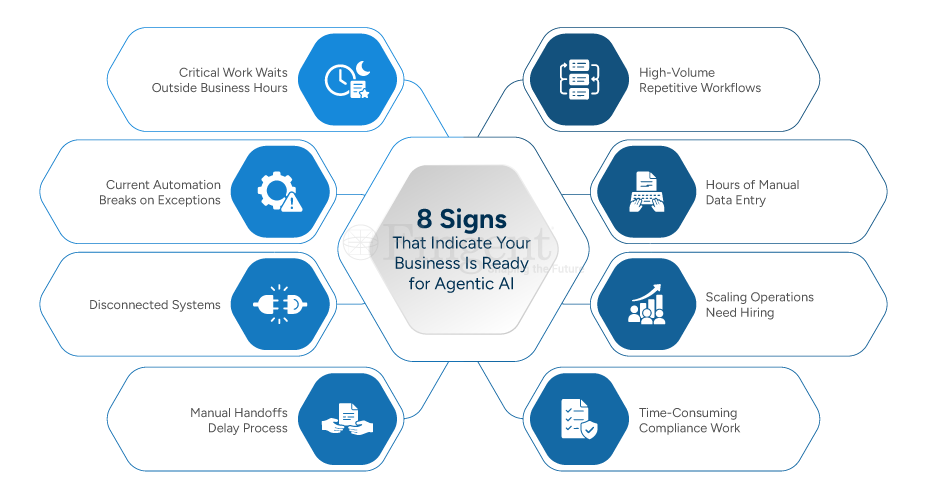
              Busy teams but no real results? It could be because of all that time wasted on manual approvals and spreadsheets. You’re not alone in that challenge. A lot of companies, at some point, see their manual processes begin to slow everything down. This leaves less time for real results.

              That’s where workflow automation makes a difference. With AI, automation evolves from a simple productivity tool into a far stronger resource. Let’s see how this works and why it matters.

              What Is AI-powered Workflow Automation?

              AI workflow automation applies AI technologies to business process automation. It is designed with intelligence at its core. Traditional automation follows fixed rules.

              AI-powered systems go further by:

              • Learning from past data
              • Understanding patterns
              • Making quick decisions
              • Refining processes over time

              You are enabling your systems to think and adapt instead of just getting your tasks automated.

              AI can perform tasks beyond merely handling customer inquiries. It can interpret your messages. Then, it gauges what needs immediate attention. Having analyzed this, it forward them to the appropriate agent.

              How is AI-Powered Workflow Automation Different from Traditional Workflow Automation?

              Conventional workflow automation functions are based on a series of guidelines: If X occurs → execute Y

              It’s reliable, but rigid.
              AI-powered systems are more flexible and intelligent: They understand context, adapt to changing inputs, and continuously improve.

              Here are some key differences:

              Difference Traditional Systems AI
              Rule-based vs Learning-based Operates on predefined rules and fixed logic AI evolves with data
              Structured vs Unstructured Data Works mainly with structured data (forms, databases) AI can process emails, PDFs, and more
              Static vs Adaptive Remains static unless manually updated AI systems improve over time
              Execution vs Decision-making Executes tasks exactly as programmed AI helps decide the next best action

              What are the Benefits of AI-Powered Workflow Automation?

              Time savings are a given. AI-Powered Workflow Automation brings much more to the table. The cost savings – that’s the clincher in terms of real business impact. Let’s break it down:

              1. Less Operational Friction

              Workflow automation routes tasks automatically. This means approvals happen instantly. Bottlenecks get flagged early. AI goes further by spotting patterns, such as repeated delays, and fixing them ahead of time.

              2. Decreased Expenses and Minimized Manual Labor

              Systems that are automated adapt better than manual systems. With workflow automation, organizations are able to:

              • Reduce their dependence on manual tasks
              • Handle higher workloads without increasing headcount
              • Distribute resources more efficiently

              3. Enhanced Precision and Strict Adherence

              AI-powered workflow automation improves precision by:

              • Automatically verifying your data
              • Cross-checking information across systems
              • Flagging inconsistencies that can be seen

              This ensures consistent processes and better audit readiness.

              4. Enriched Customer Experience

              Fast service with minimum delays – that’s non-negotiable with customers today. AI-powered workflow automation empowers businesses to:

              • Respond faster to queries
              • Reduce any delays in resolving issues
              • Ensure that communication is consistent
              • Prioritize follow-up in order of the level of urgency

              5. Predictive and Proactive Decision-Making

              Problems need to be handled before they happen. With AI-powered workflow automation, you can:

              • Predict customer churn
              • Forecast demand
              • Identify any inefficiencies in your processes

              With AI, you’re always on the ball. If a client appears disengaged, AI will sense it. The system can trigger a re-engagement workflow immediately.

              6. Scalability Without Complexity

              Manual processing of procedures is challenging as your company expands.
              With workflow automation:

              • Processes are standardized
              • Systems handle increased volume effortlessly
              • AI adapts to changing business needs

              Integrate Intelligence Within Your Workflow

              Explore Your Options!

              What Business Processes Can Be Improved with AI-Powered Workflow Automation?

              1) Sales & Marketing

              Sales and marketing teams often deal with scattered customer data and slow follow-ups. Qualifying leads manually takes time, and campaign approvals can create delays. As operations grow, tracking customer interactions and measuring campaign performance also becomes more difficult.

              AI-powered workflow automation helps simplify these tasks. It can score leads automatically, send personalized follow-ups, and analyze campaign results in real time. AI also speeds up approvals and reduces repetitive manual work, helping teams respond faster and work more efficiently.

              Key Benefits

              • Smarter lead prioritization
              • Faster customer follow-ups
              • Better campaign performance
              • Quicker approvals
              • Improved sales visibility
              • Less manual work

              2) Customer Service

              Customer service teams often struggle with high ticket volumes, delayed responses, and repetitive customer queries. Manually sorting issues and routing requests to the right teams can slow down resolution times and affect customer satisfaction.

              AI-powered workflow automation helps support teams respond faster and work more efficiently. AI can prioritize urgent issues, provide instant answers through intelligent knowledge bases, and automatically route queries to the right agents. This reduces delays, improves response times, and helps teams deliver better customer support.

              Key Benefits

              • Faster issue prioritization
              • Instant customer responses
              • Smarter ticket routing
              • Reduced response delays
              • Improved customer satisfaction
              • Less manual workload

              3) Legal & Compliance

              Legal and compliance teams spend excessive time handling documents, tracking deadlines, and preparing reports manually. Missing important dates, overlooking risks, or managing large volumes of compliance data can increase operational and regulatory challenges.

              AI-powered workflow automation helps simplify these tasks by automatically generating reports, extracting key information from documents, and tracking important deadlines. AI can also identify potential risks early and send alerts, helping teams stay compliant with less manual effort.

              Key Benefits

              • Automated compliance reporting
              • Faster document data extraction
              • Better deadline tracking
              • Early risk identification
              • Reduced manual effort
              • Improved compliance accuracy

              4) Finance

              Finance teams often deal with repetitive manual tasks like invoice processing, claim verification, and financial data validation. These processes can be slow, error-prone, and difficult to manage at scale, increasing the risk of delays, fraud, and compliance issues.

              AI-powered workflow automation helps finance teams process invoices faster, automate policy-based claim verification, and monitor transactions in real time. AI can also detect unusual activities and trigger alerts early, helping businesses improve accuracy, reduce risks, and speed up financial operations.

              Key Benefits

              • Faster invoice processing
              • Automated claim verification
              • Real-time anomaly detection
              • Reduced financial errors
              • Better fraud prevention
              • Improved operational efficiency
              Automate 99% of Your Routine Workflows With AI

              Read Full Use Case

              How Do You Implement Workflow Automation Successfully?

              You cannot rush it with workflow automation implementation. A systematic approach is key . This can help your business save costly resources.

              1. Identify Scope Areas

              Identify which areas will benefit most from automation. Look into your current workflows, and see:

              • What tasks are repetitive and based on fixed rules?
              • Where are the bottlenecks?
              • What processes have a large amount of data or manual work?

              Focus on workflows that:

              • Require frequent approvals
              • Involve multiple handoffs
              • Are prone to human error

              When you map out your workflows visually, you can see the gaps in your processes.

              Bonus tip: Focus on high-impact, low-complexity processes for some quick wins.

              2. Define Automation Goals

              Set clear goals. This helps align teams, set expectations, and measure ROI. For AI-driven automation, these goals could be a starting point:

              • Improve decision accuracy
              • Enable predictive insights
              • Enhance personalization

              3. Pick The Right Tools

              The right platform should fit your needs, not just offer features. Look for the following features:

              • Can it process unstructured data and learn?
              • Does it connect with your CRM, ERP, or accounting tools?
              • Will it grow with your business?
              • Can your team use it easily?
              • Can workflows be tailored?

              4. Begin with a Pilot Phase

              Start with one process. Implement the automation in that process, and monitor the results.
              This helps you:

              • Validate your approach
              • Identify gaps early
              • Gather user feedback

              5. Monitor and Improve – Continuously

              Track key metrics like:

              • Processing time
              • Error rates
              • Cost savings
              • Customer satisfaction

              These are things you should do continuously:

              • Analyze workflow data
              • Update rules or models
              • Use feedback to enhance workflows

              Yes, AI systems improve over time. They still need regular checks and changes.

              Frequently Asked Questions (FAQs)

              1. Can AI-powered workflow automation handle unstructured data?

              A. Yes. Making sense of unstructured data – that is the superpower of AI. This is crucial because business data is often unstructured, like emails, PDFs, scanned documents, images, handwritten notes, and chat conversations.

              Systems powered by AI can:

              • Read and understand emails. It can understand intent and urgency.
              • Extract key data from documents even if formats vary.
              • Understand customer queries

              Example: An AI system can scan a PDF invoice. It extracts vendor details and matches them to a purchase order. It then, without any human input, forwards the document for approval.

              2. What is the difference between AI automation and RPA?

              A. There is a clear difference between the two. Understanding the difference will help you make the best of either or both.

              RPA is mainly used for:

              • Repetitive, rule-based work
              • Structured data environments
              • High-volume, predictable processes

              This could be anything, such as data entry from one system to another, generating reports, or completing a regular transaction.

              With AI automation, your systems can:

              • Learn from previous data
              • Adapt to changing inputs
              • Handle ambiguity and complexity
              • Make context-aware decisions

              For instance:

              • RPA can process an invoice if the format is fixed
              • AI can handle invoices with different templates or that are incomplete

              The power combination of both might be what you need for the best results. RPA for – structured, repetitive execution. AI for – incorporating decision-making, pattern recognition, and flexibility.

              3. What is the ROI of AI-powered workflow automation?

              The ROI for AI-driven workflow automation can be seen across different areas of the business.

              1. Reduction in Costs

              • Reduces dependence on manual labour
              • Reduces overtime and operational overhead
              • Reduces error and rework costs

              2. Time Efficiency

              • Shortens processing cycles (days to hours—or even minutes)
              • Eliminates waits for manual approvals/pick-ups/deliveries
              • Enhances the overall capacity of the operation

              3. Accuracy and Risk Reduction

              • Minimizes opportunity for human error in data input and reporting
              • Ensures compliance through consistent processes
              • Detects anomalies and potential fraud early

              4. Revenue Growth Opportunities

              • Faster lead response improves conversion rates
              • Better customer experience increases retention
              • AI-led insight into new opportunities

              5. Customer Satisfaction

              • Faster query resolution
              • Personalized interactions
              • Consistent service delivery

              Most companies start seeing measurable returns in a matter of months, particularly if they begin with high-impact processes such as finance operations or customer support.

              As a result, ROI compounds. As systems become more intelligent by learning from data and making better decisions, an AI-powered workflow automation will keep providing continuously greater value without needing an incremental amount of effort or costs.

              Wait No More! Drive Business Excellence with AI-Powered Workflow Automation

              Contact Us Now!

              How Can Fingent Help?

              It’s a no-brainer – automating workflows gives you a leg up on the competition. The trick is to execute it effectively. That’s where a reliable tech partner is key.

              Fingent’s approach is geared towards realizing quick wins by addressing high-impact ones, such as:

              • Minimizing operational obstacles
              • Decreasing physical effort and operational costs
              • Improving customer contentment
              • Anticipating results using AI

              These solutions are adaptable and allow your business to gain rapid success. They provide a solid foundation for ongoing expansion via AI-powered workflow automation.

              Ready to give your processes a competitive edge? Connect with Fingent to explore how AI-powered workflow automation can simplify your operations and give you the best results.

              Stay up to date on what's new

                About the Author

                ...
                Tony Joseph

                Tony believes in building technology around processes, rather than building processes around technology. At Fingent, he specializes in custom software development, especially in analyzing processes, refining them, and then building technology around it. He works with clients on a daily basis to understand and analyze their operational structure, discover (and not invent) key improvement areas, and come up with technology solutions to deliver an efficient process. You can reach him at [email protected], Skype: tony_fingent

                Talk To Our Experts
                  Does this sound familiar? Your sales manager has a client call in 20 minutes. She needs the deal status from the CRM, a delivery timeline from the project tool, and the latest inventory figure. Three systems with four screens. By the time she is done, one number has changed.

                  This is not a data problem. It is an access problem. It’s the exact gap modern enterprise AI is built to close. Although not every AI is built for it.

                  A chatbot handles a question. An enterprise AI assistant handles the complexity behind it. Getting that distinction right before you build anything is what separates a strong AI investment from an expensive lesson. Here’s a deep dive into Conversational AI Chatbot vs Assistants!

                  What Is a Conversational AI Chatbot?

                  A conversational AI chatbot listens, interprets, and responds. NLP handles the intent, and Machine learning sharpens it over time. It works best in a defined domain: customer support, HR queries, appointment booking, and onboarding.

                  It handles those things well at high volume and around the clock. That focused reliability is exactly what makes it valuable — and exactly where it ends.

                  What Is an Enterprise AI Assistant?

                  An enterprise AI assistant is a different class of tool entirely. Where a chatbot answers from a single system, an AI assistant orchestrates queries across your CRM, ERP, project management platform, document repositories, and more — simultaneously. It uses Retrieval-Augmented Generation (RAG) to ground every response in live, verified data rather than outdated training knowledge. MCP servers and API-based tool calls let it act, not just respond.

                  The result: one question in plain English; one coherent answer drawn from across your enterprise. No toggling between screens. No waiting for a report to land in your inbox.

                  AI assistants are not smarter chatbots. They are intelligent interfaces to the enterprise itself.

                  Conversational AI Chatbot vs Assistants: The Core Differences

                  Here is where the two diverge in ways that actually matter for a deployment decision.

                  Dimension Conversational AI Chatbot Enterprise AI Assistant
                  Purpose Handle specific, repetitive tasks within a defined domain Reason across systems and deliver knowledge from multiple data sources
                  Interaction Complexity Low to medium. Handles straightforward, scoped queries High. Manages multi-step, context-rich interactions with follow-up reasoning
                  Technology NLP, rule-based logic, limited ML, single-system integration NLU, deep learning, RAG, MCP servers, API orchestration, tool calls, and LLM agents
                  Data Reach Typically one or two integrated systems CRM, ERP, documents, project tools, and databases simultaneously
                  Context and Memory Session-level only. Usually resets between conversations Persistent context across sessions, users, and organizational history
                  Adaptability Improves within its domain. Cannot expand scope independently Continuously learns from new data and adapts to changing enterprise context
                  Response Quality Scripted or ML-generated replies from a limited dataset RAG-grounded answers from live, verified enterprise data with source traceability
                  Governance Simpler to govern. Limited data exposure risk Requires role-based access, data governance policies, and audit logging
                  Primary Value Reduces volume of repetitive human interactions Reduces decision latency and improves decision quality with real-time data

                  When Should You Choose an AI Assistant Over a Chatbot?

                  The scope is the deciding factor, really.

                  Repetitive, well-defined, single-source interactions like FAQ handling, HR self-service, and lead capture are chatbot territory.

                  An AI assistant earns its place when teams toggle between systems for one answer, when executives wait on analysts for data they should already have, or when institutional knowledge is buried where no one looks.

                  A simple test from our practice: if one internal question requires more than two systems to answer, you have an assistant problem, not a chatbot problem.

                  Build AI that Works for Your Business

                  Explore Now!

                  Use Cases for Conversational AI Chatbots

                  Conversational AI Chatbots are finding their way into every sphere of industry. 58% of B2B companies and 42% of B2C companies integrate chatbots into their websites. But that is not the only use of chatbots. Some use cases:

                  • Customer support: Resolve common tier-1 queries instantly, such as order status, password reset process, FAQs, and troubleshooting steps without requiring live agent involvement. Provide 24/7 assistance across channels while reducing support workload and improving response times.
                  • HR self-service: Enable employees to quickly access leave balances, payroll schedules, reimbursement status, and company policies through conversational interactions. Reduce repetitive HR queries and improve employee experience with instant, on-demand support.
                  • Lead qualification: Engage website visitors in real time by asking relevant qualifying questions based on industry, requirements, budget, or urgency. Automatically score, segment, and route high-intent leads to the right sales representatives for faster follow-ups.
                  • Learning and onboarding: Deliver interactive onboarding experiences by guiding employees, customers, or partners through training materials, workflows, and product tutorials conversationally. Improve knowledge retention with contextual assistance and step-by-step guidance.
                  • Incident alerting: Monitor systems continuously and instantly notify engineering or operations teams when predefined thresholds or anomalies are detected. Share contextual insights, recommended actions, and escalation workflows directly within collaboration channels.

                  Use Cases for Enterprise AI Assistants

                  • Sales intelligence: Give sales teams instant access to deal status, account history, renewal timelines, and customer interactions from CRM systems through a single conversational query. Help teams make faster, data-driven decisions without switching between multiple platforms.
                  • Project team Q&A: Provide real-time visibility into overdue tasks, project dependencies, delivery risks, and resource allocation without requiring lengthy status meetings. Enable project managers and teams to quickly identify bottlenecks and take corrective action.
                  • Internal knowledge search: Surface-verified answers from enterprise documents, SOPs, wikis, emails, and internal systems in plain English. Reduce time spent searching for information while ensuring employees have access to the most accurate and up-to-date knowledge.
                  • Customer self-service: Handles complex customer account queries by pulling information simultaneously from CRMs, billing platforms, ticketing systems, and knowledge bases. Deliver faster, personalized responses without requiring manual support intervention.
                  • Executive decision support: Provide leadership teams with on-demand insights into business performance, sales pipelines, operational metrics, and financial trends through conversational dashboards. Deliver sourced, contextual answers that support faster strategic decision-making.

                  Fingent in Practice

                  Fingent is an expert in developing custom, AI-powered conversational bots for our clients. Here is a look at some client case studies.

                  Case Study 1: Turning 3.4 Million Conversations into Marketing Intelligence

                  A $700 million media organization was logging 9,400 customer calls daily. None of it was being analyzed. Marketing campaigns ran on incomplete information. Product decisions chased delayed feedback rather than real-time customer sentiment.

                  Fingent built a conversational AI agent on Azure OpenAI with RAG on PostgreSQL with pgvector and MCP-based tool integration. Marketing users could query the entire call database in plain English and get answers in seconds.

                  Results: 85% average time savings on research tasks. Work that took over 4 hours is now done in under 15 minutes. Campaign development accelerated by 3 weeks. In the pilot, the system answered 78% of queries correctly from day one.

                  Case Study 2: A Teaching Assistant That Never Sleeps

                  The University of North Carolina needed to scale student support without scaling headcount. Students faced delayed responses to queries. Instructors were stretched thin.

                  Fingent built AiTA, an AI-enabled Teaching Assistant powered by IBM Watson. Instructors upload content and train bots directly. Students get real-time query resolution, 24/7, without waiting on office hours.

                  Results: Faster query resolution without instructor intervention. Improved student satisfaction and engagement. Streamlined content management for educators. Support that scales without adding staff.

                  How Businesses Can Win with AI: Best Practices

                  • Start with process, not technology. Map where time is actually lost before choosing a tool. The problem should drive the decision, not the other way around.
                  • Use RAG for any assistant querying live data. Without it, answers are only as current as the model’s training data. With it, every response reflects your actual organizational reality.
                  • Design for multi-system integration from day one. An assistant that reaches one system will quickly frustrate users who expect more. Build the integration layer on MCP and secure APIs that can scale.
                  • Govern from the start. Role-based access and audit logging are not optional. They are what make an AI assistant safe in regulated or data-sensitive environments.
                  • Deploy focused, then expand. Solve one high-friction workflow well. Measure and refine. Then scale. Trying to solve everything at once usually means solving nothing convincingly.
                  Embrace the Change! Drive Business Transformation with AI

                  Contact Us Now!

                  Frequently Asked Questions

                  Q. How is conversational AI different from traditional chatbots?

                  A. Traditional chatbots follow scripts. Go off-script, and they break.

                  Conversational AI is different. It understands intent, manages context across the session, and handles variation naturally. It also improves with each interaction, so the longer it runs, the more accurately it serves your users. The practical difference shows up in edge cases: a chatbot struggles with them; conversational AI adjusts to them.

                  Q. Can enterprise AI assistants connect with CRM, ERP, and internal documents?

                  A. Certainly. Via APIs, MCP orchestration, and tool calls, an enterprise AI assistant simultaneously queries systems such as Salesforce, SAP, and document repositories, providing one unified response from a single request.
                  MCP, known as the Model Context Protocol, functions as a universal connector. Rather than creating unique connectors for each system, it provides AI agents a uniform method to safely explore and connect with your complete enterprise infrastructure. No toggling between screens. No delicate single-use integrations.

                  Q. How does RAG improve enterprise knowledge assistants?

                  A. RAG retrieves information from your data sources at query time before generating a response. This matters because standard AI models are trained on static datasets. They cannot reflect a policy updated last week or a deal closed yesterday. RAG bridges that gap by pulling live, relevant context from your actual systems and feeding it to the model before it responds. The result is answers grounded in current organizational reality, not outdated training data. It also reduces hallucinations significantly and gives users verifiable, source-cited responses they can act on with confidence.

                  Q. What is right for my business, a Conversational AI Chatbot or Assistants?

                  A. Start by asking where your team loses time. If the bottleneck is repetitive and draws from one or two sources, a chatbot solves it efficiently. If people are toggling between systems, waiting on analysts, or failing to find knowledge that exists but is buried, that is an AI assistant problem.

                  The distinction matters at scale, too. A chatbot in the wrong context hits its limits fast, and trust erodes. An AI assistant without proper RAG and governance risks confident-sounding answers that are simply wrong.

                  At Fingent, we map where decisions slow down and where data is fragmented before recommending either. The right tool becomes obvious once you see the actual workflow.


                  How Fingent Can Help

                  As specialists, Fingent knows all there is to know about both conversational AI Chatbots as well as Assistants. We know that the right AI tool is not always the most advanced one. It is the one built around your actual process. Which is why, we start with your operational structure, not a technology recommendation. The conversational AI chatbot vs assistants decision looks different for every enterprise — and it should. We map the friction, identify what fits, and build around your process.

                  From sales and project team assistants to internal knowledge search and customer self-service portals, we give employees a natural language interface into their enterprise data without the multi-screen overhead.

                  If your team is searching for answers that already exist somewhere in your systems, that is a solvable problem. Let us show you how.


                  Stay up to date on what's new

                    About the Author

                    ...
                    Tony Joseph

                    Tony believes in building technology around processes, rather than building processes around technology. At Fingent, he specializes in custom software development, especially in analyzing processes, refining them, and then building technology around it. He works with clients on a daily basis to understand and analyze their operational structure, discover (and not invent) key improvement areas, and come up with technology solutions to deliver an efficient process. You can reach him at [email protected], Skype: tony_fingent

                    Talk To Our Experts
                      Intelligent integration architecture – it’s more valuable than you think. Yes, your enterprise already has AI, the forecasting models, recommendation engines, and automation workflows.

                      Now here’s the hard question: Are these systems creating value together or quietly cancelling each other out?

                      Most organizations don’t notice the gap until something breaks. A demand signal triggers procurement. Procurement optimizes for cost. Logistics is constrained by capacity and then delivery slips.

                      Each system performs correctly on its own. The failure happens between them, showing up not as errors but as missed revenue, delayed responses, and silent inefficiency.

                      These raise uncomfortable questions:

                      • Who decides when multiple AI systems disagree?
                      • Where is alignment enforced before execution begins?
                      • How much revenue leakage hides inside “correct” but conflicting decisions?

                      This is where Intelligent integration architecture becomes critical. It defines how intelligence flows, aligns, and executes across enterprise systems.

                      What Is an Intelligent Integration Architecture?

                      Intelligent integration architecture is the structural design that enables AI systems, services, and agents to operate as a coordinated network rather than isolated components.

                      Traditional integration connects systems, while intelligent integration ensures they act together, not in conflict. In practical terms, this shifts integration from data exchange to decision alignment.

                      At its core, it defines:

                      • How AI systems communicate
                      • How decisions are prioritized
                      • How actions are executed across systems
                      • How feedback loops refine outcomes

                      This layer functions above microservices and APIs. It frequently uses event-driven architecture (EDA), orchestration engines, and shared context layers to align decisions throughout distributed systems.

                      In modern Enterprise AI architecture, integration must handle:

                      • Real-time decision flows
                      • Cross-system dependencies
                      • Dynamic workloads
                      • Continuous learning cycles

                      Without this structure, enterprises don’t just face system fragmentation. They face decision fragmentation at scale.

                      The Core Components of Intelligent Integration

                      To understand how this architecture works, we need to break it into execution layers that mirror real-world systems.

                      1. MCP Servers: The Coordination Backbone

                      MCP servers can be understood as coordination hubs within the control plane, similar in role to orchestration engines or API gateways, but focused on maintaining decision context across systems.

                      Think of them as control points. Not passive connectors. Their responsibilities include:

                      • Routing tasks between systems
                      • Managing execution context
                      • Handling state across workflows
                      • Enforcing communication protocols

                      In practice, this function is often implemented using workflow orchestration platforms (such as Temporal or Camunda) combined with event streaming systems like Kafka to maintain state and sequencing.

                      In the context of MCP servers in enterprise AI, they ensure that interactions between agents and systems remain structured and traceable.
                      Without it, integration becomes fragile, costly, and doesn’t scale.

                      2. Agent Frameworks: The Execution Layer

                      Agent frameworks define how autonomous or semi-autonomous AI agents operate. Agents are not just models. They are decision-makers with defined roles, combining models, rules, tools, and memory within controlled autonomy.

                      Agent frameworks provide:

                      • Lifecycle management
                      • Task orchestration logic
                      • Inter-agent communication protocols

                      In real-world implementations, frameworks such as LangChain or AutoGen enable agents to interact with APIs, tools, and other agents in structured workflows.

                      In Agent frameworks for enterprise AI, the goal is not autonomy for its own sake. It is controlled autonomy aligned with business outcomes.

                      Because unmanaged autonomy does not scale. It multiplies risk.

                      3. Orchestration Layer: The Control Mechanism

                      This is where coordination becomes execution.

                      An AI orchestration framework ensures that multiple agents and systems work together without conflict.

                      It defines:

                      • Task sequencing
                      • Dependency resolution
                      • Conflict management
                      • Priority handling

                      Technically, this layer integrates workflow engines, rule engines, and event-driven pipelines to enforce coordination across distributed systems.

                      This is where AI system orchestration becomes visible. Without it, systems compete; with it, they align. The real challenge begins when speed clashes with cost, multiple agents are right, and coordination slows decisions.

                      The orchestration layer resolves this in real time by balancing speed, cost, and accuracy.

                      What Is Intelligent Integration & What Does It Promise For Enterprises in 2026?

                      Read More!

                      How Intelligence Is Coordinated Across Systems

                      Most enterprises treat coordination as a setup task. It is not. Every new data signal, agent decision, or system update has the potential to create misalignment downstream.

                      Coordination has to run continuously, not occasionally. In a well-designed Enterprise AI integration framework, this happens through a structured flow that keeps every system in sync as conditions change:

                      • Input Aggregation: Data flows in from ERP, CRM, and operational systems.
                      • Context Formation: MCP-like coordination layers establish shared context using event streams and state management systems.
                      • Agent Activation: Relevant agents are triggered.
                      • Decision Coordination: The orchestration layer aligns outputs before execution.
                      • Execution Across Systems: Actions are executed across platforms.
                      • Feedback Loop: Outcomes are captured and refined.

                      The critical insight! Failures rarely occur at execution. They occur before execution, when context is misaligned.

                      This is how Coordinating AI across enterprise systems becomes structured rather than reactive.

                      Architecture in Practice

                      In an Enterprise AI architecture, consider a supply chain scenario:
                      A demand forecasting agent predicts a surge, then a procurement agent evaluates suppliers, and then a logistics agent plans distribution.

                      Now consider the reality. Procurement saves money, logistics saves time, and finance protects budgets. Yet no one saves the outcome.

                      With AI agents orchestration architecture:

                      • MCP servers establish shared context
                      • Agents exchange insights
                      • The orchestration layer resolves trade-offs
                      • Execution follows a unified plan

                      The result is fewer conflicting decisions, faster alignment, and measurable operational efficiency.

                      Extend this further: in customer experience systems, pricing engines, recommendation engines, and churn prediction models often act independently. Without coordination, they optimize different outcomes. With integration, they align toward a single customer strategy.

                      This is the difference between automation and intelligence.

                      Key Design Principles

                      Good architecture is not just about performance. It is about accountability. When something goes wrong, you should be able to trace what happened and why. Without that clarity, small issues turn into expensive problems. These principles ensure that visibility is never lost.

                      Principles for an Intelligent System Architecture

                      1. Context Awareness
                      2. Controlled Autonomy
                      3. Real-Time Coordination
                      4. Scalable AI integration layer architecture
                      5. Observability and Governance

                      Challenges in Implementation

                      Designing architecture is one part, but implementation is where most failures occur. In most enterprises, these failures appear in a few recurring patterns:

                      1.  Legacy System Constraints

                      Legacy systems were built for batch processing, not real-time integration. When AI agents need immediate data, these systems quickly become bottlenecks.

                      Solution: Implement abstraction layers and APIs between legacy systems and the integration layer. Event-driven connectors enable legacy systems to react almost in real time without requiring a complete overhaul.

                      Trade-off: You incur increased latency and initial integration expenses. This is still significantly less expensive than dismantling core systems.

                      2. Fragmented Data Sources

                      AI is only as good as its data. When that data is inconsistent or siloed, agents start making decisions no one can trust.

                      Solution: Unify data models and uphold governance. Employ data agreements, uniform formats, and verification prior to data entering decision processes.

                      Trade-off: Substantial initial engineering work. Bypassing it means you’ll face the consequences later through poor choices and expensive repairs.

                      3. Agent Conflict and Overlap

                      Several agents collaborating on the same signals might appear to be effective. In truth, it results in clashes, redundancy, and disruption.

                      Solution: Establish distinct responsibilities for every agent. Allow the orchestration layer to serve as the ultimate decision-maker in cases of conflict.

                      Trade-off: Reduced independence for each agent. However, unchecked autonomy at scale produces greater risk than benefit.

                      4. Scalability Issues

                      What succeeds with a small number of agents fails quickly when scaled up. Latency increases, conflicts proliferate, and visibility decreases

                      Solution: Create with a modular approach from the start. Each component must be deployable and replaceable on its own.

                      Trade-off: Increased preparation and greater initial effort. However, expanding a well-organized system is much simpler than repairing a delicate one afterwards.

                      Still Wondering If You Need Intelligent Integrations?We Can Help You Seamlessly Embed AI into Your Processes to Enable Faster Results.

                      Talk To Us Now!

                      FAQs

                      Q. In what way do AI agents collaborate within enterprise systems?

                      A. AI agents operate within well-defined roles and interact via structured protocols. A coordination layer, similar to an MCP server, maintains shared context. This helps every agent to know what others are doing. The orchestration layer subsequently coordinates its outputs before execution. Doing so ensures they aim for a single outcome rather than moving in different directions.

                      Q. What is AI orchestration, and why does it matter?

                      A. AI orchestration manages decisions and actions among agents and systems. It arranges tasks, addresses dependencies, and manages conflicts when results collide. In its absence, every system seeks its own optimization. That can lead to a negative impact on the overall business results, despite the good performance of individual components.

                      Q. What function do MCP servers serve in AI integration?

                      A. MCP servers acts as central coordination points. They direct tasks, uphold execution context, and ensure organized communication among agents. In the absence of this layer, interactions turn unstructured, difficult to track, and unstable when scaled.

                      Q. In what ways are agent frameworks utilized in enterprise AI?

                      A. Agent frameworks outline the construction, deployment, and regulation of agents. They oversee the lifecycle, regulate the transformation of inputs into actions, and standardize interactions with systems and tools. Frameworks such as LangChain and AutoGen facilitate transparent, verifiable workflows rather than unclear, black-box actions.

                      Q. How do organizations align intelligence across different systems?

                      A. Structure gives rise to alignment. Orchestration layers arrange decisions in sequence, coordination centers uphold a common understanding, and agent frameworks dictate actions. Collectively, they guarantee that various systems function as a unified whole instead of rival units pursuing different objectives.

                      Q. What is the difference between AI architecture and AI integration architecture?

                      A. AI integration architecture is about making sure those systems work together. One focuses on creating capable models and the infrastructure behind them. The other focuses on what happens when multiple capable systems are running at the same time.

                      Q. Is intelligent integration architecture suitable for legacy systems?

                      A.Yes. Legacy systems were never built for real-time coordination. Replacing them is not the only option, though. APIs and abstraction layers act as bridges. Thus, allowing older systems to connect with modern components without a full rebuild. Event-driven connectors go a step further by allowing responses to real-time signals rather than depending on batch cycles.

                      Enable Enterprise AI Architecture for Your Business

                      Enterprises no longer struggle to build AI. They struggle to align it. It is from isolated intelligence to coordinated execution. Intelligent integration architecture defines how that coordination happens.

                      The real question is, are your systems thinking together or competing silently at scale?

                      This is where the right partner becomes critical.

                      At Fingent, the focus goes beyond building AI solutions to enabling Enterprise AI architecture that aligns intelligence across the business. With expertise in AI integration architecture and orchestration, Fingent helps organizations move from fragmented adoption to coordinated execution.
                      From designing AI orchestration framework layers to implementing Agent frameworks for enterprise AI and Coordinating AI across enterprise systems, the objective is simple: one unified business outcome.

                      Competitive advantage doesn’t come from more AI. It comes from AI that works as one.

                      Stay up to date on what's new

                        About the Author

                        ...
                        Tony Joseph

                        Tony believes in building technology around processes, rather than building processes around technology. At Fingent, he specializes in custom software development, especially in analyzing processes, refining them, and then building technology around it. He works with clients on a daily basis to understand and analyze their operational structure, discover (and not invent) key improvement areas, and come up with technology solutions to deliver an efficient process. You can reach him at [email protected], Skype: tony_fingent

                        Talk To Our Experts
                          Most AI initiatives do not fail because they never reach the core of the business. They might stay in pilots, generate insights, and impress in presentations. But they do not impact decision-making.

                          The real question for enterprises in 2026 is: How to enable Intelligent Integration with AI?

                          If AI is separate from operational systems, it stays in the experimental phase. No one wants that. If it is embedded inside workflows, data flows, and decision points, it becomes structural. That shift is called intelligent integration. It is not about adding tools. It’s about upgrading the brains of the systems already running your business so they do more than process. They learn, reason, and act.

                          That distinction is what separates short-lived experimentation from lasting enterprise impact.

                          What Is Intelligent Integration in AI and Why Does It Matter Now?

                          The urgency is not ambiguous. Did you know that in three years, over 40% of agentic AI projects will be discontinued? Why so? Unclear business values, insufficient governance, and rising costs.

                          In plain terms, excitement is high, strategic planning is low. The technology is sprinting ahead. The strategy behind it is limping. And in this race, speed without direction is just expensive noise.

                          That is precisely why intelligent integration matters. When intelligence lives inside revenue and risk systems, value is measurable. Governance gets real.

                          Discover Ways To Maximize Business Impact With AI Let Us Help You Start Small and Scale Smart

                          Talk To Us Now!

                          How Is Intelligent Integration Different from AI Automation?

                          The key difference between the two is this. Automation rule-driven and great at repeatable work. Think batch invoice processing – reliable and predictable. Intelligent integration is different. It turns systems from task runners into decision makers. Add context and feedback, and they stop repeating work. They start getting smarter.

                          Today, leaders are moving beyond task automation toward decision augmentation and operationalized generative and agentic AI. But here’s the catch. Where there is no governance, there are no gains.

                          If AI actions are not tied to business KPIs, you are not scaling intelligence. You are scaling guesswork.

                          How Agentic AI and AI Agents Enable Intelligent Integration

                          Agentic AI and AI agents are a pattern for modular intelligence. Think of agentic AI as a set of specialist workers embedded across systems. Each agent has a bounded remit, clear inputs/outputs, and a governance envelope:

                          • CRM lead-qualification agent — scores and routes leads inside the CRM.
                          • Support triage agent — classifies tickets and suggests fixes inside the ticketing system.
                          • Procurement forecasting agent — adjusts reorder triggers inside the ERP.

                          This multi-agent approach lets enterprises add intelligence without rebuilding core systems. Gartner and Forrester reports indicate enterprises are increasingly piloting and embedding such agentic patterns, but warn that many projects will fail unless value and risk are clearly defined.

                          What Are Examples of Intelligent Integration in Enterprises?

                          The following examples aren’t “AI on the side” add-ons. They are intelligence built into the system fabric where value gets tracked, decisions speed up, and existing platforms stay intact.

                          1. AI-powered operational assistant in marketing opsAn award-

                          winning experiential marketing firm in the US embedded an AI assistant into their existing CRM, project management, and inventory systems to enable unified data management. This powers the sales operators during client calls with quick access to relevant customer data.

                          The solution reduces the routine information lookup workload by 70%. The time taken to analyze project data is reduced by 75%. Sales productivity is improved by 3–5% and Report generation time fell by 40%.

                          2. Conversational AI for real-time marketing insight

                          A diversified media organization serving millions of customers online implemented a conversational AI agent to extract meaningful insights from their customer calls. It analyzes 9,400 daily call interactions in real time. It improves intelligence gathering, enhances clarity on changing trends and customer behavior, and accelerates campaign development by 3 weeks.

                          The team can now enhance customer engagement and brand value with customer-specific marketing campaigns and product enhancements.

                          3. AI lead response automation

                          A leading IT firm in the US was losing 30-40% of potential leads due to a slow and manual lead management process. They embedded AI Agents into their sales workflow to identify, qualify, and route leads automatically.

                          The solution helps reduce response time from 4–24+ hours to one hour. It enables 100% accuracy in sales manager assignment. Classification accuracy reached 96%. No opportunities are lost due to delays.

                          4. AI-powered ticketing in support workflows

                          A global technology and electronic company had their skilled agents spend more time on administrative triage than real problem resolution. Manual email triage and ticketing led to time-consuming and error-prone processes.

                          A custom AI ticketing system was embedded into the existing support platform. It auto-triages emails and routes tickets intelligently. Manual bottlenecks were reduced. Resolution consistency improved. Throughput increased without replacing the core system. Manual handling time was reduced by 80%. Agent productivity boosted by 40%.

                          Organizational Capabilities You Must Build (Not Buy)

                          Technology alone won’t deliver outcomes. Organizations must develop:

                          • MLOps and governance: The foundational support for AI operations. This encompasses model oversight, performance evaluation, retraining processes, audit records, and compliance measures to mitigate drift and unmanaged risk.
                          • Quantifiable KPIs and use cases: Domain product owners are business leaders who establish quantifiable KPIs, prioritize use cases, and hold themselves responsible for results. They make certain that AI projects address genuine operational issues rather than just theoretical ones.
                          • Human involvement in the process: Established oversight systems in which critical or risky choices necessitate human confirmation. This safeguards against automation mistakes and maintains responsibility.
                          • Preparing for the change: Organized adoption initiatives that synchronize process reworking, education, and communication. AI is effective when it enhances results without causing unnecessary workflow interruptions

                          A Practical Enterprise Rollout Roadmap (Six Steps)

                          This incremental approach reduces the risk and increases the odds of sustained value capture.

                          1. Diagnose & prioritize – Audit workflows for decision friction.
                          2. Define value metrics – Replace vague goals with measurable targets.
                          3. Architect with a containment strategy – Choose an integration pattern. Ensure fallback and human override.
                          4. Build an agent MVP – One bounded agent integrated into a single workflow. Measure business impact against your chosen metrics.
                          5. Operationalize (MLOps + monitoring) – Build model serving, feature stores, drift detection and operational dashboards. Measure both model health and business impact.
                          6. Scale by function – Expand agents into adjacent workflows and maintain interoperability via shared services and feature stores.

                          The Economics: Value First, Cost Disciplined

                          Remember, organizations that focus on scaling and building organizational capability realize substantially greater value from AI investments. Here’s what you can do:

                          1)  Cost model

                          Intelligent integration often wins on total cost of ownership versus replatforming, because it:

                          • Leverages existing licensing and processes
                          • Delivers faster ROI via targeted KPIs
                          • Avoids the one-time capital shock

                          Ensure to make cost-vs-value explicit in the pilot business case and tie future funding to measured outcomes.

                          2. Risk and controls: governance checklist

                          Embed governance into the integration lifecycle:

                          • Decision audit trails — every agent action must be traceable back to inputs, model version, and human sign-off.
                          • Role-based permissions — limit which agents can act automatically vs. recommend only.
                          • Safety boundaries — agents that touch financials, safety, or legal workflows should be recommendation-only until proven.
                          • Testing & staging parity — production-like data in staging reduces surprises.
                          • Drift and fairness monitoring — monitor performance across cohorts to catch regressions.

                          Failure to control agent scope is a leading cause of project cancellation and reputational risk. Put governance first.

                          3. Security and Compliance Considerations

                          Enterprise AI integration must account for data residency and access control. Include third-party model risk.

                          Organizations implementing intelligent integration must ensure:

                          • Strict role-based access controls for AI agents
                          • Encryption of data in transit and at rest
                          • Clear audit logs for regulatory traceability
                          • Prompt injection and model abuse safeguards
                          • Vendor risk assessments for external LLM providers

                          Security cannot be layered after integration; it must be architected alongside it.

                          4. Integration checklist for legacy systems

                          Is intelligent integration for legacy enterprise systems possible? Absolutely — but expect work.

                          Actionable checklist:

                          • Inventory available APIs and integration points.
                          • Add a middleware/API layer if direct integration is risky.
                          • Use event adapters to capture business events.
                          • Build read-only views first to assess risk, then move to writeback.
                          • Prioritize non-critical workflows for early agents.

                          5. Success Metrics

                          CFOs and CROs care about impact, not model ROC curves. Example metrics:

                          • Revenue uplift (conversion, cross-sell rate)
                          • Cycle time reductions (lead response, procurement)
                          • Support TTR reduction and CSAT lift
                          • Cost per transaction reduction
                          • Model uptime and incident frequency (ops metrics)

                          Measure both model performance and business impact — one without the other won’t justify scale.

                          Leverage AI for Your Business With the Right Expertise

                          Explore Our Services Now!

                          Common FAQs

                          Q. Is intelligent integration suitable for legacy systems?

                          A. Yes. Intelligent integration is suitable for legacy systems. Use APIs, middleware, or event-driven adapters to attach intelligence. Read-only pilots reduce risk before writeback is permitted.

                          However, system interoperability and data quality must be assessed early. Enterprises with fragmented or undocumented legacy systems may require preliminary modernization before safe integration.

                          Q. What is the first step to intelligent integration?

                          A. The initial step involves conducting a systematic workflow evaluation. Determine areas where decision-making is sluggish, manual, prone to errors, or has financial implications within your current systems, like ERP, CRM, or support platforms.

                          Next, establish a quantifiable business metric linked to that friction point, like minimizing lead response time, enhancing forecast precision, or decreasing processing mistakes. Smart integration should start in areas where AI can produce tangible operational effects, rather than where it merely appears cutting-edge.

                          Q. Why do enterprises struggle with AI integration?

                          A. Enterprises commonly struggle with AI integration due to the lack of strategic planning. For a successful AI integration, businesses must first identify core areas of improvement, where AI integration can matter the most. Planning for ‘Quick Wins’ or easily measurable results can demonstrate more success. Tech partnership also determines the success of AI projects for business. Partnership with reliable and experienced AI solution providers can add to the success.

                          How Fingent Helps Enterprises Scale Intelligently

                          AI is not the challenge. Making it work inside your systems is.
                          Intelligent integration requires a structured architecture. Plus, it also demands organized data and governance that maintains scalability. Fingent can help integrate AI agents into existing CRM, ERP, marketing, and support platforms via secure, API-driven integration with inherent supervision. No rip and replace. No innovation theater.

                          The result is intelligence working inside the systems that already run your business. Practical, measurable, and ready to scale.

                          Stay up to date on what's new

                            About the Author

                            ...
                            Tony Joseph

                            Tony believes in building technology around processes, rather than building processes around technology. At Fingent, he specializes in custom software development, especially in analyzing processes, refining them, and then building technology around it. He works with clients on a daily basis to understand and analyze their operational structure, discover (and not invent) key improvement areas, and come up with technology solutions to deliver an efficient process. You can reach him at [email protected], Skype: tony_fingent

                            Talk To Our Experts
                              AI is not a feature you bolt on. It is an architectural decision. And architecture determines advantages.

                              AI has moved past the pilot stage. It is no longer a capability organizations are exploring. It is the logic layer that determines how modern enterprises predict, decide, and operate. The question is no longer whether to adopt AI. It is whether your architecture can actually support it.

                              Companies pulling ahead are not buying better AI tools. They are building AI into the core of how their business runs. And when intelligence becomes foundational, software architecture becomes a strategic decision, one with compounding consequences.

                              When intelligence becomes foundational, the question is no longer which AI tool to buy, it becomes what kind of software architecture can truly support it. 

                              The Hidden Cost of SaaS Dependency

                              SaaS platforms are engineered for broad applicability. For organizations that need precision, that generality becomes a constraint. And as AI adoption deepens, the limitations of standardized software do not stay static, they compound.

                              Dimension SaaS Custom Software
                              Workflow Fit Standardized workflows built for broad market adoption and each individual customer (business) is expected to adapt to the system. Engineered around your exact processes and operational complexity. The system adapts to you.
                              AI Capability Pre-packaged, generic AI features guided by vendor roadmap for their target market. Purpose-built AI embedded at the workflow level, trained on proprietary data, continuously optimized.
                              Data Control Constrained by data models assembled and used by the vendor. Full ownership of data architecture, pipelines, governance, and model access.
                              Integration Depth API-based integrations that often remain surface-level and cause additional fragmentation. Deep, architecture-level intelligence integration across ERP, CRM, legacy systems, and data ecosystems.
                              Scalability & Cost Model Scales usage and subscription costs; differentiation remains constant. Scales capabilities, intelligence, and competitive advantage alongside business growth.
                              Competitive Advantage Scales usage and subscription Efficiency tool available to everyone in your industry. Strategic asset that encodes your IP, workflows, and intelligence into software
                              SaaS optimizes efficiency. Custom software builds differentiation.

                              Build custom software tailor-made for your business.

                              Talk to an expert

                              Where SaaS Starts Breaking Down

                              SaaS platforms are engineered for broad applicability to a specific target audience within a particular industry. For a business that needs custom-built intelligence and adaptability, that generic applicability becomes a restraint.

                              As AI adoption becomes mainstream, the limitations of standardized software compound and cause technical debt than competitive advantage.

                              There are several more reasons why SaaS will start to break down as enterprise scale increases.

                              One-size-fits-many architecture

                              SaaS products are designed around a pre-defined ICP and customer persona with a narrowed-down business requirement.

                              All intricacies like software features, workflows, and data structures are optimized for market scale and not for the unique operating model of your business.

                              For a business whose competitive edge lies in differentiated processes, this standardization becomes constraint.

                              Rigid data models

                              AI systems work their best when they are trained on structured, contextual, and well-governed data.

                              However, most SaaS platforms restrict schema flexibility, data relationships, and access to underlying data layers.

                              This makes it difficult to:

                              • Create domain-specific AI models
                              • Combine structured and unstructured datasets
                              • Implement advanced analytics across systems

                              Over time, intelligence becomes limited by what the vendor allows and not what your strategy actually demands.

                              Workflow constraints

                              In SaaS environments, customization usually means configuration within predefined boundaries. It is hard to come by and often is expensive as well.

                              When workflows grow complex involving multiple departments, conditional logic, compliance layers, or real-time decision triggers SaaS often forces simplification.

                              The result is too many workarounds requiring extensive manual interventions, use of shadow systems, and unnecessary operational friction.

                              Escalating subscription economics

                              SaaS appears cost-efficient at the outset. Over time, per-user fees, tier upgrades, API premiums, and AI feature surcharges compound, while the differentiation they deliver does not.

                              The total cost of SaaS dependency rarely appears on a single invoice. It accumulates in engineering hours, missed capabilities, and eroding negotiating leverage as switching costs deepen.

                              Organizations that fail to assess total SaaS dependency risk are not making a neutral choice, they are making a deferred one.

                              Why Custom Software Wins in the AI Era

                              Custom software does not win in any single dimension. It wins because these five properties reinforce each other, each one making the others more effective. Together they create a compounding advantage that standardized software cannot replicate.

                              1. Business-model first approach
                              2. Purpose-built AI
                              3. Seamless ecosystem integration
                              4. Data ownership & governance
                              5. Long-term cost efficiency
                              BUILT AROUND YOUR BUSINESS MODEL
                              Software That Mirrors How You Actually Operate


                              Generic platforms are engineered for the median enterprise, which means they fit no enterprise exactly. Custom software is designed from the ground up to reflect your actual workflows: the approval chains, exception logic, and operational rhythms that define how your business moves. That fidelity is not cosmetic; it determines where competitive differentiation is preserved versus where it gets quietly flattened to fit a vendor’s data model. As operational complexity grows, a custom foundation scales with it rather than against it.

                              Software That Mirrors How You Actually Operate
                              PURPOSE BUILT AI
                              PURPOSE-BUILT AI

                              Fine-Tuned, Context-Aware, Industry-Specific


                              Generic models answer generic questions well. Purpose-built AI answers yours. Fine-tuned on your domain’s language and logic, it operates with context-awareness that off-the-shelf systems cannot approximate; understanding the weight of a contract clause, the significance of a supply signal, the priority of a service escalation. Industry-specific intelligence layers replace broad inference with precise, relevant output that practitioners actually trust.

                              SEAMLESS ECOSYSTEM INTEGRATION

                              Connected to Everything That Matters

                              An AI system that cannot reach your ERP, CRM, legacy infrastructure, data lakes, and warehouses is working blind. API-first architecture eliminates the integration tax involving the friction, latency, and data loss that accumulates when intelligence operates outside the systems of record. Custom software is built to integrate deeply, not workaround gracefully.

                              SEAMLESS ECOSYSTEM INTEGRATION
                              DATA OWNERSHIP & GOVERNANCE
                              DATA OWNERSHIP & GOVERNANCE

                              Control That Stays With You

                              Your data never leaves your ecosystem. Custom architecture means full control over storage, access, retention, and use. Compliance obligations are built in, not bolted on, and security posture is designed around your standards rather than a vendor’s lowest common denominator. In regulated industries, that distinction is not a preference; it is a requirement.

                              LONG-TERM COST EFFICIENCY

                              Costs That Scale With You, Not Against You

                              SaaS pricing is engineered to grow faster than your usage. Seat-based models, tier jumps, forced upgrades, and feature bloat accumulate into costs that compound in the wrong direction. Custom software delivers predictable scaling; you pay for what your operations require, not for a vendor’s roadmap decisions. Over a three-to-five year horizon, the total cost almost always favors ownership: no surprise re-pricing, no redundant capability, no upgrade cycles that disrupt live operations.

                              Where Custom Software Consistently Outperforms SaaS

                              The case for custom is not theoretical. It is most visible in four contexts where the gap between what standardized software can do and what the business actually needs is widest.

                              Complex operational environments

                              Manufacturing, healthcare, and financial services share one trait: interlocking systems with compliance obligations that interact in ways no packaged software can fully anticipate. In these environments, the cost of workflow approximation is not an inconvenience, it is a risk. Custom architecture handles the edge cases, exception logic, and regulatory nuance that generic platforms paper over.

                              Highly regulated industries

                              Data sovereignty requirements like GDPR, HIPAA, sector mandates, or cross-border transfer restrictions demand precise control over where data resides and who can access it. Custom architecture places that control entirely within your environment. Auditability is built into the foundation, not reconstructed after the fact for a regulator.

                              Businesses with unique competitive processes

                              For organizations whose advantage lives inside how they operate, standardized software is a structural liability. Proprietary workflows encoded into a SaaS platform become subject to its constraints like feature deprecations, API limits, and the risk that a competitor on the same platform is working from the same playbook. Custom software keeps your IP yours.

                              Enterprises undergoing digital transformation

                              Transformation is not a migration, it is a rearchitecting of how an organization competes. Custom software provides the architectural continuity that transformation requires: systems that evolve as strategy evolves, integrations that deepen rather than fray, and an AI layer built to grow into the business.

                              Organizations that use transformation as the moment to establish a custom foundation do not just modernize, they build an advantage that SaaS-dependent competitors cannot structurally close.

                              AI will reshape your industry. The question is whether your organization enters that future as an architect or as a tenant.

                              At Fingent, We Don't Just Build This for Clients. We Run It Ourselves

                              The argument for custom software with embedded AI is not one Fingent makes from the outside. It is the same architecture Fingent operates on internally across sales, engineering, delivery, and quality. The results are not projections; they are production numbers.

                              Faster time-to-market
                              0 %
                              Lead routing accuracy
                              0 %
                              Faster client delivery
                              0 %

                              SALES OPS
                              Automated Lead Management

                              AI classifies and routes inbound leads automatically reducing response time to under 1 hour, achieving 96% routing accuracy, and ensuring 100% correct sales assignment. Sales teams spend time on conversations, not triage.


                              ENGINEERING

                              AI-Augmented Development Lifecycle

                              AI is woven through every stage of the SDLC involving cost estimation, requirements validation, architecture design, code generation, testing, security scanning, and deployment. Prompt-based code generation is wired to repository conventions; test generation learns from past bug patterns. The result is faster delivery with fewer defects, not a trade-off between the two.

                              OPERATIONS
                              Autonomous Task & Incident Management

                              AI agents monitor system health, triage support tickets, and resolve common issues before engineers engage. Natural language-to-task automation handles routine workflows end-to-end eliminating the manual coordination overhead that slows delivery teams at scale.

                              QUALITY & RELEASE
                              Predictive Quality & Release Intelligence

                              AI-assisted testing and release pipelines improve code quality and deployment predictability reducing operational costs while maintaining governance and compliance standards. What Fingent proves internally is the same standard it delivers to clients: measurable outcomes, not methodology claims.

                              AI adoption at Fingent operates within clearly defined guardrails. Models, tools, and data access are standardized, monitored, and audited. This helps ensure consistency, accountability, and quality across every team and engagement. The discipline applied internally is the same discipline Fingent brings to client deployments.
                              Stop Subscribing to Someone Else’s Roadmap.
                              Your workflows, your data, your competitive edge built into your software that works the way your business actually runs. Talk to our AI expert

                              Stay up to date on what's new

                                About the Author

                                ...
                                Tony Joseph

                                Tony believes in building technology around processes, rather than building processes around technology. At Fingent, he specializes in custom software development, especially in analyzing processes, refining them, and then building technology around it. He works with clients on a daily basis to understand and analyze their operational structure, discover (and not invent) key improvement areas, and come up with technology solutions to deliver an efficient process. You can reach him at [email protected], Skype: tony_fingent

                                Talk To Our Experts

                                  Enterprises are drowning in data, but still starve for clarity. Not because the data is missing. Because insight does not emerge automatically from systems, even very good ones.

                                  This is the real context in which Generative AI with SAP matters. Not as a trend. Not as a promise. But as a way to finally close the gap between enterprise data and executive decision making.

                                  The question leaders should ask is not whether AI is powerful. That is already settled. The real question is this. Can AI reason with enterprise data in a way leaders can trust?

                                  What Is Generative AI in SAP?

                                  Why Generative AI matters in the SAP ecosystem?

                                  SAP systems run the most sensitive and consequential processes in the enterprise. Finance, procurement, supply chain, compliance, and human capital. These are not experimental domains. They are where risk lives.

                                  For decades, SAP has captured transactions, enforced controls, and produced reports. But reports describe the past.
                                  Your SAP system knows your business. So why does getting answers still feel like an interrogation?

                                  This is where Generative AI with SAP changes the dynamic. It shifts SAP from being a system you query into a system that can explain, summarize, and suggest. Not autonomously but responsibly.

                                  This matters because intelligence that sits outside the ERP rarely scales. Intelligence that lives inside core systems can.

                                  Leverage the Power of Generative AI with SAP Unlock Unique Possibilities for Your Business

                                  Talk To Us Now!

                                  What Are the Potential Applications of Generative AI Within SAP?

                                  There is considerable buzz surrounding generative AI. Most of it is not relevant to enterprise leaders.

                                  In the SAP context, generative AI is not about creative output. It is about cognitive support. It reads enterprise data, understands business context, and helps humans interpret complexity.

                                  Say, your SAP system already knows what happened. Generative AI helps you understand the reasons for it. It also helps in evaluating possible future results, based on real data.

                                  This is the reason Generative AI with SAP distinctly differs from independent AI tools. It does not live on the edges of the business. It works inside enterprise governance, authorization, and process logic.

                                  The same controls leaders already trust. The same systems that run finance, supply chains, and people operations. That difference matters.

                                  Does that mean it replaces judgment? No! It sharpens judgment by removing friction.

                                  How Does SAP Integrate Enterprise Data With Generative AI?

                                  Enterprise leaders are right to worry about hallucinations, data leakage, and compliance risk. Open AI models trained on the internet are not designed for regulated enterprise environments.

                                  SAP takes a different approach. Generative AI is grounded in enterprise data. It is not free floating. It does not guess. It reasons within defined boundaries.

                                  SAP integrates generative AI through controlled access to structured business data, metadata, and process context. Responses are traceable. Permissions are enforced. Auditability remains intact.

                                  Here is the logical test leaders should apply. If AI cannot explain where an insight comes from, should it influence a decision? With Generative AI with SAP, that traceability is built into the design.

                                  Where Generative AI Fits in SAP Landscapes?

                                  Enterprise architecture is not forgiving. One poorly integrated capability can introduce risk far beyond its value.

                                  So, where does generative AI belong? The answer is simple. It belongs where decisions already happen. Let’s look at a few key factors that explain this:

                                  1. SAP S/4HANA and Core Business Processes

                                  SAP S/4HANA is the digital core of the enterprise. It handles financial close, inventory valuation, order fulfilment, and production planning.

                                  These processes already generate immense data. What they lack is interpretation at speed.

                                  Imagine a CFO during close week. The numbers are finalising and the variances appear. The question is not what changed. The question is why.

                                  With Generative AI with SAP, the CFO does not need to pull multiple reports. The system can summarise drivers, highlight anomalies, and explain trends using actual ledger data.

                                  2. What Role Does SAP BTP Play in SAP’s AI Strategy?

                                  SAP Business Technology Platform is the quiet enabler behind most enterprise innovation.

                                  It connects systems. It governs data. It allows extensions without destabilizing the core.

                                  For generative AI, BTP is critical. It provides the layer where AI services can interact with SAP and non-SAP data securely. It is also where enterprises control how and where intelligence is applied.

                                  Without this layer, Generative AI with SAP would remain a series of disconnected experiments. With it, AI becomes part of enterprise architecture.

                                  3. What Are SAP AI Core, SAP AI Launchpad, and Joule?

                                  These components exist for a reason. Enterprises do not just need AI. They need AI that can be managed.

                                  SAP AI Core handles the operational side. It deploys and runs AI models in a controlled way. SAP AI Launchpad gives visibility. It allows teams to monitor, govern, and refine AI use cases.

                                  Joule is where leaders and users feel the impact. It is the conversational layer that allows natural interaction with enterprise data.

                                  4. Integration With Enterprise Data and Workflows

                                  Adoption fails when intelligence feels foreign.

                                  Generative AI works best when it feels native. Embedded in approvals. Embedded in analysis and embedded in daily work.

                                  When insight arrives on the same screen where action is taken, friction disappears. This is not convenient. It is operational leverage.

                                  Enterprise Benefits of Generative AI with SAP

                                  Enterprises adopting generative AI inside SAP environments are not chasing novelty. They are solving pressure points.

                                  Decision cycles shorten because insight arrives faster. Manual analysis decreases because summarization is automated. Risk exposure reduces because anomalies surface earlier.

                                  But there is a deeper benefit: Confidence. Leaders act faster when they trust the reasoning behind the numbers. Generative AI with SAP does not replace reports. It explains them.

                                  That explanation is what turns data into leadership action.

                                  Is Generative AI in SAP Secure for Enterprise Use?

                                  Security concerns are not a fear. They are responsible.

                                  SAP approaches generative AI with the same discipline it applies to financial data. Access is role-based. Data usage is governed. Models do not train on customer data by default.

                                  This matters because AI that cannot be governed will not be adopted, especially not at scale.

                                  The real question is this: Can Artificial Intelligence be introduced without increasing risk? With Generative AI with SAP, the answer is yes, when implemented correctly.

                                  Enterprise Use Cases of Generative AI with SAP

                                  Enterprises that treat generative AI as a novelty will see novelty results. Enterprises that treat it as an extension of enterprise reasoning will see real transformation. Generative AI with SAP is not about replacing systems or people. It is about helping leaders think better, faster, and with greater confidence.

                                  • Intelligent Finance

                                  Finance teams spend an enormous amount of time explaining results. Not just reporting them.

                                  Generative AI can summarise financial performance, explain variances, and support scenario exploration using actual SAP data.

                                  Instead of digging through spreadsheets, finance leaders ask focused questions. The system responds with context, not guesses.

                                  That changes the rhythm of finance.

                                  • Procurement Processes

                                  Procurement (which includes contracts, suppliers, compliance, and pricing) is complex by design. Generative AI simplifies that intricacy. It aids teams in quickly reviewing contracts, uncovering hidden risks, and assessing supplier behavior instantly with reduced manual work. Improved choices, enhanced oversight. It doesn’t replace negotiation. It elevates it.

                                  In procurement, speed without insight is a risk multiplier. Insight without speed is useless. Generative AI with SAP balances both.

                                  • Document Processing

                                  Invoices, contracts, regulatory documents. Enterprises are buried in them.

                                  Classification, extraction, summarization—Generative AI compresses hours of work into minutes. Errors reduce. Visibility improves. This is not glamour, but rather an operational relief.

                                  Achieve 99.99% Scalable Operational Accuracy with AI-Driven Document Processing!

                                  Read More!

                                  Why Strategic Partnership Matters?

                                  Technology rarely fails because it does not work. It fails because it is misapplied.

                                  Generative AI requires discipline. Use case selection matters. Governance and integration matters.

                                  Without experience, enterprises either overreach or underdeliver. A strategic partner helps avoid both.

                                  How Fingent Can Help!

                                  Fingent approaches Generative AI with SAP from a business-first perspective.

                                  We help leaders identify where intelligence will create measurable value. We design architectures that respect enterprise constraints. We embed AI into workflows that already matter.

                                  Our focus is not experimentation. It is outcomes.

                                  Stay up to date on what's new

                                    About the Author

                                    ...
                                    Tony Joseph

                                    Tony believes in building technology around processes, rather than building processes around technology. At Fingent, he specializes in custom software development, especially in analyzing processes, refining them, and then building technology around it. He works with clients on a daily basis to understand and analyze their operational structure, discover (and not invent) key improvement areas, and come up with technology solutions to deliver an efficient process. You can reach him at [email protected], Skype: tony_fingent

                                    Talk To Our Experts
                                      Traditional automation excels at repetition. RPA follows scripts. GenAI generates insights.

                                      But when conditions change mid-process, suppliers miss dates, forecasts shift, or approvals stall – these tools stop short. They alert. They suggest. Then they wait.

                                      Enterprises don’t need more notifications. They need systems that take ownership of outcomes. That’s where agentic AI development enters the picture.

                                      Why Agentic AI, Why Now?

                                      When systems detect problems but cannot resolve them, teams become the glue.

                                      In finance, forecasts trigger alerts but require manual adjustment. In IT ops, cloud overspend is flagged after the bill arrives. In sales ops, leads are scored but still sit untouched. The pattern is the same: insight without execution.

                                      Agentic AI development closes that gap. It identifies issues, evaluates options, executes decisions within policy, and learns from outcomes. All without waiting on handoffs.

                                      We’re seeing enterprises drive meaningful operational costs this way. With the agentic AI market projected to grow to USD 154.84 billion by 2033, the question is no longer if enterprises adopt, but who gains the lead.

                                      Integrate AI Into Your Existing Systems The Smart Way. Reduce Friction. Maximize Results.

                                      Explore Our Services Now!

                                      What Agentic AI Means for Your Operations

                                      Agentic AI development builds systems that act independently. They sense issues, plan responses, execute fixes, and learn over time, all with minimal supervision. Forget rigid scripts. These systems handle surprises the way experienced operators do.

                                      Picture your invoice disputes. An agent pulls contract data, cross-checks deliveries, flags errors, issues credits, and updates ledgers automatically. No more weekend escalations.

                                      We mix perception (spotting anomalies), reasoning (weighing options), tools (accessing ERP systems), memory (past deals), and decisions (approving changes under limits). That’s agentic AI development in action, transforming chaos into smooth flows.

                                      Expand this to tail-spend. Those 3,000+ low-value purchases eating your time? The agent aggregates them, benchmarks prices, bundles into bulk deals, and executes, freeing your team for strategic sourcing.

                                      Why It’s Not Like Chatbots or Basic Bots

                                      Generative AI spits out reports on supplier risks but stops there; now, you act. Virtual assistants book a meeting but can’t renegotiate contracts.

                                      Agentic AI development goes further. It is platform agnostic, integrating with your existing enterprise systems, executing actions, tracking outcomes, and adapting over time.

                                      In IT operations, this means more than dashboards. An agent detects abnormal cloud usage, reallocates resources, enforces budgets, and documents actions automatically. No ticket queues. No late surprises.

                                      Key Benefits of Agentic AI for Enterprises

                                      Agentic AI drives cost reduction and speed through autonomous, end-to-end execution. Let’s dig deeper:

                                      1. Cut Costs and Speed Wins in Procurement

                                      Procurement slows down when decisions wait on people, and systems don’t talk to each other. Agentic AI fixes this by orchestrating sourcing workflows end to end. Autonomous agents monitor pricing, flag cost gaps, recommend renegotiation paths, and route sourcing actions without manual handoffs. Teams stay focused on exceptions, while routine work moves faster with tighter control.

                                      2. Faster, Smarter Decisions Daily

                                      Markets shift fast—agentic AI processes signals instantly, beating human speed. In finance, it flags risky loans early; in procurement, it predicts shortages.

                                      Finance teams love this for cash flow: The agent forecasts spend patterns from invoices and POs, flags variances, auto-adjusts forecasts, and suggests accruals, keeping your books tight.

                                      Procurement leaders report improved supplier quality, too. Agents evaluate risks like financial stability or ESG compliance continuously, dropping underperformers proactively.

                                      3. Personalize at Enterprise Scale

                                      Personalization breaks when scale increases. Agentic AI fixes that by adapting actions, not just messages. AI agent development companies craft agents that adapt emails, terms, and follow-ups based on your data.

                                      A B2B firm scored leads, personalized outreach, timed calls, and tweaked pricing. Result: more conversions, shorter cycles, bigger deals. Apply this to RFPs, you win more bids.

                                      For enterprise architects, think spend categorization: Agents parse unstructured invoices, classify by GL codes, and flag maverick spend, ensuring compliance without manual reviews.

                                      Enterprise Use Cases

                                      Agentic AI automates enterprise workflows end to end, reducing risk, controlling spend, and keeping operations on track. Here’s how this shows up across enterprise functions:

                                      1. Procurement and Supply Chain Wins

                                      Disruptions keep you up at night. Multi-agent systems monitor everything: performance, forecasts, compliance.

                                      One retailer used autonomous agent solutions to track inventory. When delays hit, agents negotiated premiums, sourced alternates, and adjusted forecasts, avoiding stockouts.

                                      Dive deeper: Autonomous supplier discovery. Agents scan markets 24/7 for vendors matching your criteria, be it cost, location, or certifications. They score them, run background checks, and suggest switches, cutting cycle times 70%.

                                      Dynamic contract negotiation takes it further. The agent drafts terms, simulates counteroffers, identifies risks (e.g., penalty clauses), and finalizes compliant deals, reducing review time.

                                      2. Finance and Risk Scenarios

                                      Banks run agentic AI development for portfolios. It scans borrowers, adjusts terms, ensures regs, all proactive.

                                      During downturns, it flags risks and retains clients. Stable times? It optimizes profits.

                                      In procurement, predictive spend analytics shines. Agents blend historical data, market trends, and real-time signals to forecast category spends, spot savings, and execute optimizations.

                                      3. Infrastructure and Ops Examples

                                      Cloud teams use agentic AI to predict demand and adjust resources automatically, improving cost efficiency and maintaining high availability without constant manual intervention. Procurement intake is simplified, without adding friction for IT teams

                                      4. Sales and Threat Protection

                                      Sales agents qualify leads, nurture them, and hand off hots. Cybersecurity agents spot insider threats, isolate systems, and log evidence. This stops breaches.

                                      For finance, threat detection means spotting unusual PO patterns like duplicate invoices or off-contract buys and blocking fraud instantly.

                                      Rollout Steps That Work

                                      Agentic AI succeeds when enterprises start small, secure data early, keep humans in control, and track ROI rigorously. These steps show how to deploy autonomous AI agents safely, scale fast, and avoid costly missteps.

                                       Agentic AI Development

                                      1. Define Goals First

                                      Pick one pain point. Invoice matching or supplier onboarding. Define what “fixed” means and start where the risk is low.
                                      Start narrow: Prove agentic workflows on routine tasks, then grow.

                                      2. Keep Humans in Key Spots

                                      Max autonomy tempts, but loop in people for big spends or contracts. It builds trust, catches drifts.
                                      Two patterns work well in practice:

                                      • Centralized for control (simple approvals)
                                      • Hierarchical scale in multi-agent systems (complex chains)

                                      3. Fix Data Upfront

                                      Audit data sources early because bad data will derail agents. Set standards, loop feedback for better decisions.
                                      In procurement, unify S2P data: Centralize spend, contracts, and suppliers for accurate agent reasoning.

                                      4. Track Relentlessly

                                      Monitor resolutions, accuracy, costs, and compliance. Refine based on real runs. Track ROI: Did negotiations yield expected savings?

                                      5. Security from Jump

                                      Apply zero-trust access, audits, and RBAC. Define firm agent limits and require review for high-value contracts.

                                      6. Build Team Skills

                                      Train on collaborating with agents. Learn from wins/losses together. Procurement teams need sessions on overriding agents safely.

                                      Pitfalls We’ve Seen

                                      Vague goals derail projects. Spell out success criteria, limits, and escalations. Define risky suppliers clearly.

                                      Fix data gaps before agentic AI development. Start with clean vendor master data. Build security in from day one. Add explainability for audits. Avoid black-box agents. Add alerts and rollback controls.

                                      Vendor lock? Pick open APIs. Accountability? Map chains now, like “agent proposes, human approves.”

                                      Your 4-Phase Start

                                      Phase 1: Target repetitive procurement task with data access, like invoice automation. Test with AI agent development company—learn feasibility.

                                      Phase 2: Quantify: Autonomy rate? Cost drop? Tweak for 70% auto-handle. Add features like risk scoring.

                                      Phase 3: Add cases (e.g., contracts), boost autonomy. Train teams, set governance. Roll to adjacent: Spend analytics next.

                                      Phase 4: Deploy widely, monitor drifts. Key: Sponsorship, cross-teams (IT/procure/finance), change prep. Aim for 50% task automation by year-end.

                                      Drive AI Success Faster! Start Small with the Right Expertise. Gain Quick Wins.

                                      Contact Us Now!

                                      Fingent as Your Partner

                                      Need help with agentic AI development? As one of the best agentic AI development companies for enterprise procurement, we tailor our solutions to your stack. We pilot fast, integrate seamlessly, govern safely, and train your team. No lock-in: We build your skills.

                                      From multi-agent designs (one for discovery, one for negotiation) to monitoring (drift alerts), we shorten your path and reduce both cost and risk. We’ve delivered significantly better ROI in tail spend for manufacturers. Now it’s your turn.

                                      Act Now

                                      Agentic AI development is already reshaping enterprise workflows. The advantage goes to teams that start small and learn fast.

                                      Pick one workflow. Run one pilot. Measure outcomes.
                                      Invoice disputes. Forecast adjustments. RFP evaluation.
                                      Start there. We’ll help you map it.

                                      Stay up to date on what's new

                                        About the Author

                                        ...
                                        Tony Joseph

                                        Tony believes in building technology around processes, rather than building processes around technology. At Fingent, he specializes in custom software development, especially in analyzing processes, refining them, and then building technology around it. He works with clients on a daily basis to understand and analyze their operational structure, discover (and not invent) key improvement areas, and come up with technology solutions to deliver an efficient process. You can reach him at [email protected], Skype: tony_fingent

                                        Talk To Our Experts
                                          ×