Tag: Software development
Increased customer expectations and rapid digital change – ring a bell? Work has become increasingly complex for business professionals. There’s more competition, and you need smarter, faster, and connected systems urgently. In this environment, using only generic tools can create roadblocks instead of support. This is why you need to take the route of custom software development.
Through tailored solutions, you now have the ability to cater to your particular requirements. Custom software development streamlines complicated tasks, slashing the cost of running operations and boosting output. It also designs experiences for customers and employees. Bespoke software development is the only way for businesses to survive today. With AI, the benefits are more powerful than ever. Come have a look at this power combo and see the benefits of custom software development for your business.
Why Businesses Must Invest in Custom Software Today
Off-the-shelf solutions work only when your needs are basic. But no successful business is truly “basic.” Each has its own complexities. This could include a unique customer journey, a complex approval process, needs for sensitive data, or regulatory controls. This is where custom software development becomes invaluable.
Custom tools are made just for your business goals, processes, and future plans. They’re different from packaged software, which is more general in the way it functions. Custom software grows with you and is very easy to integrate into your workflows. If you want your business to evolve, custom software is the way to go.
Drive Business Excellence With Custom-Built Software Solutions
7 Clear Signs Your Business Needs Custom Software
Here are the signs that your organization may need custom software because generic tools no longer fit:
1. Manual processes are slowing down growth
If teams are relying on spreadsheets, emails, or handwritten records, their growth will be limited. Manual work causes delays, errors, and decreases productivity, which is true when you’re a part of a fast-paced industry. Custom solutions automate workflows. This reduces human error. Your team gets to focus on what they do best. Scalability is one of the crucial benefits of custom software development. You know you need it if you are growing.
2. Your current tools cannot address unique business challenges
Every business has at least one process that no off-the-shelf tool can fully support. Your approval cycle might be complex. Maybe your customer onboarding journey is unique. You could also have special compliance needs. When generic platforms become restrictive, slow, or require endless workarounds, that’s your cue. With custom software development, your system adjusts to your business, not the other way around.
3. Operational costs are increasing year after year
The cost of commercializing, subscription renewals, and integrations that require a lot of work can accumulate. Relying on numerous individual tools can also put a drain on finances. Organizations sometimes have to buy a lot more features than they need. Proprietary solutions, on the other hand, may have a higher up-front cost, but significantly reduce costs over time. You are free from recurring licensing, additional add-ons, and platforms that your teams don’t fully use. Eventually, bespoke software is the more cost-effective and scalable route to take.
4. Contradictory data and low data visibility
Data is gold and should enable decision-making. Oftentimes, it becomes an impediment. What will you do with data that is spread out everywhere? Multiple CRM platforms, ERPs, Excel sheets, WhatsApp chats, legacy systems – where do you begin to look? This is bad data governance. In turn, it results in bad insights, siloed reports and more. The outcome? Sluggish decision-making. Custom software provides real-time analytics and enables automation. Custom software development boosts business performance, and this is one of its biggest benefits today.
5. Your software cannot scale with your business
Scalability is a big issue if your current tools:
- crash during busy times
- slow down as more users join
- need costly upgrades
- can’t handle new business models or departments
Custom solutions are built to grow with your business. They adjust to your needs. Whether you open new locations, add product lines, or onboard more users, they maintain strong performance.
6. Integration limitations are affecting productivity
Most businesses use a mix of applications — CRM, HRMS, accounting tools, ERPs, marketing platforms, and more. But when they don’t communicate with each other, efficiency drops. Poor integration leads to:
- double data entry
- inconsistent information
- miscommunication
- delayed operations
Custom software development makes it easy to let all your tech systems work together. That includes APIs, legacy systems, third-party platforms, and new tools. This produces a smooth flow of work that increases productivity and visibility.
7. You’re struggling to keep up with industry compliance or security standards
Now, for industries such as healthcare, BFSI, government, logistics, HR, real estate, etc., strict guidelines are to be maintained. Readymade software solutions rarely comply with or cater to all the regulations pertaining to industry, and they lack advanced security features. With custom software development, you can include:
- role-based permissions
- secure authentication
- audit trails
- encryption
- compliance configurations
- automated reporting
You can lower risk, improve your data privacy, and increase trust from customers and regulators.
Wait No More! Stay Ahead of The Competitive Curve with Custom Software Development
Your Most Common Custom Software Questions Answered
The benefits of custom software development are evolutionary to say the least. But it’s natural to have questions before you implement it.
1. How do I know if my business needs custom software?
Most businesses begin with off-the-shelf tools. But soon, these tools can limit growth. You’ll need custom software development if daily operations are slow.
This is how you know your existing tool set is underperforming:
- When repetitive work begins to take up too much of your staff’s time.
- If you constantly find yourself jumping from system to system.
- If your people are inventing workarounds
- Key tasks are being performed in Excel
- You rely on manual data entries that are dotted with errors
This shows that your off-the-shelf software isn’t working to your benefit. When it becomes a roadblock, you need to tap into the benefits of custom software development.
2. How does custom software improve efficiency and scalability?
Custom software fits your business perfectly. It removes issues caused by irrelevant features, confusing interfaces, or broken workflows. The system fits well with your internal processes. So, employees finish tasks faster and make fewer mistakes. As your business grows, custom software grows with you. You can easily add new features, support more users, introduce automation, or connect with new systems. Custom solutions grow at your pace. Unlike packaged tools, they don’t pressure you to upgrade to costly enterprise plans. Custom software development is very flexible. This flexibility makes it powerful for long-term efficiency and scalability.
3. Can custom software help reduce operational costs?
Absolutely. A major advantage of bespoke software development is the savings in cost in the long run. With process automation and optimization, your team can spend less time on repetitive work. This means fewer labour hours.
Custom software cuts out the need for many third-party tools. It also removes ongoing subscription fees. Plus, fewer manual errors mean reduced losses, faster service delivery, and better customer satisfaction. These enhancements accumulate into a leaner, more cost-effective operation over time. Although it may be a more expensive upfront cost, a custom solution can offer a far superior long-term ROI than off-the-shelf software.
4. How does poor data management affect business performance?
Simple truth: poor data organization slows down your business processes. How? Think about how your team is affected. They are now invested in gathering and verifying data from various documents and spreadsheets. Does this help in productivity? Of course not. They could have been spending this valuable time playing to their strengths – skills that they were hired for.
This is where custom software can benefit you. It is designed to help you automate. Collecting and analyzing data is done automatically. And it’s accessible to your team whenever they need it. Real-time dashboards and automated reporting are an immense help in making decisions – faster and more efficiently. This not only helps you but also your team to be more confident in what their role is, and this leads to greater business intelligence.
5. Why is integration so important in business software?
Modern businesses have many digital tools that are available for use, such as:
- CRM
- ERP
- HRMS
- Accounting software
- Marketing platforms
When these tools are not talking to one another, the information gets siloed. Teams are wasting time manually re-keying information, and productivity decreases. Integration makes each system function as a cohesive unit, like one integrated ecosystem. Tailor-made software allows a seamless flow of data across departments. This creates a unified experience for operations. It eliminates redundancy, errors, and accelerates the workflows. In simple words: better integration = better business performance.
6. What are the benefits of on-demand development teams?
Having an on-demand team can help you source talented developers quickly. This avoids long hiring cycles. Fingent offers vetted experts who can join your team right away. This helps speed up development and eases workload stress. You keep full control of the project. That’s nothing but a boon for you — flexible, expertise, predictable costs. This model is perfect when you have a short-term project or want to expand your tech team. It reduces the time required to make a delivery and maintains the momentum of development.
7. How do offshore software development centers speed up delivery?
Offshore development centers (ODCs) serve as your extended arms outside your home country. They help you grow fast. You get access to global talent, smooth processes, and 24/7 development. Because teams in different time zones can work while your local team rests, projects progress significantly faster. Fingent’s ODC model offers dedicated teams, advanced tools, and tested workflows. These elements speed up releases without sacrificing quality. An ODC is great for businesses seeking steady output. Expense reduction and accelerated time-to-market – that’s a win-win.
8. What industries most benefit from custom software development?
Almost all industries benefit from custom software development. This is particularly true for those who have unique processes or are subject to heavy compliance. Healthcare utilizes custom software for managing patients, medical records, and exchanging data in a secure manner. Finance depends on tailor-made solutions for reporting, risk management, and compliance. Retail and e-commerce have access to custom solutions for creating personalized customer experiences, automating inventory and product management, and integrating with email marketing platforms and sales channels. Customized software solutions are needed in manufacturing, logistics, real estate, education, hospitality and public administration. The software helps increase productivity, reduce errors, and improve customer service. If an industry calls for accuracy and process control, custom software is essential.
9. How can a tech partner help build future-ready custom solutions?
A reliable tech partner doesn’t just build software; they help you plan for the future. Companies like Fingent have knowledge of various industries and how they work. AI, automation, cloud, analytics, and IoT – they have the know-all on it.
They know industry trends. They help you create solutions that stay relevant as your business changes. With Global Capability Centers, Fingent provides continuous support, scalability, and innovation. Their teams use AI tools to cut build time, boost code quality, and make smarter apps. A good tech partner makes sure your software works well today. It should also be adaptable, secure, and ready for future challenges.
How Can Fingent Help?
Fingent’s Global Capability Center model offers businesses dedicated teams, scalable infrastructure, and continuous delivery. It also focuses on innovation-driven engineering. GCCs support:
- large-scale transformation
- multi-year digital roadmaps
- enterprise-grade solutions
- faster execution with reduced costs
This model is ideal for businesses looking for long-term digital capability building.
Fingent uses AI in all parts of software development. This includes requirement gathering, testing, and deployment.
AI accelerators help improve:
- project timelines
- code accuracy
- automation capabilities
- predictive analytics
- overall software intelligence
That way, you can be sure that all the solutions are smart, and future-ready.
Fingent offers flexible teams or a fully managed offshore center. We provide top talent in various technologies. Clients gain speed, flexibility, and budget benefit. We know the industry well. This helps us create solutions that meet real business needs and compliance rules. It doesn’t matter if you’re in healthcare, BFSI, education, logistics, or retail.
Stay up to date on what's new

About the Author

Tony Joseph

Tony believes in building technology around processes, rather than building processes around technology. At Fingent, he specializes in custom software development, especially in analyzing processes, refining them, and then building technology around it. He works with clients on a daily basis to understand and analyze their operational structure, discover (and not invent) key improvement areas, and come up with technology solutions to deliver an efficient process. You can reach him at [email protected], Skype: tony_fingent
Featured Blogs








Stay up to date on
what's new



Talk To Our Experts

There is a reason so many businesses today are building an offshore software development team: it is smart, cost-effective, and opens doors to global talent.
But then there is the concern—managing a team halfway across the world is definitely not a walk in the park. It is more like trying to do a group project when half the group is asleep while you are working.
Yet, what happens to the companies that get it right? They do not just survive remote development—they thrive with it.
Here is the big question: Are you managing your offshore team—or merely delegating and hoping for the best?
Let’s find out what you can do to make it a success.
Not Sure How To Scale Faster Or Speed Up Your Development Cycles? Deploy a Quick-to-Implement Offshore Software Development Team!
The Offshore Team – Challenges
Hiring an offshore team feels like an easy task. You get:
- Access to specialized skills
- Lower operational costs
- 24/7 productivity (in theory)
But here is the glitch: many companies think hiring an offshore team is as easy as flipping a switch. Set it up, and voila—magic happens.
Reality check?
Without the right strategy, your offshore software development team becomes a siloed unit, completely disconnected from your vision and your outcomes. That is when deadlines slip, quality dips, and everyone starts playing the blame game.
Let’s Talk About the Real Challenges
Before we hit the fixes, let’s take a hard look at what actually gets in the way of success.
Time Zones: The Invisible Wall
Sure, having developers work while you sleep sounds like a good strategy. Until you hit a blocker at 9 a.m. and have to wait until 6 p.m. for a response. Time differences are manageable—but they demand strategy.
Communication Gaps: More Than Just Accents
We are not just talking about grammar or language here. We are talking about nuance. About how “ASAP” means different things in New York and New Delhi. Or how silence in one culture might mean “yes,” but in another means “no.”
Accountability Drift
If you can’t walk down the hall and check on progress, how do you know what’s really happening? Offshore teams can sometimes feel “out of sight, out of mind”—unless you build visibility into your process.
Misaligned Goals
Your offshore team might be coding like champs, but if they don’t fully get your business, they might build something that’s technically right and strategically wrong.
So now the real question: What’s your game plan to beat these challenges before they beat your project?
Offshore Success Starts with Strategy
Offshore software development is set to triple, soaring to $389.7 billion by 2033 — growing at a swift 12.5% a year. Numbers can’t lie. Offshore software development is working. What about all those challenges that we just discussed though?
Here’s the good news: All these problems are solvable. But only if you stop thinking of your offshore team as “extra hands” and start treating them like strategic partners.
Let’s break down the offshore software development best practices that actually work—beyond the usual cliches.
Onboard Like They’re In-House
Let’s be real—most offshore teams get thrown into projects like substitute teachers on their first day. No context, no clarity, just chaos.
Want better results? Start with better onboarding:
- Share your company’s mission, not just tasks
- Show them your customer’s pain points
- Walk them through product vision and roadmap
If you want ownership, build understanding. Ownership without context is just chaos with a smile.
Define Goals Like You’re Writing a GPS for the Project
Vague goals lead to vague results. Be razor-specific:
- What problem are we solving?
- What does success look like?
- What are the non-negotiables?
Here is a litmus test: Can every developer explain what their work means to the end user? If not, you have homework.
Build a Two-Way Communication Culture
Most companies think communication is about sending. Smart companies know it is about receiving.
Do your offshore team members feel safe enough to say, “This doesn’t make sense”? Do they have channels to raise flags before the ship hits the iceberg?
Remote team management tips are not just about Zoom meetings—they’re about psychological safety.
Set up:
- Daily standups with room for feedback
- Shared task boards for full transparency
- Post-sprint retros to reflect and reset
Communication is a living system—not a checklist.
Align Tools with Trust
Trust doesn’t mean “turn a blind eye.” It means building systems that don’t rely on micromanagement.
Some tools that help:
- Jira/ClickUp for sprint tracking
- Slack/Teams for informal, real-time comms
- Loom for quick screen walkthroughs
Bonus tip? Use shared dashboards. This way, you let both onshore and offshore teams see work progress at a glance. Trust grows when everyone sees the same truth.
Blend the Cultures—Don’t Just Tolerate Them
Here’s where most companies drop the ball. They hire offshore, but forget to integrate offshore.
Invite your offshore team into:
- Product brainstorming sessions
- Customer feedback reviews
- Team bonding activities (yes, even virtual ones)
Humanize the connection. Celebrate wins. Acknowledge their impact.
Managing offshore development team culture means making everyone feel like they matter—because they do.
Discover Offshore Development Team Structure That Best Fits Your Business
FAQs
Here are some questions you may have before (and during) your offshore journey.
Are we hiring offshore talent to save money—or to scale wisely?
One leads to burnout and blame. The other leads to innovation and growth. Which outcome are you designing for?
Is our offshore team focused on long-term business vision or just meeting current deadlines?
The short-term focus can create quick wins. Empower your team to grow with your business, instead of merely pushing them to finish tasks. Build a sustainable partnership that ensures long-term alignment.
How do you manage an offshore development team effectively?
First, set clear goals. Then, establish robust procedures early, and foster a culture of accountability and trust.
What strategies can one implement to avoid project delays and misunderstandings?
Line up consistent daily updates. Once you do that, rely on a centralized communication platform to keep everyone aligned and informed.
How to collaborate with offshore teams?
Treat offshore teams as true partners. This involves maintaining transparency, being mindful of time zone variances, and encouraging open, ongoing dialogue.
Do we treat our offshore team like vendors or like value creators?
Ownership mirrors respect. Trust your team to make the right decisions, be creative, and solution-oriented. When trust grows, ownership follows—and autonomy fuels real innovation. That’s how winning teams are built.
Are you micromanaging every step our team takes?
Micromanaging offshore teams can smother creativity and growth.
Do our KPIs track output or outcomes?
If your only metric is “how fast did they code it,” you’ll miss the bigger picture. Focus on whether the product actually solves the user’s problem.
Are we building a team—or just buying labor?
Teams thrive. Labor churns. Make your choice early.
Are we blending cultures with intention—or just hoping it works?
Cultural integration isn’t something you can ‘just do.’ It’s not a checkbox. Think about it: Are you actively creating a space where different cultures add value, or are you forcing your ways onto them? Find the sweet spot where everyone feels respected—and where the best ideas from all sides can flow freely. That’s when the magic happens.
What can be done to blend the offshore team with effective onshore specialists?
Pair up developers from both sides for code reviews. Rotate leadership in retrospectives. Cross-train wherever possible.
The goal? Blur the borders. Let ideas travel freely. You don’t want two teams—you want one team across two geographies.
How Fingent Helps You Get Offshore Right
This isn’t just theory for us. At Fingent, we’ve built high-performing offshore software development teams for companies around the globe. We do not believe in cookie-cutter outsourcing.
We believe in crafting teams that understand your business, your users, your success metrics. Whether you need to scale quickly, fill skill gaps, or build long-term innovation capacity—we bring the strategy, structure, and support to make it work.
Here’s what we help you do:
- Set up a tailored Offshore Development Center
- Align strategy across time zones
- Build long-term knowledge retention
- Deliver outcomes—not just code
Do you need help building a team that delivers beyond expectations?
Let’s talk.
Final Word: Offshore is not a Shortcut. It’s a Strategy.
Outsourcing is not about cost-cutting. It’s about value amplification. It’s about building a flexible, future-ready team that moves as fast as your market demands—and as smart as your vision requires.
So the next time you think about hiring offshore, don’t ask: “How cheap can I get this done?”
Ask: “How can I use global talent to build something extraordinary?”
The answer might just start with Fingent.
Ready to build your Offshore Development Center? Let’s craft a team that works like it was born in your boardroom.
Stay up to date on what's new
About the Author
Tony Joseph
Tony believes in building technology around processes, rather than building processes around technology. At Fingent, he specializes in custom software development, especially in analyzing processes, refining them, and then building technology around it. He works with clients on a daily basis to understand and analyze their operational structure, discover (and not invent) key improvement areas, and come up with technology solutions to deliver an efficient process. You can reach him at [email protected], Skype: tony_fingent
Featured Blogs
Stay up to date on
what's new
Talk To Our Experts

“Give me six hours to chop down a tree and I will spend the first four hours sharpening the axe.”
– Abraham Lincoln
Stay up to date on what's new
About the Author

Featured Blogs
Stay up to date on
what's new
Talk To Our Experts
To build or to buy has been a million-dollar question most businesses seek an answer for. This can become more daunting when you consider the numerous factors influencing the decision. To make it less overwhelming, we will discuss factors and tips to help business leaders make informed decisions. This blog also explains the right process to follow once the decision is made.
Build Or Buy: Should You Buy Software or Build It?
Several factors must be analyzed when deciding to buy or build software internally. Here is an analysis of four key points that can help business leaders to make an informed decision that will impact their business growth:
- What is the scope of the problem that you are attempting to solve?
- How complex does the software solution need to fit your business?
- Can the organization leverage exist experts, or will you need to hire more?
- How quickly does the organization need the software?
It is good to remember that there are no one-size-fits for all in this regard. Analyzing these questions will help businesses zero in on one of the two options. Please read on to find out top tips to help companies identify which of these two is most suitable for their business.
Read more: Choosing the right Software Development Vendor
Top Considerations for Companies to Help Recognize Build vs Buy
Deciding to buy or build custom software is not as easy as flipping a coin. Here are the top considerations that will increase the odds of making the right decision:
- Problem – Businesses must give thought to the problem at hand. Is it attempting to solve a common problem or specific to the company alone?
- Funds – Can the company have dedicated funds to host and maintain the software solution, including upfront costs?
- Time – Consider how time-intensive the problem at hand is. Is it just a nagging annoyance or a serious health threat to the company’s survival?
- Strengths and Weaknesses – Analyzing a business’s strengths and weaknesses will help companies choose whether to build or buy. Can the business withstand the risks that may surface with technical debts, quality concerns, opportunity costs, and more?
- Quality – Consider if you can fully focus business efforts on solving this problem without compromising quality.
- Surface-Level Risks – Before buying or in the future with a trial, demo, or quote, reviewing the surface-level risks of buying versus building software is important.
- Data – For certain companies, their data is vital to their competitive advantage. In such cases, it is crucial to consider how the third party may your proprietary data. Consider if there is the possibility of losing access or oversight to customer data or other critical business insights.
- Security – Ensure the company’s accounts are not compromised by finding out if the third party can be trusted and if they use cybersecurity best practices.
- Vendor Reliability – Consider if the third-party vendor is reliable. Does it have the ability to weather a market downturn or other external factors that may impact the business?
Read more: When Does Your Business Need Custom Software Development Solution – Evaluate Now!

If a company decides to build custom software after all these considerations, it is vital that they follow the right process for the successful development of software.
What is The Right Process If You Decide to Build?
Building custom software might be the perfect solution for your business and building it the right way is key to its success. Usually, it is developed by a third party or in-house developers. Custom solutions ensure features and functionality with the company’s needs in mind. As a result, businesses enjoy increased productivity and growth.
To get started, here is the right process companies can follow:
1. Define your organizational needs
First, determine the current business process, expectations, and verifiable success. Talking to experts, finding out why the changes are necessary, and sketching out the workflows will help ensure a smooth project management process.
2. Resist the temptation to keep everything in-house
It may be tempting to handle all processes in-house to save money. However, working with your own IT team could cause a slowdown in the company operations as they already have their daily work. Here, outsourcing certain tasks makes the most sense. Consider working with a vendor with a verifiable track record in building custom software for other companies.
3. Be practical
To keep the project on track, create a realistic plan together with all involved in the project. This will allow companies to set specific deadlines. Knowing the timeline will help in allocating funds when required.
4. Test and test
Before implementing the new custom software, it must go through two levels of test. One is technical testing by IT professionals and developers to ensure all elements are working. The second is user testing to see if the software works as intended.
5. Document each stage
Documentation must include the team members’ details, roles and responsibilities, deadlines, and expectations for the project. It must also include a test plan, checklist, scope statement, training plan, implementation plans, and detailed user documentation.
Top 5 Trends in Custom Software Development Today to Look Out For
The custom software market is growing exponentially. Some software development trends stand out. These trends are influenced by the need for businesses to leverage advancing technology.
- Cloud technology: The pandemic shut the door on data on-site and opened the door to cloud technology. Developing cloud-native applications will likely continue as many companies still use remote work setups.
- Internet of Behavior: The Internet of Behavior, or IoB, studies customer behavior through the data gathered from various devices. This data allows businesses to understand how to improve the quality of their products and services.
- Blockchain: Blockchain is used in businesses to track records without worrying about discrepancies.
- Low-code and No-code development tools: Workers can create programs and sites even if they lack coding knowledge. According to research, by 2024, 65% of software projects will be done through low-code or no-code development.
- Software integration: Software integration can provide a seamless user experience. Additionally, it helps the company save time and increase productivity.
Read more: Low Code/No Code Development with SAP BTP: How It Is Turning the Future of Enterprise Resilience

Build For the Future
Building custom software allows organizations to use technology that addresses their unique needs. Following the right process can ensure they are implemented in a way that supports and advances business growth.
Custom software development is our forte, and we have been able to help many clients get exactly what they need from their software.
Give us a call, and let’s discuss what we can do for your business.
Stay up to date on what's new
About the Author
Tony Joseph
Tony believes in building technology around processes, rather than building processes around technology. At Fingent, he specializes in custom software development, especially in analyzing processes, refining them, and then building technology around it. He works with clients on a daily basis to understand and analyze their operational structure, discover (and not invent) key improvement areas, and come up with technology solutions to deliver an efficient process. You can reach him at [email protected], Skype: tony_fingent
Featured Blogs
Stay up to date on
what's new
Talk To Our Experts
The world of programming has come very far, and it continues to evolve. What this gives you is – options. Out of the many ways to fabricate these programs, the two most common ways are functional programming and microservices. This blog gives you an in-depth view of both of them.
To understand the similarities and differences between these two, we must first understand how they work individually.
What Is Functional Programming?
Functional Programming (also called FP) is a programming paradigm in which everything is bound together by using pure mathematical functions. Its programming style is declarative because it focuses on “what to solve” instead of “how to solve.”
FP is mainly based on the ancient Lambda Calculus developed in 1930. It is famously known as the smallest programming language in the world, and it defines what is computable. Functional programming languages are classified into Pure Functional Languages and Impure Functional Languages. A few examples of Programming Languages that support functional programming are – Haskell, JavaScript, and Python.
Read more: Enhance Your Small Business Growth & Success with Custom Software Solution!

What Are Microservices?
Microservice architecture, or simply Microservices, is a modern perspective on software whereby application code is conveyed distinctively in small, manageable pieces. It mainly focuses on building small, self-contained, and ready-to-run applications that can bring great pliability and added resilience to a code.
Each service functions independently in its own process, making microservices a service-oriented architecture where applications are built as a collection of divergent smaller services rather than one whole monolithic app. The programming languages that support microservices development are – Java, Golang, Python, .Net, and Node JS.
Read more: Is Microservice Architecture The Next Best Move For Businesses?

How Are Functional Programming And Microservices Similar?
Although Functional Programming and Microservices are very different, a few similarities can be noted between them.
- They have a shared goal of deployed elasticity
- Both functional programming and microservices are formulated to scale and load-balance simultaneously with any increase in demands
- They are also designed to replace faulty instances
- They both share a concept of encapsulation and clear separation
- Both functional programmes and microservices are small, which means they both carry the minimum amount of logic
- When using microservices or functional programmes, utmost discretion is advised since the major quality of experience problems could develop.
- The most significant point of similarity between the two is that neither functional programming nor microservices should store data within a component.
With the help of transport independence and pattern matching, services can be edited from your system, letting you reposition the topology with each deployment. If you look closer, this benefit emerges from the similarities between microservices and functions from functional programming.
How Is Functional Programming Different From Microservices?
Although often associated together, microservices and functional programming are fundamentally quite different, especially regarding software design and development. A few of these differences are listed and explained below:
- Reasons for small size – Microservices are small to facilitate better generalization, which capacitates developers to contrive applications from a collection of small functional units. Whereas functional programmes are small to perform limited tasks. Functional programs cannot be composed into applications; instead, they are linked with events.
- Functional programming concepts aggressively exercise stateless behavior. It emphasizes mostly on generating the same outputs from the same inputs. While microservices usually exhibit stateful behavior because they conserve state throughout a database, which is also called back-end state control.
- Functional programming performs on asynchronous outside triggers cited as event flows. Alternatively, microservices are called by other software when they are required to be part of a workflow.
- At a specific point during processing, you’re probably calling a microservice if you want to call an individual component. Still, if you want to respond to something external, that’s generally pursuant to functional programming.
- Organized functions have sequences in place of workflows, and every step in the processing of an event is likely set on by the step before it. On the contrary, all activations of your software associated with microservices are explicit calls, so you don’t have to worry about figuring out how to keep the steps in sequence.
- Exploring how they will sequence the steps in their scheduled functions is imperative for functional programming, but concurrency is the key with microservices.
- Since microservices are called by other software, you can control how they are called, so you can control concurrency. Alternatively, you can expect event-driven functions to be concurrent.
Under What Circumstances Are Functional Programming And Microservices Best Employed?
Functional Programming:
Typically it is used for mathematical operations, AI, and pattern matching; generically, anything that can be broken down into a set of rules that must be utilized to get a solution.
Some of FPs advantages that make it better employed are –
- It helps solve problems effectively in an easy way.
- It increases modularity.
- It allows the implementation of lambda calculus in programmes to solve complex problems.
- Some programming languages endorse nested functions which improve the tenability of the code.
- It improves the productivity of the developer.
- It helps debug any code briskly.
Microservices:
Microservices have quintessentially changed the way server-side engines are fabricated. Making the most of microservices is a unique science and requires discipline.
A few of their advantages that make them better employed are –
- Each microservice, as needed, can evolve independently, enabling constant improvement and faster app updates.
- Resources can individually be increased to the most needed microservices rather than scaling an entire app. Therefore scaling is faster and usually more cost-efficient as well.
- If a particular microservice fails, you can prevent cascading failures that would cause the app to crash by simply isolating the failure to that single service.
- Its smaller codebase allows teams to understand the code more easily, making it simpler to maintain.
- Microservices boost agility by reducing the time to market and speeding up your CI/CD pipeline.
Read more: Breaking Down The Enterprise Software Monoliths!
Make the Best of These Programming languages for Your Business
Deciding which programming language is best for you is a critical decision.
Speak to our tech experts at Fingent top custom software development company to see which one is right for you and how you can implement it for your business.
Stay up to date on what's new
About the Author

Featured Blogs
Stay up to date on
what's new
Talk To Our Experts






Stay up to date on what's new
About the Author
Tony Joseph
Tony believes in building technology around processes, rather than building processes around technology. At Fingent, he specializes in custom software development, especially in analyzing processes, refining them, and then building technology around it. He works with clients on a daily basis to understand and analyze their operational structure, discover (and not invent) key improvement areas, and come up with technology solutions to deliver an efficient process. You can reach him at [email protected], Skype: tony_fingent
Featured Blogs
Stay up to date on
what's new
Talk To Our Experts
How Sanity.io manifests the value of headless CMS
In our recent white paper, we stated that customer experience will overtake price and product as the key brand differentiator in 2020. We also discussed how the rapid evolution of both customer expectations and CX technologies is a wakeup call for both CX and IT leaders.
So, that’s it! Any business failing to deliver omnichannel customer experiences or remaining inactive across their website, mobile application, voice assistant, email, social media profiles, or online customer support is sure to face peril. This has set in a new level of expectation as to how digital content should be managed. Definitely, this puts the onus on companies to adopt a headless content management system (CMS).
Now, the question is what’s wrong with the traditional CMS? If WordPress, Drupal, or Joomla allows you to have both the CMS and the website’s design in one place, wouldn’t it be easier to make updates and manage your content seamlessly? Then why did leading brands like Cornerstone, Cloudflare, and Eurostar move to Sanity, one of the top headless CMS platforms?
Here, we tell you what’s a headless CMS and why many industry leaders have adopted Sanity.io.
The Headless CMS Movement
Remember the “pre-CMS era” where you had to update HTML pages manually and upload them on the website via FTP and perform a lot more steps? The birth of popular content management systems like Drupal and Joomla not only gave us relief, also did they tempt us with convenience. However, these legacy platforms often force us to solicit assistance from developers working on a specific CMS and require us to spend more time, resources, and budget for maintenance and enhancements.
A traditional CMS ideally fits an enterprise-level small business website or a personal website, especially if you do not have to share content with multiple digital devices or platforms. With cross-channel content dissemination at the speed of light becoming the Holy Grail, the monolith, single storage feature offered by traditional CMS is easily giving way to headless CMS.
Read more: Top 6 Tech Stacks That Reign Software Development in 2020
Decoding Headless CMS
In simple terms, a headless CMS is a content-first CMS where the content repository (body) is decoupled/separated from the presentation layer (head). It’s a back-end only content management system that makes content accessible to external clients for display through APIs.
The result: Even a non-developer can create or edit content without getting worried about how the content will be displayed or consumed by the external systems. If you need to publish content on multiple platforms all at once, headless CMS is the best choice.
The beauty: Headless CMS is front-end agnostic. You can choose the framework or tool you like for displaying content to the end-user. It allows front-end developers to solely focus on the presentation layer without thinking about how the content will be managed.

5 reasons to go for Sanity, the popular headless CMS
“Build with structured content” is the byword of Sanity. However, the platform makes no assumptions about how your content is structured, created, validated, and presented. This offers you the flexibility to deliver structured content into any digital devices or applications via Sanity’s real-time, cloud-hosted APIs and customizable open-source editing environment.
1. Get started in no time
You can quickly get started with Sanity.io by downloading CLI from npm and use it to launch a new project. Alternatively, you can go to Sanity’s starter projects that will help you get started in minutes with its preconfigured Sanity Studio and a functional front-end with a range of frameworks to choose from, all deployed to Netlify with source code on GitHub.
2. Superior editing features
Sanity’s editor or the Sanity Studio is a flexible, open-source application that allows you to define content models with simple JavaScript. A single-page app built with React.js, Sanity Studio allows you to customize or extend it using your own React.js components. Its advanced features help you modify workflows for your editors. Along with customization, Sanity Studio offers core features like Block Content, Structure Builder, and a Dashboard plugin.
3. Exceptional APIs
The primary reason for choosing a headless CMS is its API-first pattern that allows you to access the content through APIs.
Sanity offers two powerful APIs for reading, writing, querying, and patching documents:
- api.sanity.io which is the live uncached API
- apicdn.sanity.io which is the CDN-distributed, cached API
Sanity also supports deploying GROQ and GraphQL APIs to query your content. The platform’s Data Store resides in the cloud and can be accessed via Sanity API either using Sanity’s client libraries or through the HTTP API directly.

4. Matured technology stack
Sanity is a cloud-hosted CMS with a real-time content studio and hence all the data is synced instantly. The underneath architecture involves mature technologies such as PostgreSQL, ElasticSearch, and JavaScript, and the blazing-fast React. It doesn’t save HTML, XML, or rich text in the database, but in rational object structures. For instance, if you want Alexa to read from your text fields, then you don’t have to parse HTML. Sanity comes packed with its well-maintained JavaScript, HTML, and PHP clients allowing you to be up and running fast with the front-end framework of your choice.
5. User-friendly headless content models
Though you require someone with basic JavaScript knowledge to get started with Sanity, it isn’t hard to find a person who is familiar with the popular web programming language. Sanity enables content editors, visual and interaction designers, and technology professionals to collaborate on building the information architecture. Front-end developers can save their efforts by accessing content fields instantly through APIs.
Need more reasons to fall for headless CMS?
To give you an example, Sanity prevents you from getting “locked-in”. Despite being a SaaS platform, Sanity allows you to easily export your content and use it wherever you need. Same with the front-end frameworks that we saw above. Customized editorial experiences, structured content approach, minimal hidden costs, pay-as-you-go pricing model, and a number of stunning features will make you say “Yes” to the headless CMS model.
If you would like to know more about Sanity.io or any other headless CMS platform that you’re currently considering, drop us a line immediately.
Stay up to date on what's new
About the Author

Featured Blogs
Stay up to date on
what's new
Talk To Our Experts
Fingent Stamps its authority as a leading CodeIgniter developer of February 2020.
When talent is met with persistence and skill, it reaps out rich results. Fingent keeps this mantra in focus and works tirelessly in giving the best possible CodeIgniter solutions to the clients. Our efforts have been appreciated by TopDevelopers.co, as in their recently done press release of top CodeIgniter Developers they have ranked Fingent amongst the leading developers for February 2020.
CodeIgnitor is a framework based on PHP. The CodeIgniter framework includes libraries and drivers that help build websites much easier and faster. Fingent excels in this technology and empowers businesses with CodeIgniter solutions to make procedures smarter and achieve a competitive edge.
Fingent was established in the year 2003 with the core objective to provide customized software solutions that solve complex business challenges. We have been front runners in catering CodeIgniter development services and have an active client base in more than 14 countries in the past 17 years.
In an interview with TopDevelopers.co, Deepu Prakash – Senior Vice President Process and Technology, Fingent, emphasized on maintaining top level client satisfaction technique and why it is important to shape the culture in the company. “We are highly proficient in providing cloud computing, Hybrid app development, Digital Transformation, IoT services and much more apart from providing top class CodeIgniter development services.”
Our elite clientele includes market leaders such as Sony, PwC, Johnson and Johnson, NEC, and many more. Our skilled app and web developers have experience in providing services in more than 20 different industry verticals. We have also proven our excellence in offering great software solutions for businesses, which lists us among the renowned web development companies.
We have a dedicated research and development team to analyze products based on the market trend and the targeted audience. The dedicated team enables us to give an extra edge to our clients that allow them to thrive and relish the cut-throat market scenario.
Visit Fingent’s profile on TopDevelopers.co and understand our procedure of work, areas of focus, industry focus, client feedback, and service updates in detail. Or directly get in touch with our experts to know how we can help you solve complex business challenges with the right technology.
Stay up to date on what's new
About the Author
Tony Joseph
Tony believes in building technology around processes, rather than building processes around technology. At Fingent, he specializes in custom software development, especially in analyzing processes, refining them, and then building technology around it. He works with clients on a daily basis to understand and analyze their operational structure, discover (and not invent) key improvement areas, and come up with technology solutions to deliver an efficient process. You can reach him at [email protected], Skype: tony_fingent
Featured Blogs
Stay up to date on
what's new
Talk To Our Experts
Every new project in an organization goes through an analysis phase. The information collected during the analysis forms the backbone for critical decisions with regards to the complexity, resources, frameworks, time schedule, cost, etc. Over the years, there have been several techniques to simplify the project analysis phase, but most of them still remain inadequate when considering the accuracy of the outcome. Even clearly defined projects can fall out during the later stages without an accurate analysis methodology in place.
Mitigation of risk in software projects turns out to be of prime importance. Usually, it starts with delineating precise measurements concerning the scope, performance, duration, quality and other key efficiency metrics of the project. Advanced analysis techniques like Function Point Analysis (FPA) bring a clear picture regarding each of these metrics, chiefly related to the project scope, staffing, cost and time, which helps in the management, control, customization of software development right from its initial planning phases.
Function Point Analysis is a standardized method used commonly as an estimation technique in software engineering. First defined by Allan J. Albrecht in 1979 at IBM, Function Point Analysis, has since then underwent several modifications, mainly by the International Function Point Users Group (IFPUG).
What is Function Point Analysis?
In simple words, FPA is a technique used to measure software requirements based on the different functions that the requirement can be split into. Each function is assigned with some points based on the FPA rules and then these points are summarized using the FPA formula. The final figure shows the total man-hours required to achieve the complete requirement.
Components of Function Point Analysis
Based on the interaction of the system components internally and with external users, applications, etc they are categorized into five types:
- External Inputs (EI): This is the process of capturing inputs from users like control information or business information and store it as internal/external logic database files.
- External Outputs (EO): This is the process of sending out data to external users or systems. The data might be directly grabbed from database files or might undergo some system-level processing.
- Inquiries (EQ): This process includes both input and output components. The data is then processed to extract relevant information from internal/external database files.
- Internal Logic File (ILF): This is the set of data present within the system. The majority of the data will be interrelated and are captured via the inputs received from the external sources.
- External Logic File (ELF): This is the set of data from external resources or external applications. The majority of the data from the external resource is used by the system for reference purposes.
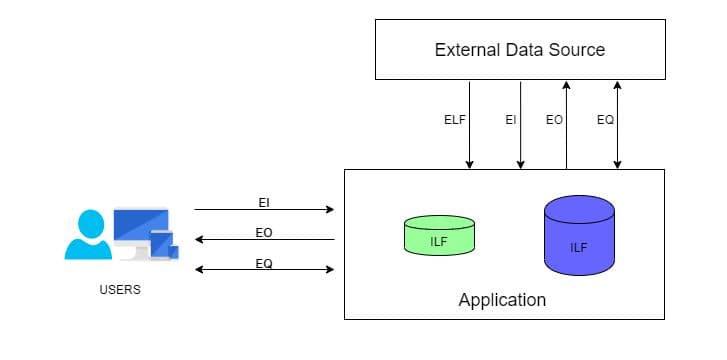 Source: https://bit.ly/2N2KFhy
Below are some abbreviations which need to be understood to know the logic in-depth:
Data Element Type (DET): This can be defined as a single, unique, non-repetitive data field.
Record Element Type (RET): This can be defined as a group of DETs. In a more generic way, we can call this a table of data fields.
File Type Referenced (FTR): This can be defined as a file type referenced by a transaction (Input/Output/Inquiry). This can be either an Internal logic file or an external interface file.
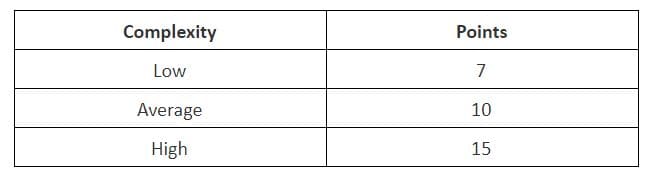
Based on the number of DETs and RETs, all the five components of FPA are classified into High, Average and Low complexity based on the below table.
For Internal Logical Files
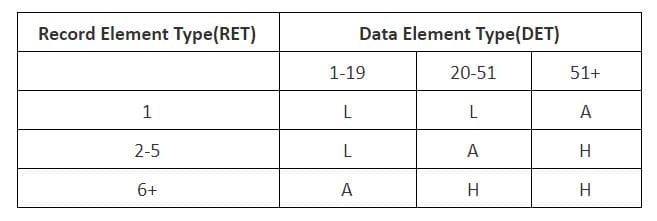
And based on the complexity, the FPA points are calculated
For External Logical Files
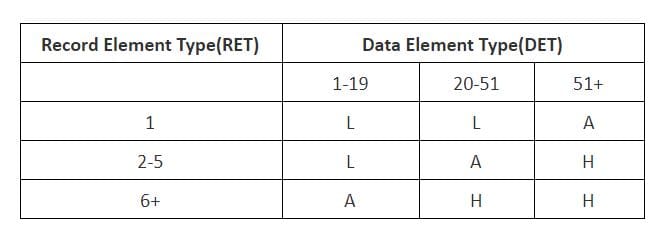
And based on the complexity, the FPA points are calculated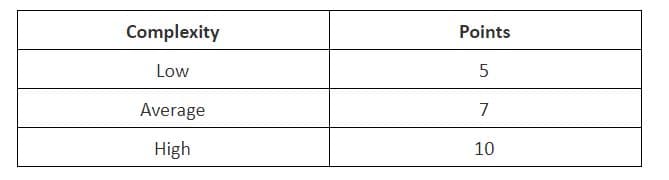
For External Input Transactions
As the External input is a Transactional type, the complexity is judged based on FTR instead of RET.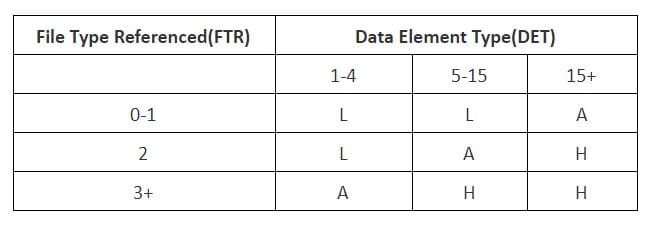
And based on the complexity, the FPA points are calculated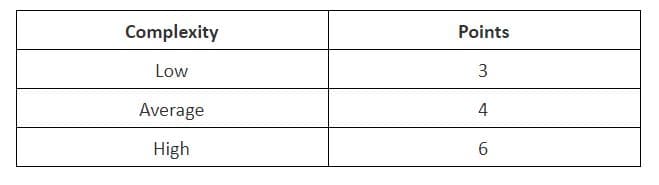
For External Output Transactions
As External Output is a Transactional type the complexity is judged based on FTR instead of RET.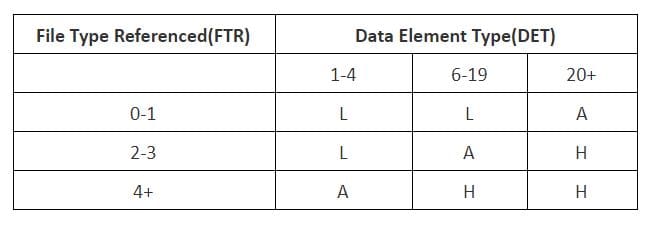
And based on the complexity, the FPA points are calculated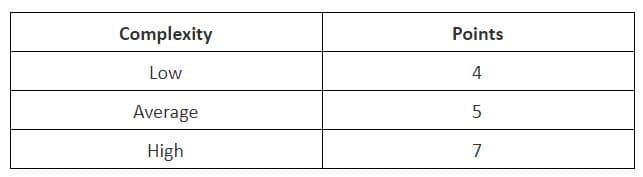
For Inquiries
As Inquiries is a Transactional type the complexity is judged based on FTR instead of RET.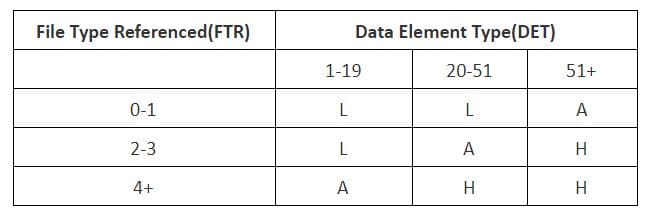
And based on the complexity, the FPA points are calculated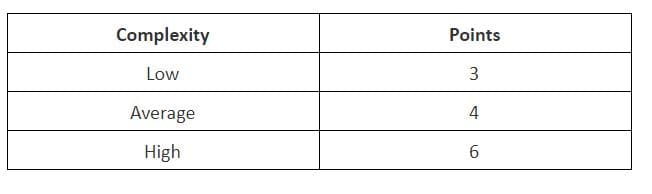
As we now have the reference chart to find the complexity of each variety of functions discovered in the system and that we also have the Points that should be assigned based on the complexity of each component. We can now look into the calculation.
Steps to Count the Function Points
Below are the steps used in counting the function points of a system.
1. Type of count: The very first step of this process is to determine the type of function count. There are 3 types of function point (FP) count.
- Development Project FP Count: This measures the functions that are directly involved in the development of the final system. This would include all the phases of the project from requirements gathering to the first installation.
- Enhancement Project FP Count: This measures the functions involved in the modifications brought in the system. That is the changes made to the system after production.
- Application FP count: This measures the functions involved in the final deliverable excluding the effort of already existing functions that may have existed.
2. Scope and Boundary of the Count: In the second step, the scope and boundary of the functions are identified. Boundary indicates the border between the application being measured and the external applications. Scope can be decided with the help of data screens, reports, and files.
3. Unadjusted Function Point Count: This is the main step of this process where all the function points produced from the above FPA components (External Inputs, External Output, Internal Logic files, External Logic files, Inquiries) are added together and labeled as unadjusted function point count.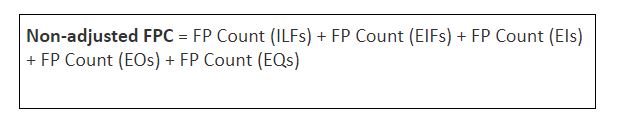
4. Value Adjustment Factor: In this step the value adjustment factor is determined. VAF contains 14 General system characteristics(GSC) of the system or application that defines the types of application characteristics and is rated on a scale of 0 to 5. The sum of all the 14 GSC rates are calculated to give out a mathematical value and is labeled as Total Degree Influence(TDI). TDI is used in the calculation of VAF and its value may vary from 0 to 35.
Below are the 14 GSCs listed and the mathematical formula for calculating the VAF.
- Data communications
- Distributed data processing
- Performance
- Heavily used configuration
- Transaction rate
- On-Line data entry
- End-user efficiency
- On-Line update
- Complex processing
- Reusability
- Installation ease
- Operational ease
- Facilitate change
- Multiple sites

Once the unadjusted function point and value adjustment factor is calculated, the Adjusted Functional point count is found out using the two values. This is done with the help of the following formula. 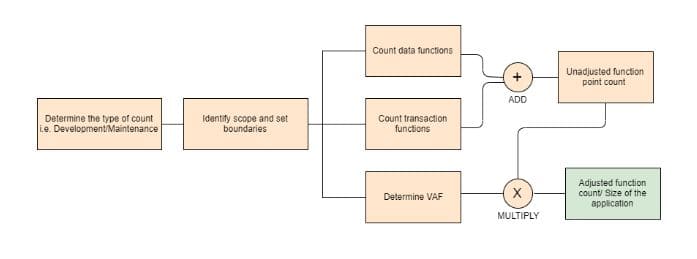

The Adjusted FPC is then multiplied with a numeric value, which is the effort based on the technology. Some of the examples are below.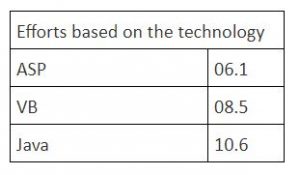
If the technology selected for a particular requirement is Java, then the formula to calculate the final hours are as follows:
FPC = (Non-adjusted FPC*VAF) * 10.6
This will give the total hours of effort required to achieve the requirement under analysis.
Merits of Function Point Analysis
- FPA measures the size of the solution instead of the size of the problem
- It helps in estimating overall project costs, schedule, and effort
- It is independent of technology/programming language
- It helps in the estimation of testing projects
- FPA gives clarity in contract negotiations as it provides a method of easier communication with business groups
Related Read: Quality Assurance in Software Testing – Past, Present & Future
References
- International Function Point User Group (IFPUG) – https://www.ifpug.org/
- ProfessionalQA.com – http://www.professionalqa.com/functional-point-analysis
- Geeksforgeeks – https://www.geeksforgeeks.org/software-engineering-functional-point-fp-analysis/
Stay up to date on what's new
About the Author

Featured Blogs
Stay up to date on
what's new
Talk To Our Experts
Custom Software Development: What To Do and Not To Do
The “build versus buys” debate in software development seems to have tipped in favor of custom software development as more and more businesses recognize the implications of customization on their growth. With rising competition, it has become imperative for each business to differentiate itself from its competitors in every way and custom software development rests at the core of this differentiation.
That being said, software development has seen its fair share of fails even when it is labeled custom. This makes it extremely important that your project is carefully planned out and well-executed. With many years of experience as custom software developers, we have put together a list of do’s and don’ts to help make your custom software development project a success. This blog will discuss 5 of them. Before that, let’s drive home the reasons why custom software is imperative for businesses.
Related Reading: Check out the top reasons why custom software development is important to your business.
Custom Software: The Backbone of Business
Custom software fulfills specific business requirements, which are unique to specific businesses. This helps businesses gain a competitive advantage and leverage the software to build processes that define an effective USP. While this in itself is an uppercut to reckon with, let’s have a look at a few more points that will help deliver the knockout punch in favor of custom software development.
- Solution Matches Need: Since custom applications are developed with your specifications in mind, the final solution will effectively address your needs. Therefore, it simplifies the entire business process saving time and effort.
- Minimal training: Tailored features make it very easy to use and require minimal training to get started on the software. When the software is optimized for each department, the interface requirements will be customized to match the needs and skill level of your employees.
- Works with your Business Model: As the custom solution is built around your business model, it will have the user roles and interoperability functions that your departments need to function effectively.
- Unique Code and Enhanced Protection: By developing a unique code that is specific to your software, custom software minimizes external threats and unauthorized access.
- Long Term Cost Benefits: Custom software helps automate several manual processes and thus saves on manpower. It also eliminates the licensing costs that accrue with off-the-shelf solutions.
- Increased Scalability: Custom software developers work on a long-term basis and can easily scale the software according to the growth of the business.
The Dos and Don’ts
There are several key steps involved in creating custom software. It involves a combination of foresight and creativity. Here are a few time-tested Do’s and Don’ts to help avoid the usual pitfalls that have been known to crop up in this process.
1. Pre-Planning
Don’t: Do not Ignore Preparation
Clients who are looking for a quick solution for their app requirements generally hire developers who agree to unreasonable deadlines. Under such circumstances, the planning and research step is often ignored and that has a ripple effect on the following stages. Not acquiring the necessary materials from the beginning can leave the company unprepared. This can lead to additional changes and the timeline for your project will have to be pushed back, not to mention escalating the costs involved.
Do: Prepare, Prepare!
The planning stage is crucial because it allows the developer to do a thorough SWOT of the idea. At this stage, some have found it helpful to include sketches or outlines and functionality options of the application. It works best to gather all the necessary information at the earliest stage to ensure your project stays on budget. This allows the project to stay on schedule.
2. Ensure its Customization
Don’t: Create for Yourself
You must have heard of the False Consensus Effect, where one thinks that others also think the same way he/she thinks. This can happen while designing the app. It is easy to put our ideas into a design and expect others to like it just because we liked it. That works contrary to the thought of customization.
Do: Keep it User-Centered
Consider carefully what the general user would appreciate. Developers must stick to the requirements drawn up at the planning stage while continuing to give their inputs on the initial ideas. Take pride in creating a user-centered app.
3. Technical Feasibility and Prototype
Don’t: Allow Misunderstandings
Misunderstanding the business’ requirements, miscommunication about the platform and the format can lead to major issues in creating the app.
Do: Keep Lines of Communication Open
Actively communicate with the team about the technical requirements and provide a timeline for building the prototype. It is difficult to visualize what an app would look like and how it will function unless there is a prototype. Ensure that you communicate frequently with management and obtain feedback at every stage of the development.
4. Design and Development
Don’t: Ignore Key Requirements
Design and development are the stages that take the most amount of time. Ignoring key requirements might lead developers to spend valuable time coding for a bad end-product. Functionality demands might be misread which leads to a loss of time and missed deadlines.
Do: Understand the Needs
It is vital to understand the UI/UX needs of the business to gain clarity and minimize work. The app will go through a lot of different changes. When changes are required, ensure that the development team and management are on the same page. Once decisions are made, stick to them.
5. QA Testing
Don’t: Be Negligent
The testing team should not be negligent towards post-development issues such as bugs, form functionalities, and security licenses. This could negatively impact the launch of the application. It could either be delayed or the app might face a post-launch backlash. Ensure that the app is not launched until all aspects have been tested and are up to the standards required.
Do: A thorough QA Test
App testing is a tedious job, but it is an important final stage. Compatibility, interface, security, and performance are some of the factors that should go through a rigorous check. Remember, after this whatever happens with the app will be in full public view.
Achieve Efficiency and Growth with Custom Software Development
Leading companies save time and costs in the long run when they customize their software according to their business model. Whether it’s creating accounting software or an HR solution or a customer-facing application, custom software allows you to choose the features you need for your business and employees. If you want to find business flexibility and growth, custom software is the right answer. It meets the needs of the company while allowing the business to grow without being limited by on-the-shelf software. To find how custom software development can do wonders to your business, call our experts today!
Stay up to date on what's new
About the Author
Tony Joseph
Tony believes in building technology around processes, rather than building processes around technology. At Fingent, he specializes in custom software development, especially in analyzing processes, refining them, and then building technology around it. He works with clients on a daily basis to understand and analyze their operational structure, discover (and not invent) key improvement areas, and come up with technology solutions to deliver an efficient process. You can reach him at [email protected], Skype: tony_fingent
Featured Blogs
Stay up to date on
what's new
Talk To Our Experts