





Custom Accounting Software Development: Understand The Steps, Costs, and Benefits

What is Custom Accounting Software? Why is It Essential?

Custom accounting software is a tailor-made software program designed to address your business-specific accounting needs, such as cash flow tracking, tax calculation, internal auditing, financial transactions, invoicing, reconciliation, business analysis, reporting, and more.
Streamlined accounting is the lifeblood of your business. It boosts your profitability and productivity. However, most accountants end up spending their precious time on countless spreadsheets and mind-numbing reconciliation jobs. Custom accounting software saves your accounting department’s time and improves their efficiency by automating several repetitive tasks and adapting to the needs of your business.

Streamlined accounting is the lifeblood of your business. It boosts your profitability and productivity.

Custom Accounting Software Allows You To:

billion
$ 0
According to Reportlinker, the global accounting software market size is expected to reach $45.3 billion by 2028, rising at a market growth of 19.6% CAGR during the forecast period 2022 to 2028. The growing requirement to modernize financial operations is fueling the adoption of custom accounting software.

Custom Accounting Software vs. Off-the-shelf Accounting Systems

Every business is unique in terms of their nature, way of operation, and size. So are the problems faced by each business. Standard accounting system software is not sufficient to handle the unique challenges affecting each business. For example, some companies want an application to streamline their inventory and asset management, while some require a solution for invoice processing or payroll management.
Traditional accounting software solutions offer a one-size-fits-all approach that fails to address specific business cases. They provide a set of standard features which can’t be customized to handle your unique needs. This is where custom accounting software comes into play.
Here’s a quick comparison of custom accounting software vs. off-the-shelf accounting solutions that will help you choose the right option:
Evaluation Criteria Custom Accounting Software Commercial Accounting Systems
Features and Functionalities Exclusive feature list customized to your specific needs Standard set of features built for the mass market
Development Time Long development process, but a guaranteed investment for a profitable future Faster to implement with the vendor’s support
Development Cost Requires significant upfront investment, but the costs will pay off in the long run Moderately priced, but forces the user to pay for unwanted software features
Support and Maintenance Software is fully supported and maintained by your developer Risk of unplanned downtimes, support will be based on the vendor’s terms and conditions
Compliance to Business Built to comply with your organization’s ecosystem and standards Requires a high level of customization and extra components to function
Third-party Integration Enables seamless integration with compatible external apps Inherently inflexible, doesn’t support deep customizations or integrations
Scalability Highly scalable and adaptable to your future business requirements Time-consuming and costly customizations needed to address the rising needs
Data Security Highly resistant to cyber infiltrations, tested thoroughly at each stage of development Vulnerable to cyber attacks and software glitches

Benefits of Custom Accounting Software

Custom accounting software provides your business with a powerful tool to manage volumes of financial information, significantly reduces your cost of operation, and improves your business efficiency. Tailored accounting software offers several benefits, including the following ones.

1 Improves Operational Efficiency

Financial accounting software tailored to your business has the ability to process large volumes of data and give accurate results in minimal time. Process automation doubles the efficiency of your internal accounting, so you can complete tasks more accurately and faster. Leaving the time-consuming, automatable financial and accounting tasks with custom software helps you focus on business areas that need more attention.

2 Saves Time and Costs

Custom accounting software allows you to perform more demanding tasks like data entry in less time, so your team can focus on business growth and expansion. Through process automation, the accounting software does all the heavy lifting which helps in bringing down your staff hiring and maintenance costs.

3 Reduces Human Errors

Every business needs an accounting system software regardless of their size or nature of operation. Managing all the financial and accounting functions by hand is a daunting task which will increase the chance of human errors. Custom accounting software helps perform all the functions with unmatched technical accuracy and efficiency, thereby reducing the chance for manual errors.

4 Better Financial Reporting and Monitoring

Manual methods used to reconcile data and prepare financial reports could take your valuable time forever. You can automate this mundane task with the help of custom accounting software. Automated report generation helps you get instantaneous reports in a few clicks, so you can monitor your company’s financial performance in real-time. This helps you identify and solve problems beforehand and make life-saving decisions based on accurate insights.

5 Higher Return on Investment

Implementing custom accounting software requires significant upfront investment, but it will end up paying off. When you buy a canned software, you will have to purchase additional hardware and pay extra for software integrations to make it function the way you expect. Custom accounting software is designed to suit every specific need of your business. You are free to choose the features that you require and fit within your budget. Moreover, the custom software developer provides you with dedicated support and maintenance without charging extra dollars.

Deliver Top-Notch Banking Experiences to Your Customers!

Custom Features To Consider in Custom Accounting Software Development

As the name suggests, custom accounting software is designed to serve your business’s specific accounting needs. Based on our experience with custom software development projects, we’ve listed some of the top features that will make your financial accounting software more valuable.
Custom accounting software enables your accountants to generate, receive, dispatch, track, and print invoices right from the software. Your accounting department can track the invoice status in real-time, follow up with overdues, set reminders for recurring invoices, and ensure that your income doesn’t fall through the cracks due to oversight. Customizable invoice templates in the accounting software allow you to quickly create invoices, so you can process them in the order you need.
You can create custom formulas to calculate employee salaries, bonuses, overtime allowances, commissions, deductions, time-offs, and more using the custom accounting software. This allows your accountants to easily track and record payroll amounts and create customizable employee payment schedules for each month or for a specific time period.
Accurate financial reporting helps understand how your company is getting along through the highs and lows. Configurable dashboards displaying real-time updates on cash inflows and outflows, stock performance, department-wise performances, general ledger, accounts payable and receivable, current asset value, and other important financial aspects help you make better forecasting and budgeting decisions. Automation, along with highly customizable reporting templates help create reports more quickly and accurately. For instance, reports like balance sheet, profit and loss statement, tax summary, equity changes, revenue recognition, customer statement, and more are made accessible at your fingertips through the custom accounting software.
Tax calculation based on user-defined parameters and region specific tax rates and regulations has always been an accountant’s nightmare. Custom accounting software makes the whole process easier by automating tax calculation based on custom formulas. Let it be VAT, sales, income, withholding, or any other form of tax, rule-based and region-specific tax filing can be done on time with the help of custom accounting software. You can also set up periodic tax payment schedules to avoid huge penalties and compliance risks that could affect your business.
Streamlined inventory goes a long way in reducing your expenses and adhering to your budgets. Real-time tracking of raw materials, goods in-production, finished products, and goods moving in and out of your warehouses located in multiple regions is an important feature that any accounting software should offer. Inventory records based on purchase orders and returns will also help you understand which of your products are doing well in the market and which ones aren’t. Automated and optimized inventory workflow enables you to avoid stock-outs and react quickly to customer needs.
Integrating your account software with important business management systems, such as CRM, ERP, e-commerce application, HRM, asset and inventory management system, bank accounts, and electronic payment applications will simplify your accountant’s job. The best part of using custom accounting software is that it’s designed to comply with all the other platforms that you would require for accurate asset calculation and faster bank reconciliation.

Go-to Integrations for Custom Accounting Software

We work with our clients to build them a holistic custom accounting software integrated with their corporate financial planning systems and multiple transaction sources, so they benefit from error-free accounting as well as time and cost savings.

1. CRM Integration

Accounting software-CRM integration will allow your accounting department to track all the sales orders, quotes, invoices, customer data, payment terms, quantity and price of goods ordered. Your team doesn’t have to manually dig out the entire data from your CRM as the integration helps auto-populate the same data into your accounting software.

2. Inventory Management Integration

Integrating inventory makes your accounting software capable of generating stock position reports in real-time. You can track how your inventory is being purchased and utilized, which of your products are fast-selling or slow-moving, how you can avoid embarrassing out-of-stock situations, and maintain more accurate records on inventory values.

3. Asset Management Integration

It’s important for your business to know the levels of utilization, maintenance, and depreciating value of fixed assets. By integrating custom accounting software with your asset management system, you can track the position and value of your assets.

4. Procurement System Integration

Procurement management, also known as the source-to-settle process, can function effectively only when it’s integrated with sourcing, supplier management, contract management, risk management, requisitioning, purchasing, invoice processing, and accounts payable. The integration works best when you choose to develop a custom accounting software.

5. Cash Management System Integration

Integrating your account software with your cash management system ensures that all the journal entries in your general ledger and sub ledgers are up-to-date with real-time data on financial transactions across operating, investment, and financing activities of your organization.

6. Financial Planning and Analysis System Integration

With a single source of true financial performance data, you can make accurate and insightful decisions related to financial planning, forecasting, and budgeting. By integrating your custom accounting software with analytics and reporting, you don’t have to switch between multiple tabs and applications to gather the right data.

7. HRM and Payroll Integration

Integration with HRM software helps automate your payroll management, making it easier for your accounting department to calculate salaries, commissions, bonuses, incentives, allowances, tax deductions, and more in a matter of minutes.

8. Bank Accounts Integration

Linking your bank accounts to the custom accounting software allows your team to handle funds quickly without process delays and service interruptions. It makes your bank account reconciliation seamless and faster and also helps in monitoring credit and managing checks.

9. Electronic Payment Gateway Integration

In-app payment options that allow users to make payments without leaving the customer portal is a must-have feature of e-commerce apps and web stores today. Custom accounting software integrated with bank accounts and payment systems allows your customers to pay directly from the application using their cards, credits, payment processing apps, or through their bank account. This enables you to keep a record of payment history and receipts.

Significance of Small Business Accounting Software

Custom accounting software helps automate several mind-numbing and repetitive to-dos, so you get more time to focus on the key areas of your operation. Effective monitoring of financial situations through accurate reporting enables you to plan, identify potential problems, solve challenges, and improve business viability. Tailored accounting software is highly beneficial for small business owners in many ways.
Unlike the traditional manual ledgers and spreadsheets, custom accounting software helps organize your financial data, which makes your turnaround time faster. Data is structured and recorded in a way that makes it easy to find. The software also simplifies data exports and imports and increases the speed of data processing. For example, just by clicking a customer or vendor ID, you can track the bills paid or overdue, transaction history, or any other details pertaining to the user, all in one spot.
With a custom accounting software by your side, you don’t have to juggle multiple applications to track your inventory levels, payrolls, financial statements, employee data, assets, procurements, sale orders, invoices, and more. Personalized account software centralizes the key areas of your financial administration, so you don’t have to implement and maintain separate tools for managing each operation. Centralized financial management helps in saving your time and money.
Personalized accounting system software offers customizable journal entry templates that help you create, evaluate, update, and approve journal entries in the general ledger (GL) as well as subledgers without breaking a sweat. Using the software, you can maintain accurate and real-time records of internal and external financial transactions, multi-currency exchanges, GL balances across multiple branches or business entities, and more. Staying updated with your accounts in real-time helps you detect potential cash flow problems at an early stage and identify customers who could cause a credit problem for your small business.
Custom-built software offers you the freedom to define who could access your data. For instance, you can share access with team members who need to send invoices to clients or who are responsible for paying company bills. Similarly, you can share the software access with your accounting department and professional tax practitioners to save your time and money.
Financial statements like balance sheets, profit and loss statements, credit reports, bank account statements, and cash flow statements come handy especially while asking for a loan or predicting your company’s taxes. With all your business accounting data in one system, report generation becomes much easier. The analytics capabilities of the custom accounting software lets you create complex reports quickly and helps you with proper financial planning.
Cloud-based custom accounting software allows you to manage your bookkeeping ledger, accounts payable, accounts receivable, invoices, and costs all in one place, and access the required details from anywhere, at any time, using any computing device. You can simply create, send, track, and record invoices or generate expense reports in a few clicks to analyze your company’s financial position using the accounting software.

Types of Accounting Software

Accounting software helps you monitor the financial health of your business and understand your company’s strengths and weaknesses. The software gives complete visibility on your income and expenses as well as sales and profits. If you are planning to choose an accounting software package for your business, it’s important to understand the different types of accounting software and in what circumstances each one should be used.

Spreadsheets

When it comes to managing your day-to-day financial data, Microsoft Excel could be the first tool that would come into your mind. Tools like Google Sheets and OpenOffice also help you with bookkeeping. However, businesses with only basic or minimal financial operations can rely on spreadsheets to manage their accounts. If you have more complex requirements or need to handle complicated accounting procedures, it’s better to build a custom accounting software that can handle all your requirements effectively. Moreover, there is a high risk of data loss, data manipulation, entry duplication, and oversight errors when using spreadsheets. Custom-made software helps avoid such errors through in-built automation and logical workflows.

Commercial Accounting Software

Most of the small and medium businesses worldwide use commercial off-the-shelf (COTS) accounting software. However, most of the COTS software are designed for the mass market and are, therefore, moderately configurable to your business’s specific needs. COTS accounting software can be installed with the help of a consultant and often requires a lengthy installation process. On-site collaboration is required to manage bug fixes, patch updates, and version upgrades. Commercially available software may offer numerous features which aren’t meant for your industry, so you end up paying more on several unused features.

Enterprise Resource Planning (ERP) Software

ERP software is a suite of applications built to manage and integrate your day-to-day business activities. These activities may include procurement, production, project, human resource, finances, inventory, and so on. ERP applications are designed to eliminate the problem of data silos across different teams and departments of a business. However, ERP implementation is required only if you are a large organization managing complex business functions and multiple departments. ERP application is an example of accounting software that provides stakeholders with accurate and real-time data to make informed decisions.

Custom Accounting Software

Custom accounting software development is the right option to go for when your entity’s needs are so specific that they cannot be met by an off-the-shelf solution or a commercial ERP software. The software complies highly with your business’s ecosystem and is scalable to your future requirements.
Custom accounting software supports integrations with complementing software apps, which makes it capable of addressing more unique business scenarios. Instead of spending heavily on third-party licenses and subscriptions, you just have to pay for its development, which means that all rights on the custom accounting software are reserved to its payer.

Is your off-the-shelf (pre-packaged) solution meeting only 60% of your operational business needs?

Cloud-based Accounting Software

Also known as online or web-based accounting software, this type of accounting software operates through a cloud application service provider, leveraging internet connectivity. Businesses using cloud-based accounting software don’t have to make any large-scale hardware investments. You can access the accounting software using your login credentials and make use of the features available in your software subscription package. This type of accounting software is highly beneficial for remote teams and businesses with multiple branches. An example would be Software as a Service (SaaS) based accounting applications that require only minimal upfront investments. The Pay-as-you-go model allows you to start with a small capital and expand later when you anticipate better business growth and profitability. SaaS application deployment takes less time and money when compared to a traditional on-premise system setup.

Steps To Build Custom Accounting Software

To develop and integrate custom accounting software into your business, you must lay out a software development roadmap and deploy a team of experienced software professionals. To learn valuable insights on how to hire the right software development outsourcing partner, read our recent guide on points to consider before choosing the best software development company. To get started with the development process, follow these steps.

Step #1Define Your Idea

Got an excellent idea for your small business accounting software? It’s the first step to start your development project. Expand your idea into an actionable strategy. Motivate your team to take the initiative, brainstorm ideas, perform analysis, and identify the practical functions and features that would be needed in the accounting system software.

Step #2Design The UX/UI of Your Software

After assessing the project idea, the next step is to work on the prototypes and design mockups. The cost of software development is often based on the number of features the solution requires. As a business owner, you can ask your custom software development partner to design mockups or prototypes of the accounting software according to your business needs. Working prototypes allow you to decide the required and essential software features during the project’s initial phase itself. This helps avoid time-consuming reworks and redesigns. Once the software’s framework and future design are accepted, you can determine the accounting software’s functionality.

Step #3Prepare a List of Features and Functionalities

Prepare a list of features and functionalities and share it with your custom software developer. Here are some of the important features that you could include while building a custom accounting software for your business:

Step #4Develop The Software

Laying out a proper design for your custom accounting software is a complex and time-consuming process. However, using a questionnaire-based development approach, you can simplify the design and development process.
Custom software development companies like Fingent ask their team of designers and QA engineers to compose test cases covering diverse user scenarios before beginning the actual development process. This helps avoid software bugs and makes your application more stable and functional. At Fingent, our developers look out for the latest UI/ UX design trends and develop applications using configuration management techniques to ensure that proper software development methodology is being followed throughout the project.

Step #5Deploy and Maintain The Software

Post development, the custom accounting software is implemented and integrated into your environment. The software is made ready-to-use after several rounds of testing and quality checks to ensure the best user experience. Right after implementation, the software may need close monitoring and improvements for a few days to increase its relevance and stability. Most custom software development companies provide you with dedicated application support and maintenance as long as you use the application. The team helps you in resolving issues related to your software’s usability, bugs, and other technical glitches.

Cost of Custom Accounting Software Development

Custom accounting software development cost depends on the software’s features and functionalities, frameworks and toolkits used for development, and various other factors including the ones listed below.
Offshore providers across different countries charge different rates based on their region’s outsourcing regulations. Based on Fingent’s experience, developing a custom accounting software of average complexity costs around $200,000 – $400,000, while personalized financial accounting software development for a large enterprise may require $500,000+ in investments.
0 %
Custom accounting software saves more than 50% of your business’s expenses and efforts.

When Custom Accounting Software Is Your Best Choice

How will you know if your business needs custom-made accounting software? Here is a checklist to help you with the analysis. If you tick any of these boxes, it might just be time to get that ball rolling on a custom software solution.
Ensure compliance
You need a business accounting software that provides 100% compliance with the local regulations in the regions where your business operates.
Data security
If your business handles highly sensitive financial and business data, you need a custom-built software that provides advanced data security features.
Integration with other systems
Your accounting application requires smooth and effective integration with legacy systems or other platforms that you’ve been using for a while.
Intelligent forecasting
You need to make smart and accurate general ledger predictions by account and make timely financial decisions based on real-time data and insights.
Transaction processing
If you want to apply user-specified events into your transaction processing workflow, custom software development is the right choice.
Streamline payroll
Implementing custom rules for payroll scheduling, tax calculations and employee reimbursements is much easier when you have a custom accounting software.
Scalability
Business expansion also means technological growth. It’s not practical to change your software every time a component of your business grows. With custom accounting software, you can easily upgrade the application and add more features as you scale.
Want to enhance your existing software with custom features?

Custom Software Development: Choosing The Right Partner

Choosing the right custom software development company from hundreds of capable contenders is easier said than done. Most of the firms have years of experience, industry knowledge, and technical expertise required to stay relevant in a highly competitive and volatile market. It’s indeed a very tricky job to pick out the right one, but we have tried to make this simple for you with our checklist given below.
Make a precise list of your requirements. Write down what you expect the custom accounting software to do. Talk to your employees and stakeholders to evaluate the problems and analyze the solution. Create an outline of the solution based on your objectives.
Research and list all potential custom software development partners who can deliver the required services. Also, find out from others to see if they have any recommendations. Learn more about each prospective contender, so you get a fair idea of their technical skills, knowledge of their team members, domain experience, project portfolios, awareness of the latest technologies, and work experience in domains similar to yours. This allows you to filter the list and narrow down your research to 4-5 companies.
Assess the software development company’s flexibility to adapt to changing environments. Look up their client base and client relationship history. Ask for customer references who can provide you with genuine feedback. Check out their ratings and reviews on B2B rating platforms like Clutch, GoodFirms, and others. Take a look at their social media content. When interacting with their previous or current customers, try to understand more about their vendor’s communication effectiveness, scheduling and service quality, costs, development methodology, engagement model, and so on. This will help you identify if the potential custom software company’s way of operation and objectives align with your requirements.
How long would it take to develop the custom accounting software? This is a critical question that needs to be discussed before choosing the right partner. For certain circumstances, you will have a deadline that you need to fulfill. Avoid haste and plan all company commitments accordingly and ensure that the software’s quality is not affected to comply with strict timelines. It is recommended that you often reserve additional time for checking and debugging applications before they are approved for widespread usage.
The legal implications of hiring a custom software development partner shouldn’t be overlooked. Ensure this gets done properly during the technical and strategic vetting of the selected company. Keep in mind that the development partner would invariably be getting access to your company’s confidential data, such as intellectual property, business strategy, or trade secrets. Perform extensive background checks to ensure the integrity and reliability of the partner.
Verify the software developer’s security policies, certifications, and accreditation. Before signing a contractual agreement with the firm, understand their terms and conditions properly. Custom software development allows you to own the product entirely unless you decide otherwise. Ensure that all rights on the custom software are reserved to its payer.
It’s important to match your project requirements with the right-sized organization. Not all companies undertake any size of custom software development projects. Find out if the custom software development company’s experience is sufficient to handle your project requirements. Read up their case studies, take a look at their website or visit their online profiles to understand more about them.
Custom accounting software is meant to handle confidential company data. It’s important to understand your software development partner’s physical and cyber data security policies. Find out how they will be handling your data and assets. Review their integrated security and/or IP protection program. It’s good to undertake an intellectual property due diligence enquiry before finalizing the software development vendor to safeguard your enterprise’s IP, and determine which functions need to be kept in-house or outsourced.
Determine if the cost of the project fits your budget. Be sure of the guaranteed ROI, so you won’t go bankrupt after purchasing a high-priced software that automates parts of your business. That said, you don’t have to compromise on the AR quality of the software for low costs either. Certain companies overprice their solutions just to portray themselves as a bigger and better company. Always look for hidden or additional costs in the contractual agreement, such as additional payment for document management, annual setup/ maintenance in addition to monthly support charges, in-person training, etc.
Even the most perfect solutions guarantee only 99.9999% up-time. Unfortunately, there are no 100% perfect solutions. There is always a 0.1% chance of things going wrong after delivery, especially in the case of software. So make sure your vendor company provides direct access to the technical team and offers good support, periodic maintenance, cloud-based updates, software upgrades, and troubleshooting services for a fair period of time after sales.
Most software development companies are willing to provide their customers a free trial to understand the quality of the features, benefits, and usability of the software. This is usually done through prototypes and mockup projects featuring a particular aspect of the envisioned software. Running a pilot project allows you to find out if the software development company is capable of meeting your expectations. Ask the vendor as many questions as possible during the trial phase.

How Fingent Helps

Fingent’s end-to-end custom software development process is tailored to meet our clients’ business needs, challenges, and goals. We understand your requirements and turn your ideas into tangible deliverables with maximum business proficiency. Let it be anything – custom software development, web and mobile app development, cloud migration, enterprise software applications, modernization of legacy software, or SaaS development – we offer innovative and reliable software solutions that will delight your customers, simplify your team’s job, and help your business scale.
Our custom software development experience spans across multiple industries and advanced tech, including data analytics, augmented and virtual reality applications, artificial intelligence, robotic process automation, internet of things, and more. We follow an impeccable workflow and a set of best practices to foster structured software development and reduce the cost of your business operations.
“We don’t simply initiate your project. We step into your shoes and understand your business landscape to give you the most purposeful solution.”
Dileep Jacob
SVP-Operations, Fingent

Frequently Asked Questions on Custom Accounting Software

Custom accounting software is designed exclusively to address your business’s specific accounting needs. The top advantages of customized accounting solutions are:
  • Business efficiency improvements
  • Reduction in human errors
  • Time and cost savings
  • Better financial monitoring and reporting
  • Faster and accurate data processing
  • Seamless integration with other business software
  • Anytime, anywhere accessibility
  • Improve compliance with tax and legal processes
  • Streamlined payroll management
  • Better traceability of invoices
There are different types of accounting software designed to meet various small business accounting needs. Some of the leading examples of accounting software are:
  • Spreadsheets
  • Pre-packaged accounting systems
  • Enterprise resource planning (ERP) software
  • Online accounting software
  • Custom-made accounting software
  • Cloud, hybrid, or on-premise accounting software
When choosing to build your own accounting software, you need to keep in mind your business’s long-term growth plans. Make sure that the software you’re going to build encompasses all the features and functionalities that you will require to drive your business in the right direction. For instance, the number of application users may grow from 10 to 100 in no time or you may open new branches of your business. Make sure the custom accounting software is scalable to meet such scenarios. Also, check if the custom software development vendor provides you with an option to add new features or upgrade the software in future.
You can access your accounting software through mobile, if it’s a mobile-enabled application. Most of the custom software developers develop mobile applications if you have a specific requirement for the same. Be it iOS or Android, you can easily access your custom accounting software through mobile. Mobile access allows you to generate invoices, record expenses, manage clients, monitor cash inflow and outflow, and do a lot more even when you are away from your desk.
Yes, you can. Custom accounting software can be integrated with your key business applications, including, ERP, CRM, HRM, inventory, payroll, and so on. Through data flow customizations enabled via APIs and integration plugins, you can easily import or export data to and from your custom accounting software. Discuss your requirement with your custom software development partner to enable seamless data transfer between applications.

Stay up to date on what's new

    About the Author

    ...
    Vinod Saratchandran

    Vinod has conceptualized and delivered niche mobility products that cater to various domains including logistics, media & non-profits. He leads, mentors & coaches a team of Project Coordinators & Analysts at Fingent.

    Talk To Our Experts

      Top 10 Tech Stack That Reign Software Development in 2025

      What is a Tech Stack?

      A tech stack, also known as a software stack or development stack, is a combination of programming languages, frameworks, libraries, tools, and technologies that are used to develop and deploy a software application or system.

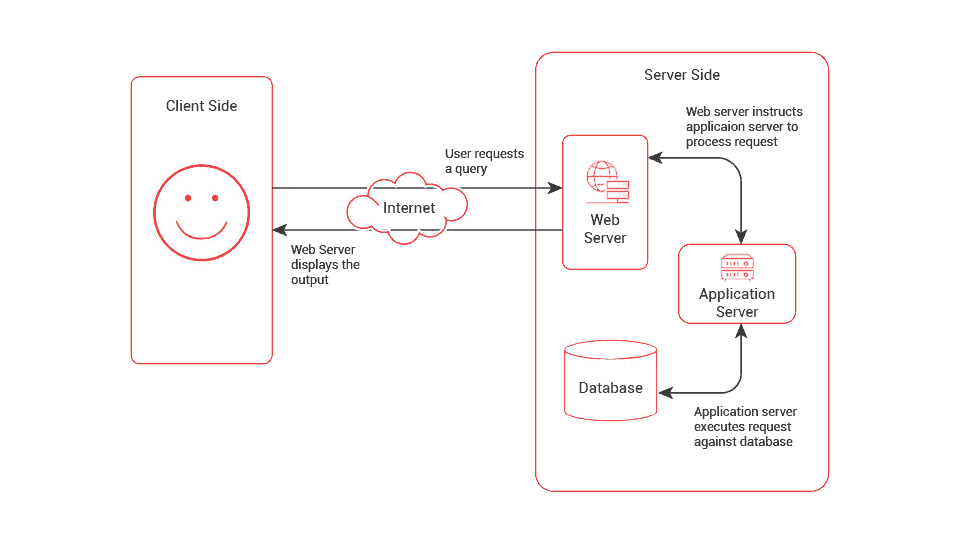
      A tech stack provides a standardized and organized approach to software development, enabling developers to leverage the existing tools, libraries, and frameworks to build efficient and reliable applications. In other words, a tech stack represents the layers of software components and infrastructure that work together to create a functioning software product.

      Layers and Components That Constitute a Technology Stack

      There are three key components that make up a tech stack:

      Client-side (frontend)

      Client-facing side that consists of what the user sees and interacts with. Frontend technologies include HTML, CSS, JavaScript, and UI frameworks and libraries.

      Server-side (backend)

      The logic that runs behind the application and its features. Various backend programming languages and tools are used for handling the requests coming from the client-facing side. Backend technologies include web frameworks, programming languages, servers, and operating systems.

      Database

      Enables the storage of application data like user profiles or information about the product or software.

      DIFFERENT LAYERS THAT CONSTITUTE A TECH STACK

      1. Operating System (OS)
      2. Server-Side Programming
      3. Web Server
      4. Database
      5. Client-Side Programming
      6. Frontend Frameworks/ Libraries
      7. Deployment & Infrastructure
      The specific technologies and components chosen for each layer may vary depending on your project requirements, scalability needs, performance considerations, target platforms (web, mobile, desktop), and your software development partner’s expertise.

      Got An Idea Or Software Requirement?

      Top 10 Tech Stacks Used for Software Development in 2024

      • A classic, time-tested stack of technologies that stands for – Linux (Operating System), Apache (Web Server), MySQL (Database), and PHP (Programming Language).
      • LAMP is one of the first open-source software stacks commonly used to develop and deliver web applications today.
      • Efficiently handles dynamic web pages wherein content changes each time when a page is loaded.
      • Allows you to choose components based on your specific business requirements. For instance, instead of Linux OS, you can choose Windows OS to form a WAMP stack or macOS to form a MAMP stack. You can also swap PHP in the stack with Perl or Python to get the desired results.
      • MEAN stack comprises MongoDB (Database), Express.js (Backend framework), Angular (Frontend framework), and Node.js (Runtime environment).
      • MEAN is an end-to-end JavaScript stack that allows you to use a single language throughout the stack. This helps you reuse the code across the entire application.
      • All the technologies in MEAN stack are free and open-source and are supported by a vibrant community.
      • MEAN stack technologies are ideal for cloud hosting since they are flexible, scalable, and extensible. The stack can be deployed easily as it includes its own web server.
      • The database can be scaled on-demand to accommodate usage spikes temporarily.
      • When you replace Angular in the MEAN stack with React, it becomes MERN. React is one of the most popular frameworks used for building high-end, single-page applications with interactive UI.
      • React uses JSX, a syntax extension to JavaScript, which provides a way to structure component rendering using syntax familiar to many developers.
      • React uses Virtual DOM (Document Object Model), that allows changes to be implemented easily.
      • Since React is a library and not a framework, developers may have to rely on third-party services to build the desired functionalities.
      • Ruby on Rails (RoR), or simply Rails, is a server-side web application framework written in Ruby under the MIT license.
      • Rails is an open source, object-oriented, model–view–controller (MVC) framework that provides default structures for a database, a web service, and web pages.
      • ROR offers innovative features such as seamless database table creations, migrations, and scaffolding of views to enable rapid application development.
      • The framework encourages and facilitates the use of web standards such as JSON or XML for data transfer and HTML, CSS and JavaScript for user interfacing.
      • .NET is an open-source developer platform made up of tools, programming languages, and libraries for building modern, scalable, and high-performing desktop, web, and mobile applications that can run natively on any operating system.
      • There are various implementations of .NET that allow the .NET code to execute on different operating systems – Linux, macOS, Windows, iOS, Android, and many more.
      • C#, F#, and Visual Basic are the three Microsoft-supported languages for NET development. There are many third-party created languages that work well with the .NET platform.
      • .NET is a highly coveted software development platform due to its advantages such as ease of development, code reusability, extensive support for high-performing applications, strong built in security measures, and active community support.
      • Django is a high-level Python web framework that encourages rapid web development with a clean, pragmatic design. Both Python and Django are widely used together for building full-stack applications.
      • Leveraging the Django-Python stack for application development allows you to use modern technologies including: PyCharm, Python, HTML, CSS, and JavaScript.
      • Developers can combine the stack with Apache web server, MySQL, and the Django framework for server-side development.
      • Django supports low-code web app development and also helps manage rising volumes of traffic and API requests to meet changing business needs.
      • Flutter is an open source framework by Google for building multi-platform applications from a single codebase.
      • Flutter is powered by Dart, a programming language optimized for fast apps on any platform.
      • Flutter can use Google’s Firebase on the backend which allows you to build highly scalable applications.
      • Flutter’s built-in widget catalog and UI toolkit allow you to build high-performing, natively compiled mobile apps with visually exciting application elements.
      • React Native is a JavaScript framework for building native iOS and Android mobile applications. The framework is based on React, a JavaScript library built by Facebook for UI development.
      • React Native applications are written with a mixture of JavaScript and XML markup. Applications built using React Native render using real mobile UI components, which means the apps look like any other mobile application.
      • Applications built using React Native provide a high level of reliability and performance and deliver a superior user experience.
      • The framework allows developers to reuse up to 100% of their code between different environments which saves a lot of development time.
      • Java Enterprise Edition (JEE) provides a platform for developers with enterprise features such as distributed computing and web services.
      • Java EE applications are usually run on reference run times such as microservers or application servers, which are ideal for creating e-commerce, accounting, and banking information systems.
      • Java EE technology is the de-facto standard for delivering secure, robust, scalable multi-platform applications and services that are portable across all the Java compatible, Enterprise Edition products available today.
      • Java EE has several specifications for making web pages, reading and writing from databases in a transactional way, and managing distributed queues.
      • Serverless architecture is one of the latest trends in software development that allows developers to focus solely on the application code instead of worrying about infrastructure and server management.
      • The serverless stack leverages cloud computing services such as AWS Lambda, Google Cloud Functions, and Azure Functions to create scalable and cost-effective applications without dedicated servers.
      • Since the serverless architecture is based on the Functions as a Service (FaaS) model, you don’t have to pay for unused server resources, which makes the stack highly cost-effective.
      • Serverless stack makes it easy to manage traffic spikes and server resources during peak times since the cloud provider automatically scales the application up or down based on the number of requests.
      jQuery(document).ready(function($) { var delay = 100; setTimeout(function() { $('.elementor-tab-title').removeClass('elementor-active'); $('.elementor-tab-content').css('display', 'none'); }, delay); });

      Benefits of Using Tech Stacks in Software Development

      7 Tips For Choosing Your Technology Stack

      Сhoosing, the right technology stack for your web development is a success factor for a project. Aligning technology stack opportunities with your web development functionalities might not suffice in each case, as there are multiple factors to look upon when choosing a technology stack for your project. Here are seven aspects that can help you make the right choice.
      7 Factors to Consider when Choosing the Right Tech Stack
      1. Define the scope of the project
      2. Scalability requirements
      3. Technology & Team Expertise
      4. Time to market
      5. Security requirements
      6. Maintenance
      7. Development Cost

      Define project size, complexity, and functionality

      The tech stack used for a small project might vary from that used for bigger projects. The size of the project is a key factor to look out for when choosing a technology stack. Also, the complexity and functionalities of your project matter. If your project is complex and includes heavy functionalities, it is wiser to choose an advanced technology stack.

      Scalability requirements

      As your project progresses and grows, the tech stack should have the potential to scale sufficiently. You should choose a technology stack that allows for adding new compelling features and handles unpredictable increases in user numbers.

      Technology & Team Expertise

      It’s important to determine whether or not your team will be able to maintain the application once it is deployed. Consider your team’s experience and expertise when choosing a tech stack. It will be better if you know that your team can use a tech stack successfully and doesn’t require additional training; otherwise, there is no need to consider one.

      Time to market

      When choosing a tech stack, ensure that it can accelerate your development process without hampering the quality and closes within the deadline.

      Security requirements

      If your app will handle confidential user data and information, security plays a major role. You need to pick a robust tech stack with fully secured standards & support a high-end security framework to meet your app development goals.

      Maintenance

      The development process doesn’t end with the app launch, which needs ongoing nurturing at every stage. It is a good practice to choose a tech stack that is easy to maintain by your development team for easy upgrades & regular maintenance.

      Development Cost

      Despite the fact that many technology stacks are available in the market as open source, they may not incorporate desired functionalities or features you are looking for. Most tech stacks come with a subscription fee if you need special or advanced features. Licensing and maintenance also incur a cost. Furthermore, some technology stacks demand huge salaries for their developers. The overall cost of the technology stack leans on all these factors.

      Deliver Top-Notch Banking Experiences to Your Customers!

      “Give me six hours to chop down a tree and I will spend the first four hours sharpening the axe.”

      – Abraham Lincoln

      What Should Be Your Next Step?

      Once you have compared and analyzed different technology stacks and discovered the best stack that fits your project, the next step is to start the software development process. But before you start, there is some groundwork to be done which involves these steps.
      Project Planning
      Plan the development process, determine the project scope, set timelines and milestones, and allocate resources accordingly.
      Team Composition
      Hire software developers and experts depending on the size and complexity of your project. Ensure your team has the necessary skills and experience to deliver the project.
      Development Environment
      Install the necessary software, tools, and libraries for setting up your development environment. Configure the environment correctly and provide the required level of access to your team members.
      MVP Development
      Develop a working Minimum Viable Product (MVP) that you can share with users to validate your idea. Add more features and functionalities based on the user feedback.
      Testing and Deployment
      Test the application thoroughly to identify and resolve bugs, ensure the application works as intended to give the desired results, and deploy it to the production environment.

      How Fingent Helps?

      Being a top custom software development company, Fingent adopts the most efficient and modern technology stacks that can make your software products highly competitive and capable of fulfilling your organization’s unique requirements. Here are some of the best practices we follow when selecting software stacks for our clients’ development projects:
      With the right tech stack and a skilled software development team by your side, you can build innovative software solutions that solve your business challenges and delight your users. If you have any questions on tech stack selection or need free software consulting services, get in touch with our team.

      FAQ

      Picking on the right technology stack for web development is an important marker of the company’s priorities and culture. It is a huge responsibility that must be done with careful research and planning. Various factors, such as your web application’s speed, quality, and security level, will depend on the chosen technology stack. Hence, it is advisable to identify the pros and cons of the various technology stacks in the market.
      Choosing the right technology stack is a crucial step in your product development and is key to its success. Here are the key pointers to consider when selecting a tech stack.
      • >> Application size, type, and complexity
      • >> Team knowledge and upskilling
      • >> End-user experience and time to market
      • >> Security and scalability
      • >> Cost and overall value of the tech stack.
      Migrating your less-performing or outdated tech stack to a tech stack of your choice is possible. However, it is a relatively time-consuming and costly process. Switching to the right tech stack may skyrocket the growth of your application. It requires rigorous analysis and perfect planning before deciding to move.
      Choosing the wrong tech stack can result in operational problems that can pile up until they become unstoppable.
      • >> The need to update your existing software with a modern technology stack.
      • >> Vulnerable to security threats
      • >> Limitations in creating and adding new features to the software
      • >> Lack of knowledge in your in-house team who can use the tech stack
      • >> Tech stack without scalability feature results in crises as your business grows

      Stay up to date on what's new

        About the Author

        ...
        Arun Thomas

        Arun is a full-stack developer at Fingent. He spends a workday experimenting with Jquery, CSS, HTML; and dabbles with Python, Node, and PHP. With a broad skill set ranging from UX to Design, and from front end to back end development, Arun enjoys working in challenging projects and is always on a go-to learn something new.

        Talk To Our Experts

          The right software can serve as a growth catalyst for your business. A robust software solution can empower your team to work more efficiently, better serve your clients, and optimize business performance.

          But when searching for these software solutions for your business, you’ll have to make many different decisions along the way. One of the very first choices you’ll encounter is whether you want to buy off-the-shelf software or build a custom solution.

          Either route can help your organization modernize its processes, improve efficiency, and scale effectively. Which approach will produce optimal results for your organization in the short and long term is still a question.

          Because your decision will significantly impact your business for years to come, it’s critical that you get it right.

          With that in mind, join us as we crack the code to smart software selection decision-making by exploring the pros and cons of building and buying software.

          Read more: Why Should Your Business Invest In An End-to-End Software Solution?

          End-To-End Custom Software Solution

          The Build or Buy Conundrum

          The buy option is relatively straightforward: You select software that aligns with your organization’s needs, purchase a license, and deploy the technology. When evaluating your options, you will encounter purpose-built solutions for your industry and more generalized options, like basic accounting software.

          Conversely, custom-built software for your organization will include specific tools you need — without superfluous features that distract users and get in the way of critical business functions. It’s important to understand that you won’t be building the software unless you have an in-house team of highly experienced software engineers. Instead, you will need to partner with a talented software development firm.

          Pros and Cons of Buying Software

          Before providing a decision-making roadmap, it’s crucial to outline the pros and cons of each option.

          The primary benefit of buying pre-built software is that it is already deployment-ready. As such, you can easily purchase the software and begin implementing it almost immediately. You’ll also be able to demo the product before you buy, giving you an idea of precisely what to expect. This expedited timetable is particularly appealing if your business’ current technology suite cannot keep up with your present needs.

          However, some notable drawbacks exist to buying software instead of taking the custom route. First and foremost, off-the-shelf software is less likely to align perfectly with your company’s needs. After all, off-the-shelf software is designed to appeal to as broad an audience as possible, and naturally, it will include some features you don’t need. Evaluating software can be time-consuming, and applications of any complexity may be impossible to assess fully in a reasonable amount of time.

          In addition, pre-built software typically has recurring license and maintenance costs that need to be considered and may change over time. There is also the risk that vendors of pre-built software may stop offering that edition or software or go out of business entirely. Pre-built software may depend upon older technologies that are no longer “leading edge,” which can lead to long-term viability concerns.

          For some software categories, you may only be able even to consider a few contenders, or what you find may lack some tools or capabilities your business is looking for.

          Read more: Choosing between Custom Software Solution and Commercial Off-the-Shelf Product!

          Advantages and Drawbacks of Building Custom Software

          Custom software is tailored to help your business meet its organizational goals and overcome its most significant growth hurdles. Every feature, tool, and capability of custom software is purpose-built for your business. As such, it can significantly impact your business more than an off-the-shelf alternative.

          The two potential downsides to custom software are cost and the deployment timetable. When there is an off-the-shelf alternative, building custom software will typically require a larger upfront investment, but you will have more control over the software. That means you can change your schedule without being tied to the vendor’s schedule or priorities. If the custom software meets important business requirements, you can expect a strong return on investment.

          It’s important to remember that developing and deploying a custom-built software solution will take slightly longer. Fortunately, you can streamline the build process by partnering with a highly experienced software development firm.

          How to Determine Which Option Fits Best for Your Business

          As you prepare to weigh your best opportunities with each approach, you can streamline your decision-making process with a refined approach.

          1. List Your Organizational Goals and Needs

          When choosing to buy or build, the most critical question you need to ask yourself is: What do you hope to accomplish with your new technology?

          Create a list of goals, objectives, and needs. In addition to providing more internal clarity, you can use this list to compare products during your search. If no single off-the-shelf solution meets your needs, it may be more pragmatic to build custom software. However, if you need the solution sooner rather than later.

          2. Analyze the Current Ecosystem

          Once you have created your list of goals and objectives, you can start analyzing the current ecosystem. Businesses operating in specific sectors — such as the healthcare industry — will have dozens of options when searching for off-the-shelf software solutions. As such, it is much more likely that a healthcare organization will be able to find a readily available solution that meets its needs when compared to a more niche sector.

          Even if you are already leaning toward building a custom solution, you should consider what options are available for your industry. Explore all known choices to see how these solutions align with your needs and goals. This tactic can also provide you with ideas to put on a must-have list for your custom software partner.

          3. Calculate the Potential ROI of Each Option

          While you must regard the upfront costs associated with buying vs. building software, calculating the potential long-term ROI of each option will be more useful for guiding your decision-making process. Start calculating ROI by assessing the likely cost-savings and additional profits that can be expected once the new software is in place. While this impact can often be difficult to predict fully, it may be easier to consider how large the impact would need to be to recover the cost of the investment — the break-even point.

          Building a custom solution will cost more on the front end, but this higher initial investment can yield a significant return over the software’s lifecycle. Conversely, going with a cheaper option could solve today’s business challenges, but you may quickly outgrow that software’s capabilities and find yourself looking to upgrade again in the near future.

          Read more: When does your Business need Custom Software Solution – Evaluate Now!

          custom software development

          Making Your Final Decision 

          Whether you buy a readily available option or want to leverage the power of custom-built software, you will need an experienced technology partner to oversee your deployment. Fingent is that partner.

          Our team of technology experts specializes in building dynamic, custom software solutions for our diverse array of clients. We can also assist with deploying solutions from Microsoft, SAP, and other leading technology development companies.

          To learn more about our deployment and development services, contact Fingent today.

          Stay up to date on what's new

            About the Author

            ...
            Tony Joseph

            Tony believes in building technology around processes, rather than building processes around technology. At Fingent, he specializes in custom software development, especially in analyzing processes, refining them, and then building technology around it. He works with clients on a daily basis to understand and analyze their operational structure, discover (and not invent) key improvement areas, and come up with technology solutions to deliver an efficient process. You can reach him at [email protected], Skype: tony_fingent

            Talk To Our Experts

              To build or to buy has been a million-dollar question most businesses seek an answer for. This can become more daunting when you consider the numerous factors influencing the decision. To make it less overwhelming, we will discuss factors and tips to help business leaders make informed decisions. This blog also explains the right process to follow once the decision is made.

              Build Or Buy: Should You Buy Software or Build It?

              Several factors must be analyzed when deciding to buy or build software internally. Here is an analysis of four key points that can help business leaders to make an informed decision that will impact their business growth:

              • What is the scope of the problem that you are attempting to solve?
              • How complex does the software solution need to fit your business?
              • Can the organization leverage exist experts, or will you need to hire more?
              • How quickly does the organization need the software?

              It is good to remember that there are no one-size-fits for all in this regard. Analyzing these questions will help businesses zero in on one of the two options. Please read on to find out top tips to help companies identify which of these two is most suitable for their business.

              Read more: Choosing the right Software Development Vendor

              Top Considerations for Companies to Help Recognize Build vs Buy

              Deciding to buy or build custom software is not as easy as flipping a coin. Here are the top considerations that will increase the odds of making the right decision:

              • Problem – Businesses must give thought to the problem at hand. Is it attempting to solve a common problem or specific to the company alone?
              • Funds – Can the company have dedicated funds to host and maintain the software solution, including upfront costs?
              • Time – Consider how time-intensive the problem at hand is. Is it just a nagging annoyance or a serious health threat to the company’s survival?
              • Strengths and Weaknesses – Analyzing a business’s strengths and weaknesses will help companies choose whether to build or buy. Can the business withstand the risks that may surface with technical debts, quality concerns, opportunity costs, and more?
              • Quality – Consider if you can fully focus business efforts on solving this problem without compromising quality.
              • Surface-Level Risks – Before buying or in the future with a trial, demo, or quote, reviewing the surface-level risks of buying versus building software is important.
              • Data – For certain companies, their data is vital to their competitive advantage. In such cases, it is crucial to consider how the third party may your proprietary data. Consider if there is the possibility of losing access or oversight to customer data or other critical business insights.
              • Security – Ensure the company’s accounts are not compromised by finding out if the third party can be trusted and if they use cybersecurity best practices.
              • Vendor Reliability – Consider if the third-party vendor is reliable. Does it have the ability to weather a market downturn or other external factors that may impact the business?

              Read more: When Does Your Business Need Custom Software Development Solution – Evaluate Now!

              custom software development

              If a company decides to build custom software after all these considerations, it is vital that they follow the right process for the successful development of software.

              What is The Right Process If You Decide to Build?

              Building custom software might be the perfect solution for your business and building it the right way is key to its success. Usually, it is developed by a third party or in-house developers. Custom solutions ensure features and functionality with the company’s needs in mind. As a result, businesses enjoy increased productivity and growth.

              To get started, here is the right process companies can follow:

              1. Define your organizational needs

              First, determine the current business process, expectations, and verifiable success. Talking to experts, finding out why the changes are necessary, and sketching out the workflows will help ensure a smooth project management process.

              2. Resist the temptation to keep everything in-house

              It may be tempting to handle all processes in-house to save money. However, working with your own IT team could cause a slowdown in the company operations as they already have their daily work. Here, outsourcing certain tasks makes the most sense. Consider working with a vendor with a verifiable track record in building custom software for other companies.

              3. Be practical

              To keep the project on track, create a realistic plan together with all involved in the project. This will allow companies to set specific deadlines. Knowing the timeline will help in allocating funds when required.

              4. Test and test

              Before implementing the new custom software, it must go through two levels of test. One is technical testing by IT professionals and developers to ensure all elements are working. The second is user testing to see if the software works as intended.

              5. Document each stage

              Documentation must include the team members’ details, roles and responsibilities, deadlines, and expectations for the project. It must also include a test plan, checklist, scope statement, training plan, implementation plans, and detailed user documentation.

              Top 5 Trends in Custom Software Development Today to Look Out For

              The custom software market is growing exponentially. Some software development trends stand out. These trends are influenced by the need for businesses to leverage advancing technology.

              • Cloud technology: The pandemic shut the door on data on-site and opened the door to cloud technology. Developing cloud-native applications will likely continue as many companies still use remote work setups.
              • Internet of Behavior: The Internet of Behavior, or IoB, studies customer behavior through the data gathered from various devices. This data allows businesses to understand how to improve the quality of their products and services.
              • Blockchain: Blockchain is used in businesses to track records without worrying about discrepancies.
              • Low-code and No-code development tools: Workers can create programs and sites even if they lack coding knowledge. According to research, by 2024, 65% of software projects will be done through low-code or no-code development.
              • Software integration: Software integration can provide a seamless user experience. Additionally, it helps the company save time and increase productivity.

              Read more: Low Code/No Code Development with SAP BTP: How It Is Turning the Future of Enterprise Resilience

              Low code/No code

              Build For the Future

              Building custom software allows organizations to use technology that addresses their unique needs. Following the right process can ensure they are implemented in a way that supports and advances business growth.

              Custom software development is our forte, and we have been able to help many clients get exactly what they need from their software.

              Give us a call, and let’s discuss what we can do for your business.

              Stay up to date on what's new

                About the Author

                ...
                Tony Joseph

                Tony believes in building technology around processes, rather than building processes around technology. At Fingent, he specializes in custom software development, especially in analyzing processes, refining them, and then building technology around it. He works with clients on a daily basis to understand and analyze their operational structure, discover (and not invent) key improvement areas, and come up with technology solutions to deliver an efficient process. You can reach him at [email protected], Skype: tony_fingent

                Talk To Our Experts

                  Modernization is a desire to stay relevant and grow. App modernization does just that for businesses. It enables them to stay relevant and grow. In line with that, organizations worldwide are scrambling toward digital transformation. How does that benefit businesses?

                  App modernization or updating older software for newer computing approaches extends the lifespan of an organization’s applications while allowing it to take advantage of technical innovations. It is like renovating an old house to improve efficiency, safety, structural integrity, and more.

                  However, there have been occasions when the app modernization project has failed. This has been a concern to most business owners considering digital transformation. Are you one of them? If so, through this blog, you can learn why and how to avoid app modernization failure.

                  First things first. Does your company need app modernization? If so, why?

                  Why Your Company Needs App Modernization

                  Apart from what we discussed earlier in this blog, app modernization integrates new features to keep up with the latest business requirements. Even so, many business leaders wonder if their business needs app modernization. Here is a list of specific reasons for you to consider:

                  • It allows you to create new features and services that align with your current business needs and goals. In addition, you can personalize these features to ensure long-term value creation.
                  • Educating new and older employees becomes easier as app modernization can automate tedious and repetitive processes.
                  • App modernization helps you leverage the benefits of the cloud environment, allowing you to provide fast and efficient customer service.
                  • Cloud-native applications offer top-notch security features as compared to legacy applications.
                  • App modernization allows you to add newer features, services, and functions. These, in turn, increase customer satisfaction leading to increased revenue.

                  Why, then, does app modernization backfire at times? And how can you ensure the success of the project?

                  Read more: Why modernize your legacy systems? What’s the best approach to legacy systems modernization?

                  Legacy system modernization

                  Why Some App Modernization Projects Fail

                  When an app modernization project fails, it may pose serious problems for your business, including wasted resources and time. Failed app modernization may hinder agility and keep your business from capitalizing on modern technology. It was noted that an alarming 79% of app modernization projects still fail. Why? Surprisingly, the failure is not due to the new system or methodology, nor caused by the modernization vendor. The reasons are much deeper. Here are the top 5 reasons why app modernization projects fail:

                  1. Ignoring the business process

                  Modernization efforts fail when the business process (accounting, inventory, finance) is poor, and a business tries to correct it with new systems. That will never work. Businesses must first understand what is slowing them down. Determining the problem is the right foundation for successful app modernization.

                  2. Implementing new systems without considering drastic business changes

                  When entirely new systems are implemented without considering the drastic business changes, the employees are forced to adapt quickly. In addition, such practice forces the business to evolve to fit the new software. Instead, the software must adapt to fit the current business process and requirements.

                  3. Businesses mistakenly assume that they are ready for a complete revamp

                  Most businesses believe that they are ready to replace the old system with new systems, and the business will run better. Now that is a huge mistake. Completely replacing all systems can send your business and your employees into shock. It may even change how customers interact with the business. A better approach is to modernize in calculated steps.

                  4. Failing to adopt an agile software

                  The pandemic helped us see that agility is king. Adopting inflexible applications can have disastrous consequences on your business. If you want to be future-ready, replace rigid applications with agile applications.

                  5. Failing to consult the end user

                  Modernization projects that do not involve the IT department and the end user fail as they do not consider how the new solution fits business needs.

                  Read more: Advancing Business Software Development With Cloud Native

                  The Secret to A Successful App Modernization Project Journey

                  Every business that embarks on a modernization project journey faces many challenges. The success of your app modernization efforts comes down to two key components: your IT team and your employees. As teams go through this journey, use these secrets to avoid failure and ensure success.

                  Secret 1.  Build a cross-functional team

                  When choosing a team or developing an innovation group, build a cross-functional team that can focus on developing the culture, process, and tools needed to improve the modernization process.

                  Secret 2.  Toss it, sort it, and commit to it

                  An effective business principle is to welcome all ideas and sort them, but when a decision is reached, you must commit to it and execute that above all else. Doing so will ensure the progress of the project.

                  Secret 3. Map out the development workflow

                  Mapping out a development workflow can help you when you encounter complexities in the project. It helps you look at every tool being used and identify dependencies.  

                  Secret 4.  Set milestones 

                  Projects may change. Setting small modernization goals will help you adjust your long-term plans and reduce engineering risk. Focus on many small steps when planning for a major milestone. Doing so will ensure smooth progress from one step to another.

                  Secret 5.  Prioritize data into categories

                  If you prioritize data into high, moderate, or low categories, you can decide what safeguards to have for each category.

                  Secret 6.  Do not sew a new cloth on an old cloak

                  Take a hard look at your development workflow and identify habits that could derail your app modernization process. Don’t just patch up old problems with a new tool. Remember, these problems can derail new tools, so don’t patch, fix.

                  Secret 7.  Keep your team in the loop

                  Your team may find it challenging to develop the knowledge they need to work on the new tools. Keeping them informed about the new tools and training them to navigate new workflows can ensure the success of application modernization.

                  Several aspects may factor into a successful modernization. That is why modernization endeavors are so challenging. However, implementing the above secrets can help the success of app modernization efforts.

                  Speaking to an expert can help you understand how to proceed with your app modernization needs. Why not reach out to us at Fingent and discuss your project with our software development experts?

                  Stay up to date on what's new

                    About the Author

                    ...
                    Tony Joseph

                    Tony believes in building technology around processes, rather than building processes around technology. At Fingent, he specializes in custom software development, especially in analyzing processes, refining them, and then building technology around it. He works with clients on a daily basis to understand and analyze their operational structure, discover (and not invent) key improvement areas, and come up with technology solutions to deliver an efficient process. You can reach him at [email protected], Skype: tony_fingent

                    Talk To Our Experts

                      Customer Experience – Two words that could make or break your business.

                      Today, customers expect businesses to provide nothing short of an excellent customer experience whenever and however they shop. This is going to be the main differentiator between you and your competitors. The race to own customer experience is on!

                      Some businesses are learning this the hard way, but you don’t have to. The solution is right here – Technology. Through this article, we want to help you understand how technology can improve customer experience. We will also discuss top technology trends to help your brand beat the competition.

                      But first, let us explain why customer experience matters.

                      Does Customer Experience Matter?

                      Did you know that 66% of customers expect companies to understand their needs and expectations?

                      Gone are the days when an unhappy customer used to complain directly to the brand. Today, they choose to complain to the rest of the world through social channels such as Twitter, Facebook, Instagram, and more. Creating a powerful and memorable customer experience is more complicated than ever in such a scenario.

                      While that is true, it is also true that these customers share positive customer experiences on these platforms as well. 71% of customers recommend a product or service just because they received a “great” customer experience.

                      As a brand, you may define your brand’s promises. However, the customer decides whether or not your brand delivers on its promises. According to market research by Gartner, customer experience drives over 60% of brand loyalty.

                      To satisfy customers, most businesses hire and train good people. But that is not sufficient. They need tools that will help them deliver a top-notch customer experience and make them want to come back to you. Using technology for customer experience can build your brand through satisfied customers.

                      That takes us to the next intriguing question: How does technology improve customer experience?

                      How Does Technology Improve Customer Experience?

                      Technology for customer experience gives customers unlimited access to information, allowing them to demand products and services whenever they want. As the speed of technology to enhance customer experience accelerates, businesses must evolve quickly. Brands that use technology to enhance customer experience will thrive, but you can be sure that those that are slow to react will not survive.

                      Here are three key ways in which technology enhances customer experience:

                      1. Increased opportunities 

                      Using smartphones, customers can research products, raise queries, and purchase products or services no matter where they are and what they are doing. A study revealed that consumers in the UK spend over 22.8 billion pounds per year on online shopping while using public transport.

                      With consumers becoming hyper-connected, businesses need to leverage increasing opportunities to engage new and existing customers. Technology can help companies integrate all marketing channels to deliver a cohesive customer experience irrespective of their channel. Technology can help you use customer data effectively to deliver seamless experiences.

                      2. Reach every audience segment

                      According to a Google report, 90% of online shoppers use more than one device to shop. A shopper may use one device to search for a product and another to check the pricing and complete the purchase.

                      Businesses need to be available with the right messaging at the right time. Technology for customer experience will help you reach your customers on any device. Technology can enable you to provide contextually relevant experiences that engage customers in the right place, at the right time, and with the right message.

                      3. Communicate better

                      Most customers switch brands because the purchasing process is too difficult. Technology offers solutions to reach customer demands. AI-powered chatbots enable your brand to communicate better with your customers.

                      Since chatbots provide detailed records of conversations with customers, you can use that data to analyze to reveal insights on consumer pain points. You can use these insights to improve products and services.

                      Top Technology Trends That Improve Customer Experience

                      1. AI chatbot

                      AI chatbot is restructuring the way brands communicate with their customers. These conversational AI chatbots are responsible for creating a personalized customer experience, making sentiment analyses, and more. Consider a use case:

                      Fingent helped one of the oldest state universities to develop an AI-driven ecosystem that allows students to interact with an AI chatbot (teaching assistant). These are built to be trained and allow instructors to upload the content that students need. These chatbots can manage student queries and allow for keyword and tag searches of teaching material.

                      2. Virtual reality

                      Virtual reality is a game-changer enabling customers to educate themselves about your company. Plus, VR redefines how your sales reps understand customers, increasing their empathy and enabling them to suggest better solutions to their issues.

                      Fingent recently built a highly interactive visual medium to enable medical students to quickly gain efficiency in stand medical procedures.

                      3. Augmented reality and 3D configuration

                      Augmented reality is considered a boon to improving the digital customer experience. It gives customers a clear picture of your product, helping in quicker purchasing decisions.

                      Fingent helps build interactive mobile apps that enable 3D purchase decisions. It also develops agnostic web solutions for eCommerce to better use AR capabilities.

                      Watch more: Take a look at how Fingent helps leading businesses thrive with 3d Web Configurator and other AR/VR capabilities.

                      Fingent- A Perfect Partner to Create Custom Technology Solutions To Enhance Customer Experience.

                      The impact of technology is a powerful catalyst for change, and the speed of that change is getting faster and faster. Fingent can help you identify technology trends and capitalize before it is too late.

                      You must acknowledge and meet consumer demands for your business to increase market share and stay relevant. Marrying customer service and technology can drive customer delight.

                      Fingent brings you deep expertise in experience strategy and design, harnessing best-in-class solutions. We can help you drive transformation across the customer lifecycle, sales, marketing, and more.

                      Fingent top custom software development company is equipped to provide support across channels. Our quick and easy setup allows you to cut time and lower costs. With the help of AI and automation, we can route your tickets to the right agent and boost customer satisfaction. Find out more about us and chat with our experts to see how this can be done.

                      Stay up to date on what's new

                        About the Author

                        ...
                        Tony Joseph

                        Tony believes in building technology around processes, rather than building processes around technology. At Fingent, he specializes in custom software development, especially in analyzing processes, refining them, and then building technology around it. He works with clients on a daily basis to understand and analyze their operational structure, discover (and not invent) key improvement areas, and come up with technology solutions to deliver an efficient process. You can reach him at [email protected], Skype: tony_fingent

                        Talk To Our Experts

                          Custom software tackles the specific needs of users more comprehensively than traditional off-the-shelf packages. Efficiency, scalability, lower integration cost, uniquely tailored features, functions, profitability, and independence are a few of its major benefits. In simple words, custom software creates a more customer-centric approach to your business, which translates to more business.

                          Globalization has pressured companies to take bold steps in expanding their horizon and potential. The rapid increase in market trends, technological innovations, and increasing competitor growth has changed and raised customer expectations. Deploying custom software development solutions in your business can be a strong weapon in this vicious battle. This blog will show you why and also help you see if this might be the right time to implement it for your business.

                          Why Is There a Need For A Custom Software Solution?

                          Evolving times have made it necessary for businesses worldwide to step up to the challenge of being bold, unique, and versatile. “Be different or be forgotten” has never before been more relevant than today. Custom software gives you the tools you need to satisfy your customers.

                          Here are some more reasons why custom software development is the current need for businesses on a global scale:

                          1. High Security

                          Security nowadays is a prime preference provided by most companies. Getting hacked by cyberpunks is a nasty affair that not only compromises your company’s data and security but also ruins the reputation of your business. Compared to commercial off-the-shelf (COTS) Software, customized business software is better in terms of security and competence in saving data.

                          Mobile app formulating corporations exemplify this feature by merging features like two-way authentication and data encryption.

                          2. Efficiency

                          Custom Software is purpose-built to support unique operations and workflows promptly and productively. It refines the workflow by removing unnecessary factors and automating monotonous and tedious manual jobs. This way, it fulfills the fundamental goal of improving your company’s and its employees’ operational efficiency and productivity.

                          Read more: How Fingent helped Impact XM improve their marketing management capabilities and enhance their business performance with a custom software solution!

                          3. Scalability 

                          Since customized software is created based on the unique needs of a business, it can easily be modified and embellished depending on the growing needs and requirements of the company. Scalability is one of the greatest significant advantages of custom software. It allows you to construct relatable software based on your business requirements. It can also cut costs associated with purchasing extra licenses and subscriptions to commercial software.

                          4. Cost-Effective

                          COTS software generally fails to work with existing and legacy applications. Businesses must invest further to ensure the software works well with their existing infrastructure. On the contrary, custom software can be built to adapt easily to an organization’s needs and integrate with any environment. Custom cloud software development goes one step further and enables you to build cloud-native applications at a much lesser cost.

                          Read more: Know What’s Driving Custom Software Development Cost This 2022!


                          5. Independence 

                          Deploying custom software means freedom from the clutches of a commercial software vendor. You can avoid incessant price hikes for licensing and support. You will also remain unaffected when packaged software goes out of business, or a vendor terminates a product. With custom-developed software, you are in charge of creating and maintaining the software, which means you can update and modify it as regularly as you need.

                          These are just a few reasons for the increasing need for custom software solutions. It can effectively meet the demands of businesses irrespective of the company’s size. Technically progressive solutions can give you a stepping stone over opponents.

                          Using custom applications reports a 77% reduction in manual data entry! Learn more about why choosing custom software works over commercial off-the-shelf solutions. Scroll through our Infographic now!

                          custom software

                          Does Your Business Need Custom Software Solution Right Now? 

                          Now that you know the benefits of custom software, the question is: do you need to implement it right now, or can you put it off for a while? Here is a checklist of symptoms. If you tick any of these boxes, it might just be time to get that ball rolling on a custom software solution:

                          1. Lack Of Efficiency 

                          Are your employees struggling with mundane manual work? Is it resulting in delays, lower productivity, and errors?

                          Custom business software developed according to your requirements will empower your business to tackle these challenges by providing an all-in-one environment for employees to plan and execute the workflow, communicate effortlessly, and procure data anytime. By enabling automation and AI in the software, you will be able to eliminate the element of human error and conserve your human resources for more focused tasks.

                          2. Data Management Issues

                          Do you often struggle to access and track crucial data? Does it take ages to make sense of the data and put it to good use? Are you struggling with the threat of data leaks?

                          Data is probably the essential asset of any business. It is usually challenging to store, analyze and track crucial information, and keep the data secure from theft to maintain the data integrity in your industry.

                          A custom software solution can be built to include Business Intelligence (BI) solutions that can help you convert data into actionable insights. This will help you make intelligent data-driven decisions for your business. You can also customize security layers for your software to address the particular security risks associated with your business.

                          3. Low Customer Satisfaction

                          Have you been receiving more customer complaints lately? Are they dissatisfied with their interaction with your business?

                          Nobody knows your customers as you do. Integrating this knowledge into your software can be priceless in ensuring customer satisfaction. Custom software allows you to do just that. You can work with your developers to integrate insights from your customer base and market analysis and provide features that your customers will be happy with, which can lead to a seamless customer experience.

                          4. Business Expansion

                          Is your business expanding? Do you need to grow technologically?

                          Expansion and development are two constants in a business owner’s mind. Whether your business is expanding in terms of location, the number of employees, or customers, you unquestionably need to grow technologically.

                          You don’t want to add technological issues to the chaos of a quickly expanding business. Looking for new software solutions every time a component of your business grows will be a real challenge. With custom software, you can easily build on the existing software and add features as you scale.

                          Read more: Choosing the Right Software Development Vendor

                          How To Get Started?

                          As you can see, custom software can play an integral part in the operation and success of your business by improving productivity and increasing efficiency. It is an excellent investment in time-saving, cost-effectiveness, and risk reduction.

                          The first step is hiring a professional technical team to help you develop custom software. Fingent, a leading custom software development company, excels in crafting tailored software solutions for clients, perfectly aligned with their unique requirements. We can help you too.

                          Give us a call, and let’s discuss your requirements.

                          Stay up to date on what's new

                            About the Author

                            ...
                            Vinod Saratchandran

                            Vinod has conceptualized and delivered niche mobility products that cater to various domains including logistics, media & non-profits. He leads, mentors & coaches a team of Project Coordinators & Analysts at Fingent.

                            Talk To Our Experts

                              It is getting more competitive than ever before for businesses today! Every company wants to lead in the market as quickly as possible. How can you get there first?

                              Software development can be your answer. But can outsourcing software development make a difference?

                              Outsourcing has been one of the most talked-about digital transformation strategies, especially if you want to launch your products quickly into the market. Outsourcing software development nurtures your business goals by saving time and cost. You ensure effective and innovative product delivery when you allow top professionals to work on your project. The benefits are not just limited to that.

                              This blog will explain the pros and cons of outsourcing software development and how you can select the right company so that you are well prepared the next time you plan to outsource your software development!

                              Why Outsource Software Development?

                              Organizations outsource software development to save costs and resources, nourish business growth, remain competitive in their sector, and more. By outsourcing, businesses enable their in-house team to focus on their expertise rather than be jack-of-all-trades. This kind of freedom allows your team to improve their performance in their field instead of doing routine tasks that consume precious time. Here are some more benefits:

                              1. Control business expenditure

                              The biggest driver of outsourcing software development is cost reduction. This frees up more funds to channel into other crucial business areas.

                              The question is, how does it reduce cost?

                              When you outsource software development, you are only paying for their services. You save common expenses associated with in-house staff like hardware and software, rent, training, etc. Besides, it is much easier and cheaper to outsource as you can find software development teams within a few clicks.

                              2. Gain access to the world’s best outsourcing specialists

                              Outsourcing software development goes beyond physical boundaries, empowering you to connect with the world’s best talent. The best part is that this collaboration could be for all projects or just a one-off project with no further obligation.

                              3. Saves time on onboarding specialized talent

                              Looking for a software developer with a diverse skill set is a complicated and time-consuming process. Plus, training a developer incurs more delays and costs. Conversely, outsourcing software development is far simpler while saving time, effort, and money.

                              4. Flexibility and speed 

                              Outsourcing software development gives you the simplicity of scaling your project. An outsourcing company allows you to choose the right cooperation model that matches your business needs.  This allows you to respond to changes as they occur and take action to address them with a quick turnaround.

                              5. Forge ahead with the latest technology

                              A good software outsourcing company uses the latest languages and development tools to build effective and innovative products at minimum cost. You can benefit from this and trust that the best tools will be used for your requirements.

                              6. Get exceptional support

                              Since the outsourcing firm may already have experts with immense knowledge in their field, they become your business partners. If you face any crisis, you can count on them to solve your problem as soon as possible.

                              Now that you understand why you should outsource software development let us clarify the difference between offshore and nearshore outsourcing.

                              Read more: Why Software Development Outsourcing Is A Smart Move Now?

                              Offshore Vs Nearshore Outsourcing

                              Offshore outsourcing is sourcing company operations outside your country in a different time zone. Nearshore outsourcing is sourcing company operations within your country.

                              Benefits of offshore outsourcing include cost savings, access to specialized expertise, and 24/7 support. Benefits of nearshore outsourcing include shared time zones, similarities in cultural background, better control, and better security.

                              Software development doesn’t need an in-house team, so you can choose either near or far outsourcing companies to build your ideal dedicated team.

                              Pros And Cons of Outsourcing

                              As for any solution, there are always pros and cons. Let us look at both, so you can make an informed decision for your business.

                              Pros of Outsourcing

                              1. Timing: While every business needs to go through a procurement phase, that time will be much reduced if you don’t have to spend onboarding the right talent. Besides, if your idea is still in the formative stage, you will not be able to attract the right talent. This makes outsourcing the best option.

                              2. Business goal: If validating your idea is your primary business goal, the earlier you begin to do this, the better. Outsourcing frees you to concentrate on business goals and build the foundation of your business viability.

                              3. Access to proven workflows: Because the outsourcing firm likely worked with many organizations similar to your business, you can be confident that it will implement proven workflows and processes.

                              4. Speed to market: Speed to market increases as the outsourcing firm can manage and optimize workflows.

                              5. Access to a larger talent pool: Outsourcing companies can access industry experts who can be reached whenever you need to consult them for a solution.

                              Cons Of Outsourcing

                              1. Risk of failure: Business failure is risky if you cannot manage your outsourcing company effectively.

                              2. Communication challenges: Some offshore firms with different cultures may pose communication challenges.

                              3. Lack of motivation: An outsourcing firm may not share your motivation to see a project through to successful completion.

                              4. Limited control: If the outsourcing firm uses freelancers, the hiring company may have only limited control over the actual work.

                              Digital transformation is an investment that has to be made to stay relevant. However, whether to hire in-house or outsource will ultimately make the business more successful and profitable.

                              Read more: A Detailed Software Development Outsourcing Guide For CEOs!

                              software development outsourcing

                              How To Select the Right Outsourcing Company?

                              Once you have decided to outsource your software development, evaluating and selecting the right vendor to complete the work that meets the best standards is crucial.

                              Here are some tips that can help you find the right outsourcing company:

                              • Research and list all potential partners who can provide the required services. Also, find out from others to see if they have any recommendations.
                              • Good communication is of utmost importance. Request a meeting to help you understand their communication style.
                              • Ask for references, read their case studies, and do your research to determine whether they have the needed experience and expertise to see your project through.
                              • Be cautious about any outsourcing company that offers cheap rates. Instead, enquire about their success in the past.
                              • Verify a vendor’s security policies, certifications, and accreditation.
                              • Ensure the vendor has professional liability insurance.
                              • Find out if the vendor can support all of the programming languages you need for your software development projects.

                              We at Fingent would love for you to come and test us out. Meanwhile, here is a look at what our clients have to say, some of our case studies, and a look at what we excel in!

                              Why Do Leading Businesses Trust Fingent With Their Tech Innovations?

                              Are You Ready to Outsource Your Software Development?

                              The choice is entirely yours. Make sure you consider all the pros and cons and make an informed decision. First, look at your business needs. Then, find out if the vendor is compatible culturally and financially. This will ensure a higher probability of success. We would be happy to discuss your needs and help you decide. Please feel free to reach out to our experts.

                              Stay up to date on what's new

                                About the Author

                                ...
                                Tony Joseph

                                Tony believes in building technology around processes, rather than building processes around technology. At Fingent, he specializes in custom software development, especially in analyzing processes, refining them, and then building technology around it. He works with clients on a daily basis to understand and analyze their operational structure, discover (and not invent) key improvement areas, and come up with technology solutions to deliver an efficient process. You can reach him at [email protected], Skype: tony_fingent

                                Talk To Our Experts

                                  Did You Know?

                                  According to Forbes, a web application is more useful than in the past, and apps will be a dominant factor in people’s lives in the coming decade.

                                  So, do you want to launch an application and stay ahead?

                                  Web Application Development: A Detailed Guide for 2026

                                  What is a Web Application?

                                  A decade ago, web pages were mostly static, with a few images and videos scattered around. In 2005, thanks to Ajax, it made it possible to create better, faster, and more interactive web applications.

                                  A web application, also known as a web app, is nothing but a computer program that uses a web browser to perform a specific function. A web application is a client-server program that comprises a client-side and a server-side. The user enters data through the client-side (front-end), while the server-side (back-end) of the application stores and processes the information. For example, shopping carts, content management systems, and online forms are typical web applications.

                                  Both enterprises and individuals develop web applications to fulfill different purposes. Web apps help integrate the tailored experience of native apps with easy access on a website browser from any device. For example, LinkedIn, Basecamp, MailChimp, or even Facebook, have web apps that provide immersive and tailored experiences like the native apps directly from the browser. Hence, web application development is gaining a lot of popularity in almost all industries, including banking, eCommerce, education, healthcare, and more.

                                  How does a Web Application Work?

                                  Web applications are accessed over a network and need not be downloaded. Instead, users can access web applications through browsers like Google Chrome, Mozilla Firefox, Opera, or Safari.
                                  A web application is built around three components- a Web Server, an Application Server, and a Database. The web server manages requests from the client, the application server processes requests, and the database stores the information.

                                  A typical web application workflow looks like this:

                                  Web apps are generally coded using JavaScript, HTML5, or Cascading Style Sheets (CSS) for the client-side programming (front-end). ASP.NET, PHP, Java, and Ruby are commonly used for server-side programming.

                                  What is Web Application Development?

                                  Web application development refers to the process of using client-side and server-side programming to develop an application that is accessible over the web browser.
                                  The web application development process begins by; first, the developer trying to find a solution to a specific problem, then designing the web app by choosing the appropriate development framework. Next, the developer tests the solution and finally deploys the web app.

                                  Types of Web Applications

                                  .webappdevblog.elementor-widget-tabs.elementor-tabs-view-vertical .elementor-tab-desktop-title { display: flex; align-items: center; padding: 12px 20px; } .webappdevblog.elementor-widget-tabs.elementor-tabs-view-vertical .elementor-tab-desktop-title.elementor-active:after { top: 50px !important; width: 80% !important; left: 70px; } .webappdevblog .elementor-tabs-wrapper .elementor-tab-title img{ top: 0px; width: 60px; }
                                  Now that we’ve covered the various aspects of web applications let’s deep dive into the different categories of web applications. Web apps are classified based on their functionalities, tools, and technologies.

                                  Web App vs. Websites

                                  Web applications are indeed websites. Users can access both via web browsers, and both require access to the internet. It may seem that there’s no difference between them. However, the lines between a website and a web app are blurred. Web application development differs substantially from website development. Here’s a simplified rundown on the differences between a website and a web application.

                                  Web Application

                                  • A web application is dynamic and is designed for user engagement.
                                  • A web application is interactive and responds to user input.
                                  • Web applications mostly require authentication.
                                  • The functions in a web application are quite higher and more complex.
                                  • The web application needs precompilation before deployment.
                                  • Integration with other software for web applications is complex.

                                  Website

                                  • A website basically contains static content.
                                  • A website is a one-way informational feed and does not allow user interaction.
                                  • Authentication is not obligatory for informational websites.
                                  • The functions of a website are relatively simple.
                                  • A website does not need not be pre-compiled.
                                  • Integration is hassle-free for websites.

                                  Web Apps vs. Mobile Apps

                                  While web apps and mobile apps are similar in many ways, both are different in many ways. Mobile apps are made exclusively for mobile gadgets and are suitable for Android, iOS, and cross-platform operating systems. Usually, mobile apps are mobile-first, meaning they work effectively on smartphones, tablets, or other handheld mobile devices. Most mobile apps work offline too. Examples include Google Maps, Amazon Kindle, Uber, etc.
                                  On the other hand, web apps function only with internet connectivity. A web app functions in real-time in a web browser with CPU resources. With adequate internal storage, mobile apps can be downloaded from the app store or play store.

                                  Benefits of Web Application Development

                                  Web application comes along with an array of benefits for businesses and users.

                                  Speed and cost

                                  Web application development is faster and more economical than building native apps. Therefore, if the primary goal is to accelerate time-to-market, web application development is the best choice for businesses.

                                  Cross-platform capabilities

                                  Web applications are programmed to run on any operating system. Due to their cross-platform capabilities, web applications can adapt well to Android, iOS, Mac OS, and Windows phones. In addition, the device responsiveness of web applications helps to get rid of OS dependencies.

                                  Browser compatibility

                                  A web application runs on the device’s browser using an accessible URL. Modern web applications are compatible with all browsers, such as Google Chrome, Internet Explorer, Firefox, and Bing. Hence, software compatibility challenges are never roadblocks.

                                  Reduced operating costs

                                  Web application development is a great way to cut down operating costs. It drives to eliminate unnecessary expenses such as hardware purchases, frequent device updates, and maintenance of numerous systems.

                                  Easy to update

                                  Updating web applications is easy, as only the server(s) would require upgrades.

                                  Customization

                                  Custom web application development offers several benefits, such as tailored features for the users. These applications are easily accessible via browsers with a stable internet connection. Custom web apps help cut unnecessary expenses and save time as only required features need to be developed. A custom web app can significantly improve your business traction brand awareness, communicate your brand ideology and help you gain a competitive edge in the chosen target market.

                                  Expanded Security

                                  Web applications are typically deployed on dedicated servers, constantly monitored, and managed by experienced server administrators. This is more effective than monitoring hundreds or even thousands of client computers, as with desktop applications. In addition, it ensures tighter security and identifies any potential breaches that could slip off.

                                  Zero downloads

                                  Web apps don’t need to be downloaded from app stores such as Apple’s App Store or Google Play. This helps save money since having a direct link through a web app is free.

                                  Technology Stack for Web Application Development

                                  The following web development technologies enable the creation of high-performing, fast, and advanced web applications.

                                  Web Application Development Process

                                  Whether you decide to develop your web application in-house team or outsource to a company like Fingent, your project will be more successful if you understand the process involved in web application development in advance.

                                  The number of steps in the web application development process can vary.

                                  Conceptualize

                                  The first step is to define the problem you want to solve with a web application and collect all the relevant information needed for app development. A well-defined problem will give an excellent head-start to the project and help you identify the best solution. Next, clarify the purpose and the end goals of the application.

                                  During the planning phase, the developers will take a run to answer the following questions.

                                  • What app do you want to build?
                                  • What features and functions should it include?
                                  • What is the audience of your product?
                                  Prototype & Development

                                  The development phase involves creating a wireframe or prototype to communicate the solution to target users.

                                  First, the developers will lay out the design elements to provide a delightful user experience to the target audience. The wireframe is then presented to potential users, considers their feedback, and iterates until they're satisfied.

                                  Post-design, the next step is to build the application. The following steps will happen in this phase.

                                  • To create a database for storage, the developers need to determine what data and data types are required for the application to perform well.
                                  • Based on the elements approved by the users during the wireframing process, developers will create the front-end application. The developers need to identify the best frameworks for front-end development.
                                  • Developers will create interaction between the user and the server.
                                  • Developers either code from scratch or use front-end and back-end frameworks to develop the web app.
                                  • Based on the application type, that is, client-side/ server-side/ single-page, programming is done.
                                  Test and Implement

                                  Whether an automated or manual web application, testing for the web application is an ongoing process throughout the software development lifecycle. Testing is an inevitable part of the software development process.

                                  The Testing (QA) team will test the app for usability, compatibility, functionality, security, and performance to eliminate bugs and ensure that the application works without any glitches.Testing also helps identify any possible improvements and upgrades to make in the future.Once the testing is complete, you can finally implement the application in your company or your customer's side.

                                  When using it for your company, you will have to train your employees to use the app productively (if the app requires training). In addition, you will have to create a communication strategy for customers and decide on the appropriate timing to launch the application in the market.

                                  At Fingent, we help you perform all the mandatory software and usability testing to ensure that your web app functions seamlessly. We also provide training and support to use the apps effectively.

                                  Hosting and Maintenance

                                  You must buy a domain and choose a hosting provider to create a server location for the app. We help you choose shared hosting, dedicated hosting, or cloud hosting based on your requirements. Be it a simple website or complex web application, and every digital product needs routine checks and enhancements. Maintenance of the application or website includes:

                                  • Ongoing QA testing
                                  • Bug fixes and improvements
                                  • Addressing changes and adding features based on user feedback
                                  • Providing regular updates and technical support

                                  Web Application Development Validation And Deployment

                                  Once your web app is developed and ready to be launched, it is critical to perform testing to ensure that the application functions correctly before its deployment. Bug fixing alone is not sufficient. Therefore, testing is vital to web application development.
                                  A standard web application undergoes the following testing,
                                  After completing the quality assurance process, your web app is ready for launch. You can use GitHub, Beanstalk App, and Bitbucket App to deploy the web app to your servers. Any new features, changes, and improvements to the deployed application are implemented according to the user’s feedback.

                                  Web Development Trends for 2026

                                  Web development has progressed over the years and is progressing with the emergence of newer technologies. A website is the face of a business rather than mere codes. More than one-third of visitors prefer to hold on to websites with attractive content and a clean layout. In 2023, companies are more than ready to apply the latest web development trends to improve conversions and develop engaging websites without having to code. If you want to stay ahead, it is vital to focus on the latest trends, updates, techniques, and web development approaches. Why developers should bring out more innovative web development approaches- the fact is it boosts business growth rather exponentially and globally.

                                  Apps For Multiple Domains With .NET Core

                                  .NET Core gives you consistency across all architectures by running your code with the same behavior. Be it gaming, IoT, mobile, or AI – we can help you develop high-performing, secure, cost-effective, and flexible applications in any domain with .NET Core. Let’s Discuss Your Project

                                  Building Exceptional Apps With C#

                                  C# is a highly versatile programming language commonly used for developing websites, Windows applications, and games. With its foundation deep-rooted in the Microsoft platform, C# is one of the most-cherished and reliable languages to build robust applications. Let’s Discuss Your Project

                                  Enterprise Web Applications With ASP.NET

                                  ASP.NET is a framework for building web apps and services with .NET and C#. ASP.NET allows you to build large and complex applications by reducing the amount of code required. This, in turn, reduces the application development time and costs involved. Let’s Discuss Your Project

                                  Microsoft Azure Cloud Services

                                  Take advantage of the cloud through hybrid cloud-based solutions with Microsoft Azure. We can help you migrate your solution to the cloud, enabling you with on-demand and secure resources of Azure. Scale according to your needs and improve your business agility. Let’s Discuss Your Project

                                  Enhance Collaboration With SharePoint Development

                                  Fingent’s Microsoft team can help you develop robust SharePoint solutions that empower your organization with efficient collaboration and communication. We can help you build intuitive interfaces and simple navigation features for effective document management. Let’s Discuss Your Project

                                  Streamline Processes With PowerApps

                                  Microsoft Power Apps enables you to build low-code, professional-grade apps that can modernize your business processes and drive innovation across your organization. Infuse your enterprise apps with AI and automation, powered by PowerApps. Let’s Discuss Your Project

                                  Business Analytics Service Using Power BI

                                  Leveraging Microsoft Power BI, we enable businesses to develop interactive visualizations and business intelligence capabilities through simple and intuitive interfaces. Enrich your business as well as end-users with custom reports and dashboards powered by insightful data. Let’s Discuss Your Project

                                  Universal Windows Platform (UWP)

                                  By leveraging UWP API, we help you create universal apps that run on Windows 10 compatible devices without the need to be re-written for each. As the name suggests, the Universal Windows Platform allows you to create apps that run on multiple types of devices. Let’s Discuss Your Project

                                  Windows Presentation Foundation (WPF)

                                  Using WPF, we incorporate visually stunning user experiences into your Windows desktop applications that include features like rich user interface, media, complex business models, animation, effects, styles, templates, controls, data binding, and so on. Let’s Discuss Your Project

                                  Business Intelligence With SQL Server

                                  Our expertise with Microsoft data platforms can empower you with real-time data for improved decision-making. Our Microsoft capabilities can help in uniting several disparate information sources and create reports from across varied systems and databases. Let’s Discuss Your Project

                                  Highly Responsive Applications With Cosmos DB

                                  We help you develop highly responsive and highly available applications on Cosmos DB using the popular open source software APIs. Experience low latency, high throughput, real-time responses, and tunable consistency with this multi-model, NoSQL database service. Let’s Discuss Your Project

                                  The Future of Web Application Development

                                  The web development industry is in flux and is constantly evolving. Therefore, it is paramount for us always to look ahead and learn about what's coming up or any risk being left in the web development dust. Web development is defined through the upcoming trends and changes in the digital world. Businesses around the globe are in a quest to build outstanding websites to up their online presence with all-new frameworks, tools, and advancements. If you want your business to stay ahead of the race, the smartest thing u can do is to try out innovative and experimental things like Augmented Reality (AR) or Artificial Intelligence. Here's a quick glance at some of the exciting developments likely to happen in the near future.

                                  Smarter Apps with Data Science

                                  Data Science is impacting web development positively. Data science helps extract significant user information on a large scale using statistics, analytics, artificial intelligence, and machine learning. Using the extraction of meaningful information, web development is now guided into a more fruitful system to impact the business's bottom line. With data science and machine learning, you can target the right customers with personalized content at the right time within your application.

                                  Augmented Reality

                                  Product visualization is the most sought-after requirement among today's customers. Augmented reality has the potential to change the shopping game. Most online shoppers prefer shopping sites to integrate some form of augmented reality for a personalized experience. AR experiences in different ways are the key for customers to become more engaged in various platforms and the digital world overall. The future is not too far, where AR experiences will move into the mainstream and cease to be viewed as a niche technology.

                                  Pageless Websites

                                  Pageless website is a new-age concept that takes an alternative choice on web design. The entire contents of a website are displayed on a single page with an endless scroll instead of having multiple pages. With responsive elements, guided narrative, and intuitive scrolling, users can surf the entire contents of the website with ease.

                                  Metaverse

                                  The Metaverse is the new kid on the block that seeks to bring together many different technologies to offer users a new web experience. Today, users view content on the web. But on the Metaverse, users will be immersed in the content. Thanks to technologies like Virtual Reality, Augmented Reality, Machine Learning, and other forms of Artificial Intelligence. Metaverse is the next iteration of the internet where users can navigate through a virtual space instead of the current two-dimensional screen.

                                  Cost of Web Application Development

                                  The cost of a complicated and custom web application development process would again differ from pre-defined, packaged, and general-purpose applications. For example, suppose the app requires developing APIs and plugins or complex technical stacks, separate UX/UI elements, brand identity development, etc. In that case, the pricing will go up as the advantages are humongous.

                                  Numerous factors influences the cost of web application development. As no two apps are the same, the price will vary, based on:
                                  • Features and functionality of the web application
                                  • Complexity of the application
                                  • Phase-wise development plan
                                  • Development team size
                                  • Platforms selected to develop the app
                                  • Technology stacks selected
                                  • Estimated project timelines
                                  Features
                                  Functionality
                                  Team Size
                                  Technology
                                  Level of complexity
                                  Time

                                  Top 5 Web Apps that Revolutionized the World

                                  A polished web app is almost a mandate for successful digital businesses today. Many apps have changed the public's perception of what they can expect and what is possible. It includes everything a typical user might look for in an app regarding design, usability, reliability, and security. Here's a rundown on five apps that has made a difference to the world.

                                  Facebook

                                  Facebook is a free social networking website that allows people to connect with others online. It lets users share photographs, post comments, post links to interesting content on the web, live chat, and watch videos. Facebook's success is attributed to its ability to appeal to both people and businesses and its ability to interact with websites around the web by providing a single login that works across multiple sites.

                                  Whatsapp

                                  WhatsApp is a free, multi-platform messaging app that lets users make video and voice calls, send text messages, share their status, and make payments, all with just an internet connection. The most appealing feature of this app is that it works on various phones and computer operating systems, which bestows uninterrupted conversations anytime, anywhere. WhatsApp serves more than 2 billion people in over 180 countries, with over a billion daily active users.

                                  Uber

                                  Uber is a transportation company that has developed an app to allow passengers to hail a ride, and drivers get paid. The app integrates with Google maps for tracking locations, routes and directing people to their destination. Uber uses smartphone app technology to connect passengers and drivers via a car-for-hire method. Most people love the simplicity of opening the app, telling where they want to go, and then seeing an Uber driver show up in a matter of minutes.

                                  Instagram

                                  Instagram is a free, popular photo-sharing app that Facebook acquired in 2012. It allows users to edit and upload photos and short videos through a mobile app. Like other social networking platforms, Instagram users can like, comment, share and bookmark others' posts. It also includes a feature of private chats and video conferencing with friends.

                                  Tiktok

                                  TikTok is a social media platform that allows users to create and share short videos. A young crowd commonly uses the app as an outlet to express themselves through singing, dancing, comics, and lip-syncing, making fun videos and sharing them across a community. In addition, users can follow other users, like, and comment on other users' videos. TikTok app quickly soared to popularity and amassed over 500 million monthly active users, the US being the most popular country where it is downloaded over 80 million times.

                                  What Can A Web Application Do for Your Business?

                                  With the internet being commonplace for most modern-day businesses, web applications are a quintessential tool for better growth in their market share. If you need to bring your company or business before the right users, the secret is to be found online with a creative and engaging web application. Web applications are of paramount importance than official websites when it comes to winning business goals and generating profits. Let’s explain the different areas a web application can help your business.
                                  First Point of Engagement

                                  A web application is the first point of access to your business and brand for your customers. Your app is the place that reflects what you do, your services, products, and your reputation. You can stand out from your competitors by having a web application that looks interesting and clearly communicates quality information to your customers. Therefore, hiring a professional web application development company is judicious to understand your vision and shape the application accordingly.

                                  A company or business without a web app or website may question the legitimacy of the business. So, having an app is an opportunity to build a great first impression and give people assurance that you’re a genuine business.

                                  Boost Online Brand Visibility

                                  Web applications play a crucial role in the branding process of a business. Showcasing your brand to your prospective customers is the key to positioning your business in the market. A web application is an underlying framework for branding your products or services because branding acts as the bridge to maintain a proper communication channel between potential customers and your business.

                                  Clearly conveying to the customers who you are, what you provide, and what your brand represents raises your business popularity coupled with building a customer base. A web application is your brand's voice that reaches out to the world through multiple social media platforms.

                                  Improve Customer Loyalty

                                  Your app is one of the most powerful assets for helping business owners improve customer relationships and increase efficiency. In addition to showcasing your offering or describing who you are, your application is one of the key tools for connecting with your existing customers and keeping them engaged. In order to create customer loyalty, you need to give your customers a reason to return.

                                  Web applications come in handy with a lot of scopes to build customer loyalty programs to win customers’ hearts. Even simple changes to your app can go a long way toward building your brand and encouraging more customers to use your app frequently. Your application can be the key to increasing customer loyalty, a critical piece of the puzzle.

                                  Easily Customizable and Scalable

                                  As your business expands, your web applications need upgrades. Off-the-shelf applications are neither flexible nor scalable, limiting their capabilities. Custom web applications are developed specifically to suit your business requirements. It is completely scalable and flexible, harmonizing with your business growth and demands. Custom applications grow with your business without any hassles of switching to new applications or extra license purchases. Moreover, the advent of cloud-native apps further enhances the flexibility and scalability of applications by adding more value to the business.

                                  Enhanced Customer Support

                                  The prompt and user-friendly customer support offered by web applications becomes more approachable and less intimidating for customers. So, the users of the app feel more comfortable with the company and are likely to stick on for a long time.

                                  Web apps help to create an engaging space for customers to interact with brands and provide a dedicated space to track and manage all the customer support queries. The beauty of web applications is that they can be accessed at any time from any location. Hence, providing any customer assistance is never an obstacle.

                                  Why develop your Web Application with Fingent?

                                  Web application development is a mandate for your organization to lead the digital space and reach out to more customers in the future. Fingent provides a wide array of software development services from software customization to building Web, Mobile, Enterprise, and Cloud applications across various industries.

                                  Fingent is a high-end custom software development company that has been helping businesses -small and large- across the globe with innovative solutions. We help build your brand, increase your brand identity, promote your products and services to help you gain a competitive advantage.

                                  Explore our range of services.

                                  Our web application development services are specifically designed to help you meet your goals, considering your business infrastructure and key facets of your industry.

                                  20+

                                  Years of Experience

                                  8

                                  Centers of Excellence (CoE)

                                  700+

                                  Completed Projects

                                  Transparent Project Management

                                  450+

                                  Qualified Professionals

                                  Dedicated QA Practices

                                  Most Common Q&As on Web Development

                                  What is better: Multi-page Website or Single-page Website?

                                  While both are good at their place, most people prefer the single-page website. This is because a single-page website offers ease of interaction and access compared to a Multi-page website.

                                  If your business has a lot to do with queries and solutions or customer interactions, it is recommended you get a chat window.

                                  For quality web application development, you should include both to help you avail more benefits. A combination of frameworks and pure codes will work as it will take less time and ensure quality development.

                                  Some of the renowned web app development technologies are:

                                  • Models:
                                      HTML, XSL, XML
                                  • Animation:   AJAX, Flash, jQuery UI, ActionScript, JavaScript
                                  • Databases:   MS SQL, MySQL, Microsoft Access, SQLite, Oracle, PostgreSQL
                                  • CMS:   WordPress, Drupal, Joomla, Kentico, Sitecore, Sitefinity, Sanity
                                  • Programming:   C#, PHP, ASP, ASP.NET, ASP.NET+MVC, Python, Ruby, Django, Go
                                  • Payment Systems:   PayPal, Assist, MoneyBookers, SMS, OSMP

                                  The choice to outsource or hire in-house solely depends on your specific business situation.

                                  Hiring an in-house developer will ensure that you have complete control over the entire development process, which is definitely great for some businesses. But it also calls for long preparation time and extra expenses. On the contrary, outsourcing cuts down costs and avoids hiring new employees altogether – which can be very useful if you are short of time or money.

                                  If your outsourcing partner is a reputable and experienced agency, you can rest assured that they will care for all your web development needs without sacrificing quality.

                                  Get Latest Insights on Web Application Development


                                  Top Technologies Used to Develop Mobile App



                                  Progressive Web App Development: 10 Benefits – Fingent


                                  How Mobile and Web Apps Increase Customer Engagement


                                  Stay up to date on what's new

                                    About the Author

                                    ...
                                    Vedavyas Shenoy

                                    Talk To Our Experts

                                      Every small business requires an array of software to run its operations smoothly and successfully. When starting a new business, it may seem like your off-the-shelf software would suffice all your needs. As your business grows, your business management software should scale to meet your team’s evolving needs, boost the efficiency of your workflows, and be flexible to support new use cases. Custom software or a software application tailor-made to address your specific business requirements helps improve your market competency and realize ROI at a faster pace. 

                                      How will you determine if custom software is the right fit for your small business?

                                      Read on this post to learn more about custom software for small businesses. 

                                      Read more: 5 Reasons Why Custom Software is Important for Your Business

                                      Custom software

                                      Top Signs Indicating Why Your Small Business Needs Custom Software          

                                      The classic “build vs. buy” decision is a pertinent question that every small business faces when addressing their software needs. Considering the cost, time, energy, and resources dedicated to custom software development, many SMEs adopt packaged software in a haste. Look out for these warning signs before deciding whether to build or buy. 

                                      1. Employee Discontent

                                      Find out if your employees are satisfied with your existing off-the-shelf software. Do they still stick to old-school tricks or find manual methods faster and more convenient? Are your employees forced to discover alternative workarounds to use the software? Do they still rely on spreadsheets and how-to guides for using the software? All these signs indicate that your off-the-shelf software lacks employee approval and can fail your business eventually.

                                      2. Existing Tech Isn’t User-friendly

                                      Rolling out enterprise-wide canned software that commands an advanced level of technical expertise will inflict more harm. It will complicate the processes for your employees and incur heavy training costs. Complex shelf software will fail the very purpose of technological innovation, that is, to simplify human efforts. If only less than 20% of your employees find the software workable, it’s better to build a customized solution.

                                      View Infographic: Custom Software vs. Commercial Off-the-shelf Solutions

                                      custom software

                                      3. Wasting Time on Mundane Tasks

                                      Is your software forcing your employees to spend their valuable time on routine activities that don’t require human thought and creativity? If your software isn’t allowing you to leverage the potential of automation, it can minimize your employees’ productivity and workplace efficiency. Automation of mundane tasks with minimal or adequate supervision is a must for small business growth and success.

                                      4. Software Spend Drains Your Wallet     

                                      Adapting a rigid off-the-shelf solution for your small business needs requires you to subscribe to third-party apps and pay multiple licensing fees. Most biz owners end up paying full price for unwanted features. Some companies would want to integrate estranged business applications to increase the usability of their shelf software. All these challenges lead to increased software spending.

                                      5. Unable to Make Data-backed Decisions  

                                      Your business data comes from multiple sources such as your website, emails, social profiles, chat, and conversation histories, helpdesk, and so on. How far is your canned software allowing you to make use of this data? Are your decisions driven by live data? If your dashboards aren’t getting updated in real-time and reports throw only past information, it’s time to consider custom software. Integrating multiple business systems and exporting all the useful data insights onto a centralized, user-friendly platform in real-time will empower small businesses to make rightful decisions.    

                                      Watch Video: Why Your Business Requires Custom Software

                                      How Can Your Small Business Benefit from Custom Software?

                                      Small business competition has intensified in recent years. Thanks to the increasing democratization of digital innovation! Access to technological advancements is no longer limited to large enterprises. With a custom-built software, your small business can stay relevant and competitive.

                                      1. Own Purpose-built Software 

                                      Custom software development guarantees 100% alignment with specific business needs. You can rest assured that no crucial operations are left unsupported and there aren’t any wasted features. Share your unique requirements with a trusted custom software development company like Fingent and get exactly the features you would require on a long-term.

                                      2. Uncompromised Security

                                      Ready-to-use software is highly vulnerable to cyberattacks due to the widespread availability of code and proliferation of users. Owning custom code places your small business under lock and key and keeps your sensitive information hack-proof. Customized solutions offer built-in security with a specialized approach to development. Better compliance and data governance improves your organization’s reputation and trust. 

                                      3. Improve Workflows and Efficiency

                                      Attaining profitability amid stiff competition needs your employees to put in their best performance. Experienced custom software companies like Fingent can help you identify the workflows or business functions that can be improved with the right technology. This makes your business more efficient and maximizes the productivity of your employees.

                                      4. Keep Costs Under Control 

                                      Improved business efficiency transforms to lower operational costs. Technologies like automation enable your employees to complete more tasks in less time, without feeling monotonous. Custom software actually costs lesser than off-the-shelf solutions, considering the extra dollars you would spend on subscriptions, licenses, third-party integrations, software upgrades and maintenance, and other overheads required to make the shelf software workable.

                                      Read more: Know What’s Driving Custom Software Development Costs in 2022

                                      5. Round-the-clock Support 

                                      Modern business might come to a standstill if technology stops working. A typical readymade software provider puts you into a long wait with back-to-back support tickets and repeated calls, whereas a dedicated custom software development partner offers access to a direct line of technical support to resolve your issues immediately.     

                                      Read more: The Dos and Don’ts of Custom Software Development 

                                      Tips to Choose the Right Software Development Partner

                                      Hiring the services of an experienced custom software development agency will help you focus on developing a sustainable business model. How can you identify the right software development partner for your small business? Here’re a few tips we recommend:

                                      • Identify your needs. Decide what you expect the software to do. List out your objectives. Use an application specification template to fill out your needs. This improves your communication with the software development vendor. It helps the vendor understand your expectations clearly. This can go a long way in finalizing the project’s scope. 
                                      • Check the partner’s technical skills, expertise, and experience. Have they handled projects related to your domain? Read up their case studies and analyze their portfolios. Arrange catch-up sessions to learn more about their software development approaches and project management methodologies.  
                                      • Ask for references. It helps you understand their reputation and trustworthiness. Use top B2B review platforms like Clutch and GoodFirms to evaluate their performance. Connect with the company’s past clients for more candid reviews. 
                                      • Cost is as important as the experience and reputation of the software development partner. Bestow your project only if you’re confident of guaranteed ROI. 
                                      • Is your development vendor passionate about your project? Figure it out over the initial meetings before the formal kick-off. Do they come up with unique ideas that improve your application’s value in the future? Make sure that their ideas are backed with convincing use cases or POCs.  
                                      • Choosing a software development partner also depends on the quality of after-sales service and technical support. Do they provide cloud-based updates, software upgrades and maintenance, and other troubleshooting services when you need them? 

                                      Selecting the right custom software development partner is a meticulous job. Check out our earlier post covering these and more crucial tips in detail. 

                                      Also read: How to Choose the Right Custom Software Development Firm

                                      Why Choose Fingent as Your Custom Software Development Partner?

                                      Over the past two decades, Fingent has been serving as a reliable and capable tech partner for many leading global brands, including Fortune 500 companies. With an impeccable track record as a successful custom software development partner, we’ve helped improve cash flow and business efficiency for many clients. If hiring in-house developers is costing you a fortune, extend your development team with our dedicated talent pool at reasonable rates. 

                                      Read more: Top Benefits of Outsourcing Software Development Services


                                      We’re in track of the latest tech development trends and help our clients explore new and emerging tech such as Augmented Reality (AR), Virtual Reality (VR), Internet of Things (IoT), 3D Web Configurator, Robotic Process Automation (RPA), Artificial Intelligence (AI), and so on. If you’re an aspiring small biz owner trying to make the most of technology without burning a deep hole in your pocket, connect with our team and get started. Let’s help you build scalable and robust small business software.     

                                      Stay up to date on what's new

                                        About the Author

                                        ...
                                        Tony Joseph

                                        Tony believes in building technology around processes, rather than building processes around technology. At Fingent, he specializes in custom software development, especially in analyzing processes, refining them, and then building technology around it. He works with clients on a daily basis to understand and analyze their operational structure, discover (and not invent) key improvement areas, and come up with technology solutions to deliver an efficient process. You can reach him at [email protected], Skype: tony_fingent
                                        Talk To Our Experts

                                          ×