Category: Web Application Development
Stay up to date on what's new

About the Author

Featured Blogs








Stay up to date on
what's new



Talk To Our Experts
Stay up to date on what's new
About the Author

Tony Joseph

Tony believes in building technology around processes, rather than building processes around technology. At Fingent, he specializes in custom software development, especially in analyzing processes, refining them, and then building technology around it. He works with clients on a daily basis to understand and analyze their operational structure, discover (and not invent) key improvement areas, and come up with technology solutions to deliver an efficient process. You can reach him at [email protected], Skype: tony_fingent
Featured Blogs
Stay up to date on
what's new
Talk To Our Experts
Legacy apps modernization is a business necessity – there’s no two ways about it. AI, cloud, automation, and more – these are the key drivers transforming the digital economy. There are no excuses anymore. Yes, modernizing used to seem expensive and tedious, but that’s no longer the case. AI empowers companies to move at the speed of tech.
AI speeds up modernization. Businesses are seeing the truth in this statement every day. It can turn old systems, built decades ago, into smart, efficient ones. What does this mean for AI in Legacy Application Modernization? How is it revolutionizing the “rules of the game”? Let’s find out.
Why Is Legacy Application Modernization Important For Businesses Today?
Legacy systems have been the backbone for businesses across all sectors, whether it is banking or retail. But these systems were built in the absence of real-time data feeds. The business you’re running today and the business opportunities for you tomorrow require you to move fast, stay nimble, and get smarter.
If your company is being hampered by old software, you know what you need to do. You upgrade, and you do better! What does this mean for your business?
With modernization, organizations can:
- Facilitate work efficiency by simplifying work process automation.
- Enhance decision-making with the aid of predictive analytics.
- Lower maintenance costs due to redundant and manual processing.
- Improve customer experiences by creating responsive and adaptive systems.
Legacy app modernization connects old tech with new innovation opportunities. A perfect fit for your unique needs, wouldn’t you say?
Don’t Stay Behind! Modernize Your Legacy Applications. Leverage AI and New-age Technologies Like Never Before.
What Happens If Businesses Avoid Modernizing Legacy Systems?
Many organizations fear modernization. They hope to delay updating their legacy systems for as long as possible. Quite often, it’s much more expensive to do nothing than to modernize. Integration problems, efficiency drainers, and more become an impediment to innovation and growth.
What are the consequences of delaying legacy app modernization?
- No Capacity to Integrate New Technologies: Traditional systems are not built for today’s APIs, data architectures, and AI. These issues have resulted in integration problems between new technological approaches.
- Competitive Disadvantage: Cloud-native and AI/ML platforms help companies innovate quickly. They also improve experiences and adapt to market changes efficiently. Without them, you are left behind.
- Increased Operational Costs: Keeping old code, facing system downtime, and needing expert help for legacy systems can all raise operating costs.
- Inability to Explore New Markets: Today’s market is looking for flexibility, localization, and personalization. These cannot be effectively done by current systems.
Not modernizing legacy apps has a cost. It’s a choice between growth and stagnation. That is something no company can afford to do in 2025.
The Business Impact of Integrating AI into Legacy Application Modernization
AI in Legacy Application Modernization changes the game. It turns a simple upgrade into a strategic boost. A paper by McKinsey deduces that “harnessing Gen AI can eliminate much of the manual work, leading to a 40 to 50 percent acceleration in tech modernization timelines and a 40 percent reduction in costs derived from technology debt while also improving the quality of the outputs.”
Here are some ways how AI redefines modernization impact:
1. Automation for Efficiency
AI is used for automating programming, testing, and migration work. AI can even carry out analysis on old code and produce optimal code by itself.
2. Predictive Analytics for Smarter Decisions
AI adds predictive analysis to business operations. This allows organizations to anticipate demands, prevent system breakdowns, and utilize resources wisely.
3. Intelligent Data-Based Decision Making
AI-based analysis is exceptional at revealing new patterns in existing data. This enables businesses to uncover insights to inform their decisions about the business.
4. Cost Savings
AI enables cost savings by means of automation and efficiency. This is achieved through reduced human interaction, maintenance costs, and system downtime.
5. Enhanced Customer Experience
Organizations can offer faster, more personalized, and consistent experiences. They can do this by updating front-end interfaces. They also connect backend systems with AI.
6. Scalability
AI is enabling enterprises to move from static IT systems to dynamic, cloud-based infrastructures.
Fingent’s whitepaper shows that AI is not just speeding up modernization. It’s also changing the business outcomes it creates.
Redefine Legacy App Modernization with AI
How AI Reduces Operational Costs in Outdated Software Systems
Many types of legacy software tend to consume a significant portion of IT spending. Here is where AI can directly address these issues:
- Automated code restructuring: The AI can read, understand, and enhance the code with minimal technical assistance.
- Predictive Maintenance: It predicts. It maintains. AI for legacy systems sees into the future. It predicts failures and prevents costly downtime.
- Resource Allocation: Machine learning algorithms detect patterns in resource consumption.
- Streamlined IT Support: With the use of AI chatbots and automation, fewer humans are needed to assist with day-to-day issues.
Why Industries Are Still Slow To Evolve
Many organizations see the benefits, but they still struggle with modernizing legacy applications. These are some concerns, and you may have them too:
- Complexity: Relocating mission-critical systems is risky.
- Resource Constraints: Shortage of IT capacity or skills impedes modernization.
- Cost Issues: Even though long-term cost savings may be substantial, upfront costs could seem high.
- Data Integrity Worries: The worry that precious data will be lost in migration.
- Management Issues: Differences in company culture regarding new tools and work practices can be tough.
With AI-assisted modernization platforms becoming more available, such impediments have largely reduced. And with the right tech partner, these concerns can be eliminated. Let’s show you how.
Mastering Strategies for Successful AI-Integrated Legacy Modernization
Effective AI-enhanced modernization strategies must integrate technology, human elements, and processes. Here are five critical areas businesses must address:
1. Understanding the AI Landscape
Start with what AI capabilities aligned to your business goals should look like for you. Think about options including NLP, machine learning and smart automation.
2. Data Governance and Management
AI can work effectively with clean, structured, and easily accessible data. Set up robust data governance policies.
3. Talent Acquisition and Development of Skills
Arm teams with multi-disciplinary training in AI, data analytics, and the cloud. Team up with seasoned providers to address skill gaps.
4. Monitoring and Evaluating Performance Systems
Cost savings, time to market, and satisfaction could be among the metrics that are tracked. This ensures transparency, equity, and legality in all spheres of the reform.
These practices give companies the confidence to evolve. They focus on avoiding disruption and maximizing benefits by using AI for modernizing legacy applications.
FAQs on Legacy App Modernization
1. What is legacy app modernization?
Legacy app modernization means updating old software systems. These systems often run on outdated infrastructure. The goal: Turn these legacy systems into flexible, smart, and future-ready solutions. What does this mean? It means you don’t have to bin it all and start from scratch. You can swap out individual modules and embed AI into existing systems. You can rehost, refactor, or rebuild. The goal is to keep the helpful business logic in current systems. This, in turn, works its magic on scalability and performance. Think better connectivity to modern tools such as AI, cloud computing, and automation. Think of what it can mean for your software investments. How it can help uncover new opportunities for innovation and digital growth!
2. How long does app modernization take?
A few factors affect the duration of app modernization. You will have to look at the complexity of the system. Business priorities and the project scope will also need to be factored in. Keep in mind, subsystems and modular upgrades can take weeks. Large enterprise transformations may take months. AI-driven tools that automate code analysis, testing, and migration can really cut down modernization time. Many organizations are now using a phased approach. They modernize in stages to cut disruption and keep things running smoothly. This way, they see results faster and with more confidence.
3. Is AI required for modernization?
AI is not mandatory, but it has a great impact. It makes modernization smarter, quicker and less expensive. AI automates discovery, testing, and optimization. This is a big change from traditional modernization, which is very manual. AI-based products can analyze old code to spot inefficiencies. It can simplify integration. This helps you stay ahead of QA and customers by optimizing performance after deployment. Apart from time and cost saving, it also improves the accuracy and the scalability of the system. Corporations that leverage AI for Legacy Application Modernization step over legacy solutions. They receive predictive intelligence and data-based insights that cannot be delivered by legacy analytical approaches.
4. What can businesses do to mitigate modernization risks?
Modernization can be simple. With a good strategy, you can lower your risks. Begin by analyzing which applications provide real business value and which to discard. AI-driven risk modelling helps spot hidden dependencies and possible integration issues early on. Effective data governance is the key. That way, it can protect sensitive data and stay compliant while migrating. Collaborating with proven technology providers such as Fingent can be the game-changer you need. It helps navigate the complexities of time-tested frameworks and best practices. Feel ready to modernize? Do this in stages and closely monitor execution.
5. Which modernization techniques deliver the best value for the cost?
Modernization is not a “go big or go home” cost. The right value-for-money solution matches the business requirements and takes the high-impact systems into consideration from day one. Many organizations choose to upgrade key business apps that impact revenue or customer experience. They also keep and improve important legacy modules. Moving to a cloud-based infrastructure reduces operating costs and increases scale. Implementing AI automation during modernization can reduce manual work. This streamlines development cycles and boosts Return on Investment even more. In the end, good design and phased implementation mean you can make modernization affordable and effective.
6. In what ways does modernization enhance customer experience?
Legacy systems modernization improves customer experience directly and significantly. Legacy systems can lead to slow response times. They can also cause server fatigue and inconsistencies in user access. Businesses today engage customers through modern architecture and AI analytics. The result is faster, more customized, and more integrated experiences. It can help with modernization. It gives businesses real-time insights. This helps them predict customer needs and create personalized offers. Businesses with modern, responsive platforms can improve service stability. This leads to higher satisfaction and stronger brand loyalty. In the end, these are the elements that bode well for strong growth in the far future.
How Can a Technology Partner Help With AI-Driven Modernization?
A reliable tech partner is a mix of skills, tools, and go-to success strategies, and the right approach is rapidly adapting to today’s AI-driven modernization wave. A partner simplifies each step of modernization. They assess readiness, build roadmaps, implement AI models, and ensure optimization after deployment.
How Fingent Helps Speed Legacy App Modernization
At Fingent, we know modernization goes beyond technology. It’s really about transformation. With years of experience in enterprise software and AI, Fingent assists organizations:
- Assess the current state of legacy systems.
- Develop modernization roadmaps that align with business priorities.
- Bring in AI and automation to deliver faster, smarter results.
- Maintain security and compliance across the entire modernization process.
Our whitepaper on legacy system modernization with AI shows how global companies use AI to modernize. This method is effective and sustainable, resulting in clear improvements in cost, performance, and scalability. Modernization is a technology decision, but with AI, it becomes a competitive advantage.
Reimagine Your Future With AI
Legacy systems once represented stability. Today, they can become roadblocks to innovation if not modernized. Using AI in modernizing legacy applications helps organizations reimagine their digital future, not just update old systems.
AI has made legacy app modernization a business must-do, not just a future plan. And the best time to modernize? Yesterday.
Stay up to date on what's new
About the Author
Tony Joseph
Tony believes in building technology around processes, rather than building processes around technology. At Fingent, he specializes in custom software development, especially in analyzing processes, refining them, and then building technology around it. He works with clients on a daily basis to understand and analyze their operational structure, discover (and not invent) key improvement areas, and come up with technology solutions to deliver an efficient process. You can reach him at [email protected], Skype: tony_fingent
Featured Blogs
Stay up to date on
what's new
Talk To Our Experts
SDK (Software Development Kit) and API (Application Programming Interface) – two terms you must be acquainted with in the software development world. Both are equally crucial. But they have radically different functions.
Understanding the difference between SDK and API can make a big difference in how quickly your business can be built. An SDK will help developers with the right tools to build applications from scratch, while an API will enable these applications to communicate with other software systems.
What will this blog help you with? You will get a deep dive into SDK vs API. Find where they differ. Understand when to implement them. See how they’re used alongside one another in the real world. This will give you clarity on what is the best choice for your business.
Transform Your Ideas Into Bespoke Software Solutions Our Experts Can Help You Leverage The Best-In-Class New-Age Technologies
What Is an SDK and What Is It Used For?
An SDK is a kit. A Software Development Kit. It is a collection of tools, libraries, documentation, samples, and debuggers that enable developers to develop applications for a particular platform. SDKs are toolboxes where you can create something new. Rather than writing everything from scratch, developers are given a head start with pre-coded bits of functionality.
Common Uses of SDKs:
- Developing Mobile Apps: Android SDK, iOS SDK.
- Developing Games: Unity SDK, Unreal Engine SDK.
- Integrating Payment: PayPal SDK, Stripe SDK.
- Social Media Apps: Facebook SDK to integrate login and sharing features.
- Developing IoT: AWS IoT Device SDK to connect hardware devices to the cloud.
Example:
You’re developing a ride-sharing app. For this, you need to build the core app first. So, you’ll likely use the Android SDK or iOS SDK for this. With the help of these kits, you can design the interface, access GPS and manage push notifications. Once that is done, you can now test the app before launch. Without SDKs, creating even a simple app would take months.
How is an SDK Different From an API?
An API specifies how two computer programs will interact. It is a group of rules and guidelines that enables your app to make requests and pass data. If an SDK provides the environment for building an app, an API is a bridge that connects your app to other platforms or services.
Example
In that same ride-sharing app mentioned before:
- The SDK will assist you in creating the app (driver dashboard, booking system, user profiles).
- The API integrates your app with Google Maps for navigation and the Stripe API for payment.
The SDK builds the app. The API hooks it up to the rest of the world.
SDK or API – Which Is Easier to Use?
APIs. They are definitely lighter and easier to use. Especially if your app only needs to “speak” with another service. This may be apt for functions like receiving weather updates or checking payments.
SDKs are more complicated because they take a full development environment, but they’re also more capable.
Analogy:
- API = Ordering food. You make a request, and the restaurant delivers.
- SDK = Meal kit. You cook with the provided ingredients and instructions, but get more control over the outcome.
SDK vs API: Which One Should Developers Use?
Businesses often face the question: SDK vs API—Which one is better for my project? The answer depends on project goals.
Choose an SDK if:
- You are building a new app from the ground up.
- You desire pre-packaged debugging and testability.
- You require platform-specific functionality such as camera, GPS, or push notifications.
Choose an API if:
- You wish to extend your app’s functionality without developing new functionality.
- You only require isolated data or services (e.g., currency rates, weather, geolocation monitoring).
- You desire rapid integration with third-party platforms.
Sometimes You Need Both
For instance, a Fintech company developing a mobile banking app might:
- Develop the app’s basic structure using an SDK.
- Integrate payment gateway, fraud detection, and regulation compliance systems using APIs.
How SDKs and APIs Work Together In App Development?
Here’s the magic: SDKs and APIs aren’t rivals—they’re teammates.
- SDKs build the environment and core functions.
- APIs bring external connectivity and expand what the app can do.
Example
Imagine building an e-commerce app:
- The SDK lets you design what you need for the app like the shopping cart, product catalog, and interface.
- API will assist in the integration with PayPal to make payments, FedEx for shipping, or Shopify to track orders.
Examples of SDKs and APIs In Real-World Applications
- Facebook SDK & API: Developers use the SDK to embed Facebook login or sharing buttons. APIs pull user profile information from Facebook servers.
- Google Maps SDK & API: The SDK lets you embed maps into your app. The API provides data like routes, distances, and traffic.
- Stripe API: Let’s businesses accept secure payments globally.
- Twilio SDK: Developers integrate SMS, voice, or video features into apps.
Extended Business Use Cases
1) Healthcare
SDKs make it possible to introduce safe video and voice calls, screen sharing, chat, even AI-driven medical advice, into healthcare apps. Developers can embed the pre-built modules into telemedicine apps with ease to facilitate seamless consultations.
APIs enable health platforms to safely draw and refresh patient information, laboratory tests, medical history, medications, and coverage. Patients and doctors can retain all the information they need for remote consultations, speeding up and allowing for decision-making.
2) Banking Facilities
SDKs allow for the integration of important features like biometric login, push notifications, account dashboards, and secure in-app communication. They support security protocol compliance and improved user experience.
APIs integrate bank applications with payment processors to enable real-time transfer of payments, payment of bills, and cross-border payments. They are also linked with anti-fraud systems, providing real-time alerts and verification checks to enable fewer instances of unauthorized access or fraudulent use.
3) Retail & E-commerce
SDKs allow capabilities such as AR-powered product previews, personalized push, loyalty tracking, and in-app talk through chatbots. These capabilities drive the shopping experience to make it interactive, user-friendly, and customized for customers.
APIs integrate shopping platforms with inventory systems to post-live inventory figures. APIs also tie up with delivery partners for tracking, and payment processors for secure multi-currency transactions. All this facilitates seamless order placement to delivery.
4) Travel & Hospitality Services
SDKs allow developers to integrate features like mobile check-in, loyalty program integration, in-app messaging, and even AR previews of a hotel room or travel destination. Such pre-developed modules save time and deliver value-added customer experience.
APIs bridge apps with map websites for navigation, flight and hotel databases to enable instant booking facilities, and payment gateways to enable secure transactions. APIs also communicate with third-party services such as weather reports and travel insurance companies to enhance the customer experience.
Common Questions About SDK vs API
Q. Can you use an SDK without an API?
A. Yes, but most SDKs include APIs for communication.
Q. Do APIs come inside SDKs?
A. Often, yes. An SDK may use APIs along with libraries, documentation, and tools.
Q. Are SDKs only for mobile apps?
A. No. SDKs are available for desktop, gaming, IoT, cloud, and web development.
Q. What comes first – API or SDK ?
A. Startups often begin using APIs for quick integration, then move to SDKs for more customization.
Q. Are APIs free to use?
A. Many APIs offer free tiers to understand how things work, but advanced features often require subscriptions.
Q. Can SDKs work offline?
A. Yes, some SDKs let developers build and test apps offline, though APIs usually require an internet connection.
Take A Look At How Fingent Is Building Smarter Software Engineering Teams With AI
How Fingent Can Help You Choose Better
The SDK vs API debate is about knowing when and how to use each. SDKs give developers the complete toolkit to build apps, while APIs extend and connect those apps to the outside world.
At Fingent, we help businesses identify what they need for their business. This can be software solutions with SDK, API, or a mix. Fingent has the right expertise to help you build applications that are secure, scalable, and future-proof your business.
Whether you’re launching a new app or modernizing business infrastructure, we are here. Our experts can assist you in making the correct decision between SDKs and APIs.
Stay up to date on what's new
About the Author
Tony Joseph
Tony believes in building technology around processes, rather than building processes around technology. At Fingent, he specializes in custom software development, especially in analyzing processes, refining them, and then building technology around it. He works with clients on a daily basis to understand and analyze their operational structure, discover (and not invent) key improvement areas, and come up with technology solutions to deliver an efficient process. You can reach him at [email protected], Skype: tony_fingent
Featured Blogs
Stay up to date on
what's new
Talk To Our Experts
Businesses need modern technology to survive today’s ever-evolving market. The right enterprise software solution can help businesses thrive. However, not all businesses might have the necessary in-house skills to develop one, and let’s be honest, off-the-shelf software does not fit all needs. Thanks to custom software development vendors, enterprises can access technology experts on the go to build customized technology solutions that cater to their unique business needs.
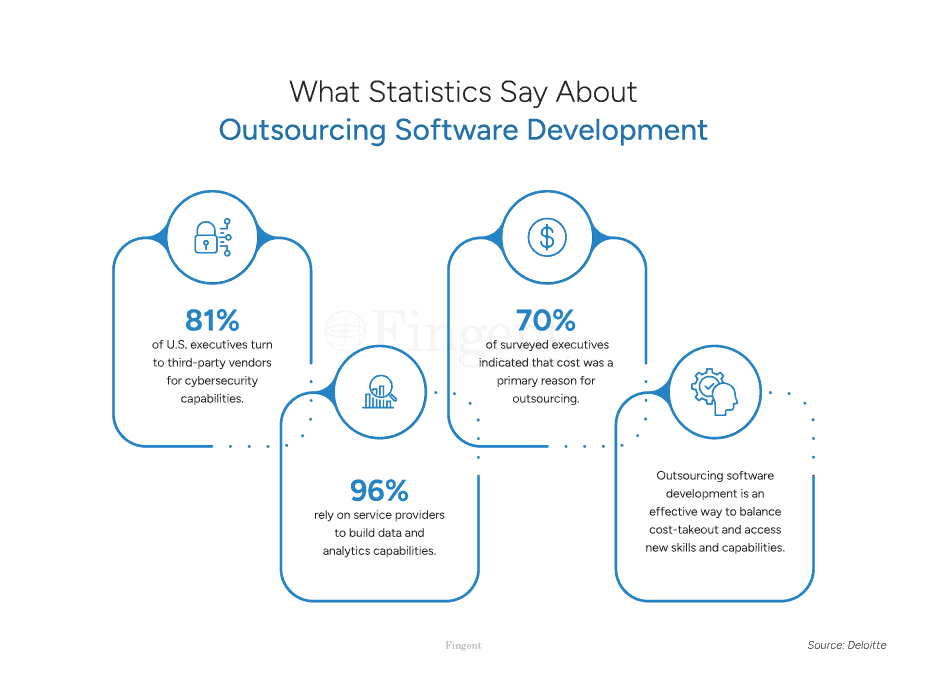
According to a survey by Deloitte, 79% of U.S. executives currently outsource software development. However, any business application is only as good as the developer who creates it. Choosing the right software development partner is a crucial responsibility.
If your business plans to hire an app development partner, here’s a quick checklist that can help. But before we get started, let’s look at why you need to choose the best software development vendor.
Have an Innovative Idea for Your Next Application?
Why Do Businesses Need Software Development Vendors?
Organizations rely on app development partners to:
- Bridge talent gaps and save in-house hiring costs
- Drive value by developing end-to-end solutions
- Access the best of technology, skills, and expertise
- Avoid development delays and cut operating costs
- Increase speed-to-market and enhance core competencies
- Mitigate the risks of running an in-house development project
You can easily unlock these advantages by choosing the right software development vendor. But what happens if you choose the wrong app development partner? Here are the risks!
Risks of Choosing a Wrong Software Development Vendor
Wrong software vendor selection can leave a lasting impact on your company.
- Poor-quality software rollouts can lead to massive sales losses. It can force your customers to go to competitors.
- Ill-fitted software solutions affect your day-to-day operations and increase your team’s workload.
- A bad match will never help you with add-ons and customizations you might need for the future.
- Botched software can cause frequent business disruptions. It can affect your customer experience, reputation, and brand.
- Faulty software can lower your team’s morale and engagement. Constant software glitches add to employee frustration and fatigue.
- A wrong vendor may not be able to meet your deadlines. They may also charge you more than expected. There is always an inherent risk of hidden costs.
- Communication breakdowns can create misunderstandings between the vendor and your stakeholders.
- Inadequate security measures opted by the vendor can put your business at risk. It can increase the chance of damaged, lost, or stolen data.
How can you avoid these risks? Ace software development vendor selection by using our checklist (below).
Why is Legacy Software Modernization Inevitable for Businesses?
Checklist: How to Choose the Right Software Development Vendor?
1. Define Your Needs and Goals
The first step to finding the right developer is identifying your goals. Why do companies seek to build customized software? Some of the common reasons are:
- Enhancing customer experience and satisfaction
- Improving workforce productivity and operational competency
- Tracking and managing staff responsibilities
- Automating specific tasks and repetitive functions
- Boosting reliability and security
A good discernment of your objectives and business needs will allow you to proceed to the next steps more efficiently.
2. Set up a Budget
Defining your goals should help you prepare a detailed budget. At this stage, it is important to determine the capital, expenditures, and forecasted return on investment (ROI).
Assess the factors that impact the cost of your software development project:
- Type of software you need and its level of complexity
- Custom software or off-the-shelf software
- UX/UI design considerations
- Backend infrastructure and dependencies
- Integrations with other applications you use
- Location of the app development partner
- Development time, resources employed
- Investments in new technologies
- Estimates/rates quoted by the software development vendor
Any business’s priority is to produce high-quality software. However, keeping the project within budget is vital for business success.
3. Research Potential Vendors
Research potential software development vendors. Assess the selected app development partners based on the following factors:
- Do they have experience working on the type of software you need?
- Have they worked in your industry or domain in the past?
- Do they handle the entire software development lifecycle? Do they provide post-launch application maintenance and support?
- Do they help train your staff on the new software?
- What are the services they offer?
- Does their rate fit your budget?
- What other value-added services do they provide software development? Developing an e-commerce application, maybe?
4. Shortlist Top Software Development Vendors
Choosing from hundreds of service providers can be overwhelming. Once you do the research and specify your requirements, you can start shortlisting the options you find appealing.
Here are a few ways to narrow down your list:
- Read through the company profiles, case studies, and client testimonials of potential vendors.
- Use any credible B2B rating platform to check out their ratings and reviews. Platforms like Clutch, GoodFirms, etc. list the top vetted software development partners.
- Filter vendors based on their minimum project costs, team size, average ratings, and location.
- Keep your list short so you can reach out to the selected firms quickly.
5. Talk to Each of the Selected Vendors
A direct conversation with the software development vendor gives you a fair idea of their services and expertise.
Before meeting a vendor, prepare a set of questions that will help you gauge their work:
- What technologies and programming languages are your team proficient in?
- What are the industries and domains that you primarily cater to?
- What project management tools do you use to manage your workflows?
- How do you ensure the quality of your software?
- What is your project engagement model?
- What software development methodology do you follow—Agile, Waterfall, RAD, Lean?
- How do you determine the costs of your work?
- Is my budget and expected timeline realistic for my project?
Above all, it’s crucial to identify if the potential vendor’s way of operating and objectives align with your requirements.
6. Narrow Down Your List Further
A direct conversation with each vendor should help you narrow your choices between two or three developers.
- Consult your leadership team. Weigh the pros and cons of each vendor based on your analysis.
- Shortlist your selection to one or two providers. Ensure they can understand your needs and match your company’s culture.
7. Data Security and Privacy Measures
Your business software needs to handle confidential company data. Is your software development partner capable of protecting your application from cyber threats?
- Before choosing a software development vendor, undertake an intellectual property due diligence inquiry.
- Find out how the vendor will be handling your data and assets.
- Review their integrated security and IP protection program.
- Determine the internal measures you should adopt to safeguard your enterprise’s IP.
- Identify which functions need to be managed in-house and what should be outsourced.
8. Compliance, Reliability, and Support
Along with analyzing the vendor’s cybersecurity offerings, you also need to verify:
- Does the vendor’s development and delivery practice/policies comply with the essential regulations?
- Have you done extensive background checks to ensure the integrity and reliability of the vendor?
- Did you do a proper technical and strategic vetting of the selected development vendor?
- Is the vendor equipped to address unexpected IT outages and disruptions?
- What are the risk management policies/processes followed by the software development vendor? Do they have a robust disaster recovery plan?
- Does their development process align with your organization’s sustainability goals?
- Does the vendor stick to responsible application design, development, and maintenance that can reduce the environmental impact?
Choosing the right software development partner requires careful planning. It’s indeed a very tricky job to pick out the right one from a huge list of potential vendors. The checklist aims to make the job simple for you.
Nearshore vs In-House Software Development: Know The Pros & Cons
Software Development Company vs. Freelancer: Which is Better?
What is the difference between a freelancer and a software development company?
- A freelancer is an individual who works independently on software development projects.
- A software development company is a professional organization that provides software development services.
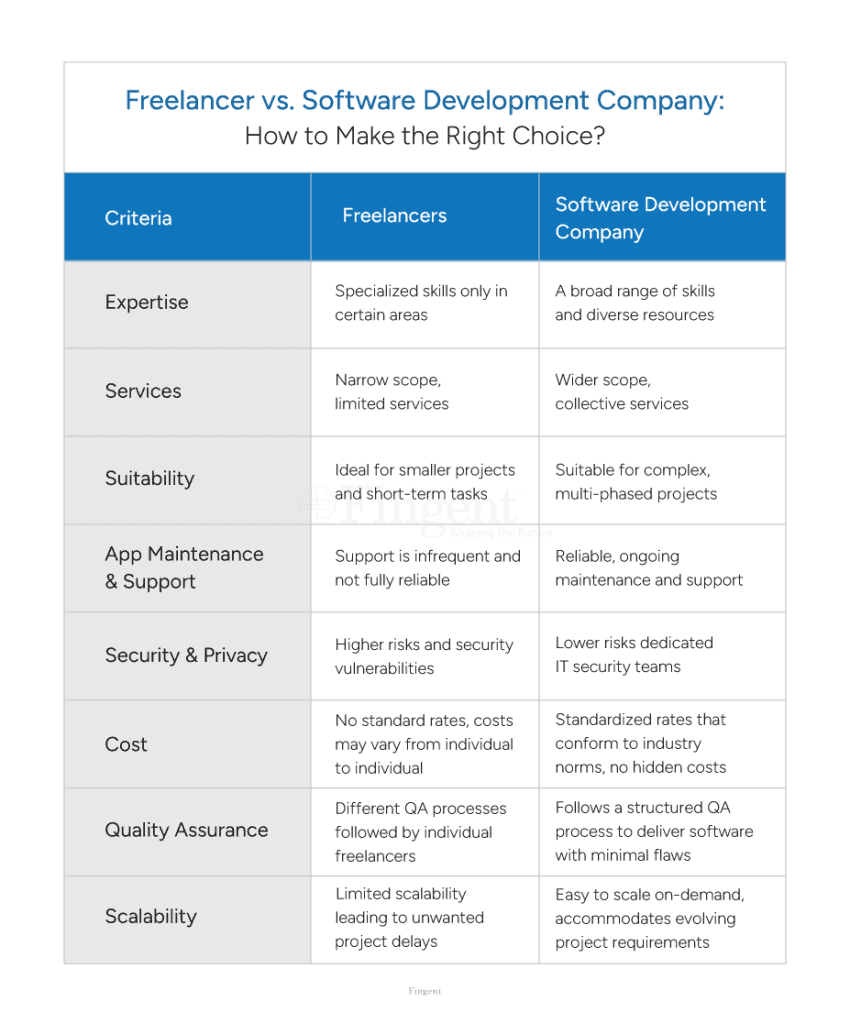
How does working with a software development company help your business?
- A team of certified professionals well-versed in multiple areas
- Access to the latest technologies and specific domain expertise
- A reliable vendor-customer contract (agreement) to back you
- Round-the-clock support and IT help desk
- Transparent communications, no hidden surprises
- Standardized pricing with no additional costs
- Dedicated ongoing maintenance and support
Transform Your Business With the Right Software Development Vendor
The best software development vendor:
- Works with you throughout the entire development process
- Helps navigate the complexities of software creation and maintenance
- Makes incremental changes for continuous software enhancement
- Develops tailor-made solutions that align with your business goals
- Improves your business’s efficiency, productivity, and financial performance
Let Us Help You Ease Your Digital Transformation Journey
Why Choose Fingent as Your Software Development Partner?
Since 2003, Fingent has been a reliable and capable software development partner for leading global brands, including several Fortune 500 companies.
- An impeccable track record as a successful custom software vendor
- Experience in new and emerging technologies—AI, AR, VR, IoT, blockchain, and more
- Legacy application modernization, cloud migration
- Multi-platform development—web, mobile, cloud, and more
- Diverse offshore talent pool with experienced developers and tech professionals
- Tech certifications, partnerships, centers of excellence
Build scalable and robust applications by partnering with a professional custom software vendor. Contact us to get an extended consultation.
Stay up to date on what's new
About the Author
Tony Joseph
Tony believes in building technology around processes, rather than building processes around technology. At Fingent, he specializes in custom software development, especially in analyzing processes, refining them, and then building technology around it. He works with clients on a daily basis to understand and analyze their operational structure, discover (and not invent) key improvement areas, and come up with technology solutions to deliver an efficient process. You can reach him at [email protected], Skype: tony_fingent
Featured Blogs
Stay up to date on
what's new
Talk To Our Experts

Microsoft Office 365
(Word, Excel, PowerPoint, Outlook, Copilot)

Google Workspace
(Docs, Sheets, Slides, Gmail)

Infince
(Intranet, Drive, Calendar & Meeting, Task, Phone System)

Salesforce CRM

Oracle NetSuite

Zoho CRM

SAP S/4HANA Cloud

Microsoft Dynamics 365

Asana

Trello

ClickUp

Monday.com

Adobe Creative
Cloud Applications

Figma

Canva

CorelDraw

AutoCAD

Slack

Microsoft Teams
Infince

Zoom


Wynk

MX Player

VLC Media Player

Spotify

Pandora

Task Automation
Automating routine tasks, such as data entry, sales emails, and marketing emails, saves a lot of manual work and allows employees to perform more strategic tasks.

Data Management
Gather, store, sort, and classify large volumes of information, make informed judgments, and trace patterns.

Communication and Collaboration
Maximizing smooth communication among the employees, partners, and customers, as well as working together on common projects.

Process Optimization
Enhancing organizational workflow and efficiency in different departments, resulting in cost cuts and enhanced productivity.

Innovative and efficient production
Allows the production of high-quality files, presentations, designs, and multimedia output.

Problem Solving
Providing targeted tools to handle specialized business purposes, be it in the field of inventory management, sales forecasting, or data security.

Enhanced customer service and satisfaction
Application software will be able to couple your CRM with other essential business programs. It delivers better and accurate information about the customers, which makes your customer service faster and more effective. Consequently, it enhances customer service and boosts customer satisfaction.

More power to decision-making
As application software gives you more reliable and updated business information, your decision-making process will be backed by accurate data. It helps you keep track of past performances and decisions, forecast future trends, plan your budgets, improve hiring and retention, and define contingency plans. Hence, well-designed application software is a CEO’s companion in every sense.

Improved productivity
Application software is useful in the automation of tasks so that employees can save time on strategic purposes of the business and produce more quantity of work in a particular time. For e.g., OCR programs that decode scanned images or PDF documents, such as insurance, banking, and law industries, can find these very useful. On the same note, RPA applications can minimize monotonous tasks, including responding to emails, checking claims in relation to a prescribed set of rules or checks, or payroll discrepancies.

Robust data security
You can integrate application software with your existing systems in the most secure way with the help of a reliable custom software development company like Fingent. You get complete control over the third-party systems integrated into your software. The application software resides within your firewall and is upgraded and maintained throughout with the support of a partner.

More flexibility
The fringe benefit of using application software is that it provides the freedom to integrate and gather data from multiple sources in a single place. This reduces your time considerably and provides a hassle-free process to create customized reports, avoiding the use of numerous applications to store data.

Seamless management
Application applications are also best at getting rid of risks, conducting research, classification of tasks as well as offering proper solutions with negligible possibilities of human error. Thus, it can be viewed as an ultimate tool that can offer a smooth experience to organizations as they deal with their business operations at large.



AI-Integrated User Experiences
Apps are integrating AI or smart capabilities into the workflows to support users, either in content suggestions, intelligent work automation, personalization, or powerful analytics. AI is no longer an add-on feature; it is becoming an all-inclusive component of your daily workflow within productivity, CRM, or ERP system.

Cross-Platform Development
Organizations are engaging in the creation of mobile applications that do not only ease the interactions between mobile, desktop, and web, but often do so with a single codebase. Frameworks such as Flutter, and react native are facilitating this shift to make the development process faster and reduce maintenance activities.

Low-Code/No-Code Development
Apps can be built by non-developers using a visual interface and drag-and-drop editors. These solutions reduce the costs of development and easing the creation of the solutions as well as reducing the time of creating.

API-First Ecosystems
The API-first design allows the smooth linking of apps, services, and platforms. It promotes flexibility and extensibility features that are paramount to companies with numerous interdependent systems.

Cloud Computing
Cloud-native applications enable companies to dynamically scale, lower infrastructure expenses, and roll out updates. Models such as SaaS, PaaS, and FaaS enable fast innovation and presence at the global level. AWS, Microsoft Azure, and Google Cloud are some of the most prominent platforms.

Hyper-Personalization at Scale
Applications are learning more about user behavior, roles, and preferences in real-time to increase relevancy and engagement across applications used by customers and internally.

Composable Architecture
Applications are changing to modular rather than monolithic design in terms of microservices or packaged business capabilities (PBCs). This simplifies the process of component replacement, scaling functions, and accelerating innovation.

Cybersecurity-Embedded Design
Security has become a central aspect of developing software. To safeguard delicate information and limit changing hazards, applications are constructed with encryption, secure verification, role-based permissions, and compliance backing.

Generative AI
An AI model that can generate content like text, graphics, and code is changing applications in marketing, software development, customer support, and design. They facilitate hyper-efficiency, personalization, and automating creativity.

Virtual Reality (VR) 2.0
Next-gen VR can be more immersive, responsive, and life-like. It is used in simulation, remote training, design visualization, and virtual collaboration in industries.

Augmented Reality (AR)
AR is superimposing digital content on the physical material. It improves customer experience, training on the side, support, remote assistance, and visualization of products, particularly in the retail, field services, and manufacturing sectors.

Internet of Things
IoT is designed to link real-world devices with software so that they can be monitored and automated in real-time and generate analytics in real-time. They are used in smart factories, logistics, energy supply and healthcare systems.

5G Expansion
5G offers rapid data transmission and ultra-low latency, enabling real-time technologies like self-driving cars, remote surgery operations, smart towns, and augmented or virtual reality applications on a large scale.

Biotechnology in Agriculture
High-end software is becoming a part of bio technology data to monitor crops, perform gene editing and precision farming in agriculture- increasing the yield, sustainability and disease resistance.

Autonomous Vehicles
Autonomous cars navigate by performing tasks through software that analyzes real-time data, which comes in the form of sensors and maps. New applications facilitate route planning, fleet control, and anticipatory treatment.

Blockchain
In addition to cryptocurrency, blockchain finds applications in secure data sharing, smart contracts, supply chains, and digital identity management, ensuring transparency and decreasing fraud.

Edge Computing
Edge computing analyzes data near the origin (e.g. IoT devices), leading to the minimization of latency and bandwidth consumption. It facilitates real-time-sensitive systems in the manufacturing, healthcare, and retail sectors.

Wearable Health Monitors
These devices are real-time biometric devices, and they play an important part in monitoring patients remotely (health monitoring applications), fitness applications, and emergency warning systems in the medical field.

Extended Reality (XR) for Training
AR + VR + MR is being used to train employees through hands-on usage, simulations, and skill training in areas such as medicine, defense, and many more, which has made them very useful in enhancing engagement and retention.

Voice-Activated Technology
Software voice interface is making the field more accessible and hands-free, particularly in smart homes, automobiles, and enterprise productivity applications such as virtual assistants.

Advanced Robotics
In logistics, healthcare, and manufacturing, software applications are being embedded into robotics AI-based technologies to control and monitor processes on a large scale, automate, and increase precision.

Telemedicine
Telemedicine apps also make it possible to diagnose, treat, and monitor a patient remotely. The solutions enhance access to healthcare, make it less expensive and convenient for the providers and patients.


Stay up to date on what's new
About the Author

Featured Blogs
Stay up to date on
what's new
Talk To Our Experts
Organizations are enhancing their competitiveness by prioritizing digital transformation as the global marketplace becomes increasingly crowded and interconnected.
Broadly speaking, the concept of digital transformation involves the systematic evolution of core and auxiliary business processes to take advantage of advances in computing and software systems to increase efficiencies.
However, no digital transformation initiative will be effective unless it involves an app modernization component.
Also referred to as “application modernization,” app modernization enables organizations to transform effectively, increase their competitiveness, and differentiate themselves within their respective industries.
What is App Modernization?
A “legacy” system uses outdated software or computing hardware to deliver important organizational capabilities but cannot interact with other systems or be updated effectively. App modernization is the process of addressing known issues in outdated legacy software. The issues may include:
- Software problems (“bugs”) that cannot be resolved fast enough,
- Missing features will take too long to add,
- Fragile code (changes tend to create new problems),
- Technology obsolescence (e.g., few programmers for the source code language used),
- A software vendor is out of business, etc.
Commercial off-the-shelf software (COTS) may not provide source code access, preventing an organization from addressing software issues. When pursuing app modernization for software for which source code is available, your organization can choose between one of three approaches:
- Revitalizing an application old applications
- Replacing an application technology with custom-built solutions
- Rehosting or re-platforming
Organizations that choose to revitalize old applications will be updating existing software with new capabilities and features. This may also include refactoring (editing the software to do the same things better).
Read more: Why choose custom software over commercial off-the-shelf solutions?
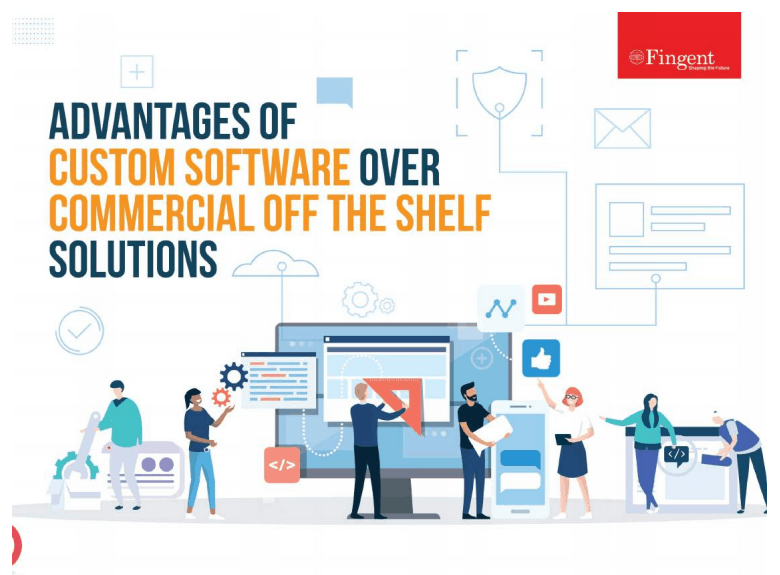
Other companies may elect to get rid of aging technology to replace it with new, custom-built solutions or with a COTS solution.
In some instances, though, to achieve performance improvements, you may just need to move your existing application onto a more powerful computing engine, typically today on a modern, cloud-based infrastructure — a process known as rehosting or re-platforming.
How do you know which is the best app modernization option for your needs?
Particularly old or antiquated legacy technology will need to be replaced, whereas newer solutions might be suitable for repurposing or retrofitting. Rehosting is the most pragmatic approach if an application still meets your business’s needs but is negatively impacted by your current infrastructure.
When updating existing software, your app modernization team will need to rewrite code to add new features to your solutions. While this can be a tedious and time-consuming process, it may be more efficient than rebuilding a new solution from the ground up.
Opting for the more labor-intensive choice of modernizing by replacing legacy systems may provide more substantial long-term benefits altogether, especially if the landscape of your industry has changed significantly since you installed your current technology suite. Proper planning will control how the migration to a new system occurs and to what extent a legacy system needs to be operational during the transition.
In order to determine which approach is most appropriate for your business, you should first consider whether your current application effectively meets your company’s needs. If it doesn’t, you will need to either repurpose or replace your technology, but if it does, a simple rehosting might be the most practical option.
Why You Need It, Especially Today
Application modernization is a core component of digital transformation. If your company’s current applications do not effectively meet its needs or promote efficiency, you will never be able to meet your digital transformation goals. In a 2019 IBM-Forrester survey, 40% of developers reported being more productive when on the cloud in a digital transformation.
Instead, you will always be working from a disadvantage, which could allow your competitors to encroach on your market share within your respective industry.
App modernization will not only enable you to fulfill your digital transformation goals, but it will also empower your business to operate more efficiently, enhancing the customer experience, paving the way for future growth, and boosting revenue.
Read more: Why Top Companies Are Investing in Application Modernization
What to Consider Before App Modernization
You cannot approach app modernization haphazardly, or you could experience significant and potentially prolonged disruptions to your company’s operations.
Remember, app modernization efforts will impact the functionality and performance of your company’s core software solutions, such as your customer relationship management platform and accounting software, so with that in mind, you must gauge the costs of an app modernization initiative.
Identify what goals you want to achieve, plan how long it will take to achieve those objectives, and seek the support of a third-party technology firm that will be able to provide an objective perspective and help you determine which approach to pursue when you start your journey toward app modernization.
Read more: The secrets to a successful app modernization journey.
Knowing Your Options in App Modernization
To decide which of these approaches is most suitable for your business, you must take an objective look at the state of your technology stack. Is the version of all elements of the stack up-to-date? Are frameworks and languages still “main stream?” If your current solutions impede business growth, it is likely time to replace them or, at minimum, rewrite them.
Rehosting can be incorporated into your app modernization strategies in two ways. If you have an application that meets your needs, you can simply migrate the app from a native architecture to a cloud-based one. Additionally, you can incorporate rehosting into your rip-and-replace or rewrite app modernization process, as transitioning to the cloud will improve the performance of any application.
Steps to Kickstart Your App Modernization Journey
The entire process can feel daunting and overwhelming when you are at the precipice of your app modernization journey. Still, you can jump-start your digital transformation and app modernization efforts through the following techniques:
1. Finding Your Why
First off, outline why you want to modernize your applications. Defining your “why” will help you and your team stay focused once your modernization journey is underway.
2. Assess Your Talent
Take an objective look at your in-house team and its capabilities. Are they going to be able to oversee your app modernization effectively? If not, it might be time to bring in some outside resources.
3. Decide Whether You Want to Move to the Cloud
Suppose you have invested heavily in on-premises resources in the past; in that case, it might be tough to move on from these assets and transition to the cloud. But making the switch will benefit your business both now and in the long run, so you should at least consider the notion.
4. Assess Risk and Act
Finally, you need to assess the risks associated with each app modernization option. Outline the benefits of rewriting your current applications, replacing them altogether, and migrating to the cloud. Once you have calculated the costs of app modernization, choose the option that best aligns with your needs and take action.
How Fingent Can Help in Successful App Modernization
Leveraging app modernization to enhance the efficacy of your digital transformation effort is a huge undertaking. Fortunately, you don’t have to navigate this process alone, as you can partner with a talented software development team like that of Fingent.
Fingent’s team of experts can help you apply the latest technologies to your business, including cloud-native solutions, artificial intelligence tools, and machine learning software.
Contact us today to learn more about how we can assist with your app modernization efforts.
Stay up to date on what's new
About the Author
Tony Joseph
Tony believes in building technology around processes, rather than building processes around technology. At Fingent, he specializes in custom software development, especially in analyzing processes, refining them, and then building technology around it. He works with clients on a daily basis to understand and analyze their operational structure, discover (and not invent) key improvement areas, and come up with technology solutions to deliver an efficient process. You can reach him at [email protected], Skype: tony_fingent
Featured Blogs
Stay up to date on
what's new
Talk To Our Experts
The right software can serve as a growth catalyst for your business. A robust software solution can empower your team to work more efficiently, better serve your clients, and optimize business performance.
But when searching for these software solutions for your business, you’ll have to make many different decisions along the way. One of the very first choices you’ll encounter is whether you want to buy off-the-shelf software or build a custom solution.
Either route can help your organization modernize its processes, improve efficiency, and scale effectively. Which approach will produce optimal results for your organization in the short and long term is still a question.
Because your decision will significantly impact your business for years to come, it’s critical that you get it right.
With that in mind, join us as we crack the code to smart software selection decision-making by exploring the pros and cons of building and buying software.
Read more: Why Should Your Business Invest In An End-to-End Software Solution?
The Build or Buy Conundrum
The buy option is relatively straightforward: You select software that aligns with your organization’s needs, purchase a license, and deploy the technology. When evaluating your options, you will encounter purpose-built solutions for your industry and more generalized options, like basic accounting software.
Conversely, custom-built software for your organization will include specific tools you need — without superfluous features that distract users and get in the way of critical business functions. It’s important to understand that you won’t be building the software unless you have an in-house team of highly experienced software engineers. Instead, you will need to partner with a talented software development firm.
Pros and Cons of Buying Software
Before providing a decision-making roadmap, it’s crucial to outline the pros and cons of each option.
The primary benefit of buying pre-built software is that it is already deployment-ready. As such, you can easily purchase the software and begin implementing it almost immediately. You’ll also be able to demo the product before you buy, giving you an idea of precisely what to expect. This expedited timetable is particularly appealing if your business’ current technology suite cannot keep up with your present needs.
However, some notable drawbacks exist to buying software instead of taking the custom route. First and foremost, off-the-shelf software is less likely to align perfectly with your company’s needs. After all, off-the-shelf software is designed to appeal to as broad an audience as possible, and naturally, it will include some features you don’t need. Evaluating software can be time-consuming, and applications of any complexity may be impossible to assess fully in a reasonable amount of time.
In addition, pre-built software typically has recurring license and maintenance costs that need to be considered and may change over time. There is also the risk that vendors of pre-built software may stop offering that edition or software or go out of business entirely. Pre-built software may depend upon older technologies that are no longer “leading edge,” which can lead to long-term viability concerns.
For some software categories, you may only be able even to consider a few contenders, or what you find may lack some tools or capabilities your business is looking for.
Read more: Choosing between Custom Software Solution and Commercial Off-the-Shelf Product!
Advantages and Drawbacks of Building Custom Software
Custom software is tailored to help your business meet its organizational goals and overcome its most significant growth hurdles. Every feature, tool, and capability of custom software is purpose-built for your business. As such, it can significantly impact your business more than an off-the-shelf alternative.
The two potential downsides to custom software are cost and the deployment timetable. When there is an off-the-shelf alternative, building custom software will typically require a larger upfront investment, but you will have more control over the software. That means you can change your schedule without being tied to the vendor’s schedule or priorities. If the custom software meets important business requirements, you can expect a strong return on investment.
It’s important to remember that developing and deploying a custom-built software solution will take slightly longer. Fortunately, you can streamline the build process by partnering with a highly experienced software development firm.
How to Determine Which Option Fits Best for Your Business
As you prepare to weigh your best opportunities with each approach, you can streamline your decision-making process with a refined approach.
1. List Your Organizational Goals and Needs
When choosing to buy or build, the most critical question you need to ask yourself is: What do you hope to accomplish with your new technology?
Create a list of goals, objectives, and needs. In addition to providing more internal clarity, you can use this list to compare products during your search. If no single off-the-shelf solution meets your needs, it may be more pragmatic to build custom software. However, if you need the solution sooner rather than later.
2. Analyze the Current Ecosystem
Once you have created your list of goals and objectives, you can start analyzing the current ecosystem. Businesses operating in specific sectors — such as the healthcare industry — will have dozens of options when searching for off-the-shelf software solutions. As such, it is much more likely that a healthcare organization will be able to find a readily available solution that meets its needs when compared to a more niche sector.
Even if you are already leaning toward building a custom solution, you should consider what options are available for your industry. Explore all known choices to see how these solutions align with your needs and goals. This tactic can also provide you with ideas to put on a must-have list for your custom software partner.
3. Calculate the Potential ROI of Each Option
While you must regard the upfront costs associated with buying vs. building software, calculating the potential long-term ROI of each option will be more useful for guiding your decision-making process. Start calculating ROI by assessing the likely cost-savings and additional profits that can be expected once the new software is in place. While this impact can often be difficult to predict fully, it may be easier to consider how large the impact would need to be to recover the cost of the investment — the break-even point.
Building a custom solution will cost more on the front end, but this higher initial investment can yield a significant return over the software’s lifecycle. Conversely, going with a cheaper option could solve today’s business challenges, but you may quickly outgrow that software’s capabilities and find yourself looking to upgrade again in the near future.
Read more: When does your Business need Custom Software Solution – Evaluate Now!
Making Your Final Decision
Whether you buy a readily available option or want to leverage the power of custom-built software, you will need an experienced technology partner to oversee your deployment. Fingent is that partner.
Our team of technology experts specializes in building dynamic, custom software solutions for our diverse array of clients. We can also assist with deploying solutions from Microsoft, SAP, and other leading technology development companies.
To learn more about our deployment and development services, contact Fingent today.
Stay up to date on what's new
About the Author
Tony Joseph
Tony believes in building technology around processes, rather than building processes around technology. At Fingent, he specializes in custom software development, especially in analyzing processes, refining them, and then building technology around it. He works with clients on a daily basis to understand and analyze their operational structure, discover (and not invent) key improvement areas, and come up with technology solutions to deliver an efficient process. You can reach him at [email protected], Skype: tony_fingent
Featured Blogs
Stay up to date on
what's new
Talk To Our Experts
To build or to buy has been a million-dollar question most businesses seek an answer for. This can become more daunting when you consider the numerous factors influencing the decision. To make it less overwhelming, we will discuss factors and tips to help business leaders make informed decisions. This blog also explains the right process to follow once the decision is made.
Build Or Buy: Should You Buy Software or Build It?
Several factors must be analyzed when deciding to buy or build software internally. Here is an analysis of four key points that can help business leaders to make an informed decision that will impact their business growth:
- What is the scope of the problem that you are attempting to solve?
- How complex does the software solution need to fit your business?
- Can the organization leverage exist experts, or will you need to hire more?
- How quickly does the organization need the software?
It is good to remember that there are no one-size-fits for all in this regard. Analyzing these questions will help businesses zero in on one of the two options. Please read on to find out top tips to help companies identify which of these two is most suitable for their business.
Read more: Choosing the right Software Development Vendor
Top Considerations for Companies to Help Recognize Build vs Buy
Deciding to buy or build custom software is not as easy as flipping a coin. Here are the top considerations that will increase the odds of making the right decision:
- Problem – Businesses must give thought to the problem at hand. Is it attempting to solve a common problem or specific to the company alone?
- Funds – Can the company have dedicated funds to host and maintain the software solution, including upfront costs?
- Time – Consider how time-intensive the problem at hand is. Is it just a nagging annoyance or a serious health threat to the company’s survival?
- Strengths and Weaknesses – Analyzing a business’s strengths and weaknesses will help companies choose whether to build or buy. Can the business withstand the risks that may surface with technical debts, quality concerns, opportunity costs, and more?
- Quality – Consider if you can fully focus business efforts on solving this problem without compromising quality.
- Surface-Level Risks – Before buying or in the future with a trial, demo, or quote, reviewing the surface-level risks of buying versus building software is important.
- Data – For certain companies, their data is vital to their competitive advantage. In such cases, it is crucial to consider how the third party may your proprietary data. Consider if there is the possibility of losing access or oversight to customer data or other critical business insights.
- Security – Ensure the company’s accounts are not compromised by finding out if the third party can be trusted and if they use cybersecurity best practices.
- Vendor Reliability – Consider if the third-party vendor is reliable. Does it have the ability to weather a market downturn or other external factors that may impact the business?
Read more: When Does Your Business Need Custom Software Development Solution – Evaluate Now!
If a company decides to build custom software after all these considerations, it is vital that they follow the right process for the successful development of software.
What is The Right Process If You Decide to Build?
Building custom software might be the perfect solution for your business and building it the right way is key to its success. Usually, it is developed by a third party or in-house developers. Custom solutions ensure features and functionality with the company’s needs in mind. As a result, businesses enjoy increased productivity and growth.
To get started, here is the right process companies can follow:
1. Define your organizational needs
First, determine the current business process, expectations, and verifiable success. Talking to experts, finding out why the changes are necessary, and sketching out the workflows will help ensure a smooth project management process.
2. Resist the temptation to keep everything in-house
It may be tempting to handle all processes in-house to save money. However, working with your own IT team could cause a slowdown in the company operations as they already have their daily work. Here, outsourcing certain tasks makes the most sense. Consider working with a vendor with a verifiable track record in building custom software for other companies.
3. Be practical
To keep the project on track, create a realistic plan together with all involved in the project. This will allow companies to set specific deadlines. Knowing the timeline will help in allocating funds when required.
4. Test and test
Before implementing the new custom software, it must go through two levels of test. One is technical testing by IT professionals and developers to ensure all elements are working. The second is user testing to see if the software works as intended.
5. Document each stage
Documentation must include the team members’ details, roles and responsibilities, deadlines, and expectations for the project. It must also include a test plan, checklist, scope statement, training plan, implementation plans, and detailed user documentation.
Top 5 Trends in Custom Software Development Today to Look Out For
The custom software market is growing exponentially. Some software development trends stand out. These trends are influenced by the need for businesses to leverage advancing technology.
- Cloud technology: The pandemic shut the door on data on-site and opened the door to cloud technology. Developing cloud-native applications will likely continue as many companies still use remote work setups.
- Internet of Behavior: The Internet of Behavior, or IoB, studies customer behavior through the data gathered from various devices. This data allows businesses to understand how to improve the quality of their products and services.
- Blockchain: Blockchain is used in businesses to track records without worrying about discrepancies.
- Low-code and No-code development tools: Workers can create programs and sites even if they lack coding knowledge. According to research, by 2024, 65% of software projects will be done through low-code or no-code development.
- Software integration: Software integration can provide a seamless user experience. Additionally, it helps the company save time and increase productivity.
Read more: Low Code/No Code Development with SAP BTP: How It Is Turning the Future of Enterprise Resilience
Build For the Future
Building custom software allows organizations to use technology that addresses their unique needs. Following the right process can ensure they are implemented in a way that supports and advances business growth.
Custom software development is our forte, and we have been able to help many clients get exactly what they need from their software.
Give us a call, and let’s discuss what we can do for your business.
Stay up to date on what's new
About the Author
Tony Joseph
Tony believes in building technology around processes, rather than building processes around technology. At Fingent, he specializes in custom software development, especially in analyzing processes, refining them, and then building technology around it. He works with clients on a daily basis to understand and analyze their operational structure, discover (and not invent) key improvement areas, and come up with technology solutions to deliver an efficient process. You can reach him at [email protected], Skype: tony_fingent
Featured Blogs
Stay up to date on
what's new
Talk To Our Experts
Frameworks are the backbone of mobile app development. They are essential to building dependable apps quickly. When choosing a framework, you can choose between native or cross-platform applications. Though both approaches have advantages, cross-platform applications work on multiple devices regardless of their operating system.
Different companies use different technologies to build and design great apps. Various company requirements have led to the emergence of four major frameworks in the market – React Native, Flutter, Ionic, and Xamarin.
If you are considering building a cross-platform application, you must understand the basics of the available frameworks and their unique strengths and features. Doing so will help you choose one that is most relevant to you. That is why we have put together this comparison. We will help you understand the key differences between Flutter, React Native, Ionic, and Xamarin.
Top 4 Characteristics to Consider While Choosing A Mobile App Framework Of 2022
The six most significant reasons to choose a cross-platform mobile development app are:
- Decreased development process
- Cost efficient
- Improved user experience
- Improved performance
- Improved quality
- Increased reach
You can determine the best mobile app framework based on the characteristics on which we can compare the four tools. Let us begin with features.
1. Features
Flutter
Flutter is the best UI toolkit that comes with fully customized widgets. Its layered architecture will ensure quick component rendering. Several popular organizations use Flutter. Its features include:
- Built-in Cupertino widgets
- Supports iOS and Android platforms
- It is comprehensive and precise
- Visuals are both appealing and engaging
- Ability to develop high-performance apps
- Rich motion APIs
Xamarin
Xamarin allows code sharing on multiple platforms. It is known to offer a development ecosystem with a back-end, API, and components. Xamarin’s’ features include:
- Faster development time
- Lesser bugs
- Best backend infrastructure
- A component store that contains cross-platform libraries, third-party libraries, and UI controls.
- Allows application indexing and deep linking
Ionic
Ionic is useful if you want to build interactive hybrid mobile and progressive web apps with cross-platform applications. It also has another lightning and powerful version called Ionic Studio that provides an easy visual development environment. Ionic’s features include:
- Fast and powerful
- Allows complete control over app building
- Allows development of both native and progressive web applications
- Easy to handle
- Allows for a single code base app building
React Native
React Native is a widely used JavaScript library that helps to develop rich apps to give the best user experience. It allows developers to create platform-specific versions of various components. React Native’s features include:
- Single codebase across multiple platforms.
- Low-code requirement.
- Declarative API for predictive UI.
- Compatible with third-party plugins.
- Supports both iOS and Android.
2. Development ease
Development of the app should be easy and should offer smooth user engagement.
- Flutter is known to provide the best. It is extremely efficient and offers great performance.
- Xamarin can be used to develop the UI. Using Xamarin.Forms to develop apps can reduce time and simplify the process.
- Ionic does not apply native elements. Instead, it applies Cordova to offer a native look and feel.
- React Native works in tandem and offers a better user experience similar to native apps.
3. Performance
Performance is a crucial factor to consider as it shows how apps will perform when different frameworks are used.
- Flutter tops all of the other apps in performance. It offers amazing speed as it uses Darts.
- Xamarin can be used to develop apps similar to native apps. It is focused on business rationale. On the other hand, Xamarin. Forms work with the concept of broad code sharing. This may decrease the performance of the code in various operations.
- Ionic does not offer performance similar to native apps. Since Ionic tools use web technologies to render the app, it tends to reduce the speed.
- React Native can be leveraged to build apps similar to native apps. It allows developers to use native modules for scripting code for complex operations.
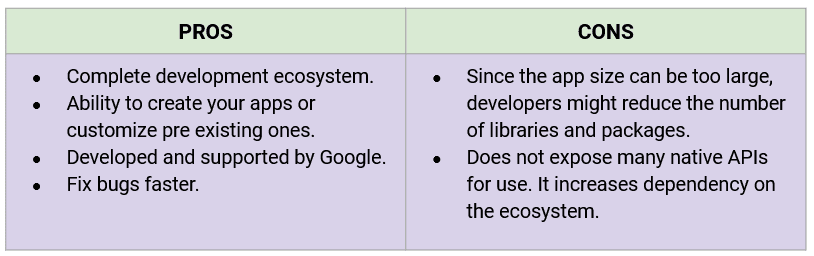
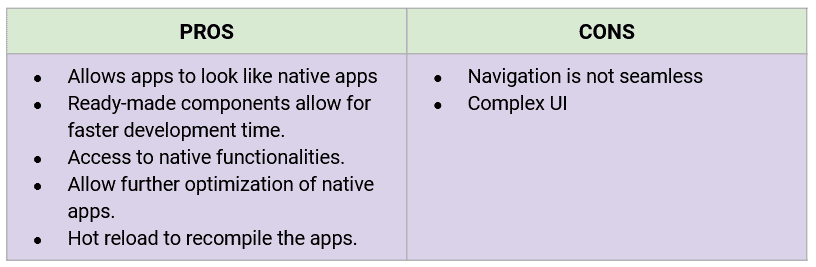
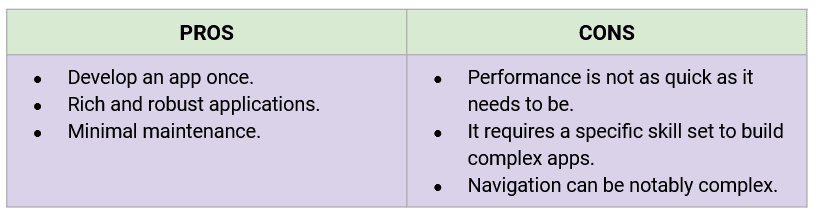
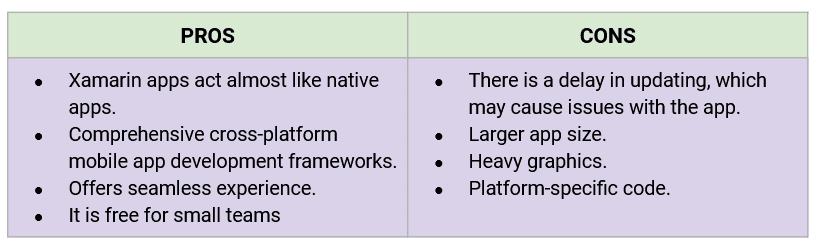
4. Top pros and cons
Each framework has its pro and cons. Please take a closer look at them:
Flutter
React Native
Ionic
Xamarin
Read more: Top Technologies Used to Develop Mobile App
Identifying What Suits Your Project
Every situation is unique. It might turn out that your technical requirements will lead to a solution. Still, this is how you can identify what suits your project:
- Flutter is a good option if the existing tech stack no longer satisfies your needs but it should be a very careful choice for startups.
- Xamarin usually fits most projects. It might be a little tricky to have everything you want, but in the long run, you will get it.
- Ionic excels in terms of performance. If you are a beginner in cross-platform development, Ionic may be the best option.
- React Native works wonders for MVPs and projects that need heavy interactivity. However, if your project is loaded with performance-hungry features, it may be best to skip it.
How Fingent Can Be Your Right Mobile App Development Partner
As a leading custom software development company, Fingent has years of experience in developing apps using various platforms for app development. Our app development team has hands-on experience in developing iOS and Android apps. No matter how complicated your app idea is, we can help you find the best solution. Let’s get talking.
Stay up to date on what's new
About the Author
Featured Blogs
Stay up to date on
what's new